


3 Post Moderation Rule for New Boarders (25 Jan 2021)
New boarders will have their posts moderated - Don't worry if you cannot see your post immediately.
Forcing Creation Date/Time As File Name


I'm asking other editors to add their frustration with this one single really stupid renaming system here. AND fill out the feedback form and let Apple know in numbers how ridiculous this forced renaming system is. Let's get this stupidity changed, shall we?
Or am I the only one with MAJOR issues about this?
P.S. Batch renaming should NOT be necessary, and if so, the Finder files should never be renamed, PERIOD. Right? Or is there something wrong with me?
Please Log in to join the conversation.
- Tom Wolsky
-

- Offline
- Moderator
-

Please Log in to join the conversation.


I believe the underlying reason for this is that FCP X dumps all media into a single folder and they're trying to avoid having to automatically rename media files in the case of duplicate clip names. But I'm assuming the code for handling that is already there for when you import media from files.
Please Log in to join the conversation.
No reason we can't have the custom name option inside the Import window. Right?
But I never had issues with duplicate files names in FCP 7. If I did, it was very rare.
Please Log in to join the conversation.
- Tom Wolsky
-
- Offline
- Moderator
-
There could be a custom naming convention in the import window, just as there is a custom naming tool inside the application. I'm not clear why the Finder name is so important.
You had to assign unique names in FCP7 or you'd get errors. Basically it made the ingest function much more cumbersome, slow, and process ridden. The idea in FCPX is to make importing as quick and effortless as possible, practically one click, to get you into the application and functional as quickly as possible. It puts organization and naming inside the application and takes it out of the importing process.
Please Log in to join the conversation.
Tom Wolsky wrote: There could be a custom naming convention in the import window, just as there is a custom naming tool inside the application. I'm not clear why the Finder name is so important.
We have a workflow that involves on-set clip viewing and timecode-based transcriptions. The transcribers need discrete clip names when creating the transcription documents. It's much easier for them and for producers to type/recognize/read a filename like "AA3057.mov" than "2013-11-06 15_27_03 (id).mov". If I want a producer to quickly do on-set notes using the Canon XF utility, the clip names they can see in that app don't match the transcodes that I make from the optimized media files in the event folder.
This can be helped by making sure that you use somewhat unique timecode when shooting that to some extent identifies the footage, but that is not always possible.
Please Log in to join the conversation.
- Tom Wolsky
-
- Offline
- Moderator
-
" the transcodes that I make from the optimized media files in the event folder."
I'm not understanding what you mean here. What are you doing?
Please Log in to join the conversation.
Tom Wolsky wrote: If you revert the browser to show camera names you should see the same names as the XF Utility window.
" the transcodes that I make from the optimized media files in the event folder."
I'm not understanding what you mean here. What are you doing?
Shoot a bunch of interview footage with a C300.
Capture the footage into FCPX (in order to create QuickTime files).
Locate these QuickTime files in the Finder (in the FCPX event folder)
Drag these QuickTime files into Sorenson Squeeze to create low bitrate 360p QuickTime transcodes with visual timecode burn of the source timecode (which can be time of day or record run)
Send these 360p QuickTime files to a professional transcriber who transcribes the interviews (with clip name and time code references throughout) for the producer.
Editor uses the transcription timecode/clip names to create rough cuts from the producer's select notes.
In this scenario, the QuickTime files delivered to the transcriber carry the date/time autoname given by FCPX. I would prefer it if these QuickTime files created by FCPX could inherit the original clip name given by the camera.
This workflow is not necessary with things shot on a 5D or 1DC as the camera writes QuickTIme files natively - which we can feed directly into Squeeze.
Please Log in to join the conversation.
Also, as for GoPro's not having unique names, how exactly does that work? Cause I see unique names for my files on my GoPro cards.
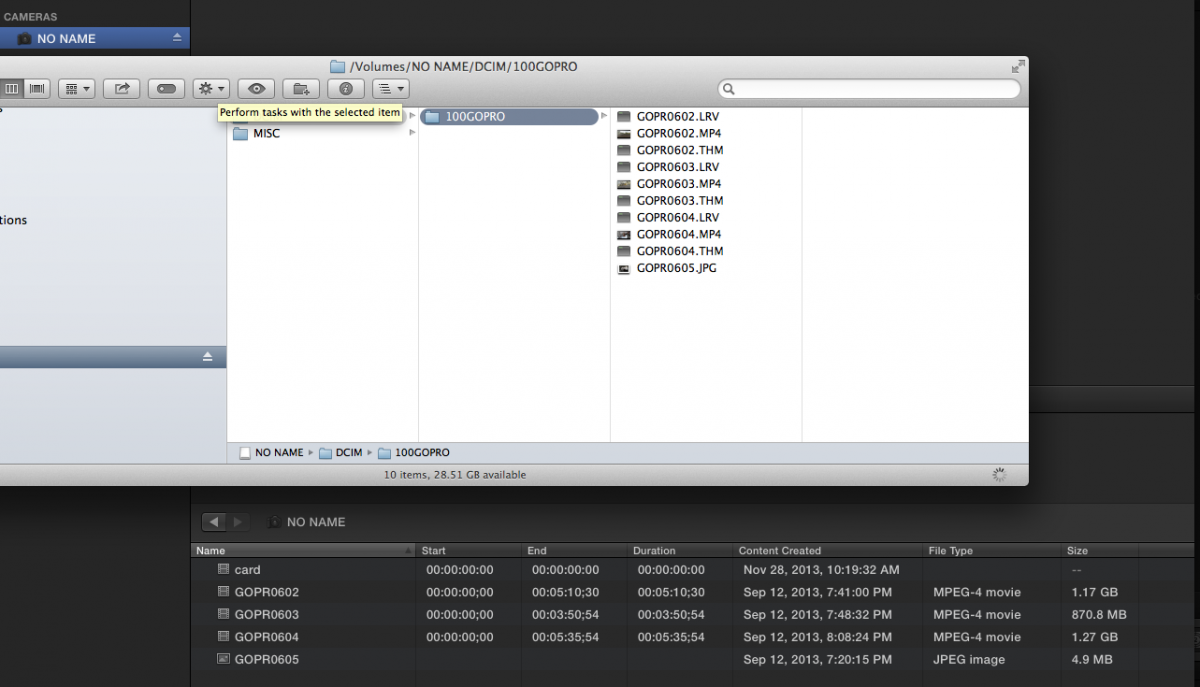
Please Log in to join the conversation.
- Tom Wolsky
-
- Offline
- Moderator
-
Please Log in to join the conversation.
Again, how to I trace a date/time Finder named file, back to my camera card archive? I can't do it by name. I have to open clips and play them and find the match with a LOT of effort.
Please Log in to join the conversation.
- Tom Wolsky
-
- Offline
- Moderator
-
Please Log in to join the conversation.
And what benefit is there to "forcing" the date/time name? Avoiding duplicate names? Still not a good reason to "force" it on us.
Please Log in to join the conversation.
- Tom Wolsky
-
- Offline
- Moderator
-
Please Log in to join the conversation.
Tom Wolsky wrote: The benefit of TOD is you know exactly when something was shot. If multiple cameras are shooting at the same time over a wide area you know exactly what happened when in relationship to other events. It's like BOP for all news and information gathering.
Time of day is not as useful if you are dealing with multiple shoots that may have taken place at the same time on different days. But it's definitely better than nothing. But as you said, if you have a camera like a C300 that has a user assignable clip name system it's the way to go.
A moot point, though, when working with a camera that does not have true assignable time code, like a Canon 5D MkII.
Please Log in to join the conversation.
- Tom Wolsky
-
- Offline
- Moderator
-
Everybody who wants naming and logging controls like FCP7 absolutely should pile on the feedback page and ask for it. All for it as long as it doesn't slow down my import process.
Please Log in to join the conversation.


So instead, I retitle them all right away while clicking on them and seeing what the actual shot is:
Woods wide - 1
Woods wide - 2
Woods close - 1
Woods close - 2
Outhouse exterior - 1
Outhouse exterior - 2
Ken enjoys outhouse smell wide
Ken enjoys outhouse smell close
Ken contributes contents to outhouse - 1
Ken contributes contents to outhouse - 2
This is FAR better than knowing the date and time of each shot.
Please Log in to join the conversation.
- Tom Wolsky
-
- Offline
- Moderator
-
Please Log in to join the conversation.
Not to mention when you have to relink back to an archive, and it makes things darn near impossible.
I've actually renamed clips in the Finder before importing just so I don't get too lost once I'm inside FCP X.
And yes, GoPro603, GoPro604 are WAY quicker and easier for me to sort through and relink back to when necessary than having FCP X create titles for clips that are nonsense.
Just saying...
Please Log in to join the conversation.
You're doing this inside FCP, aren't you?
Of course. What would be nice is to be able to do it upon import like you can in FCP7. You can rename files in the Log and Transfer window.
Please Log in to join the conversation.
