


- Posts: 11
- Thank you received: 0
3 Post Moderation Rule for New Boarders (25 Jan 2021)
New boarders will have their posts moderated - Don't worry if you cannot see your post immediately.
issue with multi cam duplicate audio channels
24 Nov 2013 18:11 - 24 Nov 2013 18:23 #34587
by bosindy
issue with multi cam duplicate audio channels was created by bosindy
I am editing a multicam edit in fcpx and it was going swimmingly but I ran into a glitch and I can't figure it out and I'm running out of time. here it is
1) I have a two camera shoot with an HVX and 5D. The HVX was the audio source and the 5D is scratch. The HVX audio is a lav and a boom mic for two channels (1 and 2) I need to mix.
2) This is 3 hours of material broken down into three 1 hour events. I used pluraleyes to match the audio, 5D and HVX and then imported a multi cam storyline.
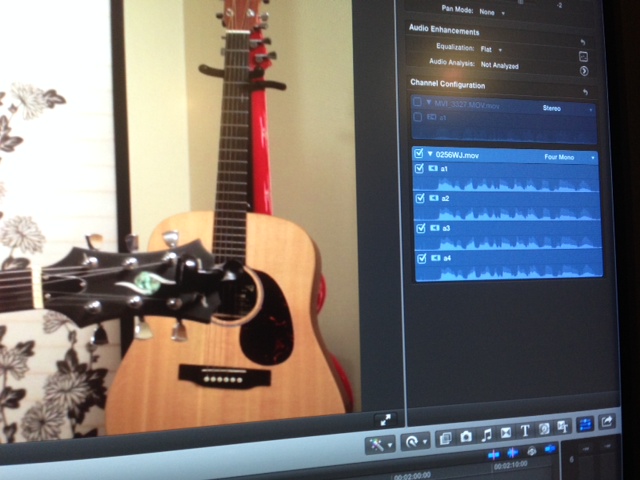
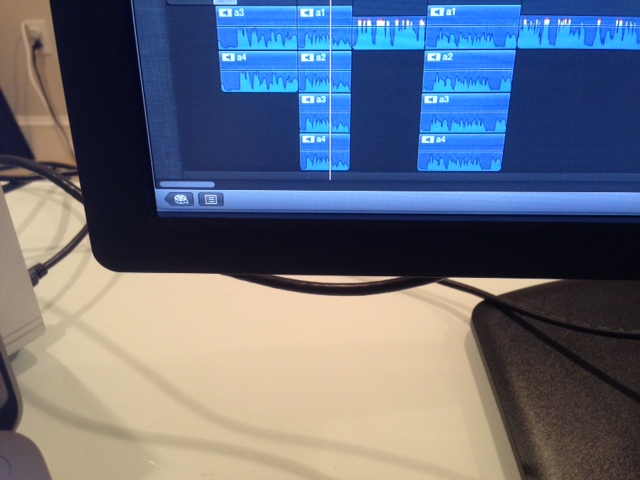
3) I cut the three hours and noticed the lav audio was running hot at times. now that I am mixing the audio I have come to realize that all four mono channels seem to be identical - the channel 1 lav! There is no boom mic audio present and there is no internal camera audio on channel three and four present in the storyline.
If I go to the synched in the event library, all the proper audio channels exist, it is only in the multi cam master that the four channels of audio are all the channel 1 lav.
What could be causing this and how to I get all four of the original audio channels attached to the clips?
Please help.
1) I have a two camera shoot with an HVX and 5D. The HVX was the audio source and the 5D is scratch. The HVX audio is a lav and a boom mic for two channels (1 and 2) I need to mix.
2) This is 3 hours of material broken down into three 1 hour events. I used pluraleyes to match the audio, 5D and HVX and then imported a multi cam storyline.
3) I cut the three hours and noticed the lav audio was running hot at times. now that I am mixing the audio I have come to realize that all four mono channels seem to be identical - the channel 1 lav! There is no boom mic audio present and there is no internal camera audio on channel three and four present in the storyline.
If I go to the synched in the event library, all the proper audio channels exist, it is only in the multi cam master that the four channels of audio are all the channel 1 lav.
What could be causing this and how to I get all four of the original audio channels attached to the clips?
Please help.
Last edit: 24 Nov 2013 18:23 by bosindy.
Please Log in to join the conversation.

24 Nov 2013 21:20 #34594
by Dave_EP
Replied by Dave_EP on topic issue with multi cam duplicate audio channels
Do you have the audio channels set to Stereo or Dual Mono?
Please Log in to join the conversation.
24 Nov 2013 21:41 #34596
by bosindy
Replied by bosindy on topic issue with multi cam duplicate audio channels
Hi Dave, it is four mono.
Please Log in to join the conversation.
24 Nov 2013 21:44 #34597
by Dave_EP
Replied by Dave_EP on topic issue with multi cam duplicate audio channels
Did you have Plural Eyes 'replace audio' ? If so then you won't be able to use these files and need to go find the originals from which you can take the audio and paste them to the sequence separately.
If not, when you look at the individual clips in the event browser, what's the state of the audio there?
If the audio is good then you should be able to take the audio from those clips, add them to the multi cam (just line it up with the video clips - since they are the same it shouldn't be that hard), then disable the audio from the video streams.
If not, when you look at the individual clips in the event browser, what's the state of the audio there?
If the audio is good then you should be able to take the audio from those clips, add them to the multi cam (just line it up with the video clips - since they are the same it shouldn't be that hard), then disable the audio from the video streams.
Please Log in to join the conversation.
24 Nov 2013 22:30 #34600
by bosindy
Replied by bosindy on topic issue with multi cam duplicate audio channels
i did't have PE replace audio.
just so I understand correctly there are 3 events created when you import into fcpx from PE. 1) the multi cam clip (what is at issue here) 2) is the synch replaced (which is empty) and 3) is the synch synched.
the #3 synch synched has all the files in it and they have the proper audio channels. the problem to use them to line them up is that the multi cam clip has only one file name on it (the first one, in this case it is 0256WJ) there are 140 files some of which is the 5D. I don't think i will be able to find the proper files and then line them up. It is 5 1/2 hour of material cut to 3 hours.
just so I understand correctly there are 3 events created when you import into fcpx from PE. 1) the multi cam clip (what is at issue here) 2) is the synch replaced (which is empty) and 3) is the synch synched.
the #3 synch synched has all the files in it and they have the proper audio channels. the problem to use them to line them up is that the multi cam clip has only one file name on it (the first one, in this case it is 0256WJ) there are 140 files some of which is the 5D. I don't think i will be able to find the proper files and then line them up. It is 5 1/2 hour of material cut to 3 hours.
Please Log in to join the conversation.
24 Nov 2013 23:02 #34602
by bosindy
Replied by bosindy on topic issue with multi cam duplicate audio channels
Dave your're a genius, I went into the multi cam clip, individual clips and have been manually replacing them from the synch synched folders. it is a pain to have to do all 70 and i don't know why this issue is happening in the first place, but i'll take it.
Please Log in to join the conversation.
25 Nov 2013 09:44 #34610
by Dave_EP
Replied by Dave_EP on topic issue with multi cam duplicate audio channels
One of the reasons I stopped using Pluraleyes altogether was because of the duplicated media problem, the other being that I've found FCPX sync using audio to be generally very good. Sometimes it failed where PluralEyes succeeded, and sometimes it sync'd stuff that PluralEyes failed with, so in either case there could be some manual fix ups to do from time to time.
The key for me was giving FCPX sync a helping hand by telling it which camera (angle) each clip was from. Once I started doing this things got a whole lot better.
The key for me was giving FCPX sync a helping hand by telling it which camera (angle) each clip was from. Once I started doing this things got a whole lot better.
Please Log in to join the conversation.
