


- Posts: 3
- Thank you received: 0
3 Post Moderation Rule for New Boarders (25 Jan 2021)
New boarders will have their posts moderated - Don't worry if you cannot see your post immediately.
Hard Disk Space Full
24 Nov 2013 01:28 - 24 Nov 2013 01:52 #34575
by The Z
Hard Disk Space Full was created by The Z
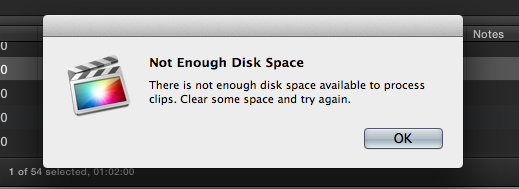
I am editing a large Event off on 2 hard drives. While editing my 3rd Project in this Event, FCPX tells me I am out of hard disk space. Is there a way I can move one of my 2 completed Projects to my 1st Drive to free up space?
1st Drive (1TB, 450G avail) is my Card Dump and Export Files
2nd Drive (1TB, 103G avail) is my Final Cut Events folder
There is no cross over between my used media between Projects, but they are in the same Event. Also My Final Cut Events only has the alias files to my media on Drive 1.
1st Drive (1TB, 450G avail) is my Card Dump and Export Files
2nd Drive (1TB, 103G avail) is my Final Cut Events folder
There is no cross over between my used media between Projects, but they are in the same Event. Also My Final Cut Events only has the alias files to my media on Drive 1.
Last edit: 24 Nov 2013 01:52 by The Z.
Please Log in to join the conversation.
- ronny courtens
-

- Offline
- Moderator
-

Less
More
- Posts: 4455
- Thank you received: 962
24 Nov 2013 13:22 #34583
by ronny courtens
Replied by ronny courtens on topic Hard Disk Space Full
I'm not sure I fully understand your question.
You say your Final Cut Events folder on drive 2 only contains aliases to your original media on drive 1. If the original media are on drive 1, then why has your drive 2 only 103 GB available? Are there other folders or media on drive 2 that don't have anything to do with your FCPX projects? If so you could move some of these to drive 1 to free up space on drive 2 without having to move any FCPX Projects.
- Ronny
You say your Final Cut Events folder on drive 2 only contains aliases to your original media on drive 1. If the original media are on drive 1, then why has your drive 2 only 103 GB available? Are there other folders or media on drive 2 that don't have anything to do with your FCPX projects? If so you could move some of these to drive 1 to free up space on drive 2 without having to move any FCPX Projects.
- Ronny
Please Log in to join the conversation.

24 Nov 2013 15:56 - 24 Nov 2013 16:00 #34584
by BenB
Replied by BenB on topic Hard Disk Space Full
I start by deleting render files for all of your events and projects.
Also, are you doing any (or a lot of) stabilizing clips?
Also, on a 1TB drive, you NEVER want to let it get less than 150GB of free space, so that it will continue to function properly. 15% free space of a drive's total capacity is the rule of thumb. So you're getting to a dangerous level of drive space usage. May be time to invest in a larger drive.
Also, are you doing any (or a lot of) stabilizing clips?
Also, on a 1TB drive, you NEVER want to let it get less than 150GB of free space, so that it will continue to function properly. 15% free space of a drive's total capacity is the rule of thumb. So you're getting to a dangerous level of drive space usage. May be time to invest in a larger drive.
Last edit: 24 Nov 2013 16:00 by BenB.
Please Log in to join the conversation.
24 Nov 2013 20:58 #34592
by The Z
Replied by The Z on topic Hard Disk Space Full
Ronny- There is nothing on Drive 2 except the Final Cut Events folder. The reason the drive is filled because the are 3 multi Cam Projects in this event that range from 4 hours long to 2 hours long. So there are some rather large mulit cam transcoded files on drive 2.
@BenB
Thanks for your reply. I have already tried deleting my render files with no sucess of freeing up any space. I completely agree that a larger drive would be a quick but costly cure but I believe there must be a way of reallocating drive space that can make this possible. Consolidating media or Duplicating Media? I dont know i'm a newbie
To restate I have 3 Projects in this Event and I would like to move 1 of the 3 to Drive #1 without compromising the other 2 projects which don't have any crossover use of clips.
Thanks guys
@BenB
Thanks for your reply. I have already tried deleting my render files with no sucess of freeing up any space. I completely agree that a larger drive would be a quick but costly cure but I believe there must be a way of reallocating drive space that can make this possible. Consolidating media or Duplicating Media? I dont know i'm a newbie
To restate I have 3 Projects in this Event and I would like to move 1 of the 3 to Drive #1 without compromising the other 2 projects which don't have any crossover use of clips.
Thanks guys
Please Log in to join the conversation.
- ronny courtens
-
- Offline
- Moderator
-
Less
More
- Posts: 4455
- Thank you received: 962
24 Nov 2013 22:14 - 24 Nov 2013 22:14 #34599
by ronny courtens
Replied by ronny courtens on topic Hard Disk Space Full
Ah, I get it now.
Getting a new drive that is big enough to work with such lengthy projects is the best advice I can give you.
Duplicating one of your Projects to your first drive with used media will create a new Event on drive 1 containing only the media you have used in this Project. But I wonder if your drive 1 will be big enough to hold these media, it's already near-full as it is now.
And a second problem: as all the clips of your Projects are inside the same Event on drive 2 this means that after duplicating the Project with its media to drive 1 you will have to manually remove the duplicated media out of the Event on drive 1 in order to make space on it. So this is not really as easy as you might think. If you want I can give you a step-by-step on how to duplicate one of your Projects to drive 1 and then manually remove media out of your Event on drive 2, but this will be at your own risk.
However, there's another thing you could do to make space on your second drive.
If you have already finished two of your three Projects and you have exported them as a Master File you can manually delete all the transcoded (Optimized) media for these Projects using the Finder. This will immediately create loads of free space on your second drive.
All you have to do is go to the Project folder on your second drive and trash the Transcoded > High Quality Media folder for each finished Project. This can do no harm, as you can always recreate the Optimized media for any clips in your Event by r-clicking the clips in the Event Library and choosing Transcode. Deleting the transcoded media for your finished Projects will allow you to finish the last Project. After that you really need to get bigger drives if you are doing this kind of lengthy projects.
- Ronny
Getting a new drive that is big enough to work with such lengthy projects is the best advice I can give you.
Duplicating one of your Projects to your first drive with used media will create a new Event on drive 1 containing only the media you have used in this Project. But I wonder if your drive 1 will be big enough to hold these media, it's already near-full as it is now.
And a second problem: as all the clips of your Projects are inside the same Event on drive 2 this means that after duplicating the Project with its media to drive 1 you will have to manually remove the duplicated media out of the Event on drive 1 in order to make space on it. So this is not really as easy as you might think. If you want I can give you a step-by-step on how to duplicate one of your Projects to drive 1 and then manually remove media out of your Event on drive 2, but this will be at your own risk.
However, there's another thing you could do to make space on your second drive.
If you have already finished two of your three Projects and you have exported them as a Master File you can manually delete all the transcoded (Optimized) media for these Projects using the Finder. This will immediately create loads of free space on your second drive.
All you have to do is go to the Project folder on your second drive and trash the Transcoded > High Quality Media folder for each finished Project. This can do no harm, as you can always recreate the Optimized media for any clips in your Event by r-clicking the clips in the Event Library and choosing Transcode. Deleting the transcoded media for your finished Projects will allow you to finish the last Project. After that you really need to get bigger drives if you are doing this kind of lengthy projects.
- Ronny
Last edit: 24 Nov 2013 22:14 by ronny courtens.
Please Log in to join the conversation.
25 Nov 2013 00:03 #34603
by The Z
Replied by The Z on topic Hard Disk Space Full
Ronny thats all sound advice. I think the quickest way to solve my problem is to purchase a larger drive. I did Figure out how to Duplicate the media and move it to drive #1 but ran in to the exact issue you described which was that all that information filled up that drive as well.
Also deleting transcodes wont work for these projects as there is a likelyhood that I will be going back into them very shortly.
Thanks for the advice
Also deleting transcodes wont work for these projects as there is a likelyhood that I will be going back into them very shortly.
Thanks for the advice
Please Log in to join the conversation.
