


- Posts: 1077
- Thank you received: 189
3 Post Moderation Rule for New Boarders (25 Jan 2021)
New boarders will have their posts moderated - Don't worry if you cannot see your post immediately.
Just a small note on rendering
- Andreas Kiel
-
 Topic Author
- Offline
- Platinum Member
-

Less
More
23 Nov 2013 16:05 #34565
by Andreas Kiel
Just a small note on rendering was created by Andreas Kiel
I made a post a few days ago about exporting regions and rendering.
Now I had an issue with rendering regions which made me hitting my head on the desk for a while.
The thing I wanted, needed to do was just to render a region of the timeline. Seems to be an easy deal, but only if the region is inside a clip. Once you try to get a small end of one clip, the full following clip and a small part of the next one and set a region you only get a beep when hit crtl-R.
You can select all three of them and render just to figure that the end keyframe of the first clip doesn't match the visually the cut of the next clip, the third clip's first keyframe doesn't match the 2nd clip's out.
In my case it would have been about an hour of rendering to see what happens in motion while playing the the timeline. Probably a much faster machine than mine would make it easier.
So here is the solution I found.
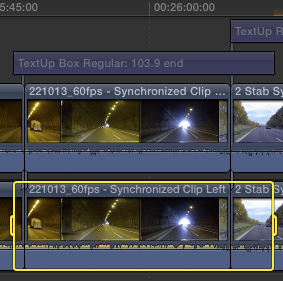
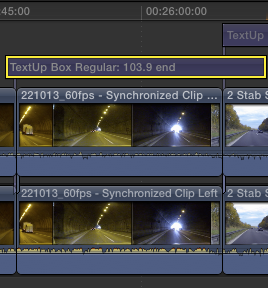
I put a title where the outgoing keyframe was (I did that anyway as a better replacement for markers) then extended the title to the time of the incoming keyframe of the third clip.
Made the title invisible and kept it selected. Then pressed ctrl-R and everything worked as expected.
- Andreas
Not working.
Working
Now I had an issue with rendering regions which made me hitting my head on the desk for a while.
The thing I wanted, needed to do was just to render a region of the timeline. Seems to be an easy deal, but only if the region is inside a clip. Once you try to get a small end of one clip, the full following clip and a small part of the next one and set a region you only get a beep when hit crtl-R.
You can select all three of them and render just to figure that the end keyframe of the first clip doesn't match the visually the cut of the next clip, the third clip's first keyframe doesn't match the 2nd clip's out.
In my case it would have been about an hour of rendering to see what happens in motion while playing the the timeline. Probably a much faster machine than mine would make it easier.
So here is the solution I found.
I put a title where the outgoing keyframe was (I did that anyway as a better replacement for markers) then extended the title to the time of the incoming keyframe of the third clip.
Made the title invisible and kept it selected. Then pressed ctrl-R and everything worked as expected.
- Andreas
Not working.
Working
Please Log in to join the conversation.

24 Nov 2013 16:11 #34586
by BenB
Replied by BenB on topic Just a small note on rendering
Many of us have created a custom Title template in Motion, that contains no text, nothing. We use this as an Adjustment Layer. Place an effect in it, an all clips below it inherit that effect.
You could use it for this same purpose, too. And save the step of muting it. Very good workaround you found, too!
You could use it for this same purpose, too. And save the step of muting it. Very good workaround you found, too!
Please Log in to join the conversation.
- Andreas Kiel
-
Topic Author
- Offline
- Platinum Member
-
Less
More
- Posts: 1077
- Thank you received: 189
25 Nov 2013 09:12 #34608
by Andreas Kiel
Replied by Andreas Kiel on topic Just a small note on rendering
Ben,
You're right.
Creating an adjustments layer was one of the first things I did when FCPX was released.
I know that many people did the same thing – I loved it, it was just one of the cool things AE has "since decades".
The thing now with the titles is a bit different. other than adjustment layers they don't affect the tracks below (at least when you got the right kind of title template)
As said I abused one of my own title templates to make "easy sequence markers" based on the primary story line which are not available in FCPX right now. Markers had been bad in FCP and are worse in FCPX.
So having a title with a role you always can enter your notes in the text entry, switch it on or off, move it, change duration, see the name/text in the timeline even if they are invisible in the canvas.
It's way easier compared to markers - at least in my case.
-Andreas
You're right.
Creating an adjustments layer was one of the first things I did when FCPX was released.
I know that many people did the same thing – I loved it, it was just one of the cool things AE has "since decades".
The thing now with the titles is a bit different. other than adjustment layers they don't affect the tracks below (at least when you got the right kind of title template)
As said I abused one of my own title templates to make "easy sequence markers" based on the primary story line which are not available in FCPX right now. Markers had been bad in FCP and are worse in FCPX.
So having a title with a role you always can enter your notes in the text entry, switch it on or off, move it, change duration, see the name/text in the timeline even if they are invisible in the canvas.
It's way easier compared to markers - at least in my case.
-Andreas
Please Log in to join the conversation.
