


- Posts: 1077
- Thank you received: 189
3 Post Moderation Rule for New Boarders (25 Jan 2021)
New boarders will have their posts moderated - Don't worry if you cannot see your post immediately.
Thru Cuts and Trim Tool
- Andreas Kiel
-
 Topic Author
- Offline
- Platinum Member
-

Less
More
23 Nov 2013 14:23 - 23 Nov 2013 14:25 #34561
by Andreas Kiel
Thru Cuts and Trim Tool was created by Andreas Kiel
I got two synched video streams (each 45 minutes).
They are in 1 timeline. So there is one as primary, the other one connected to the first one.
Because same parts of each clip have to have some effects the sequence was divided into a lot of smaller parts by using "Blade All". So there are a lot of cut thru edits.
Everything looked fine at the first glimpse. Then it turned that some of the cuts had to be changed in timing. Means not at X but Y.
So I thought the Trim tool is the easiest way. It worked fine for the primary storyline – it moved the thru cut. For the connected clips it doesn't work cause it keeps the time links to the primary clips.
Using the trim out/trim in will bring the clips out of sync.
So the option is to use the "Blade" for just the connected clip, delete the "new" clip and then change out of the first clip to match and in of the second.
Anybody with a better idea out there?
-Andreas
They are in 1 timeline. So there is one as primary, the other one connected to the first one.
Because same parts of each clip have to have some effects the sequence was divided into a lot of smaller parts by using "Blade All". So there are a lot of cut thru edits.
Everything looked fine at the first glimpse. Then it turned that some of the cuts had to be changed in timing. Means not at X but Y.
So I thought the Trim tool is the easiest way. It worked fine for the primary storyline – it moved the thru cut. For the connected clips it doesn't work cause it keeps the time links to the primary clips.
Using the trim out/trim in will bring the clips out of sync.
So the option is to use the "Blade" for just the connected clip, delete the "new" clip and then change out of the first clip to match and in of the second.
Anybody with a better idea out there?
-Andreas
Last edit: 23 Nov 2013 14:25 by Andreas Kiel.
Please Log in to join the conversation.
- Tom Wolsky
-

- Offline
- Moderator
-

23 Nov 2013 14:39 #34562
by Tom Wolsky
Replied by Tom Wolsky on topic Thru Cuts and Trim Tool
Would it help to convert the upper layer to a secondary storyline? You can break it apart at any time b
Please Log in to join the conversation.
- Andreas Kiel
-
Topic Author
- Offline
- Platinum Member
-
Less
More
- Posts: 1077
- Thank you received: 189
23 Nov 2013 14:49 #34563
by Andreas Kiel
Replied by Andreas Kiel on topic Thru Cuts and Trim Tool
Thanks Tom,
It did that as well. But in this special case it makes things even more complicated cause it's 3d stereo setup.
- Andreas
It did that as well. But in this special case it makes things even more complicated cause it's 3d stereo setup.
- Andreas
Please Log in to join the conversation.
24 Nov 2013 00:48 #34574
by Gretta
Replied by Gretta on topic Thru Cuts and Trim Tool
That's the tildé key. Hold it down and the connections will stay put.
Please Log in to join the conversation.
- thefluentone
-
- Offline
- Senior Member
-

Less
More
- Posts: 68
- Thank you received: 5
28 Nov 2013 03:03 #34797
by thefluentone
Replied by thefluentone on topic Thru Cuts and Trim Tool
Would it help to make a synch clip of the 3d stereo clips? Then cut the synch clips, or am I missing something.
Please Log in to join the conversation.
- Andreas Kiel
-
Topic Author
- Offline
- Platinum Member
-
Less
More
- Posts: 1077
- Thank you received: 189
28 Nov 2013 08:59 #34805
by Andreas Kiel
Replied by Andreas Kiel on topic Thru Cuts and Trim Tool
Where is the tilde key. I can't find on a US keyboard layout.
-Andreas
-Andreas
Please Log in to join the conversation.
- knurrrrrrt
-
- Offline
- Premium Member
-

Less
More
- Posts: 85
- Thank you received: 10
28 Nov 2013 09:33 #34806
by knurrrrrrt
Replied by knurrrrrrt on topic Thru Cuts and Trim Tool
use the customize keyboard command in FCPX and assign a key of your choice with the "override connection" command. i had a hard time trying to get it to work with the tilde key.
Please Log in to join the conversation.

28 Nov 2013 10:14 - 28 Nov 2013 10:18 #34808
by BenB
Replied by BenB on topic Thru Cuts and Trim Tool
"Where is the tilde key. I can't find on a US keyboard layout."
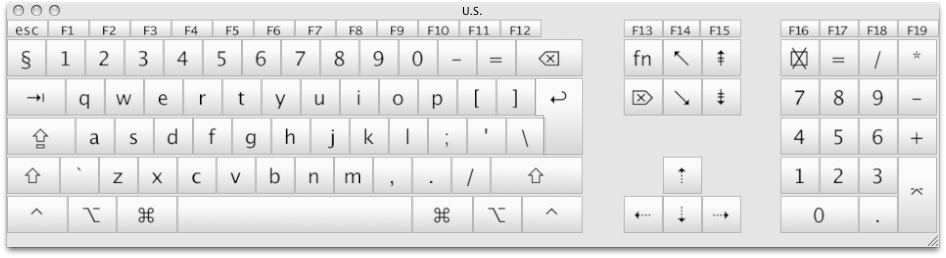
On a U.S. English keyboard Tilde is the key immediately to the left of the 1/! key.
I've never had issue with the Tilde key working as designed.
On a U.S. English keyboard Tilde is the key immediately to the left of the 1/! key.
I've never had issue with the Tilde key working as designed.
- Hold down tilde key first first.
- You will see the orange "connection override" symbol added to your cursor.
- Grab your clip.
- Move your clip.
- Let go of the clip.
- Let off the tilde key.
Last edit: 28 Nov 2013 10:18 by BenB.
Please Log in to join the conversation.
- knurrrrrrt
-
- Offline
- Premium Member
-
Less
More
- Posts: 85
- Thank you received: 10
28 Nov 2013 10:17 #34809
by knurrrrrrt
Replied by knurrrrrrt on topic Thru Cuts and Trim Tool
I should have been more specific. I had problems with a german keyboard and no matter what layout. ( German or US) Therefore my tip to assign the command to a different key.
Please Log in to join the conversation.
- Andreas Kiel
-
Topic Author
- Offline
- Platinum Member
-
Less
More
- Posts: 1077
- Thank you received: 189
28 Nov 2013 11:20 #34811
by Andreas Kiel
Replied by Andreas Kiel on topic Thru Cuts and Trim Tool
thefluentone: "Would it help to make a synch clip of the 3d stereo clips? Then cut the synch clips, or am I missing something."
Thanks
It's right and somehow it's what I did.
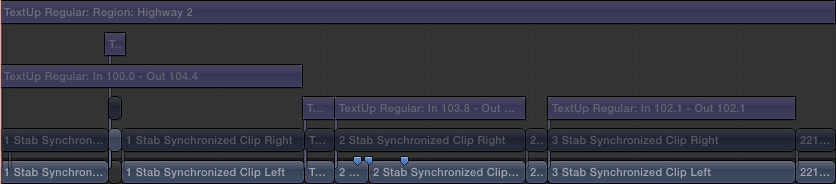
My actual problem is that I don't find an easy way to delete the cuts.
Parts of the 2 long clip have to be stabilized for each eye with stab in sync. Most of these parts are to long to get satisfying results, therefor they have to be split as well using the blade tool.
It's tedious trial and error to find the best in/outs.
If there would be an easy option the delete the cuts would help a lot. But I think it's not possible cause of the trackless nature of FCPX.
knurrrrrrt: "use the customize keyboard command in FCPX and assign a key of your choice with the "override connection" command. i had a hard time trying to get it to work with the tilde key."
"I should have been more specific. I had problems with a german keyboard and no matter what layout. ( German or US) Therefore my tip to assign the command to a different key."
Thanks
I also forgot to mention that I use a German keyboard and just mapped a US layout to it to figure out whether I can find it there (or the key I've to press on my keyboard).
I didn't know about the "Override Connection" option. But the correct shortcut is already there with the basic layout (running an US OS). Unfortunately it doesn't do what I need.
If you look at the screenshot above I want clear for example the cut between the second last and last clip. In FCP it was easy – just click the cut and press delete (see above about trackless).
BenB: "On a U.S. English keyboard Tilde is the key immediately to the left of the 1/! key."
If I switch to US layout it looks like below.
Thanks again to all
-Andreas
Thanks
It's right and somehow it's what I did.
My actual problem is that I don't find an easy way to delete the cuts.
Parts of the 2 long clip have to be stabilized for each eye with stab in sync. Most of these parts are to long to get satisfying results, therefor they have to be split as well using the blade tool.
It's tedious trial and error to find the best in/outs.
If there would be an easy option the delete the cuts would help a lot. But I think it's not possible cause of the trackless nature of FCPX.
knurrrrrrt: "use the customize keyboard command in FCPX and assign a key of your choice with the "override connection" command. i had a hard time trying to get it to work with the tilde key."
"I should have been more specific. I had problems with a german keyboard and no matter what layout. ( German or US) Therefore my tip to assign the command to a different key."
Thanks
I also forgot to mention that I use a German keyboard and just mapped a US layout to it to figure out whether I can find it there (or the key I've to press on my keyboard).
I didn't know about the "Override Connection" option. But the correct shortcut is already there with the basic layout (running an US OS). Unfortunately it doesn't do what I need.
If you look at the screenshot above I want clear for example the cut between the second last and last clip. In FCP it was easy – just click the cut and press delete (see above about trackless).
BenB: "On a U.S. English keyboard Tilde is the key immediately to the left of the 1/! key."
If I switch to US layout it looks like below.
Thanks again to all
-Andreas
Please Log in to join the conversation.

28 Nov 2013 11:25 #34812
by alex4D
Replied by alex4D on topic Thru Cuts and Trim Tool
Andreas,
It is the key to the left of the Z key. European keyboards require that you press Shift to get a tilde.
@Alex4D
It is the key to the left of the Z key. European keyboards require that you press Shift to get a tilde.
@Alex4D
Please Log in to join the conversation.
- Andreas Kiel
-
Topic Author
- Offline
- Platinum Member
-
Less
More
- Posts: 1077
- Thank you received: 189
28 Nov 2013 12:38 - 28 Nov 2013 12:46 #34813
by Andreas Kiel
Replied by Andreas Kiel on topic Thru Cuts and Trim Tool
Thanks Alex.
I figured out that meanwhile somehow.
So on a German keyboard with US layout it will be the physical keys "shift - <".
But if I try to use that I only got an error beep.
The earlier recommended "Override Connection" has a default shortcut (for my keyboard) "cmd - <".
That works fine, but thats not the effect I need.
So I've to go the tedious way obviously.
- Andreas
P.S.
For all who read that: Alex helped me a real lot to preview these 3d stereoscopic things creating some "beta" effects which allowed me to test camera settings within the timeline. He's incredible – so support him.
P.S. P.S.
Here a dropbox link to make it a bit clearer what I'm talking about.
www.dropbox.com/s/2unyz3mgsmw3kcr/Side%20By%20Side%20JPEG.mov
Its one eye only and the full download is > 800 mb
I figured out that meanwhile somehow.
So on a German keyboard with US layout it will be the physical keys "shift - <".
But if I try to use that I only got an error beep.
The earlier recommended "Override Connection" has a default shortcut (for my keyboard) "cmd - <".
That works fine, but thats not the effect I need.
So I've to go the tedious way obviously.
- Andreas
P.S.
For all who read that: Alex helped me a real lot to preview these 3d stereoscopic things creating some "beta" effects which allowed me to test camera settings within the timeline. He's incredible – so support him.
P.S. P.S.
Here a dropbox link to make it a bit clearer what I'm talking about.
www.dropbox.com/s/2unyz3mgsmw3kcr/Side%20By%20Side%20JPEG.mov
Its one eye only and the full download is > 800 mb
Last edit: 28 Nov 2013 12:46 by Andreas Kiel.
Please Log in to join the conversation.
