


- Posts: 32
- Thank you received: 1
3 Post Moderation Rule for New Boarders (25 Jan 2021)
New boarders will have their posts moderated - Don't worry if you cannot see your post immediately.
Why FCP X became very slow
22 Nov 2013 05:54 - 22 Nov 2013 05:55 #34533
by namu5583
Why FCP X became very slow was created by namu5583
Hi, I'm currently on a project. It's a simple project, just a 5 minutes slideshow of pictures with a background song.
The problem is halfway through the process, my fcp became very slow, it never crash though. But it so irritating when I insert a text, adding transition.
At the end when I'm almost finish, even my mouse scroll is lag.
I googled about this, I find something about storage problem, but I still have about 40% of my drive space.
So why is this happening? Anyone got a clue?
Thanks before for sharing.
I'm currently using
Processor 2 x 2.4 GHz Quad-Core Intel Xeon
Memory 6 GB 1066 MHz DDR3 ECC
Graphics ATI Radeon HD 5770 1024 MB
Software OS X 10.9 - Maverick
Storage 1 TB SATA
My workflow : create event - create project 1920 x 1080 24fps - import asset ( a lot of jpeg picture, wav audio, tiff image, avi video) - rough cut - insert transition,text,effect,audio,video - share
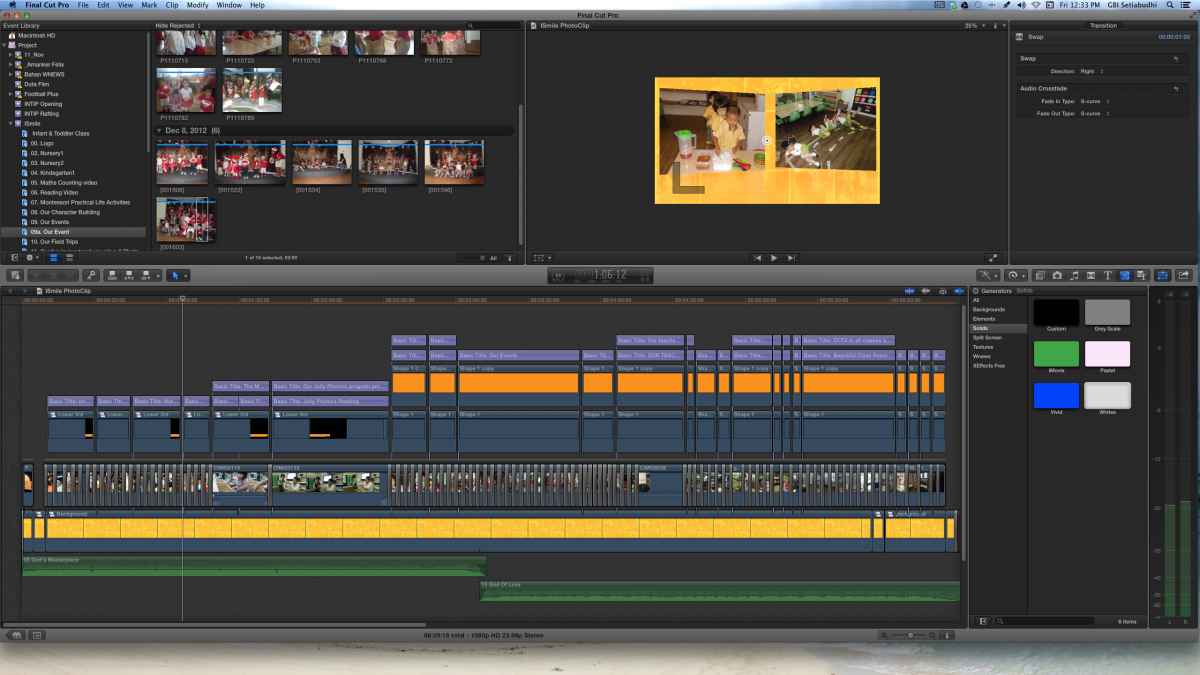
The problem is halfway through the process, my fcp became very slow, it never crash though. But it so irritating when I insert a text, adding transition.
At the end when I'm almost finish, even my mouse scroll is lag.
I googled about this, I find something about storage problem, but I still have about 40% of my drive space.
So why is this happening? Anyone got a clue?
Thanks before for sharing.
I'm currently using
Processor 2 x 2.4 GHz Quad-Core Intel Xeon
Memory 6 GB 1066 MHz DDR3 ECC
Graphics ATI Radeon HD 5770 1024 MB
Software OS X 10.9 - Maverick
Storage 1 TB SATA
My workflow : create event - create project 1920 x 1080 24fps - import asset ( a lot of jpeg picture, wav audio, tiff image, avi video) - rough cut - insert transition,text,effect,audio,video - share
Last edit: 22 Nov 2013 05:55 by namu5583.
Please Log in to join the conversation.
- ronny courtens
-

- Offline
- Moderator
-

Less
More
- Posts: 4455
- Thank you received: 962
22 Nov 2013 06:56 #34534
by ronny courtens
Replied by ronny courtens on topic Why FCP X became very slow
What is the original frame size of your stills? Are they much larger than 1920x1080?
Unrendered generators, a lot of stacked title clips and picture-in-picture effects with oversized stills are very RAM hungry. For such an effect-intensive project I think 6 GB RAM is barely enough.
Try rendering your timeline and see if this brings back enough speed to finish your edit.
- Ronny
Unrendered generators, a lot of stacked title clips and picture-in-picture effects with oversized stills are very RAM hungry. For such an effect-intensive project I think 6 GB RAM is barely enough.
Try rendering your timeline and see if this brings back enough speed to finish your edit.
- Ronny
Please Log in to join the conversation.
- Tom Wolsky
-

- Offline
- Moderator
-
22 Nov 2013 08:28 #34538
by Tom Wolsky
Replied by Tom Wolsky on topic Why FCP X became very slow
Are you optimizing your imported media? AVI doesn't belong in FCP.
Please Log in to join the conversation.
- Russ Haskell
-

- Offline
- Elite Member
-

Less
More
- Posts: 176
- Thank you received: 24
22 Nov 2013 16:41 #34547
by Russ Haskell
Replied by Russ Haskell on topic Why FCP X became very slow
Following up on the RAM idea, open Activity Monitor and check whether your free RAM is being depleted during the course of your project. People who have more a lot RAM than 6 GB will sometimes report that they need to close and restart FCP to be able to work on RAM-instensive projects.
Russ
Russ
Please Log in to join the conversation.

22 Nov 2013 19:50 #34551
by plysat
That's probably it. Transcode or optimize and it will likely be better. Certain codecs make X sad...
Can't sleep? Try this: fcpxpert.net ;-)
Replied by plysat on topic Why FCP X became very slow
Tom Wolsky wrote: Are you optimizing your imported media? AVI doesn't belong in FCP.
That's probably it. Transcode or optimize and it will likely be better. Certain codecs make X sad...
Can't sleep? Try this: fcpxpert.net ;-)
Please Log in to join the conversation.
26 Nov 2013 07:19 #34663
by namu5583
Replied by namu5583 on topic Why FCP X became very slow
Hi guys, sorry for the late reply.
@ Ronny : Yes, all the picture are more than 1920x1080, is that a problem? I never knew it would be a problem.
@ Tom Wolsky & plysat : Yes, I'm using avi video. But now I changed it to mov.
@ Russ Haskell : Yes, the RAM certainly depleted a lot (you can see from my screen capture)
At the end the project is a success. But certainly I'm worried for more project to come if problems like this still occurred.
Anyway, why is FCP X take so much memory. Before I open the app, my memory is about 2.5G but after I opened it, it jumps to 5.8G and finally it stand at 5.99G :woohoo:
Thanks again for the reply and suggestion, it been a real help for me.
@ Ronny : Yes, all the picture are more than 1920x1080, is that a problem? I never knew it would be a problem.
@ Tom Wolsky & plysat : Yes, I'm using avi video. But now I changed it to mov.
@ Russ Haskell : Yes, the RAM certainly depleted a lot (you can see from my screen capture)
At the end the project is a success. But certainly I'm worried for more project to come if problems like this still occurred.
Anyway, why is FCP X take so much memory. Before I open the app, my memory is about 2.5G but after I opened it, it jumps to 5.8G and finally it stand at 5.99G :woohoo:
Thanks again for the reply and suggestion, it been a real help for me.

Please Log in to join the conversation.
- ronny courtens
-
- Offline
- Moderator
-
Less
More
- Posts: 4455
- Thank you received: 962
26 Nov 2013 07:38 #34665
by ronny courtens
Replied by ronny courtens on topic Why FCP X became very slow
I'm glad you have been able to finish the project. The slowdown you had seems to be caused by a combination of factors, so this is for future reference:
1. Oversized stills eat up a lot of RAM. The larger the size (in pixels) of your stills the more RAM your NLE will need to cache them in memory. That's why it is best not to make your stills much larger than the project frame size, unless you need to do stills animations such as zooming in or panorama panning.
2. Optimizing your footage makes life easier. This has less to do with RAM usage but with processor load. Whenever you use a format that is not natively handled by FCPX (such as AVI) your processor needs to decode this format on the fly, taking up a lot of processing power during playback.
The combination of fully depleted RAM caused by the large stills as well as many unrendered titles and generators above them, and the overcharging of your processor by using non-optimized formats, would certainly explain your system slowing down.
- Ronny
1. Oversized stills eat up a lot of RAM. The larger the size (in pixels) of your stills the more RAM your NLE will need to cache them in memory. That's why it is best not to make your stills much larger than the project frame size, unless you need to do stills animations such as zooming in or panorama panning.
2. Optimizing your footage makes life easier. This has less to do with RAM usage but with processor load. Whenever you use a format that is not natively handled by FCPX (such as AVI) your processor needs to decode this format on the fly, taking up a lot of processing power during playback.
The combination of fully depleted RAM caused by the large stills as well as many unrendered titles and generators above them, and the overcharging of your processor by using non-optimized formats, would certainly explain your system slowing down.
- Ronny
Please Log in to join the conversation.
26 Nov 2013 07:47 #34667
by namu5583
Replied by namu5583 on topic Why FCP X became very slow
Now I will always remember no oversize stills & always optimized. But certainly it give me a double job to change all the stills to a more suitable sizes. I need to batch all the stills in a image processor like photoshop.
Thanks again.
Thanks again.
Please Log in to join the conversation.
- ronny courtens
-
- Offline
- Moderator
-
Less
More
- Posts: 4455
- Thank you received: 962
26 Nov 2013 10:11 #34673
by ronny courtens
Replied by ronny courtens on topic Why FCP X became very slow
Yes, it does take some extra work to resize the stills and to optimize your video, but you will find the smoother editing will easily make up for this time. This is not only an issue with FCPX, it is an issue with any NLE where you use stills.
- Ronny
- Ronny
Please Log in to join the conversation.

26 Nov 2013 17:18 #34689
by Bobbyco
Replied by Bobbyco on topic Why FCP X became very slow
You can use a nice utility like GraphicConverter
www.lemkesoft.de/en/products/graphicconverter/
to batch resize images easily. Or, for free do it wit OS X Automator. Here's how:
www.macobserver.com/tmo/article/how_to_b...mages_with_automator
Please Log in to join the conversation.
