


- Posts: 32
- Thank you received: 1
3 Post Moderation Rule for New Boarders (25 Jan 2021)
New boarders will have their posts moderated - Don't worry if you cannot see your post immediately.
Failed render because of random drop frame
17 Nov 2013 08:57 #34296
by namu5583
Failed render because of random drop frame was created by namu5583
Hi, guys. I'm having a problem with my FCP X project.
I'm currently using FCP X 10.0.9. On my latest project I tried to render a project but I had a problem.
When I'm rendering from the share - master file in FCP X, it always drops frame at random frame, not during playback.
All my video are .mov files 1920x1080 25 fps. It's proxy media.
I'm using Mac Pro
Processor 2 x 2.4 GHz Quad-Core Intel Xeon,
Memory 6 GB 1066 MHz DDR3 ECC,
Graphics ATI Radeon HD 5770 1024 MB,
OS Maverick
I appreciate your help guys.
I'm currently using FCP X 10.0.9. On my latest project I tried to render a project but I had a problem.
When I'm rendering from the share - master file in FCP X, it always drops frame at random frame, not during playback.
All my video are .mov files 1920x1080 25 fps. It's proxy media.
I'm using Mac Pro
Processor 2 x 2.4 GHz Quad-Core Intel Xeon,
Memory 6 GB 1066 MHz DDR3 ECC,
Graphics ATI Radeon HD 5770 1024 MB,
OS Maverick
I appreciate your help guys.
Please Log in to join the conversation.
- ronny courtens
-

- Offline
- Moderator
-

Less
More
- Posts: 4455
- Thank you received: 962
17 Nov 2013 09:12 #34297
by ronny courtens
Replied by ronny courtens on topic Failed render because of random drop frame
I'm not sure I understand your question, so please correct me if I'm wrong:
- You are editing in Proxy mode in FCPX
- When you play the edit in FCPX you don't get drops during playback
- Then you switch your Playback mode to Original Media and you share the edit to a ProRes 422 Master File
- When you play the exported file in QuickTime player you get drops at random frames
Is that correct?
- You are editing in Proxy mode in FCPX
- When you play the edit in FCPX you don't get drops during playback
- Then you switch your Playback mode to Original Media and you share the edit to a ProRes 422 Master File
- When you play the exported file in QuickTime player you get drops at random frames
Is that correct?
Please Log in to join the conversation.
17 Nov 2013 09:23 #34298
by namu5583
Replied by namu5583 on topic Failed render because of random drop frame
Thank you for your reply
1. Yes, when I'm importing all the media, I'm transcoding with proxy media
2. Yes, I don't get drops during playback
3. No, I don't switch my playback mode to original media.
4. It already failed when rendered. Because of the drops.
1. Yes, when I'm importing all the media, I'm transcoding with proxy media
2. Yes, I don't get drops during playback
3. No, I don't switch my playback mode to original media.
4. It already failed when rendered. Because of the drops.
Please Log in to join the conversation.
- ronny courtens
-
- Offline
- Moderator
-
Less
More
- Posts: 4455
- Thank you received: 962
17 Nov 2013 09:33 #34299
by ronny courtens
Replied by ronny courtens on topic Failed render because of random drop frame
You cannot render the edit? Do you get error messages when rendering?
Or you cannot export (share) the edit? Do you get error messages when exporting?
I think it would be best if you gave us a step-by-step explanation of your workflow.
- Ronny
Or you cannot export (share) the edit? Do you get error messages when exporting?
I think it would be best if you gave us a step-by-step explanation of your workflow.
- Ronny
Please Log in to join the conversation.
17 Nov 2013 09:51 - 17 Nov 2013 09:56 #34300
by namu5583
Replied by namu5583 on topic Failed render because of random drop frame
I cannot export(share) the edit. I get error messages when exporting.
You can see my attachment, I attached my screen capture.
You can see my attachment, I attached my screen capture.

Last edit: 17 Nov 2013 09:56 by namu5583.
Please Log in to join the conversation.
- ronny courtens
-
- Offline
- Moderator
-
Less
More
- Posts: 4455
- Thank you received: 962
17 Nov 2013 09:56 #34301
by ronny courtens
Replied by ronny courtens on topic Failed render because of random drop frame
Sorry I cannot see your attachment, but it would be very helpful.
Click "Add File" to add your screenshot to the file list
When the screenshot appears in the list, click "Insert" to insert the file in your message
- Ronny
Click "Add File" to add your screenshot to the file list
When the screenshot appears in the list, click "Insert" to insert the file in your message
- Ronny
Please Log in to join the conversation.
17 Nov 2013 09:58 #34302
by namu5583
Replied by namu5583 on topic Failed render because of random drop frame
I just edit my previous post. Thank you.
Please Log in to join the conversation.
- ronny courtens
-
- Offline
- Moderator
-
Less
More
- Posts: 4455
- Thank you received: 962
17 Nov 2013 10:12 - 17 Nov 2013 10:15 #34303
by ronny courtens
Replied by ronny courtens on topic Failed render because of random drop frame
Okay, I see. We have been getting lots of these export errors on the forum lately, especially with Mavericks.
If you get this kind of export error on multiple frames these are the first things you should do:
1. Disable Mavericks App Nap for FCPX.
Go to your Applications folder, R-click the FCPX application icon and select Show Info.
In the Info window put a checkmark next to "Disable App Nap".
2. Delete ALL your Event and Project render files.
Select your Event and choose File > Delete Event Render Files
Select your project and choose File > Delete Project Render Files (delete ALL render files, not just te unused)
Then try sharing the edit as a Master File without rendering first.
If you still get export errors after this, please post back.
IMPORTANT: Oh yes, one more question: what are your Playback settings in Preferences? Can you post a screenshot of your Playback Preferences?
- Ronny
If you get this kind of export error on multiple frames these are the first things you should do:
1. Disable Mavericks App Nap for FCPX.
Go to your Applications folder, R-click the FCPX application icon and select Show Info.
In the Info window put a checkmark next to "Disable App Nap".
2. Delete ALL your Event and Project render files.
Select your Event and choose File > Delete Event Render Files
Select your project and choose File > Delete Project Render Files (delete ALL render files, not just te unused)
Then try sharing the edit as a Master File without rendering first.
If you still get export errors after this, please post back.
IMPORTANT: Oh yes, one more question: what are your Playback settings in Preferences? Can you post a screenshot of your Playback Preferences?
- Ronny
Last edit: 17 Nov 2013 10:15 by ronny courtens.
Please Log in to join the conversation.
17 Nov 2013 10:15 #34305
by namu5583
Replied by namu5583 on topic Failed render because of random drop frame
My workflow :
0. Create event
1. Import assets ( Video : mov 1920x1080/25fps - create proxy media, audio : mp3 )
2. Create project
3. Rough Cut
4. Adding transition, effect, trimming, etc.
5. Export/Share - master file ProRess 422
0. Create event
1. Import assets ( Video : mov 1920x1080/25fps - create proxy media, audio : mp3 )
2. Create project
3. Rough Cut
4. Adding transition, effect, trimming, etc.
5. Export/Share - master file ProRess 422
Please Log in to join the conversation.
- ronny courtens
-
- Offline
- Moderator
-
Less
More
- Posts: 4455
- Thank you received: 962
17 Nov 2013 10:17 #34306
by ronny courtens
Replied by ronny courtens on topic Failed render because of random drop frame
Thank you for the information.
See my post above: Can you post a screenshot of your Playback Preferences?
- Ronny
See my post above: Can you post a screenshot of your Playback Preferences?
- Ronny
Please Log in to join the conversation.
17 Nov 2013 10:22 #34307
by namu5583
Replied by namu5583 on topic Failed render because of random drop frame
My playback settings in Preferences
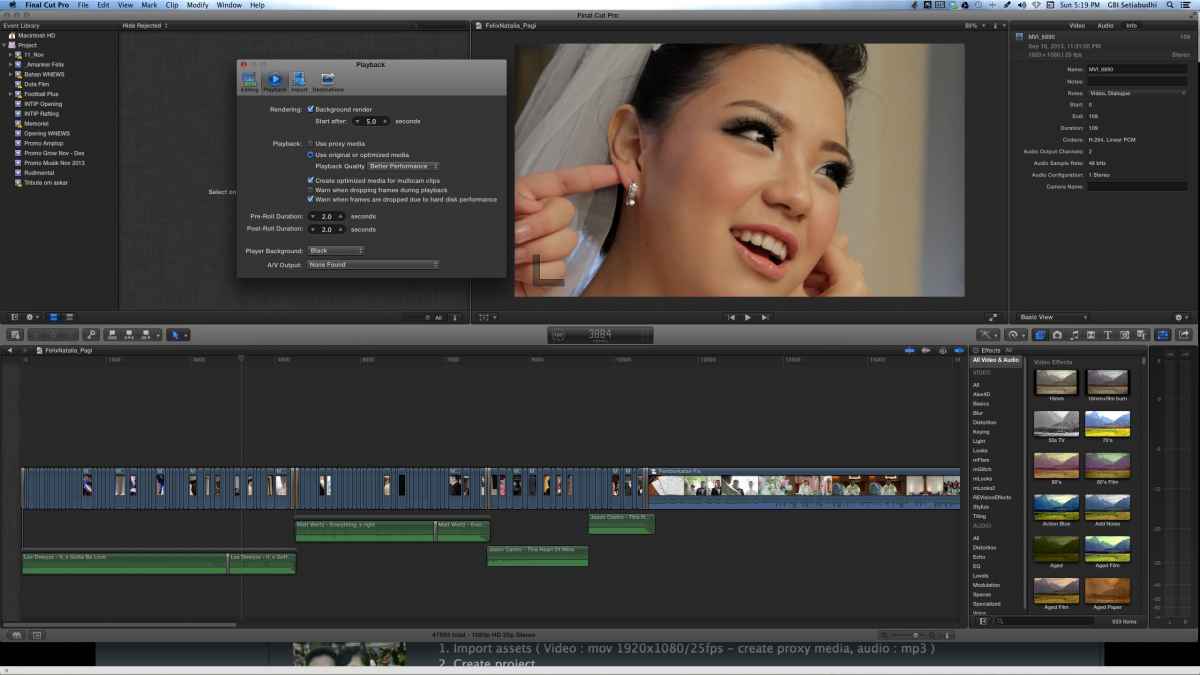
Please Log in to join the conversation.
- ronny courtens
-
- Offline
- Moderator
-
Less
More
- Posts: 4455
- Thank you received: 962
17 Nov 2013 10:26 #34308
by ronny courtens
Replied by ronny courtens on topic Failed render because of random drop frame
Okay, thank you. That's correct. I was afraid you were exporting in Proxy Mode but that's not the case.
One thing you should do is disable Background Rendering in your Playback Preferences.
Then do the two things I have mentioned in my reply above (disable App Nap and delete all your render files), then try exporting again. If you stil get the error make a note of the frame where exporting stops and post back.
- Ronny
One thing you should do is disable Background Rendering in your Playback Preferences.
Then do the two things I have mentioned in my reply above (disable App Nap and delete all your render files), then try exporting again. If you stil get the error make a note of the frame where exporting stops and post back.
- Ronny
Please Log in to join the conversation.
17 Nov 2013 10:39 #34309
by namu5583
Replied by namu5583 on topic Failed render because of random drop frame
Okay, I'm on it. Thanks.
Please Log in to join the conversation.
- jjsanderson
-

- Offline
- Elite Member
-

17 Nov 2013 10:39 #34310
by jjsanderson
To clarify this: Proxy media is only used if you select Proxy in your playback settings. It's then used everywhere, even for export. Which, yes, is a bit ridiculous, but that's how FCPX currently works.
If you're leaving your playback settings as 'Use original/optimised media', the Proxy media is never touched. You have to manually toggle it to edit in Proxy and export from the originals.
To be honest, I never bother with Proxy. For multi camera work I'll transcode to ProRes ('Optimised media'), but otherwise I just edit the original material.
Try Ronny's advice about deleting render files and disabling background rendering and App Nap. It might also help to know a little more about the system you're editing on - in another thread we seem to have traced problems to a MacBook Pro which had its discrete graphics card disabled in Energy Saver prefs.
Replied by jjsanderson on topic Failed render because of random drop frame
ronny courtens wrote: I was afraid you were exporting in Proxy Mode but that's not the case.
To clarify this: Proxy media is only used if you select Proxy in your playback settings. It's then used everywhere, even for export. Which, yes, is a bit ridiculous, but that's how FCPX currently works.
If you're leaving your playback settings as 'Use original/optimised media', the Proxy media is never touched. You have to manually toggle it to edit in Proxy and export from the originals.
To be honest, I never bother with Proxy. For multi camera work I'll transcode to ProRes ('Optimised media'), but otherwise I just edit the original material.
Try Ronny's advice about deleting render files and disabling background rendering and App Nap. It might also help to know a little more about the system you're editing on - in another thread we seem to have traced problems to a MacBook Pro which had its discrete graphics card disabled in Energy Saver prefs.
Please Log in to join the conversation.
17 Nov 2013 12:03 #34315
by namu5583
Replied by namu5583 on topic Failed render because of random drop frame
Guys, it works. All my export is doing just fine.
So what is the real problem here, the app nap? OS Maverick? or the background rendering?
Anyway thank you ronny courtens & jjsanderson for your time & help.
So what is the real problem here, the app nap? OS Maverick? or the background rendering?
Anyway thank you ronny courtens & jjsanderson for your time & help.
Please Log in to join the conversation.
- ronny courtens
-
- Offline
- Moderator
-
Less
More
- Posts: 4455
- Thank you received: 962
17 Nov 2013 13:12 - 17 Nov 2013 13:15 #34317
by ronny courtens
Replied by ronny courtens on topic Failed render because of random drop frame
Hi Alfred,
I'm glad it works now.
- In your specific case rendering is the most probable cause of the export issue. When you render while you edit sometimes existing render files are overwritten or partially replaced by new ones when you modify and re-render a clip that was already rendered. In some cases this can lead to render files not linking correctly to the media on the timeline, or to corrupt render frames when similar render files overlap. When you export your timeline FCPX detects these corrupt frames and stops exporting to avoid corrupt frames in your exported video.
When you delete all render files and you completely re-render your timeline in one pass before exporting, or when you delete all existing render files and you just export the un-rendered timeline, you will prevent possible corrupt render files or corrupt render frames.
Most render file corruption comes from repeated re-rendering of the same clip or the same part to the timeline. That's why Background Rendering is best turned off. When background rendering is on, FCPX continuously starts rendering whenever it detects inactivity on your timeline. This creates more overlapping render files and more risk for corrupt render frames than if you first finish working on your clips and then do a manual render or just export the un-rendered timeline.
- Disabling App Nap is especially useful for long exports. Apparently Mavericks does not see FCPX exporting as a real "activity", so when you have a very long export there is a chance that Mavericks' App Nap will completely slow down FCPX after a certain time and you will get an export error. That's why at this time it is best to have App Nap disabled for FCPX.
- Mavericks seems to work well for most people running FCPX, but as with every major OS update there are also issues being reported on specific systems and in specific circumstances. If you experience any issues and you don't find readily available solutions on help-forums such as this one, the best (and the only effective) way of letting Apple know about your issue is to use the feedback form.
- Ronny
I'm glad it works now.
- In your specific case rendering is the most probable cause of the export issue. When you render while you edit sometimes existing render files are overwritten or partially replaced by new ones when you modify and re-render a clip that was already rendered. In some cases this can lead to render files not linking correctly to the media on the timeline, or to corrupt render frames when similar render files overlap. When you export your timeline FCPX detects these corrupt frames and stops exporting to avoid corrupt frames in your exported video.
When you delete all render files and you completely re-render your timeline in one pass before exporting, or when you delete all existing render files and you just export the un-rendered timeline, you will prevent possible corrupt render files or corrupt render frames.
Most render file corruption comes from repeated re-rendering of the same clip or the same part to the timeline. That's why Background Rendering is best turned off. When background rendering is on, FCPX continuously starts rendering whenever it detects inactivity on your timeline. This creates more overlapping render files and more risk for corrupt render frames than if you first finish working on your clips and then do a manual render or just export the un-rendered timeline.
- Disabling App Nap is especially useful for long exports. Apparently Mavericks does not see FCPX exporting as a real "activity", so when you have a very long export there is a chance that Mavericks' App Nap will completely slow down FCPX after a certain time and you will get an export error. That's why at this time it is best to have App Nap disabled for FCPX.
- Mavericks seems to work well for most people running FCPX, but as with every major OS update there are also issues being reported on specific systems and in specific circumstances. If you experience any issues and you don't find readily available solutions on help-forums such as this one, the best (and the only effective) way of letting Apple know about your issue is to use the feedback form.
- Ronny
Last edit: 17 Nov 2013 13:15 by ronny courtens.
Please Log in to join the conversation.
- therealamaru
-
- Offline
- New Member
-

21 Dec 2013 10:56 #36836
by therealamaru
Replied by therealamaru on topic Failed render because of random drop frame
I am having a similar problem. The Mavericks update screwed things up on my MBP. So I got an iMac for temp use to finish project. I downloaded Mavericks to the new system (I did not want to do it). Now it continues to render continuously. It did the same thing on my MBP. Before the FCPX update my MBP kept crashing. In fact my whole system kept crashing over and over. Seemingly, the update fixed that problem but now I have this content rendering issue on BOTH systems now. Should I be worried? How do I fix it?
Thanks for your wisdom in advance!
Amaru
www.therealamaru.com
www.anniewasaliar.com
Thanks for your wisdom in advance!
Amaru
www.therealamaru.com
www.anniewasaliar.com
Please Log in to join the conversation.
- ronny courtens
-
- Offline
- Moderator
-
Less
More
- Posts: 4455
- Thank you received: 962
21 Dec 2013 10:59 #36837
by ronny courtens
Replied by ronny courtens on topic Failed render because of random drop frame
If you see constant rendering you might go to your Preferences and turn "Background Rendering" off.
- Ronny
- Ronny
Please Log in to join the conversation.
- therealamaru
-
- Offline
- New Member
-
21 Dec 2013 11:06 #36838
by therealamaru
Replied by therealamaru on topic Failed render because of random drop frame
That's it? I shouldn't be worried?
Please Log in to join the conversation.
- ronny courtens
-
- Offline
- Moderator
-
Less
More
- Posts: 4455
- Thank you received: 962
21 Dec 2013 11:10 #36839
by ronny courtens
Replied by ronny courtens on topic Failed render because of random drop frame
Try it, and if you still have any issues with rendering after this post back here and we will try to assist you. That's what we're here for 
- Ronny
- Ronny
Please Log in to join the conversation.
