


3 Post Moderation Rule for New Boarders (25 Jan 2021)
New boarders will have their posts moderated - Don't worry if you cannot see your post immediately.
Upgrading OS: wrongly formatted drive!
- finalbug.net
-
 Topic Author
- Offline
- Platinum Member
-

- Absence of Quality is the essence of squareness.
Less
More
13 Nov 2013 07:00 - 13 Nov 2013 07:03 #34116
by finalbug.net
Upgrading OS: wrongly formatted drive! was created by finalbug.net
Not really sure where to put this one. So I am putting it in here! Maybe someone has a tip for me!
However it happened my system hard drive is formatted as Mac OS Extended. NOT Mac OS Extended Journaled.
This means that when I try to upgrade to Mavericks I get an error message telling me that I need to use disk utility to switch the drive to Jornaled. (Currently on OSX 10.8.5 on a mid 2011 Power Book)
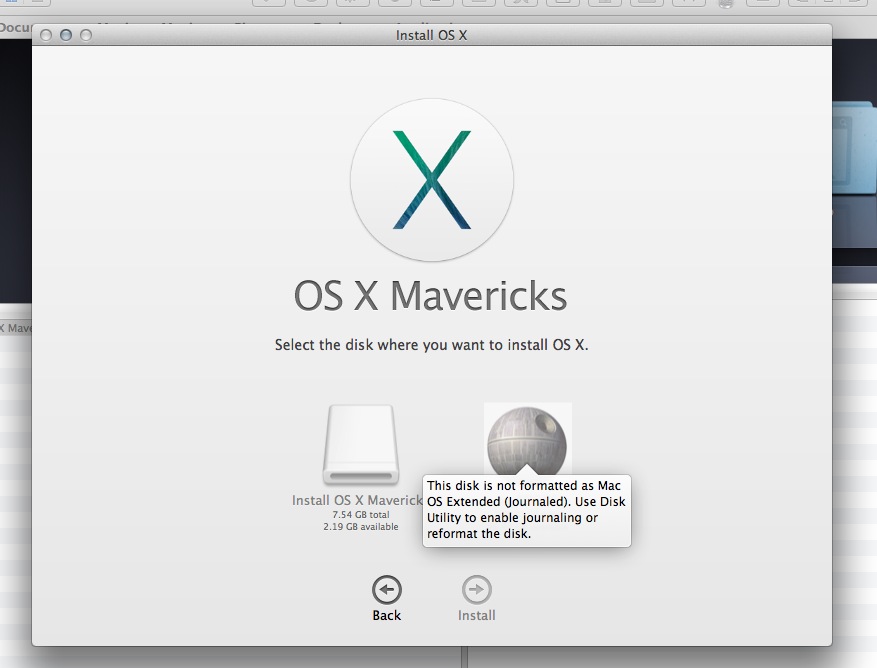
If I go to disk utility and partition the option where Mac OS Extended is listed is greyed out. If I start from a Mac OSX boot disk and open disk utility this option is also greyed out so I am guessing that I have to reformat the drive. Is kind of logical anyway that I can not just flip a switch to change how all the stuff on my drive is formatted!?! This also means that I can not use my back up (Super Duper) as a start up disk either. It is after a back up of the wrongly formatted drive! So I guessed that I would have to do a clean install. Then I went here:
osxdaily.com/2013/10/23/create-os-x-mavericks-install-drive/
And started preparing for a fresh install.
Towards the end of the instructions I noticed this:
This drive is a standard OS X installer but it’s also bootable, meaning it can be used for upgrading from prior versions of Mac OS X (Mavericks 10.9 supports direct upgrades from Mac OS X Snow Leopard 10.6, Lion 10.7, or Mountain Lion 10. , or Blah, blah, blah.
So now I am wondering if I can reverse engineer this!
Or maybe I am missing something!?! Time Machine?
It is not the end of the world doing a fresh install it is just I would like to avoid it as I will spend half a day getting my email, browsers and favourite programs all playing ball and would like to avoid this if possible. I would be very grateful if some one could give me some tips.
thanks
Paul
However it happened my system hard drive is formatted as Mac OS Extended. NOT Mac OS Extended Journaled.
This means that when I try to upgrade to Mavericks I get an error message telling me that I need to use disk utility to switch the drive to Jornaled. (Currently on OSX 10.8.5 on a mid 2011 Power Book)
If I go to disk utility and partition the option where Mac OS Extended is listed is greyed out. If I start from a Mac OSX boot disk and open disk utility this option is also greyed out so I am guessing that I have to reformat the drive. Is kind of logical anyway that I can not just flip a switch to change how all the stuff on my drive is formatted!?! This also means that I can not use my back up (Super Duper) as a start up disk either. It is after a back up of the wrongly formatted drive! So I guessed that I would have to do a clean install. Then I went here:
osxdaily.com/2013/10/23/create-os-x-mavericks-install-drive/
And started preparing for a fresh install.
Towards the end of the instructions I noticed this:
This drive is a standard OS X installer but it’s also bootable, meaning it can be used for upgrading from prior versions of Mac OS X (Mavericks 10.9 supports direct upgrades from Mac OS X Snow Leopard 10.6, Lion 10.7, or Mountain Lion 10.
, or Blah, blah, blah.So now I am wondering if I can reverse engineer this!
Or maybe I am missing something!?! Time Machine?
It is not the end of the world doing a fresh install it is just I would like to avoid it as I will spend half a day getting my email, browsers and favourite programs all playing ball and would like to avoid this if possible. I would be very grateful if some one could give me some tips.
thanks
Paul
Last edit: 13 Nov 2013 07:03 by finalbug.net.
Please Log in to join the conversation.

13 Nov 2013 09:05 #34120
by Redifer
Replied by Redifer on topic Upgrading OS: wrongly formatted drive!
How about using Super Duper to clone your drive to an external or some other drive. Or use Norton Ghost if you're using Windows 98, which you're not, so don't do that. Now boot up from the cloned drive. Then reformat the internal drive to Mac OS Extended Journaled. Now you have a completely fresh and completely blank drive. Now Super Duper all your stuff back on to the newly Mac OS Extended Journaled drive. Now install Mavricks. This entire process should take less than a day... maybe. But think of how much fun you'll have!
I remember going through this when HFS+ was the hot new drive format that all the cool kids were using. But everyone had normal ol' HFS. Fortunately there was an app which transformed an HFS drive to an HFS+ drive without deleting any of the data. To my knowledge no such app exists for Mac OS Extended vs Journaled. It SHOULD exist, but probably not.
I remember going through this when HFS+ was the hot new drive format that all the cool kids were using. But everyone had normal ol' HFS. Fortunately there was an app which transformed an HFS drive to an HFS+ drive without deleting any of the data. To my knowledge no such app exists for Mac OS Extended vs Journaled. It SHOULD exist, but probably not.
Please Log in to join the conversation.
- finalbug.net
-
Topic Author
- Offline
- Platinum Member
-
- Absence of Quality is the essence of squareness.
13 Nov 2013 09:19 #34121
by finalbug.net
Replied by finalbug.net on topic Upgrading OS: wrongly formatted drive!
OK got it. Sounds simple.
I was figuring that when I Super Duper back to the internal drive it would write the Wrongly Formatted Super Duper Version of my Operating system over writing how the drive was formatted.
So I just want to double check. Not that I am paranoid or anything :blink:
The correctly formatted drive gets priority. When I Super Duper back to my newly correctly formatted drive the Super Duper version will slot into the correctly formatted drive.
And every ting will be Super Duper
thanks
Paul
I was figuring that when I Super Duper back to the internal drive it would write the Wrongly Formatted Super Duper Version of my Operating system over writing how the drive was formatted.
So I just want to double check. Not that I am paranoid or anything :blink:
The correctly formatted drive gets priority. When I Super Duper back to my newly correctly formatted drive the Super Duper version will slot into the correctly formatted drive.
And every ting will be Super Duper
thanks
Paul
Please Log in to join the conversation.
13 Nov 2013 09:30 #34122
by Redifer
Replied by Redifer on topic Upgrading OS: wrongly formatted drive!
Well one way to be sure is to Super Duper it to a Mac OS Extended Journaled drive in the first place. Once that's done, double-check the formatting.
Please Log in to join the conversation.
- finalbug.net
-
Topic Author
- Offline
- Platinum Member
-
- Absence of Quality is the essence of squareness.
13 Nov 2013 09:32 #34123
by finalbug.net
Replied by finalbug.net on topic Upgrading OS: wrongly formatted drive!
Excellent idea. Will do.
Means I can also finally clean my desk for a few hours and do some paper work :woohoo:
Thanks for you help
Paul
Means I can also finally clean my desk for a few hours and do some paper work :woohoo:
Thanks for you help
Paul
Please Log in to join the conversation.
- finalbug.net
-
Topic Author
- Offline
- Platinum Member
-
- Absence of Quality is the essence of squareness.
15 Nov 2013 11:49 - 15 Nov 2013 16:34 #34229
by finalbug.net
Replied by finalbug.net on topic Upgrading OS: wrongly formatted drive!
This is a cautionary note for any one who finds them selves in the same/or similar situation. I noticed that when I went into system preferences and selected Startup Disk Option, my external Super Duper Back up was not showing as a bootable drive! Which makes sense. As the back up was a back up of a wrongly formatted drive! If I had missed this I might have really got myself into trouble!
As Redifer says
double-check the formatting
So being paranoid camper that I am, I wiped my wrongly formatted back up drive. And reformatted it. This time with as Mac OS X Journaled and also made sure that it was set to GUID Partition table. To get to the latter, I had to click the little options button down at the bottom of the Partition tab in Disk Utility.
As of now I am writing this, in a Text editor on my booted back up drive whilst copying the back up from my correctly formatted external back up drive to my correctly formatted internal drive! So every thing looks good and I can not help remembering the old adage the only reliable back up is a tested back up! So I guess I got lucky once again! I am also guessing that my whole system will be more stable and reliable now. Am curious to see how Mavericks works!
ps after repeated attempts I noticed the Enable Journaling in the disk manager :blush: and this did the trick. despite activating Journaling Extended manually as outlined above it kept flipping back to Journaled (not extended)
As Redifer says
double-check the formatting
So being paranoid camper that I am, I wiped my wrongly formatted back up drive. And reformatted it. This time with as Mac OS X Journaled and also made sure that it was set to GUID Partition table. To get to the latter, I had to click the little options button down at the bottom of the Partition tab in Disk Utility.
As of now I am writing this, in a Text editor on my booted back up drive whilst copying the back up from my correctly formatted external back up drive to my correctly formatted internal drive! So every thing looks good and I can not help remembering the old adage the only reliable back up is a tested back up! So I guess I got lucky once again! I am also guessing that my whole system will be more stable and reliable now. Am curious to see how Mavericks works!
ps after repeated attempts I noticed the Enable Journaling in the disk manager :blush: and this did the trick. despite activating Journaling Extended manually as outlined above it kept flipping back to Journaled (not extended)
Last edit: 15 Nov 2013 16:34 by finalbug.net.
Please Log in to join the conversation.
