


- Posts: 582
- Thank you received: 5
3 Post Moderation Rule for New Boarders (25 Jan 2021)
New boarders will have their posts moderated - Don't worry if you cannot see your post immediately.
Clarity effect in FCPX?
12 Nov 2013 17:45 #34077
by Neguah
Clarity effect in FCPX? was created by Neguah
When I edit my RAW photos in Elements, I can adjust the clarity. I really like using this. Is there any plugins for FCPX which can replicate the effect?
Please Log in to join the conversation.
- ronny courtens
-

- Offline
- Moderator
-

Less
More
- Posts: 4455
- Thank you received: 962
12 Nov 2013 19:01 #34081
by ronny courtens
Replied by ronny courtens on topic Clarity effect in FCPX?
The Clarity slider creates contrast in the mid-tones. The closest you can get to the "Clarity" adjustment is by using the Pop slider in Magic Bullet Looks.
But you can achieve very similar results by using curves. There is a plugin for FCPX that is excellent for working with curves: Nattress Levels and Curves. Here's a video on how this plugin works:
www.nattress.com/?q=/levels-and-curves-movies
For a Clarity effect you would need to push the contrast in the middle of the curve after you have set the overall contrast, only affecting the mid-tones. Of course the higher quality your video is, the better results you will achieve.
- Ronny
But you can achieve very similar results by using curves. There is a plugin for FCPX that is excellent for working with curves: Nattress Levels and Curves. Here's a video on how this plugin works:
www.nattress.com/?q=/levels-and-curves-movies
For a Clarity effect you would need to push the contrast in the middle of the curve after you have set the overall contrast, only affecting the mid-tones. Of course the higher quality your video is, the better results you will achieve.
- Ronny
Please Log in to join the conversation.
14 Nov 2013 16:03 #34178
by Neguah
Replied by Neguah on topic Clarity effect in FCPX?
I have the Mojo looks, so MB will have to wait.
But I will definitely try the curves from Natress. It looks great!
Thank you very much, Ronny!
Very helpful!
But I will definitely try the curves from Natress. It looks great!
Thank you very much, Ronny!
Very helpful!
Please Log in to join the conversation.
08 Dec 2013 23:03 #35343
by Neguah
Replied by Neguah on topic Clarity effect in FCPX?
I don't get the clarity effect with curves. It only lower or raising the brightness. But how does this work:
www.crumplepop.com/?page_id=1539?source=idustrialrevolution
www.crumplepop.com/?page_id=1539?source=idustrialrevolution
Please Log in to join the conversation.
29 Jun 2018 07:37 #96163
by Axel
Replied by Axel on topic Clarity effect in FCPX?
This may be one for Karsten. Shouldn't it be possible to rig such a clarity slider in Motion? Yes, I know, there is no luma curve. Contrast adjustments combined with the midtone range. Would help tremendously in building my own filters.
Please Log in to join the conversation.
- Karsten Schlüter
-

- Offline
- Moderator
-
Less
More
- Posts: 3790
- Thank you received: 718
29 Jun 2018 08:29 - 29 Jun 2018 08:30 #96164
by Karsten Schlüter
… two a***s, one chair :lol: - tried already but have difficulties to 'mask' midtones … but I lack a deeper understanding how 'clarity' really works… do you have some source?
Replied by Karsten Schlüter on topic Clarity effect in FCPX?
Axel wrote: This may be one for Karsten. Shouldn't it be possible to rig such a clarity slider in Motion?…
… two a***s, one chair :lol: - tried already but have difficulties to 'mask' midtones … but I lack a deeper understanding how 'clarity' really works… do you have some source?
Last edit: 29 Jun 2018 08:30 by Karsten Schlüter.
Please Log in to join the conversation.
30 Jun 2018 05:45 #96174
by Axel
There is Simon Ubsdells TKYShadowsHighlights (download link). Opened in Motion, you see "Keys" with Levels.
Now I've learned that the Adobe version of clarity, which you can find in ACR and Lightroom, is way more sophisticated, but I can raise clarity with a luma curve in FCP:

Replied by Axel on topic Clarity effect in FCPX?
Karsten Schlüter wrote: … two a***s, one chair :lol: - tried already but have difficulties to 'mask' midtones … but I lack a deeper understanding how 'clarity' really works… do you have some source?
There is Simon Ubsdells TKYShadowsHighlights (download link). Opened in Motion, you see "Keys" with Levels.
Now I've learned that the Adobe version of clarity, which you can find in ACR and Lightroom, is way more sophisticated, but I can raise clarity with a luma curve in FCP:
Please Log in to join the conversation.
- Karsten Schlüter
-
- Offline
- Moderator
-
Less
More
- Posts: 3790
- Thank you received: 718
30 Jun 2018 06:07 - 30 Jun 2018 06:10 #96175
by Karsten Schlüter
(link doesn't work, btw, this one does: www.fcp.co/media/kunena/attachments/458/...sHighlights2.0.1.zip )
Moin Axel,
on a Saturday morning you have time to 'waste' at fcpx.co? As a Wedding photo/wedding 'grapher, it's rush-hour now.
Yep, saw the replies at slashcamDE … way too 'pixelpeeper-ish' for me, but fun to read the wowu-battles … :sick:
Guess, you're 'reverse s-curve' is a legitimate work-around, probably not 99.9% picture perfect to mimic Adobes Clarity but delivering a very similar result. For my standards.
THANKS for posting me to Master Ubsdell's plugin… I have a look; if any useful output will occur, I post here.
Have a nice & busy weekend!
Replied by Karsten Schlüter on topic Clarity effect in FCPX?
Axel wrote: …There is Simon Ubsdells TKYShadowsHighlights. Opened in Motion, you see "Keys" with Levels.…
(link doesn't work, btw, this one does: www.fcp.co/media/kunena/attachments/458/...sHighlights2.0.1.zip )
Moin Axel,
on a Saturday morning you have time to 'waste' at fcpx.co? As a Wedding photo/wedding 'grapher, it's rush-hour now.
Yep, saw the replies at slashcamDE … way too 'pixelpeeper-ish' for me, but fun to read the wowu-battles … :sick:
Guess, you're 'reverse s-curve' is a legitimate work-around, probably not 99.9% picture perfect to mimic Adobes Clarity but delivering a very similar result. For my standards.
THANKS for posting me to Master Ubsdell's plugin… I have a look; if any useful output will occur, I post here.
Have a nice & busy weekend!
Last edit: 30 Jun 2018 06:10 by Karsten Schlüter.
Please Log in to join the conversation.
- Karsten Schlüter
-
- Offline
- Moderator
-
Less
More
- Posts: 3790
- Thank you received: 718
05 Jul 2018 04:38 #96218
by Karsten Schlüter
Replied by Karsten Schlüter on topic Clarity effect in FCPX?
soooo, after 3 days of squeezing my brain … I'd call that an alpha…
Simons plugin teaches us how to select highlights/shadows, but I'm not able to do the transfer his technique for mid-tones
… but…
the Luma-keyer (!) can be set to make brighter and darker parts transparent:
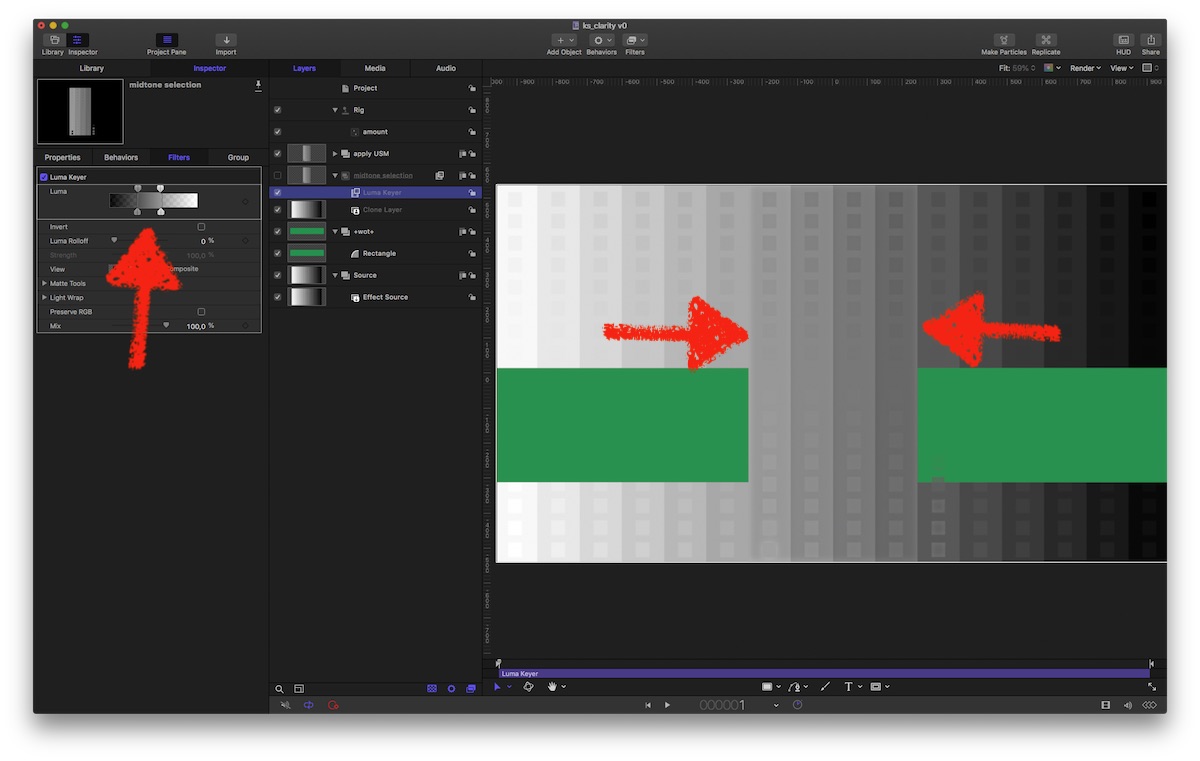
the green bar is just to show the effect: mid-tones are visible, the rest is transparent and shows the underlying original … the upper layer now gets a hefty dose of Unsharp Mask … published an 'Amount' slider …
Unfortunately you can not 'publish' the LumaKeys parameters, to make the selection customizable; set it to … the middle.
@Axel et al
Does this comes close to Clarity…?
usual advice to install plugins: dl, un-zip, drag resulting folder into ~/Movies/Motion Templates/Effects
Simons plugin teaches us how to select highlights/shadows, but I'm not able to do the transfer his technique for mid-tones
… but…
the Luma-keyer (!) can be set to make brighter and darker parts transparent:
the green bar is just to show the effect: mid-tones are visible, the rest is transparent and shows the underlying original … the upper layer now gets a hefty dose of Unsharp Mask … published an 'Amount' slider …
Unfortunately you can not 'publish' the LumaKeys parameters, to make the selection customizable; set it to … the middle.
@Axel et al
Does this comes close to Clarity…?
usual advice to install plugins: dl, un-zip, drag resulting folder into ~/Movies/Motion Templates/Effects
Please Log in to join the conversation.
05 Jul 2018 07:03 #96223
by Axel
Replied by Axel on topic Clarity effect in FCPX?
Wow!
Danke Danke Danke
"Unsharp mask" looks totally different. It has to be connected to "contrast". Now that I know how to key the mids, I might figure that out.
Thanks again.
Danke Danke Danke
"Unsharp mask" looks totally different. It has to be connected to "contrast". Now that I know how to key the mids, I might figure that out.
Thanks again.
Please Log in to join the conversation.
- Karsten Schlüter
-
- Offline
- Moderator
-
Less
More
- Posts: 3790
- Thank you received: 718
05 Jul 2018 07:29 #96224
by Karsten Schlüter
… just replace the USM filter with Contrast … had that, been there, but gave some … odd look. imho.
read about using USM with some insane amount of Radius in some advice to mimic Clarity in tools like Gimp..... yep, it 'contrasts' the edges not areas, but therefor doesn't fumble overall Luma..
nope, sorry, me too much amateur when it comes to grading :silly:
… but have to admit: that 'dirty trick' abusing the LumaKey to select mid-tones is … neat. And not borrowed… probably, one should add some blur to the key/mask… wotever.
Thanks for the flowers, freut mich, looking forward for your version…
(hint: don't just publish filter's original sliders, I rigged them to avoid silly max, and give more precision for control)
Replied by Karsten Schlüter on topic Clarity effect in FCPX?
Axel wrote: … has to be connected to "contrast".….
… just replace the USM filter with Contrast … had that, been there, but gave some … odd look. imho.
read about using USM with some insane amount of Radius in some advice to mimic Clarity in tools like Gimp..... yep, it 'contrasts' the edges not areas, but therefor doesn't fumble overall Luma..
nope, sorry, me too much amateur when it comes to grading :silly:
… but have to admit: that 'dirty trick' abusing the LumaKey to select mid-tones is … neat. And not borrowed… probably, one should add some blur to the key/mask… wotever.
Thanks for the flowers, freut mich, looking forward for your version…
(hint: don't just publish filter's original sliders, I rigged them to avoid silly max, and give more precision for control)
Please Log in to join the conversation.
13 Jul 2018 09:42 - 13 Jul 2018 09:43 #96329
by Axel
To be honest, I am stuck here. I can rig individual parameters, but every time I want to publish a filter as a whole, it doesn't appear as expected. I'm not that experienced with Motion, I'm afraid. Must RTFM again, better a full class tutorial series.
Now trying to reverse-engineer the luma range selection from this "better glow" plugin, which I also try to rig with the "protect skin" slider of >Color >Tint to have an instant candlelight-filter for my wedding videos (there was one very good in the Tiffen DFX, which I had a test version of and which are now EOL).
The ultimate goal, of course, would be to rig a fully functional ACR filter palette, with the HSL-Sliders (right). This is my favorite tool for stills.

Replied by Axel on topic Clarity effect in FCPX?
Karsten Schlüter wrote: Thanks for the flowers, freut mich, looking forward for your version…
(hint: don't just publish filter's original sliders, I rigged them to avoid silly max, and give more precision for control)
To be honest, I am stuck here. I can rig individual parameters, but every time I want to publish a filter as a whole, it doesn't appear as expected. I'm not that experienced with Motion, I'm afraid. Must RTFM again, better a full class tutorial series.
Now trying to reverse-engineer the luma range selection from this "better glow" plugin, which I also try to rig with the "protect skin" slider of >Color >Tint to have an instant candlelight-filter for my wedding videos (there was one very good in the Tiffen DFX, which I had a test version of and which are now EOL).
The ultimate goal, of course, would be to rig a fully functional ACR filter palette, with the HSL-Sliders (right). This is my favorite tool for stills.
Last edit: 13 Jul 2018 09:43 by Axel.
Please Log in to join the conversation.
- Karsten Schlüter
-
- Offline
- Moderator
-
Less
More
- Posts: 3790
- Thank you received: 718
14 Jul 2018 08:36 #96353
by Karsten Schlüter
wow, one step after the other!!
You're mixing here three goals, don't you?:
• a sim of the Clarity filter, which we are a close, I dare to say: found a method to select midtones by abusing the LumaKeyer, and rise contrasts (with an USM or a Contrast filter …)
• … I'm not sure, what the BetterGlow plugin has to do with that - btmk, Glows are for Highlights (??) and as far as I can tell after a quick look into it, it uses the Levels to filter just that… = doesn't help with the clarity problem…
• a slider-control field for CC in the HSL (or LAB?) color space… that touches in my humble (not)understanding of this topic handling of Raw material, doesn't it? proResRAW is new, I wouldn't be surprised, if the 'usual suspects' will offer add-ons for exactly that sooner or later. Doesn't DVResolve offer such knobs&sliders?
… sounds off-topic, but: Affinity Photo allows to create LUTs, which are smoothly integrate into FCPX … just have started to explore that twilight-zone… maybe that detour is a way to accomplish a few of your wanted effects… just as an inspiration
Replied by Karsten Schlüter on topic Clarity effect in FCPX?
Axel wrote: …The ultimate goal, of course, would be to rig a fully functional ACR filter palette, with the HSL-Sliders .…
wow, one step after the other!!
You're mixing here three goals, don't you?:
• a sim of the Clarity filter, which we are a close, I dare to say: found a method to select midtones by abusing the LumaKeyer, and rise contrasts (with an USM or a Contrast filter …)
• … I'm not sure, what the BetterGlow plugin has to do with that - btmk, Glows are for Highlights (??) and as far as I can tell after a quick look into it, it uses the Levels to filter just that… = doesn't help with the clarity problem…
• a slider-control field for CC in the HSL (or LAB?) color space… that touches in my humble (not)understanding of this topic handling of Raw material, doesn't it? proResRAW is new, I wouldn't be surprised, if the 'usual suspects' will offer add-ons for exactly that sooner or later. Doesn't DVResolve offer such knobs&sliders?
… sounds off-topic, but: Affinity Photo allows to create LUTs, which are smoothly integrate into FCPX … just have started to explore that twilight-zone… maybe that detour is a way to accomplish a few of your wanted effects… just as an inspiration
Please Log in to join the conversation.
14 Jul 2018 15:13 - 14 Jul 2018 15:14 #96362
by Axel
Replied by Axel on topic Clarity effect in FCPX?
You are right of course. I think the candlelight-filter is a short-term-objective. The clarity slider is not clear
The effect accomplished with the FCP X luma curve above suffices for me, but I don't know how to make it a slider in Motion. Your version (but with contrast instead of USM) affects the colors too much.
Yes, but since two PS versions (or so), you can apply the CR-Filter to jpgs/pngs/tiffs. It appears as a standard filter in the filter tab, due to popular demand. Whereas (apart from clarity) the first, general tab has more or less the same features also found in FCP Xs Color Wheels, the HSL tab lets you very quickly and intuitively change any color in your image. Like Color Finales "6 vectors", just with more precision:

Call it Stockholm syndrom, but I'm used to it, and I like it.
Even AAE doesn't have ACR for video clips (there are some tricks to open, edit and render/export video with Photoshop, but it's pretty cumbersome). I can do everything I need in FCP alone, it just takes much longer. In a way, CC in FCP now is on par (some things better here, some better there) with Lumetri.
There are HSL qualifyers (like Hue/Saturation Curves in FCP), but no "vectors" (unless they're well hidden).
The effect accomplished with the FCP X luma curve above suffices for me, but I don't know how to make it a slider in Motion. Your version (but with contrast instead of USM) affects the colors too much.
Karsten Schlüter wrote: • a slider-control field for CC in the HSL (or LAB?) color space… that touches in my humble (not)understanding of this topic handling of Raw material, doesn't it?
Yes, but since two PS versions (or so), you can apply the CR-Filter to jpgs/pngs/tiffs. It appears as a standard filter in the filter tab, due to popular demand. Whereas (apart from clarity) the first, general tab has more or less the same features also found in FCP Xs Color Wheels, the HSL tab lets you very quickly and intuitively change any color in your image. Like Color Finales "6 vectors", just with more precision:
Call it Stockholm syndrom, but I'm used to it, and I like it.
Karsten Schlüter wrote: proResRAW is new, I wouldn't be surprised, if the 'usual suspects' will offer add-ons for exactly that sooner or later.
Even AAE doesn't have ACR for video clips (there are some tricks to open, edit and render/export video with Photoshop, but it's pretty cumbersome). I can do everything I need in FCP alone, it just takes much longer. In a way, CC in FCP now is on par (some things better here, some better there) with Lumetri.
Karsten Schlüter wrote: Doesn't DVResolve offer such knobs&sliders?
There are HSL qualifyers (like Hue/Saturation Curves in FCP), but no "vectors" (unless they're well hidden).
Last edit: 14 Jul 2018 15:14 by Axel.
Please Log in to join the conversation.
