


- Posts: 379
- Thank you received: 6
3 Post Moderation Rule for New Boarders (25 Jan 2021)
New boarders will have their posts moderated - Don't worry if you cannot see your post immediately.
Importing from an existing Event
- Marc Lucas
-
 Topic Author
- Offline
- Platinum Member
-

Less
More
12 Nov 2013 15:50 #34071
by Marc Lucas
Importing from an existing Event was created by Marc Lucas
I have added a bunch of new clips to an Event I now need to import them into the Event. Is there a quick way to sort the clips that haven't already been imported? i.e if I select all the clips now in the Original Media folder and select import will that only import the ones that haven't already been imported or will it import ALL again so I will have duplicates?
Please Log in to join the conversation.
- ronny courtens
-

- Offline
- Moderator
-

Less
More
- Posts: 4455
- Thank you received: 962
12 Nov 2013 18:01 #34078
by ronny courtens
Replied by ronny courtens on topic Importing from an existing Event
Hi Marc,
I guess you mean you have imported new media into an existing Event without copying the original media into the Event folder and now you want to copy over only the new media?
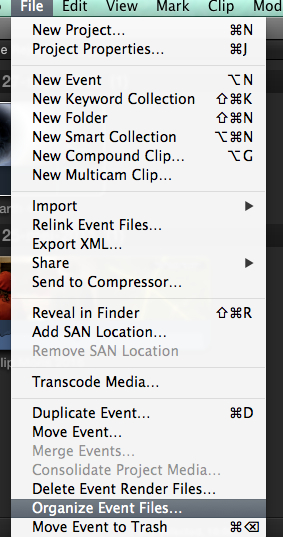
In that case select your Event in the Event Library and choose File > Organize Event files. This will copy all your media into your Event folder, ignoring media that are already inside the folder.
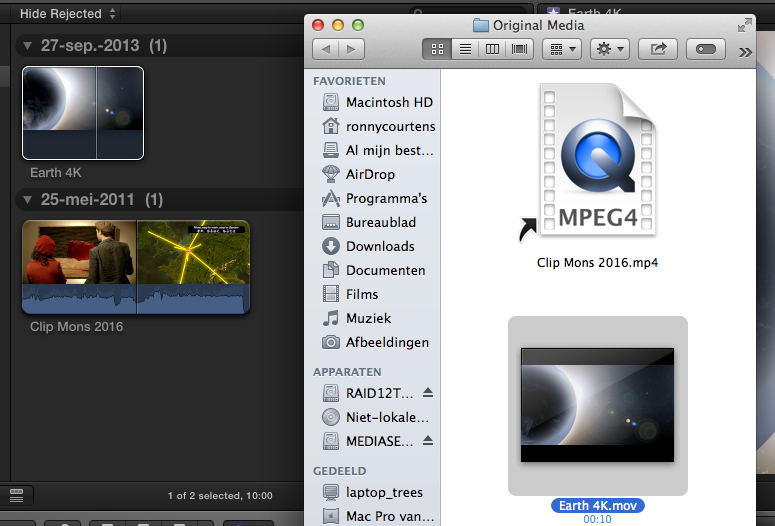
Here you see two clips in the Event folder, one has been copied over and the other is linked to media outside the Event:
Select the Event and choose File > Organize Event files
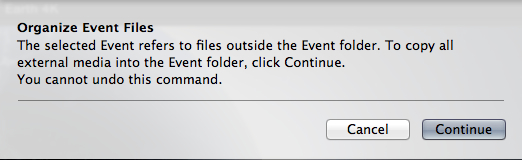
A warning will appear telling you that media will be moved to the Event folder, press Continue
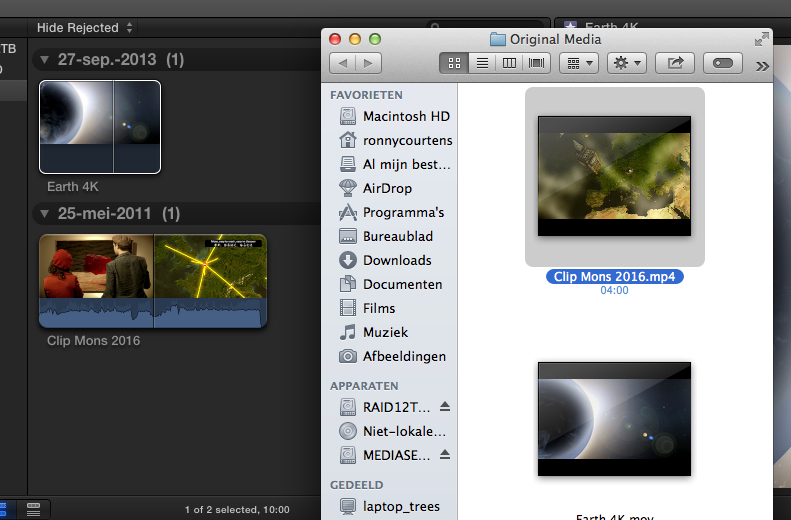
You will see FCPX starts copying your media over and when it's done every clip that was linked to media outside your Event folder will have been copied over into the Original Media folder of your Event, no duplicate clips will be copied
- Ronny
I guess you mean you have imported new media into an existing Event without copying the original media into the Event folder and now you want to copy over only the new media?
In that case select your Event in the Event Library and choose File > Organize Event files. This will copy all your media into your Event folder, ignoring media that are already inside the folder.
Here you see two clips in the Event folder, one has been copied over and the other is linked to media outside the Event:
Select the Event and choose File > Organize Event files
A warning will appear telling you that media will be moved to the Event folder, press Continue
You will see FCPX starts copying your media over and when it's done every clip that was linked to media outside your Event folder will have been copied over into the Original Media folder of your Event, no duplicate clips will be copied
- Ronny
Please Log in to join the conversation.
- Marc Lucas
-
Topic Author
- Offline
- Platinum Member
-
Less
More
- Posts: 379
- Thank you received: 6
12 Nov 2013 22:22 - 12 Nov 2013 22:34 #34099
by Marc Lucas
Replied by Marc Lucas on topic Importing from an existing Event
Thanks for the reply Ronny but I had already copied them into the Original Media folder so using that method doesn't work because they already live in the Event.
I'll just do some manual organising in the Finder and work out what I need to import.
I'll just do some manual organising in the Finder and work out what I need to import.
Last edit: 12 Nov 2013 22:34 by Marc Lucas. Reason: Add content
Please Log in to join the conversation.


12 Nov 2013 22:36 #34100
by BenB
Replied by BenB on topic Importing from an existing Event
You manually copied media into an Event folder?
Please Log in to join the conversation.
- Marc Lucas
-
Topic Author
- Offline
- Platinum Member
-
Less
More
- Posts: 379
- Thank you received: 6
12 Nov 2013 23:14 #34108
by Marc Lucas
Replied by Marc Lucas on topic Importing from an existing Event
Yes. I had a situation where additional footage from a shoot was not imported into the Event that I was working on so instead of going through all the rushes I just copied everything to the Original media folder and the files that were missing were copied over.
Please Log in to join the conversation.
12 Nov 2013 23:28 #34109
by plysat
Yeah you shouldn't do that. FWIW, had you simply dragged all the media onto your event in X, it would have (I think) ignored the existing media and just copied in the new stuff. So poking around in the finder is likely the only way to deal with it now. Try to find the "missing" stuff in the Original media folder, remove it, and then import it via FCP X, not the Finder.
Can't sleep? Try this: fcpxpert.net ;-)
Replied by plysat on topic Importing from an existing Event
Marc Lucas wrote: Yes. I had a situation where additional footage from a shoot was not imported into the Event that I was working on so instead of going through all the rushes I just copied everything to the Original media folder and the files that were missing were copied over.
Yeah you shouldn't do that.
FWIW, had you simply dragged all the media onto your event in X, it would have (I think) ignored the existing media and just copied in the new stuff. So poking around in the finder is likely the only way to deal with it now. Try to find the "missing" stuff in the Original media folder, remove it, and then import it via FCP X, not the Finder. Can't sleep? Try this: fcpxpert.net ;-)
Please Log in to join the conversation.
13 Nov 2013 07:24 #34118
by BenB
Replied by BenB on topic Importing from an existing Event
"...had you simply dragged all the media onto your event in X, it would have (I think) ignored the existing media and just copied in the new stuff."
Actually, drag-and-drop will do whatever is configured in the Preferences > Import settings. Those settings are there specifically for drag-and-drop operations from Finder windows.
And yes, never copy stuff into an Event folder manually.
Actually, drag-and-drop will do whatever is configured in the Preferences > Import settings. Those settings are there specifically for drag-and-drop operations from Finder windows.
And yes, never copy stuff into an Event folder manually.
Please Log in to join the conversation.
- Marc Lucas
-
Topic Author
- Offline
- Platinum Member
-
Less
More
- Posts: 379
- Thank you received: 6
13 Nov 2013 23:27 #34157
by Marc Lucas
Replied by Marc Lucas on topic Importing from an existing Event
All sorted go myself out of that mess quite quickly, however, what I decided to do was setup a Smart Collection to quickly organise the freshly imported clips.
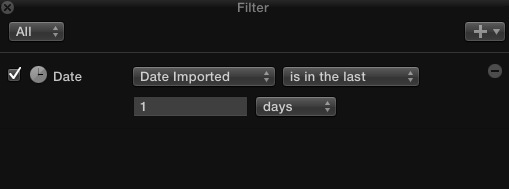
I thought the best way was to set it up as a 'date imported' collection to 1 day as you can see in the pic. As I imported the clips nothing happened no clips were put in that Smart Collection. Even when I had organised by date in the Event Browser the 'date imported date' as Oct 8th? These clips were originally imported into another FCPX system then sent to me so I take it FCPX is referencing the first time they were imported into FCPX regardless of my import. Just tried the Smart Collection and yes it does read the original date that they were first imported.
I thought the best way was to set it up as a 'date imported' collection to 1 day as you can see in the pic. As I imported the clips nothing happened no clips were put in that Smart Collection. Even when I had organised by date in the Event Browser the 'date imported date' as Oct 8th? These clips were originally imported into another FCPX system then sent to me so I take it FCPX is referencing the first time they were imported into FCPX regardless of my import. Just tried the Smart Collection and yes it does read the original date that they were first imported.
Please Log in to join the conversation.
