


- Posts: 9
- Thank you received: 0
3 Post Moderation Rule for New Boarders (25 Jan 2021)
New boarders will have their posts moderated - Don't worry if you cannot see your post immediately.
Editing Final Cut Pro X Metadata/MP4 Metadata
11 Nov 2013 16:53 - 11 Nov 2013 16:58 #34018
by ritland
Editing Final Cut Pro X Metadata/MP4 Metadata was created by ritland
I have tried to solve this problem for hours without success. I posted this question
here
, but I didn't get much of a response so I decided to give more detail about the issue.
I have dozens of FCPX projects I have exported as .MOV files. I just realized that I have been failing to specify the Title, Author, Description, & Tag files when I export the files. (See picture of FCPX export window)
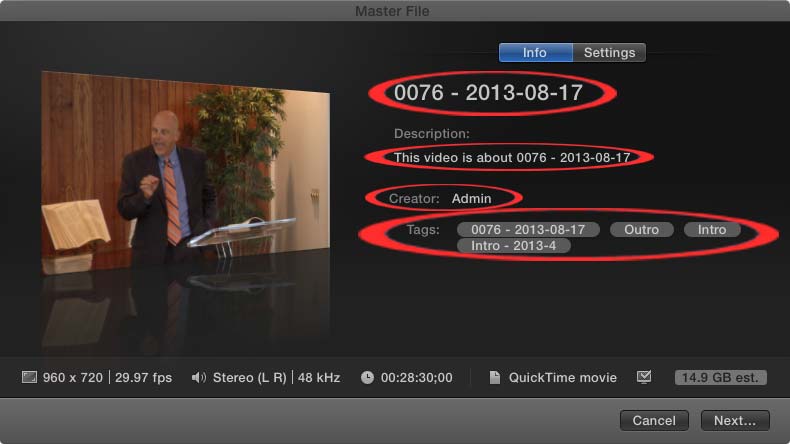
Unfortunately, I have too many videos to re-export all of them from FPCX. As a result, I need to figure out a way to edit the Title, Author, Description, & Tag fields embedded in the files.
At first, I thought the information was stored as ID3 Tag information. As a result, I imported the videos into iTunes and tried to edit the fields. Initially, it looked like it worked as the ID3tag information was updated within the file itself. (See picture of VLC Media Information window):
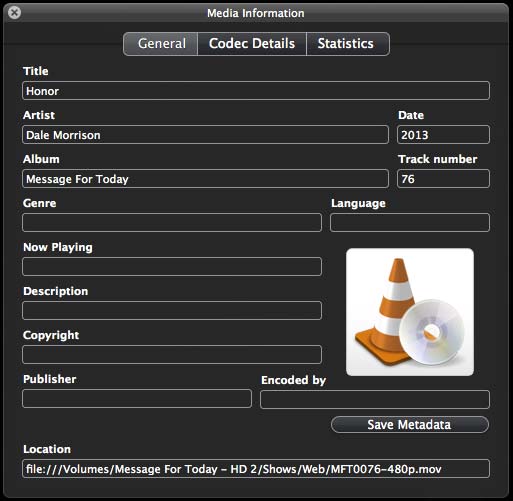
However, when I played the video in QuickTime, the old Title, Author, Description, & Tag were still being used. I highlighted the old tag information in the QuickTime image below.
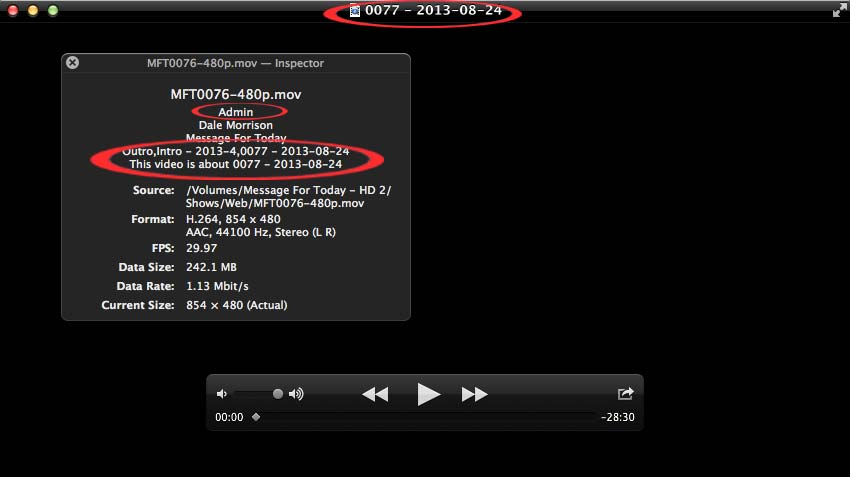
This is particularly frustrating as the old Title information is displayed prominently on top of the QuickTime window. Moreover, when I went to Finder and used the "Get Info" command, the old tag data was still there as well. (See Finder window below)
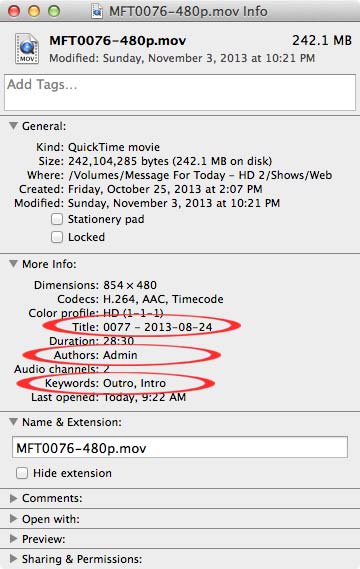
I did some research and it looks like this information is NOT ID3 tags but rather is Spotlight metadata stored within the file itself (i.e. the Spotlight data is not in the hidden .DS_Store file). I ran a mdls command in terminal on the file and this is what it gives me (I've bolded the important information):
mdls MFT0076-480p.mov
kMDItemAudioBitRate = 103
kMDItemAudioChannelCount = 2
kMDItemAuthors = (
Admin
)
kMDItemCodecs = (
"H.264",
AAC,
Timecode
)
kMDItemContentCreationDate = 2013-10-25 19:07:12 +0000
kMDItemContentModificationDate = 2013-11-04 04:21:52 +0000
kMDItemContentType = "com.apple.quicktime-movie"
kMDItemContentTypeTree = (
"com.apple.quicktime-movie",
"public.movie",
"public.audiovisual-content",
"public.data",
"public.item",
"public.content"
)
kMDItemDateAdded = 2013-11-11 15:18:11 +0000
kMDItemDescription = "This video is about 0077 - 2013-08-24"
kMDItemDisplayName = "MFT0076-480p.mov"
kMDItemDurationSeconds = 1709.974933333333
kMDItemFSContentChangeDate = 2013-11-04 04:21:52 +0000
kMDItemFSCreationDate = 2013-10-25 19:07:12 +0000
kMDItemFSCreatorCode = "TVOD"
kMDItemFSFinderFlags = 0
kMDItemFSHasCustomIcon = (null)
kMDItemFSInvisible = 0
kMDItemFSIsExtensionHidden = 0
kMDItemFSIsStationery = (null)
kMDItemFSLabel = 0
kMDItemFSName = "MFT0076-480p.mov"
kMDItemFSNodeCount = (null)
kMDItemFSOwnerGroupID = 89
kMDItemFSOwnerUserID = 89
kMDItemFSSize = 242104285
kMDItemFSTypeCode = "MooV"
kMDItemKeywords = (
Outro,
Intro
)
kMDItemKind = "QuickTime movie"
kMDItemLastUsedDate = 2013-11-11 15:22:46 +0000
kMDItemLogicalSize = 242104285
kMDItemMediaTypes = (
Video,
Sound,
Timecode
)
kMDItemPhysicalSize = 242106368
kMDItemPixelHeight = 480
kMDItemPixelWidth = 854
kMDItemProfileName = "HD (1-1-1)"
kMDItemStreamable = 0
kMDItemTitle = "0077 - 2013-08-24"
kMDItemTotalBitRate = 1126
kMDItemUseCount = 16
kMDItemUsedDates = (
"2013-11-11 06:00:00 +0000"
)
kMDItemVideoBitRate = 1022
I tried to use commands such as "xattr -d com.apple.metadata:kMDItemDescription MFT0076-480p.mov" with no success as my syntax is wrong. I'm not a programmer so my Terminal knowledge is very limited.
Does anyone have a clue how to edit the Title, Author, Description, & Tag fields after FCPX exports the movie? Any help would be very appreciated.
I have dozens of FCPX projects I have exported as .MOV files. I just realized that I have been failing to specify the Title, Author, Description, & Tag files when I export the files. (See picture of FCPX export window)
Unfortunately, I have too many videos to re-export all of them from FPCX. As a result, I need to figure out a way to edit the Title, Author, Description, & Tag fields embedded in the files.
At first, I thought the information was stored as ID3 Tag information. As a result, I imported the videos into iTunes and tried to edit the fields. Initially, it looked like it worked as the ID3tag information was updated within the file itself. (See picture of VLC Media Information window):
However, when I played the video in QuickTime, the old Title, Author, Description, & Tag were still being used. I highlighted the old tag information in the QuickTime image below.
This is particularly frustrating as the old Title information is displayed prominently on top of the QuickTime window. Moreover, when I went to Finder and used the "Get Info" command, the old tag data was still there as well. (See Finder window below)
I did some research and it looks like this information is NOT ID3 tags but rather is Spotlight metadata stored within the file itself (i.e. the Spotlight data is not in the hidden .DS_Store file). I ran a mdls command in terminal on the file and this is what it gives me (I've bolded the important information):
mdls MFT0076-480p.mov
kMDItemAudioBitRate = 103
kMDItemAudioChannelCount = 2
kMDItemAuthors = (
Admin
)
kMDItemCodecs = (
"H.264",
AAC,
Timecode
)
kMDItemContentCreationDate = 2013-10-25 19:07:12 +0000
kMDItemContentModificationDate = 2013-11-04 04:21:52 +0000
kMDItemContentType = "com.apple.quicktime-movie"
kMDItemContentTypeTree = (
"com.apple.quicktime-movie",
"public.movie",
"public.audiovisual-content",
"public.data",
"public.item",
"public.content"
)
kMDItemDateAdded = 2013-11-11 15:18:11 +0000
kMDItemDescription = "This video is about 0077 - 2013-08-24"
kMDItemDisplayName = "MFT0076-480p.mov"
kMDItemDurationSeconds = 1709.974933333333
kMDItemFSContentChangeDate = 2013-11-04 04:21:52 +0000
kMDItemFSCreationDate = 2013-10-25 19:07:12 +0000
kMDItemFSCreatorCode = "TVOD"
kMDItemFSFinderFlags = 0
kMDItemFSHasCustomIcon = (null)
kMDItemFSInvisible = 0
kMDItemFSIsExtensionHidden = 0
kMDItemFSIsStationery = (null)
kMDItemFSLabel = 0
kMDItemFSName = "MFT0076-480p.mov"
kMDItemFSNodeCount = (null)
kMDItemFSOwnerGroupID = 89
kMDItemFSOwnerUserID = 89
kMDItemFSSize = 242104285
kMDItemFSTypeCode = "MooV"
kMDItemKeywords = (
Outro,
Intro
)
kMDItemKind = "QuickTime movie"
kMDItemLastUsedDate = 2013-11-11 15:22:46 +0000
kMDItemLogicalSize = 242104285
kMDItemMediaTypes = (
Video,
Sound,
Timecode
)
kMDItemPhysicalSize = 242106368
kMDItemPixelHeight = 480
kMDItemPixelWidth = 854
kMDItemProfileName = "HD (1-1-1)"
kMDItemStreamable = 0
kMDItemTitle = "0077 - 2013-08-24"
kMDItemTotalBitRate = 1126
kMDItemUseCount = 16
kMDItemUsedDates = (
"2013-11-11 06:00:00 +0000"
)
kMDItemVideoBitRate = 1022
I tried to use commands such as "xattr -d com.apple.metadata:kMDItemDescription MFT0076-480p.mov" with no success as my syntax is wrong. I'm not a programmer so my Terminal knowledge is very limited.
Does anyone have a clue how to edit the Title, Author, Description, & Tag fields after FCPX exports the movie? Any help would be very appreciated.
Last edit: 11 Nov 2013 16:58 by ritland.
Please Log in to join the conversation.

11 Nov 2013 18:22 - 11 Nov 2013 18:25 #34021
by plysat
Can't sleep? Try this: fcpxpert.net ;-)
Replied by plysat on topic Editing Final Cut Pro X Metadata/MP4 Metadata
QT Edit, part of Digital Rebellions Pro Media Tools will do it. Not free, and ya gotta get the whole suite, but IMO it's worth it. They have a trial Mode, though not sure of the limitations. Here's a Screen Shot of the UI:
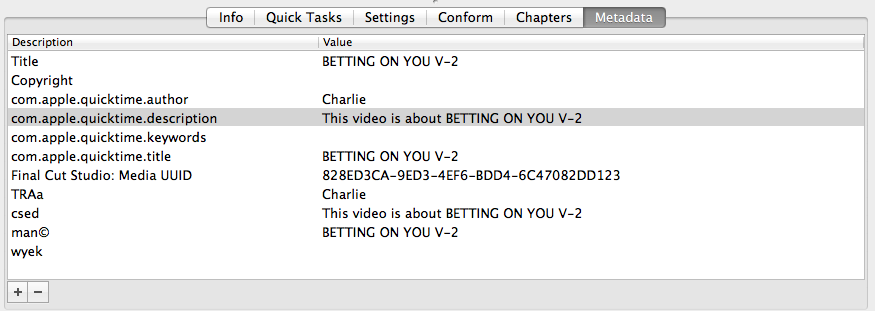
You can also do a ton of other stuff... modify TC, Reel Name etc. Also, the other tools in the package are super useful, though not all are FCP X specific...
You can also do a ton of other stuff... modify TC, Reel Name etc. Also, the other tools in the package are super useful, though not all are FCP X specific...
Can't sleep? Try this: fcpxpert.net ;-)
Last edit: 11 Nov 2013 18:25 by plysat.
Please Log in to join the conversation.

12 Nov 2013 03:46 #34040
by marchyman
Replied by marchyman on topic Editing Final Cut Pro X Metadata/MP4 Metadata
QT7 pro. Open the movie then open the movie properties pane (cmd-J). Click on the Annotations tag if necessary. You can add, remove, and edit annotations.
Please Log in to join the conversation.
12 Nov 2013 04:41 - 12 Nov 2013 04:47 #34043
by ritland
Replied by ritland on topic Editing Final Cut Pro X Metadata/MP4 Metadata
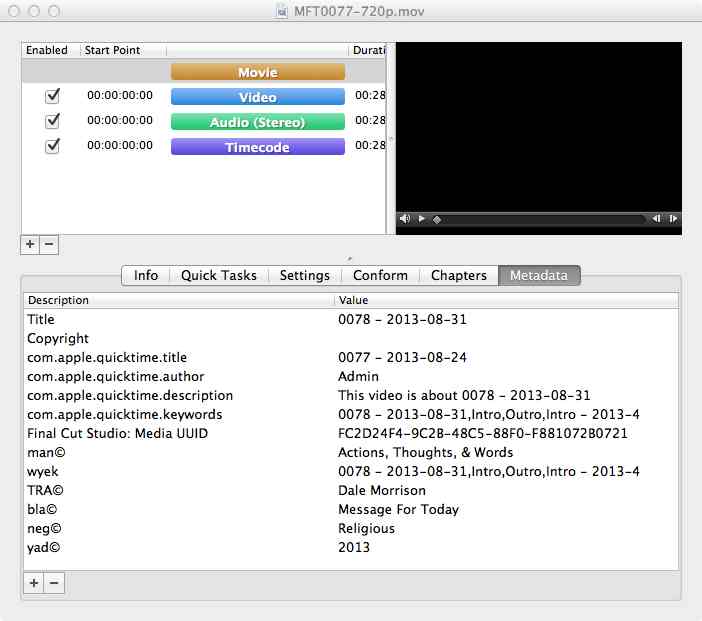
Thanks plysat & marchyman! I tried QT Edit & QuickTime Pro and it looks like the both get the job done. However, I think I will go with QT Edit as it offers more comprehensive metadata editing. For example, here is the same file in both QT Edit & QuickTime Pro:
QT Edit
QuickTime Pro
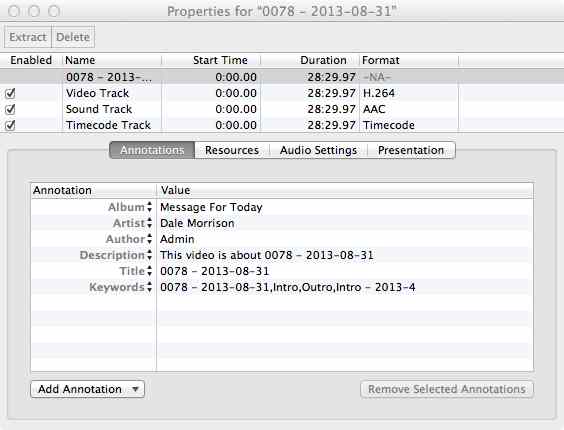
As you can see, QT Edit offer a more comprehensive view of the metadata (including ID3 tags). Moreover, if I edit the metadata using QuickTime Pro it still leaves traces of the old data. For example, here is a cleaned up version of the same file using QuickTime Pro:
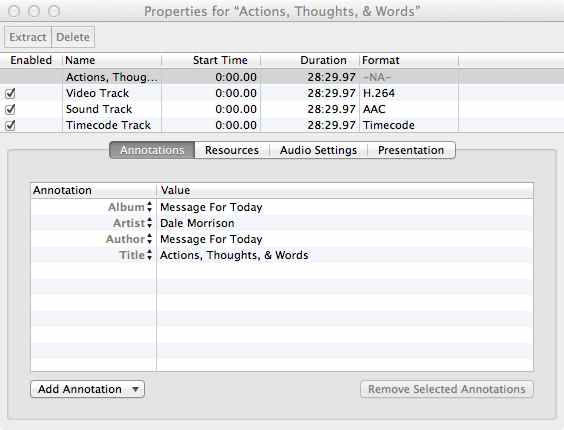
However, here is what metadata really looks like when I open the file in QT Edit after it has been modified by QuickTime Pro:
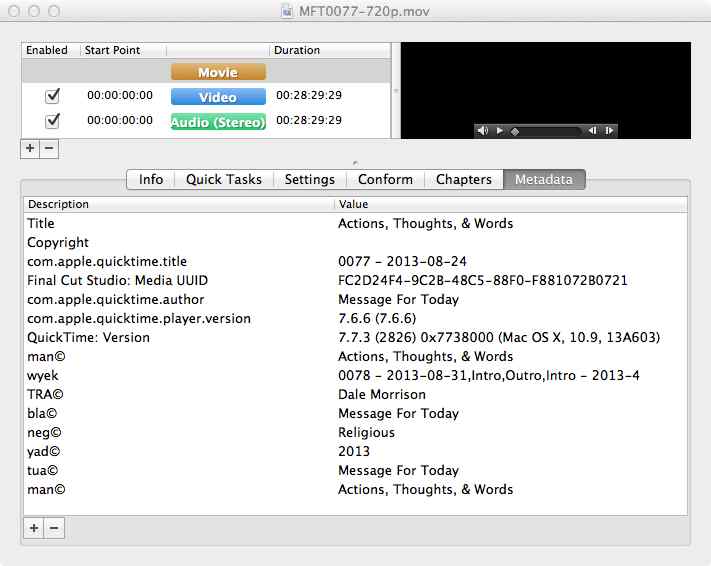
As you can see, not only does QuickTime Pro add its own metadata to the file but still leave the com.apple.quicktime.title field as well as the wyek field. Even though QT Edit it more pricey, I'd rather have complete control of the metadata. Thanks again!
p.s. If anyone knows how to do edit the same metadata using Terminal so I could automate the process, that would be great.
QT Edit
QuickTime Pro
As you can see, QT Edit offer a more comprehensive view of the metadata (including ID3 tags). Moreover, if I edit the metadata using QuickTime Pro it still leaves traces of the old data. For example, here is a cleaned up version of the same file using QuickTime Pro:
However, here is what metadata really looks like when I open the file in QT Edit after it has been modified by QuickTime Pro:
As you can see, not only does QuickTime Pro add its own metadata to the file but still leave the com.apple.quicktime.title field as well as the wyek field. Even though QT Edit it more pricey, I'd rather have complete control of the metadata. Thanks again!
p.s. If anyone knows how to do edit the same metadata using Terminal so I could automate the process, that would be great.
Last edit: 12 Nov 2013 04:47 by ritland.
Please Log in to join the conversation.
12 Nov 2013 05:09 - 12 Nov 2013 05:17 #34044
by plysat
Can't sleep? Try this: fcpxpert.net ;-)
Replied by plysat on topic Editing Final Cut Pro X Metadata/MP4 Metadata
Glad you found something that works. I tried using QT Pro, Metadata Hootenanny, and a few others before I found QT Edit. It just works. I found others often wouldn't really save the changes and just general flakiness... There are also a bunch of other nice tools in both the DR Media Tools and Maintenance tools packages. I'm a cheapskate by nature, but after playing with them I got 'em both. Very handy, like insurance. You don't *need* them... until you need them... 
EDIT: Just noticed that QT Edit supports batch processing, maybe this could work for you? Instructions are in the manual here .
EDIT: Just noticed that QT Edit supports batch processing, maybe this could work for you? Instructions are in the manual here .
Can't sleep? Try this: fcpxpert.net ;-)
Last edit: 12 Nov 2013 05:17 by plysat.
Please Log in to join the conversation.
12 Nov 2013 05:22 - 12 Nov 2013 05:30 #34045
by ritland
Replied by ritland on topic Editing Final Cut Pro X Metadata/MP4 Metadata
It looks like I am having one other issue. It seems that when I try to edit the "Title" metadata either in QT Edit or QuickTime Pro it will keep reverting back to the old title information even after it is saved. I have to keep saving it until it randomly sticks.
Here is a video of what I am talking about:
Video
This is the only field in which this reversion happens and it happens with every .mov file I have. Have you run into this problem before?
Here is a video of what I am talking about:
Video
This is the only field in which this reversion happens and it happens with every .mov file I have. Have you run into this problem before?
Last edit: 12 Nov 2013 05:30 by ritland.
Please Log in to join the conversation.
12 Nov 2013 05:33 #34046
by plysat
Can't sleep? Try this: fcpxpert.net ;-)
Replied by plysat on topic Editing Final Cut Pro X Metadata/MP4 Metadata
"Have you run into this problem before?"
Don't recall it happening with the title specifically, but I've had similar things occur... timecode changes not sticking being one. I've had less of those issues with QT Edit than other apps, thus the recommendation, but I wish I had a solution. This may not apply... I have found that modifying files that aren't local (on a server or something) is more likely to not work as expected.
Don't recall it happening with the title specifically, but I've had similar things occur... timecode changes not sticking being one. I've had less of those issues with QT Edit than other apps, thus the recommendation, but I wish I had a solution. This may not apply... I have found that modifying files that aren't local (on a server or something) is more likely to not work as expected.
Can't sleep? Try this: fcpxpert.net ;-)
Please Log in to join the conversation.
12 Nov 2013 13:11 #34064
by ritland
Replied by ritland on topic Editing Final Cut Pro X Metadata/MP4 Metadata
Well its good to know I am not the only one who has this issue. I will keep trying to figure it out. If I find a solution, I'll let you know!
Please Log in to join the conversation.
13 Nov 2013 23:45 #34158
by ritland
Replied by ritland on topic Editing Final Cut Pro X Metadata/MP4 Metadata
I couldn't figure out why the title was reverting so I contacted Jon at Pro Media Tools. He was extremely helpful in resolving the issue. I sent him a sample video and he was able to diagnose the problem. He said that:
I would encourage anyone who is editing with Final Cut Pro X to get Pro Media Tools. Great products and great support.
He even sent me an updated version of version of QT Edit the same day with the necessary fix. Now everything is working great. If anyone already has Pro Media Tools and needs an updated version of QT Edit ASAP, Jon stated to contact them using the forum on their website: www.digitalrebellion.com/promedia/ .FCPX writes two display name attributes to the file - one without a language designation and one tagged as US. Both need to be updated for it to work but the QT API only updates the one without any language tags. So we're now updating both manually and it's working successfully.
I would encourage anyone who is editing with Final Cut Pro X to get Pro Media Tools. Great products and great support.
Please Log in to join the conversation.
14 Nov 2013 00:55 #34160
by plysat
Can't sleep? Try this: fcpxpert.net ;-)
Replied by plysat on topic Editing Final Cut Pro X Metadata/MP4 Metadata
Great followup, good info. Everyone should get this stuff, regardless of NLE. Very useful...
Can't sleep? Try this: fcpxpert.net ;-)
Please Log in to join the conversation.
