


3 Post Moderation Rule for New Boarders (25 Jan 2021)
New boarders will have their posts moderated - Don't worry if you cannot see your post immediately.
Thin Orange Frame around Multicam Clips in Event Browser?
- stkirkland
-
 Topic Author
- Offline
- Senior Member
-

- Haven't I already written something (LOTS) about myself on my "Info" page??
Less
More
07 Nov 2013 03:21 #33798
by stkirkland
Hi:
Nothing negative has happened because of this (so far), but I just can't find an answer to WHY. Why are there thin orange frames around a few multi cam clips in the event browser? What does that mean? Curious.
Hopefully the screenshot is visible. Anyone else have this happen? I'd love to know the meaning.
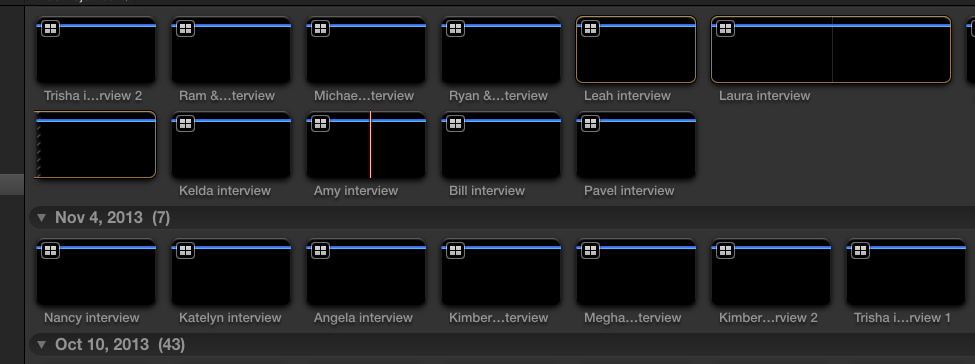
Nothing negative has happened because of this (so far), but I just can't find an answer to WHY. Why are there thin orange frames around a few multi cam clips in the event browser? What does that mean? Curious.
Hopefully the screenshot is visible. Anyone else have this happen? I'd love to know the meaning.
Please Log in to join the conversation.
- ronny courtens
-

- Offline
- Moderator
-

Less
More
- Posts: 4455
- Thank you received: 962
07 Nov 2013 08:43 #33801
by ronny courtens
Replied by ronny courtens on topic Thin Orange Frame around Multicam Clips in Event Browser?
Hi Sean,
Select a clip that has these orange frames and press ALT+X. Do the frames go away?
- Ronny
Select a clip that has these orange frames and press ALT+X. Do the frames go away?
- Ronny
Please Log in to join the conversation.
- stkirkland
-
Topic Author
- Offline
- Senior Member
-
- Haven't I already written something (LOTS) about myself on my "Info" page??
07 Nov 2013 18:33 #33823
by stkirkland
Replied by stkirkland on topic Thin Orange Frame around Multicam Clips in Event Browser?
Yes, that's it. I looked that up and it's "Clear Selected Ranges." I know when I've chosen I/O points before, you get the bright yellow frame around it and then when it's not highlighted it's that orange color. I suppose I've just never seen it around the entire clip and that's what threw me off. Either way, thanks for clearing that up (literally).
I didn't even know I had selected those clips for any range, thus adding to my confusion. What DID I do to choose the entire clip as I/O points?
I didn't even know I had selected those clips for any range, thus adding to my confusion. What DID I do to choose the entire clip as I/O points?
Please Log in to join the conversation.
- ronny courtens
-
- Offline
- Moderator
-
Less
More
- Posts: 4455
- Thank you received: 962
07 Nov 2013 21:12 #33829
by ronny courtens
Replied by ronny courtens on topic Thin Orange Frame around Multicam Clips in Event Browser?
I honestly have no clue as to why you have these In to Out lines. Normally you can only see them after you have physically created a range on a clip, so this is strange indeed.
- Ronny
- Ronny
Please Log in to join the conversation.
