


- Posts: 3
- Thank you received: 0
3 Post Moderation Rule for New Boarders (25 Jan 2021)
New boarders will have their posts moderated - Don't worry if you cannot see your post immediately.
Critical Import Problem - Urgent Help Required Please
05 Nov 2013 15:13 #33715
by Stork
Critical Import Problem - Urgent Help Required Please was created by Stork
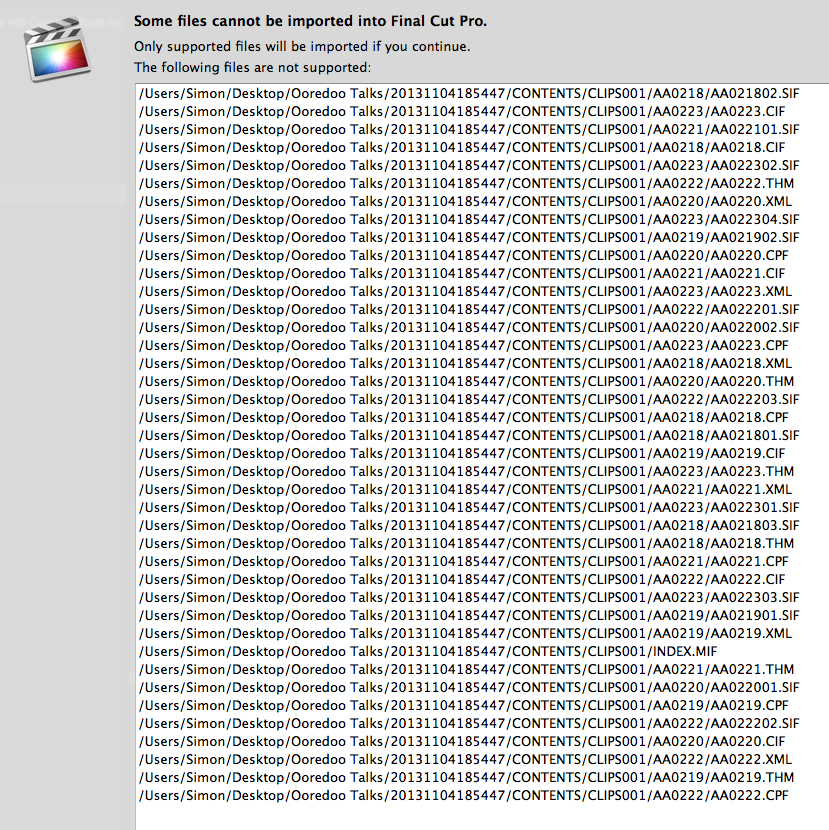
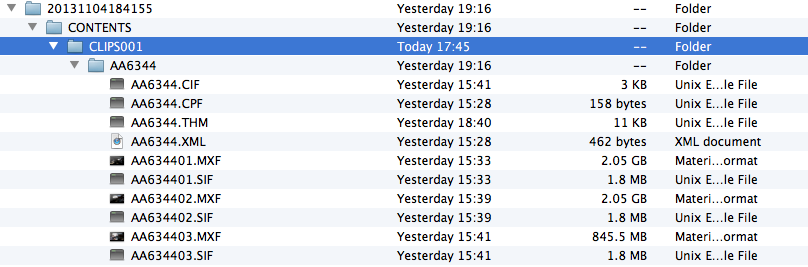
I am trying to import footage shot on my C300 into FCP X . When I try to import using Canon XF Utility I get a long list telling me many files are unsupported. FCP X only seems to be importing the MXF files and nothing else from the folder structure. So, I have a clip of an eight minute speech by a CEO which I can watch in full in XF Utility. But when it's in FCP X, I just get three 30 second clips from the total speech. I have attached screen shots of the 'unsupported files' list and the folder structure of the clips I am trying to import. Any advice hugely appreciate for what is a very important and time critical corporate. Thanks in advance. PS: I have uploaded many files before without issue.
Please Log in to join the conversation.
- jjsanderson
-

- Offline
- Elite Member
-

05 Nov 2013 15:52 #33719
by jjsanderson
Replied by jjsanderson on topic Critical Import Problem - Urgent Help Required Please
Bit of a wild guess here since I've not dealt with C300 footage, but with AVCHD and AVCCAM cards you can't just copy the card in the Finder - FCPX won't find the metadata and will give up interpreting the directory, even if it looks to the Finder like it's a perfect copy. Yes, it's kinda craze that anyone agreed a media card format that relies on hidden file structure, but that's what we're stuck with.
Here, you look to be trying to ingest from a Finder copy of the card. That won't be the same thing as the card itself and FCPX won't see it as such. You'll either need to go back to the original card, or find another way of converting the clips into something FCPX can read (ClipWrap?).
Again, however, I've not dealt with C300 footage, nor with Canon XF Utility.
Here, you look to be trying to ingest from a Finder copy of the card. That won't be the same thing as the card itself and FCPX won't see it as such. You'll either need to go back to the original card, or find another way of converting the clips into something FCPX can read (ClipWrap?).
Again, however, I've not dealt with C300 footage, nor with Canon XF Utility.
Please Log in to join the conversation.
05 Nov 2013 16:11 #33722
by Stork
Replied by Stork on topic Critical Import Problem - Urgent Help Required Please
JJ,
Thanks for the suggestion but I don't think that's what's up. To make this even weirder I have just imported the files onto FCP X on my laptop without a problem.
The laptop has the same version of FCP X and I used exactly the same import process using Canon XF Utility.
The problem is occurring when I try to import onto my brand new custom iMac which replaced the laptop because it can't cope with large video files.
Whilst setting up the iMac I had no problem importing pictures of my cat shot on the C300. Typical that this happens with a project that has a very tight deadline.
Anyone else have an idea how I might solve this?
Thanks for the suggestion but I don't think that's what's up. To make this even weirder I have just imported the files onto FCP X on my laptop without a problem.
The laptop has the same version of FCP X and I used exactly the same import process using Canon XF Utility.
The problem is occurring when I try to import onto my brand new custom iMac which replaced the laptop because it can't cope with large video files.
Whilst setting up the iMac I had no problem importing pictures of my cat shot on the C300. Typical that this happens with a project that has a very tight deadline.
Anyone else have an idea how I might solve this?
Please Log in to join the conversation.
- jjsanderson
-
- Offline
- Elite Member
-
05 Nov 2013 16:54 #33725
by jjsanderson
Replied by jjsanderson on topic Critical Import Problem - Urgent Help Required Please
Ah, drat. Sorry I wasn't helping.
Can you ingest the footage on your laptop, then move the Event over to your iMac? Not a long-term solution, but if it gets you running on your current project…
Good luck!
Can you ingest the footage on your laptop, then move the Event over to your iMac? Not a long-term solution, but if it gets you running on your current project…
Good luck!
Please Log in to join the conversation.
05 Nov 2013 17:22 #33728
by Stork
Replied by Stork on topic Critical Import Problem - Urgent Help Required Please
Thanks for the suggestion JJ.
I may just try that.
Simon.
I may just try that.
Simon.
Please Log in to join the conversation.

06 Nov 2013 11:23 #33746
by Seanus
Sean Lander - Editing since 1982 - AVID 1991 - FCP 1999 - FCPX 2011
Replied by Seanus on topic Critical Import Problem - Urgent Help Required Please
I use the C300 a lot. Works perfectly with FCP X first thing you need to do is download the plugin for FCP X from Canon.
Once you've done that. Create a folder and name it what ever you'd like the reel no. To be. Then copy the contents of your card into that folder. Go to import in FCP X and select the Folder only! Select import.
You can choose to transcode, copy or leave the media in place.
Once you've done that. Create a folder and name it what ever you'd like the reel no. To be. Then copy the contents of your card into that folder. Go to import in FCP X and select the Folder only! Select import.
You can choose to transcode, copy or leave the media in place.
Sean Lander - Editing since 1982 - AVID 1991 - FCP 1999 - FCPX 2011
Please Log in to join the conversation.

11 Nov 2013 04:29 #33976
by dgwvideo
Creating history....one edit at a time !
Replied by dgwvideo on topic Critical Import Problem - Urgent Help Required Please
@jjsanderson not sure about AVCCAM, but I copy AVCHD cards all the time in the finder and point to them with FCPX for ingest. Works perfectly for me, even under latest Mavericks.
Creating history....one edit at a time !
Please Log in to join the conversation.
