


3 Post Moderation Rule for New Boarders (25 Jan 2021)
New boarders will have their posts moderated - Don't worry if you cannot see your post immediately.
frame 1340 (error-1) Share Operation
- tedtv
-
 Topic Author
- Offline
- Senior Member
-

- Digital Content Creator Sports photographer for CBS MaxPreps www.tedtv.tv (713)501-9706 youtube.com/tedirving tedirving@yahoo.com tedtv@facebook.com
Less
More
04 Nov 2013 03:16 #33647
by tedtv
frame 1340 (error-1) Share Operation was created by tedtv
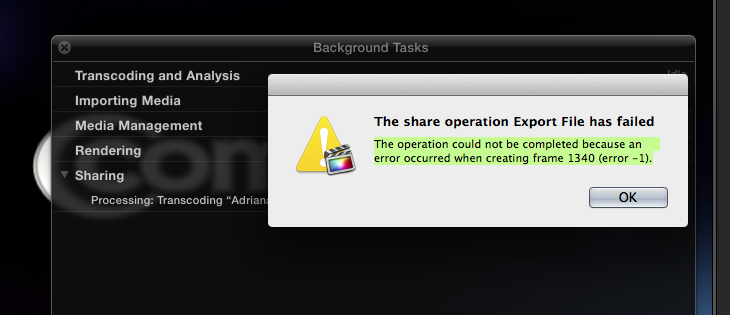
Has anyone had this issue/error messaging when exporting:
The operation could not be completed because an error occurred when creating frame 1340 (error -1).
The operation could not be completed because an error occurred when creating frame 1340 (error -1).
Please Log in to join the conversation.
- ronny courtens
-

- Offline
- Moderator
-

Less
More
- Posts: 4455
- Thank you received: 962
04 Nov 2013 09:01 #33653
by ronny courtens
Replied by ronny courtens on topic frame 1340 (error-1) Share Operation
It means that you either have a corrupt clip, effect or transition at frame 1340, or you have a corrupt render file.
In many cases this is related to a render error. If it is, deleting unused or all Project render files may solve the problem. Or you can go to just the problematic clip and un-render it, then try exporting again.
If you want to know where exactly frame 1340 is on your Timeline you can use a tc/frame calculator: www.michaelcinquin.com/tools/timecode_keykode . Just enter your frame rate and the app will convert the 1340 frames to timecode.
- Ronny
In many cases this is related to a render error. If it is, deleting unused or all Project render files may solve the problem. Or you can go to just the problematic clip and un-render it, then try exporting again.
If you want to know where exactly frame 1340 is on your Timeline you can use a tc/frame calculator: www.michaelcinquin.com/tools/timecode_keykode . Just enter your frame rate and the app will convert the 1340 frames to timecode.
- Ronny
Please Log in to join the conversation.
- Tom Wolsky
-

- Offline
- Moderator
-
04 Nov 2013 17:31 #33679
by Tom Wolsky
Replied by Tom Wolsky on topic frame 1340 (error-1) Share Operation
Why are you doing anything on your computer while you're exporting?
Please Log in to join the conversation.

05 Nov 2013 10:35 #33701
by Soundwise
Or change the Time Display to Frames in the Preferences.
Replied by Soundwise on topic frame 1340 (error-1) Share Operation
ronny courtens wrote: If you want to know where exactly frame 1340 is on your Timeline you can use a tc/frame calculator: www.michaelcinquin.com/tools/timecode_keykode . Just enter your frame rate and the app will convert the 1340 frames to timecode.
- Ronny
Or change the Time Display to Frames in the Preferences.
Please Log in to join the conversation.
05 Nov 2013 13:57 - 05 Nov 2013 13:58 #33713
by tedtv
Replied by tedtv on topic frame 1340 (error-1) Share Operation
Thanks for all the tips. I'll do these tonight. I"m doing nothing while exporting. Not attempting to edit at all. I also don't have any footage with a yellow exlamation point triangle so, i'm finding it weird that a frame is damaged or corrupt. Interesting because I would think an entire clip where that frame is associated would be damaged and have an exclamation marker. And to add to all of this, the error disappears when exporting a timeline set as proxy. If i go to high quality then the error occurs.
Last edit: 05 Nov 2013 13:58 by tedtv.
Please Log in to join the conversation.
- Karsten Schlüter
-

- Offline
- Moderator
-
Less
More
- Posts: 3790
- Thank you received: 718
05 Nov 2013 15:26 - 05 Nov 2013 15:28 #33717
by Karsten Schlüter
Replied by Karsten Schlüter on topic frame 1340 (error-1) Share Operation
I only had once this annoying error message.
lucky me, it was frame 400-and-some, so, the export was just a few minutes old ...
going to that specific frame, and zoooooming in, I noticed, I managed somehow to create a 'gap' in the main storyline! A gap, no 'black clip' generator - just clip#1 ending, 1 single frame 'zero' = the one mentioned in the error code, then clip#2.
I should have done a screen shot, but I was in a hurry/panic, not getting my project done.-
just had to 'shift' clip#2 a lil' left, close to #1 - done. Export flawless.
... no idea, how I managed to create such a 'black hole' :lol:
lucky me, it was frame 400-and-some, so, the export was just a few minutes old ...
going to that specific frame, and zoooooming in, I noticed, I managed somehow to create a 'gap' in the main storyline! A gap, no 'black clip' generator - just clip#1 ending, 1 single frame 'zero' = the one mentioned in the error code, then clip#2.
I should have done a screen shot, but I was in a hurry/panic, not getting my project done.-
just had to 'shift' clip#2 a lil' left, close to #1 - done. Export flawless.
... no idea, how I managed to create such a 'black hole' :lol:
Last edit: 05 Nov 2013 15:28 by Karsten Schlüter.
Please Log in to join the conversation.
