


- Posts: 6
- Thank you received: 0
3 Post Moderation Rule for New Boarders (25 Jan 2021)
New boarders will have their posts moderated - Don't worry if you cannot see your post immediately.
No more BD export with Mavericks?
28 Oct 2013 14:02 #33349
by Scrat
No more BD export with Mavericks? was created by Scrat
Hello everybody,
What a disappointment! Despite a "clean install" (twice...) of Mavericks, the "BD" button in the "Destination" window of FCP X (10.0.9) has disappeared!...
Even with an attempt to "add a destination". Just DVD is proposed.
Under Moutain Lion, I burned a lot of BD's and today FCP X refuses this possibility.
Am I alone?
Thank you for any help
Best regards.
Pat.
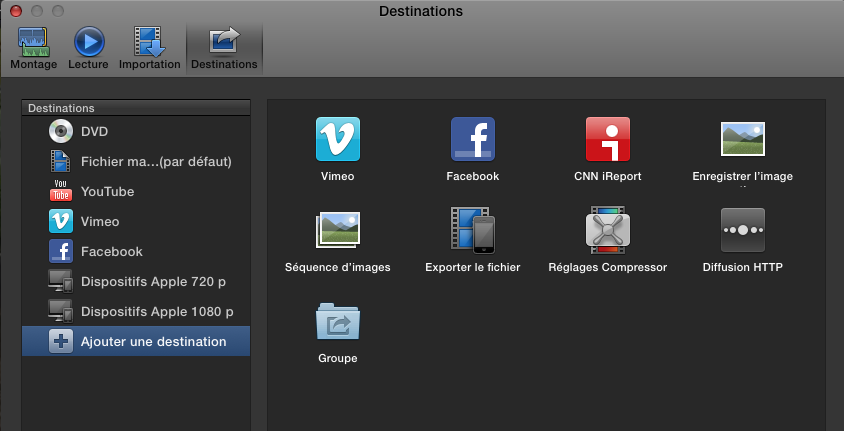
What a disappointment! Despite a "clean install" (twice...) of Mavericks, the "BD" button in the "Destination" window of FCP X (10.0.9) has disappeared!...
Even with an attempt to "add a destination". Just DVD is proposed.
Under Moutain Lion, I burned a lot of BD's and today FCP X refuses this possibility.
Am I alone?
Thank you for any help
Best regards.
Pat.
Please Log in to join the conversation.
- Tom Wolsky
-

- Offline
- Moderator
-

28 Oct 2013 15:03 #33356
by Tom Wolsky
Replied by Tom Wolsky on topic No more BD export with Mavericks?
Don't know if you're alone, but you are missing a lot of items in the French version. They are there in the English version. You should report this to feedback.
Please Log in to join the conversation.
28 Oct 2013 15:37 #33358
by Scrat
Replied by Scrat on topic No more BD export with Mavericks?
Thank you Tom
Please Log in to join the conversation.


28 Oct 2013 19:23 #33381
by alex4D
Replied by alex4D on topic No more BD export with Mavericks?
If you Control-click one of the destinations on the left, you'll see a pop-up menu.
From this menu, try the French equivalent of "Restore Default Destinations"
@Alex4D
From this menu, try the French equivalent of "Restore Default Destinations"
@Alex4D
Please Log in to join the conversation.
28 Oct 2013 21:21 #33389
by Scrat
Replied by Scrat on topic No more BD export with Mavericks?
Thanks Alex,
Already tried...
For the moment, the solution is to export to Compressor. Unfortunately, I am not very comfortable with it...
Maybe the next update will solve my problem.
Pat.
Already tried...
For the moment, the solution is to export to Compressor. Unfortunately, I am not very comfortable with it...
Maybe the next update will solve my problem.
Pat.
Please Log in to join the conversation.
30 Oct 2013 18:50 #33507
by Scrat
Replied by Scrat on topic No more BD export with Mavericks?
I found it!
The first line in the destination window exists!... but it is hidden behind the top of the window.
Unaccessible because there is no way to modify the size of the preference window.
Not easy...
The first line in the destination window exists!... but it is hidden behind the top of the window.
Unaccessible because there is no way to modify the size of the preference window.
Not easy...
Please Log in to join the conversation.
01 Nov 2013 16:28 #33590
by Scrat
Replied by Scrat on topic No more BD export with Mavericks?
Solved!
Thanks to Tom Wolsky.
It is a French localization issue. Switching to english, I recovered the Bluray option and could add it in the list.
Back in French, it was still in the list.
Thank you Tom.
Pat.
Thanks to Tom Wolsky.
It is a French localization issue. Switching to english, I recovered the Bluray option and could add it in the list.
Back in French, it was still in the list.
Thank you Tom.
Pat.
Please Log in to join the conversation.
