


- Posts: 1228
- Thank you received: 114
3 Post Moderation Rule for New Boarders (25 Jan 2021)
New boarders will have their posts moderated - Don't worry if you cannot see your post immediately.
is iMovie now profesional?
- Scrubelicious
-

- Offline
- Platinum Member
-

Less
More
28 Oct 2013 09:46 #33332
by Scrubelicious
I have seen people (construction) that make money for what they do... after looking at the completed. I wouldn't call them professionals or maybe lazy. :silly:
Replied by Scrubelicious on topic is iMovie now profesional?
robertdee wrote: I've seen people with pro tools effectively charging for equipment hire who's professionalism - both in terms of their ability to use their tools and their attitude - are dwarfed by other people on much less expensive equipment.
I don't want to turn this thread into a debate about professionalism but I tend to view it the same way the tax man does: If you make your money with it, that's professional. As for so-called below/above the line stuff, I've been a glorified button pusher on big projects for international brands and had complete creative control on projects for smaller firms. I prefer the latter generally.
As for iMovie being professional, that's like asking if a hammer is professional. You could go around smashing windows with it or knock a few nails in. Depends on the user and the use.
I have seen people (construction) that make money for what they do... after looking at the completed. I wouldn't call them professionals or maybe lazy. :silly:
Please Log in to join the conversation.

28 Oct 2013 09:51 #33334
by robertdee
Replied by robertdee on topic is iMovie now profesional?
Why is it always builders who get the bad rap? There's plenty of dodgy middle class professions in the world 
When you put it like that, though, you have a point. I guess my concern is the snobbery of the type of work being done when it's the attitude of the worker that's important.
When you put it like that, though, you have a point. I guess my concern is the snobbery of the type of work being done when it's the attitude of the worker that's important.
Please Log in to join the conversation.
- Scrubelicious
-
- Offline
- Platinum Member
-
Less
More
- Posts: 1228
- Thank you received: 114
28 Oct 2013 09:54 #33335
by Scrubelicious
Replied by Scrubelicious on topic is iMovie now profesional?
Well I guess I could also use mechanics for example. 
Please Log in to join the conversation.
- finalbug.net
-
 Topic Author
- Offline
- Platinum Member
-
- Absence of Quality is the essence of squareness.
28 Oct 2013 11:51 - 28 Oct 2013 12:00 #33338
by finalbug.net
Replied by finalbug.net on topic is iMovie now profesional?
I don´t suppose there is any thing like sales figures for iMovie? I tried google but did not see anything obvious. I remember that Philip Hodgetts had some kind of theory of FCP X numbers outselling Legacy FCP.
EDIT:
The penny is beginning to drop. iMovie is basically on any new mac today!
EDIT:
The penny is beginning to drop. iMovie is basically on any new mac today!
Last edit: 28 Oct 2013 12:00 by finalbug.net.
Please Log in to join the conversation.
31 Oct 2013 12:26 - 01 Nov 2013 10:08 #33539
by NocoDave
Replied by NocoDave on topic is iMovie now profesional?
I've just and another chance to tinker with iMovie. I found a couple of interesting features that could be potentially better (or preferable to me) if it was done the same way in FCPX.
The "Speed Editor" in iMovie is very basic, but if the features of the FCPX "Retime Editor" were in there I'd prefer it to the current version. It also gives the possibility of displaying/manipulating the animation graph in the clip.
The other is the iMovie "Clip Trimmer". I like to work on the timeline but I think this looks like a better GUI than than the FCPX "Precision Editor". You can't do slide edits in iMovie X but if that was introduced. But maybe the FCPX "Precision Editor" has more scope for enhancement for features I can't think of.
Anything else any one would like to see in FCPX?
The "Speed Editor" in iMovie is very basic, but if the features of the FCPX "Retime Editor" were in there I'd prefer it to the current version. It also gives the possibility of displaying/manipulating the animation graph in the clip.
The other is the iMovie "Clip Trimmer". I like to work on the timeline but I think this looks like a better GUI than than the FCPX "Precision Editor". You can't do slide edits in iMovie X but if that was introduced. But maybe the FCPX "Precision Editor" has more scope for enhancement for features I can't think of.
Anything else any one would like to see in FCPX?
Last edit: 01 Nov 2013 10:08 by NocoDave. Reason: changed "slip" to "slide".
Please Log in to join the conversation.
- finalbug.net
-
Topic Author
- Offline
- Platinum Member
-
- Absence of Quality is the essence of squareness.
31 Oct 2013 12:40 - 06 Nov 2013 18:12 #33540
by finalbug.net
Replied by finalbug.net on topic is iMovie now profesional?
@ NocoDave
Would you mind posting a screen shot, of what you are talking about?
From a mail with my former boss and what he could remember about the iMovie experiment he did over 3 years ago
**************
what i remember about the project:
i think the goal was to edit something in an hour.
but i think there was a fair bit of time to import media, and also to export. like 30 mins each or so.
but the edit was do-able.
i think other problems were that managing music/audio tracks was too limited. needed to prepare stuff outside the app?
most of the above i think has been dealt with.
i think also the way it managed projects was a pain for BLAH at the time I think the project/library needed to live locally, couldn’t be somewhere else.
was a problem for the whole corrections/collaboration workflow we had.
**************
I will be very curious to see how the whole management of projects gets nailed for iMovie and FCPX. It all seems to be up in the air.
Would you mind posting a screen shot, of what you are talking about?
From a mail with my former boss and what he could remember about the iMovie experiment he did over 3 years ago
**************
what i remember about the project:
i think the goal was to edit something in an hour.
but i think there was a fair bit of time to import media, and also to export. like 30 mins each or so.
but the edit was do-able.
i think other problems were that managing music/audio tracks was too limited. needed to prepare stuff outside the app?
most of the above i think has been dealt with.
i think also the way it managed projects was a pain for BLAH at the time I think the project/library needed to live locally, couldn’t be somewhere else.
was a problem for the whole corrections/collaboration workflow we had.
**************
I will be very curious to see how the whole management of projects gets nailed for iMovie and FCPX. It all seems to be up in the air.
Last edit: 06 Nov 2013 18:12 by peteramwiggins.
Please Log in to join the conversation.

31 Oct 2013 17:31 #33554
by Sniper X
I agree completely. I sell and integrate HD broadcast TV equipment and in the last ten years, have come across so many self proclaimed professionals who don't know the difference between HD SDI and composite video it makes me want to cry. When the people can't grasp a verbal explanation of why their system isn't working because they don't understand the jargon let alone the signal, it is time to vet the resumes a little harder and replace the "Pros".
Resistance isn't Futile, it is voltage divided by current.
Replied by Sniper X on topic is iMovie now profesional?
BenB wrote: "Professional" is such a subjective word in media production, it now has absolutely no universal meaning, and thus should never be used again. Ban the "P word"!
I agree completely. I sell and integrate HD broadcast TV equipment and in the last ten years, have come across so many self proclaimed professionals who don't know the difference between HD SDI and composite video it makes me want to cry. When the people can't grasp a verbal explanation of why their system isn't working because they don't understand the jargon let alone the signal, it is time to vet the resumes a little harder and replace the "Pros".
Resistance isn't Futile, it is voltage divided by current.
Please Log in to join the conversation.
01 Nov 2013 10:07 #33585
by NocoDave
No problem Paul.
The "Speed Editor" is this simple stretch/compress handle that you get by right clicking a clip and enabling it. Much like in FCPX but with a different look and without the ability to make any further adjustments.
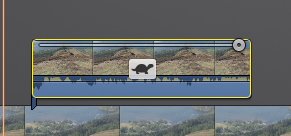
If it did have the ability, that line across the top could show the curve very nicely.
The "Clip Trimmer" appears when you double click a clip. It seems like a simpler streamlined version of the "Precision Editor", but slide edits aren't possible.
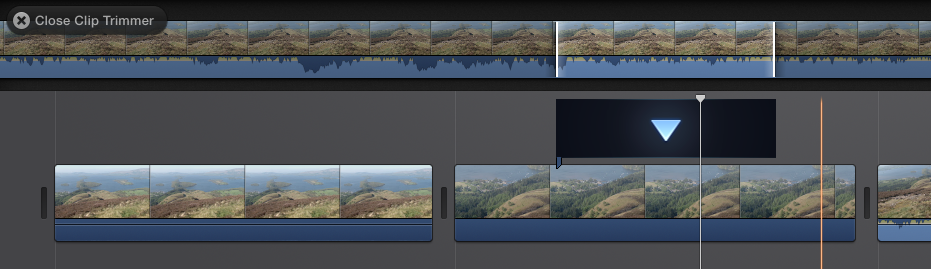
N.B. I worte slip edits by accident in my original post, I'll edit that just now.
Replied by NocoDave on topic is iMovie now profesional?
Would you mind posting a screen shot, of what you are talking about?
No problem Paul.
The "Speed Editor" is this simple stretch/compress handle that you get by right clicking a clip and enabling it. Much like in FCPX but with a different look and without the ability to make any further adjustments.
If it did have the ability, that line across the top could show the curve very nicely.
The "Clip Trimmer" appears when you double click a clip. It seems like a simpler streamlined version of the "Precision Editor", but slide edits aren't possible.
N.B. I worte slip edits by accident in my original post, I'll edit that just now.
Please Log in to join the conversation.
- sirdavidabraham
-

- Offline
- Senior Member
-

- Musician, Geek and Spinach lover.
Less
More
- Posts: 79
- Thank you received: 3
01 Nov 2013 11:30 #33586
by sirdavidabraham
Replied by sirdavidabraham on topic is iMovie now profesional?
iMovie can also skim video clips from iPhoto library.
In general the interface feels smooth and responsive, I hope the next FCPX enjoys the same polish.
In general the interface feels smooth and responsive, I hope the next FCPX enjoys the same polish.
Please Log in to join the conversation.
- finalbug.net
-
Topic Author
- Offline
- Platinum Member
-
- Absence of Quality is the essence of squareness.
01 Nov 2013 14:08 #33589
by finalbug.net
Replied by finalbug.net on topic is iMovie now profesional?
thanks for that NocoDave
I absolutely hated the speed functions on Legacy FCP. Particularly pre FCP 7!
Frankly the idea of having to play with speed curves just wrecks my head but then maybe that is just me.
Stupid question why do you need/want speed curves? I am guessing for aligning/timing objects in Motion. I think I know where this is going. You want to be doing all kinds of curvy stuff in the timeline and not just speed changes? Right? Again like in legacy FCP. I remember the advantage of this was that you could eye ball your curves in the timeline and get them all playing with each other nicely…
I absolutely hated the speed functions on Legacy FCP. Particularly pre FCP 7!
Frankly the idea of having to play with speed curves just wrecks my head but then maybe that is just me.
Stupid question why do you need/want speed curves? I am guessing for aligning/timing objects in Motion. I think I know where this is going. You want to be doing all kinds of curvy stuff in the timeline and not just speed changes? Right? Again like in legacy FCP. I remember the advantage of this was that you could eye ball your curves in the timeline and get them all playing with each other nicely…
Please Log in to join the conversation.
04 Nov 2013 12:41 #33668
by NocoDave
Replied by NocoDave on topic is iMovie now profesional?
It's mostly about visualisation right enough Paul.
I love that in Motion I can add a behaviour to control the animation of a parameter; position, rotation, time etc. while looking at the animation curves. It's great for alignments.
I'm not a fan of how little you really get know about what's going on behind the "Retime Editor" in FCPX. It shows the sections and what speeds they are set to with smooth transitioning between. On finer adjustment I'd prefer to see what the animation looks like. Not necessarily a traditional keyframe type adjustment, but a visual representation of some means, and curves work perfectly.
I love that in Motion I can add a behaviour to control the animation of a parameter; position, rotation, time etc. while looking at the animation curves. It's great for alignments.
I'm not a fan of how little you really get know about what's going on behind the "Retime Editor" in FCPX. It shows the sections and what speeds they are set to with smooth transitioning between. On finer adjustment I'd prefer to see what the animation looks like. Not necessarily a traditional keyframe type adjustment, but a visual representation of some means, and curves work perfectly.
Please Log in to join the conversation.
