


3 Post Moderation Rule for New Boarders (25 Jan 2021)
New boarders will have their posts moderated - Don't worry if you cannot see your post immediately.
Can't eject drives?!! Really?
- tedtv
-
 Topic Author
- Offline
- Senior Member
-

- Digital Content Creator Sports photographer for CBS MaxPreps www.tedtv.tv (713)501-9706 youtube.com/tedirving tedirving@yahoo.com tedtv@facebook.com
Less
More
25 Oct 2013 00:13 #33121
by tedtv
Can't eject drives?!! Really? was created by tedtv
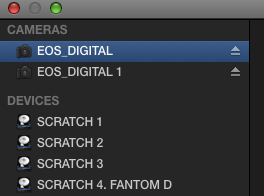
:evil: Ok so there are tiny eject icons next to your external drives when you are in import mode in FCPX, yet if you click the eject icon your drives won't eject. Who has the magic phrase or keystroke that will unmount your external drives from within FCPX?
Please Log in to join the conversation.

25 Oct 2013 00:17 #33123
by Julian
Replied by Julian on topic Can't eject drives?!! Really?
My guess is that this is a safety thing. If you go into a finder window you can also eject drives, but if FCPX is using them, it won't let you eject them.
What I've found is that if you keep the finder windows closed and never open them after you've opened FCPX, then a good amount of the time I've been able to eject my SD cards after import, but I haven't tried it with drives.
What I've found is that if you keep the finder windows closed and never open them after you've opened FCPX, then a good amount of the time I've been able to eject my SD cards after import, but I haven't tried it with drives.
Please Log in to join the conversation.
25 Oct 2013 01:31 #33128
by tedtv
Replied by tedtv on topic Can't eject drives?!! Really?
True. But then why add it? To tease us? LOL If you aren't going to let me eject the drives, SD cards, compact flash, etc., then remove that function. I can eject my H4N SD card, but not SDHC cards formatted by Canon and being read in a card reader. Can't even eject my JVC Addixxion action cam. I'm sure that functionality is there for hot swappable drive architecture but its annoying because if I have a project like yesterday, with six SDHC cards, it is a hassle to have to quit fcpx after importing three cards and then removing and adding the other two, launching fcpx, and then importing those. I guess if I had a super-multi card reader with 15 slots then there is no complaint.
Please Log in to join the conversation.
25 Oct 2013 02:43 #33132
by Julian
Replied by Julian on topic Can't eject drives?!! Really?
This is why I never transcode or analyze media during import when I have like 5 cards to import. That would be a pain in the ass.
Please Log in to join the conversation.

25 Oct 2013 04:37 #33142
by Redifer
Replied by Redifer on topic Can't eject drives?!! Really?
It's a bug. It'll eject my GoPro cards after import and also cards from the Canon XF100, but it keeps cards from the Canon 5D and 7D. Not sure what FCPX thinks it's still doing with the cards even after the import process is 100% complete.
Please Log in to join the conversation.

31 Oct 2013 23:05 #33565
by dgwvideo
Creating history....one edit at a time !
Replied by dgwvideo on topic Can't eject drives?!! Really?
Probably is indeed a bug. But FWIW, importing direct from the camera card does pose some risk in the event an error occurs during import and corrupts your data. I choose to copy all my cards to an external drive and import from there. The import is typically faster than retrieving footage off a camera USB or FW port or card reader and if something goes wrong, your footage is still intact on the card.
Creating history....one edit at a time !
Please Log in to join the conversation.
31 Oct 2013 23:23 - 31 Oct 2013 23:25 #33566
by Redifer
Replied by Redifer on topic Can't eject drives?!! Really?
But couldn't the same error happen when copying to your hard drive from the card in the Finder? FCPX copies all of the files into the Original Media folder before it transcodes/optimizes so it's doing that step already (and it leaves it there). Also it leaves the footage on the card. How many errors have you had copying files from the card? I've only had errors in FCP7 and THAT was only because I was an idiot and messed with FCP7 while twas logging and transferring.
Last edit: 31 Oct 2013 23:25 by Redifer.
Please Log in to join the conversation.
31 Oct 2013 23:40 #33567
by Dave_EP
Replied by Dave_EP on topic Can't eject drives?!! Really?
The inability to eject some card types drives me nuts - absolutely nuts. It really bugs me that I have to quit FCPX in between each and every card copy when I'm out in the field and need to check some shots in a hurry - and perhaps not even import them, just need to check them. C'mon Apple, how hard could this be?
Please Log in to join the conversation.
01 Nov 2013 00:05 #33571
by dgwvideo
Creating history....one edit at a time !
Replied by dgwvideo on topic Can't eject drives?!! Really?
@ Redifer You are probably correct that there could still be an error copying from the finder, I just believe transferring from the camera is slightly more risky. More potential issues could arise especially if the camera is not AC powered and transferring on battery. The direct OS copy might be safer than going through the FCPX app if that app crashes for some reason. And, if you are not able to eject your card for some reason while transcoding is going on, the camera connection remains on all that much longer.
I shoot in optimized formats so I don't go thru that step typically.
The other advantage I get from this method is I have my direct copy on one drive, then upon import I copy the files to the event on another drive. Once I have two valid copies of my footage I feel comfortable reformatting the card.
I have never had any errors copying direct to the computer, and honestly only twice have I had a problem with the data during import direct from camera. Fortunately the card in the camera was write protected, so while the event data was no good, I was able to re-import after a reboot and all clips were intact. Since I want the backup copy of all projects raw footage, I transfer to the computer first.
I shoot in optimized formats so I don't go thru that step typically.
The other advantage I get from this method is I have my direct copy on one drive, then upon import I copy the files to the event on another drive. Once I have two valid copies of my footage I feel comfortable reformatting the card.
I have never had any errors copying direct to the computer, and honestly only twice have I had a problem with the data during import direct from camera. Fortunately the card in the camera was write protected, so while the event data was no good, I was able to re-import after a reboot and all clips were intact. Since I want the backup copy of all projects raw footage, I transfer to the computer first.
Creating history....one edit at a time !
Please Log in to join the conversation.
01 Nov 2013 23:33 #33603
by Redifer
Replied by Redifer on topic Can't eject drives?!! Really?
I don't copy from the camera, I remove the compact flash card and insert it into a CF reader which is connected to the computer.
Please Log in to join the conversation.

23 Oct 2016 08:35 - 23 Oct 2016 08:36 #81118
by steve223
Replied by steve223 on topic Can't eject drives?!! Really?
can only second this, super annoying have 10 carts to import and have to quit after every card and interrupt the Transcoding instead of FCPX continuing in the bg.
It's now 2016 and Apple has not managed to fix this....
It's now 2016 and Apple has not managed to fix this....
Last edit: 23 Oct 2016 08:36 by steve223.
Please Log in to join the conversation.
