


- Posts: 2
- Thank you received: 0
3 Post Moderation Rule for New Boarders (25 Jan 2021)
New boarders will have their posts moderated - Don't worry if you cannot see your post immediately.
Replace source clips in Multicam?
23 Oct 2013 17:55 - 23 Oct 2013 17:57 #33027
by realtwang
Replace source clips in Multicam? was created by realtwang
OK, I'm brand new on FCP, but I'm well versed in audio editing, so I'm finding my way around pretty well. However, I have run into one issue. I've done a multi cam clip, which I've subsequently done edits on. I bounced it down to a master file, and in watching the result, I've noticed a problem with one of the source clips that happened when converting it for import.
So my question is: Is it possible to replace one "angle" in a multi cam clip with an identical copy? Are the multi cam clips merely nondestructive pointers to the original source files, or are they destructive?
Hopefully, I'm not out of luck - it would be a pain to recut everything from scratch. It could be done, but I don't want to...
Thanks in advance!
So my question is: Is it possible to replace one "angle" in a multi cam clip with an identical copy? Are the multi cam clips merely nondestructive pointers to the original source files, or are they destructive?
Hopefully, I'm not out of luck - it would be a pain to recut everything from scratch. It could be done, but I don't want to...
Thanks in advance!
Last edit: 23 Oct 2013 17:57 by realtwang.
Please Log in to join the conversation.
- ronny courtens
-

- Offline
- Moderator
-

Less
More
- Posts: 4455
- Thank you received: 962
23 Oct 2013 20:08 #33040
by ronny courtens
Replied by ronny courtens on topic Replace source clips in Multicam?
Hi Jason, and welcome.
Open the multiclip in Angle Editor.
Click on the clip in the Angle you want to replace and delete it from the Angle.
Drag the new clip inside the Angle. If this clip is exactly the same as the one you have deleted you will not need to synchronize it to the other angles.
Go back to your Timeline. All your cuts should still be there.
- Ronny
Open the multiclip in Angle Editor.
Click on the clip in the Angle you want to replace and delete it from the Angle.
Drag the new clip inside the Angle. If this clip is exactly the same as the one you have deleted you will not need to synchronize it to the other angles.
Go back to your Timeline. All your cuts should still be there.
- Ronny
Please Log in to join the conversation.
- ronny courtens
-
- Offline
- Moderator
-
Less
More
- Posts: 4455
- Thank you received: 962
23 Oct 2013 20:15 #33041
by ronny courtens
Replied by ronny courtens on topic Replace source clips in Multicam?
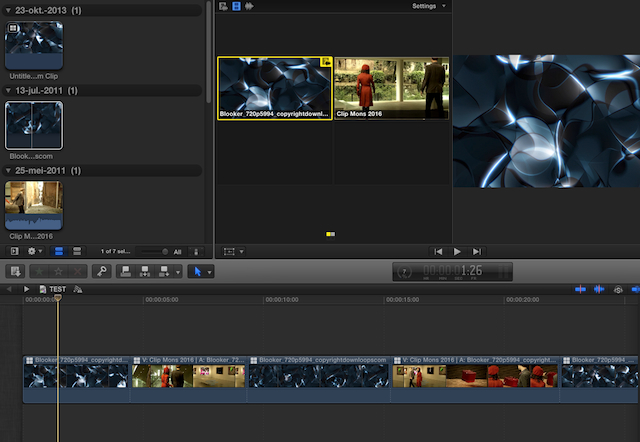
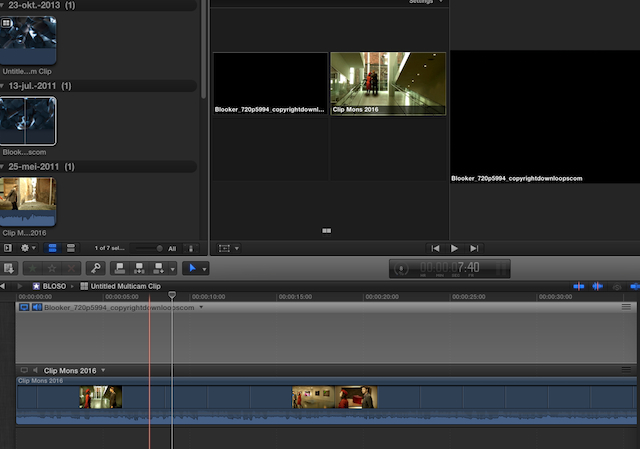
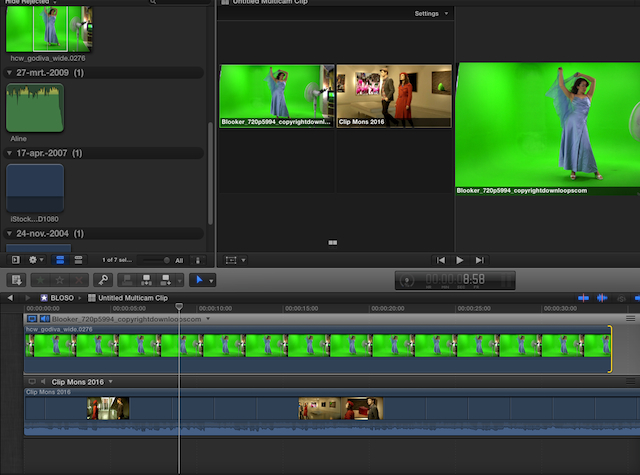
P.S. I have just done this and here's some screenshots:
Original multiclip cut:
Open multiclip in Angle Editor and delete clip in Angle:
Insert new clip (I have take a completely different clip to make it clearer):
Go back to multiclip on timeline: all the cuts are still there with the new clip:
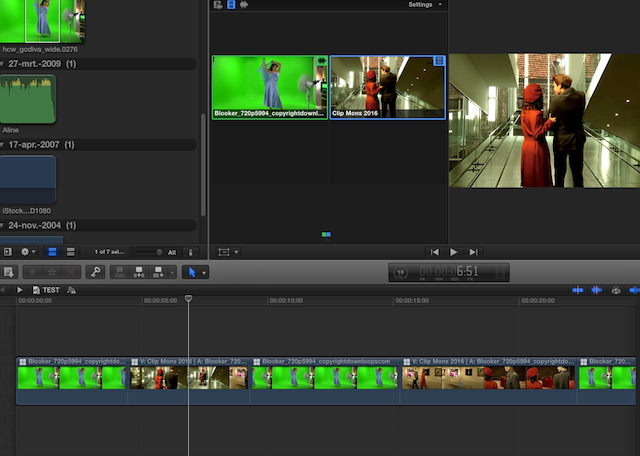
- Ronny
Original multiclip cut:
Open multiclip in Angle Editor and delete clip in Angle:
Insert new clip (I have take a completely different clip to make it clearer):
Go back to multiclip on timeline: all the cuts are still there with the new clip:
- Ronny
Please Log in to join the conversation.
