


- Posts: 582
- Thank you received: 5
3 Post Moderation Rule for New Boarders (25 Jan 2021)
New boarders will have their posts moderated - Don't worry if you cannot see your post immediately.
Edit with CMYK profil?
21 Oct 2013 07:21 - 21 Oct 2013 07:47 #32782
by Neguah
Edit with CMYK profil? was created by Neguah
Take a look at this video:
vimeo.com/18017106
I'm really impressed by(of?) the color grading. The comments say that he used CMYK profile and bumped the cyan. I can se that there's some blue in the clips. But there must be something else he does to create this grading, so I'm thinking the CMYK must be important.
I know that CMYK is cyan, magenta, yellow and key(or black), different than RGB coloring. Is it possible to edit a CMYK profile in FCPX? Or can I "easily" create the look of the video with FCPX color board?
vimeo.com/18017106
I'm really impressed by(of?) the color grading. The comments say that he used CMYK profile and bumped the cyan. I can se that there's some blue in the clips. But there must be something else he does to create this grading, so I'm thinking the CMYK must be important.
I know that CMYK is cyan, magenta, yellow and key(or black), different than RGB coloring. Is it possible to edit a CMYK profile in FCPX? Or can I "easily" create the look of the video with FCPX color board?
Last edit: 21 Oct 2013 07:47 by Neguah.
Please Log in to join the conversation.
- ronny courtens
-

- Offline
- Moderator
-

Less
More
- Posts: 4455
- Thank you received: 962
21 Oct 2013 13:49 - 21 Oct 2013 13:57 #32795
by ronny courtens
Replied by ronny courtens on topic Edit with CMYK profil?
Hey Øystein,
This cyan cast is not a CMYK color correction. If it were it would only affect the objects with a lot of cyan in any part of the video, and not the overall picture as it does here.
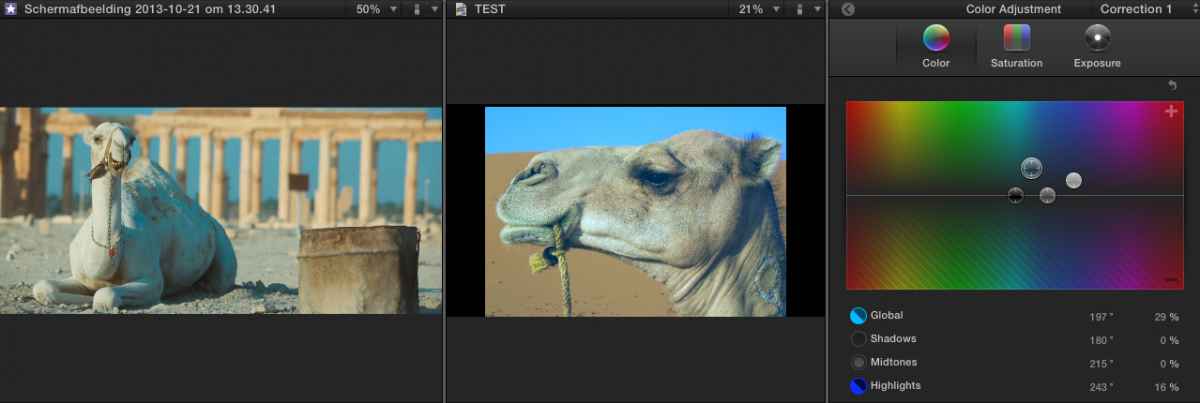
This can be done very easily in FCPX by slightly pushing the cyan for the Global parameter in the color board and then compensating for the greenish cast caused by the correction by only pushing the blue in the Highlights. I will demonstrate it with an example.
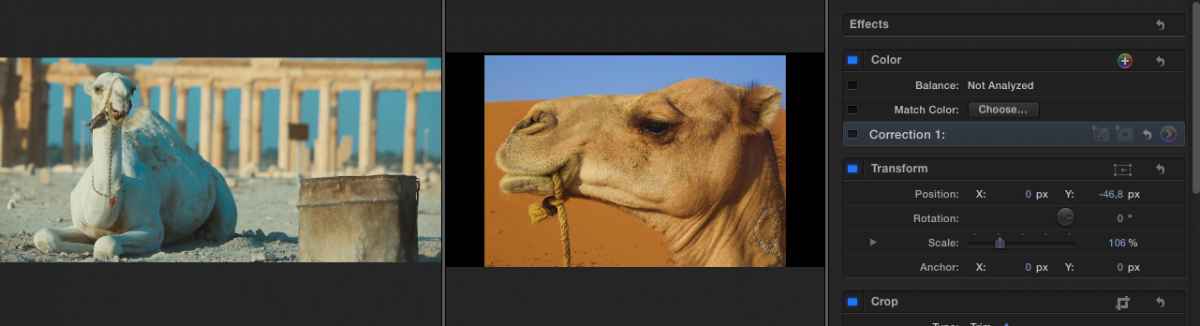
Here you have a screenshot from the camel scene in his video next to a low res still of a camel I have grabbed with Google. Look at how different they are:
Here I have made the corrections described above: push the global cyan and compensate with pushing the highlight blue:
The camels now look pretty similar, but of course the background and the sky in the two images are different. That's simply because they were shot differently. So to show you how well the color correction on my camel really matches with the corrected camel in the video I have used the FCPX keyer (the best keyer in the industry IMO) and a little bit of rough SliceX masking to cut out my camel and composite it over his scene. This is the result:
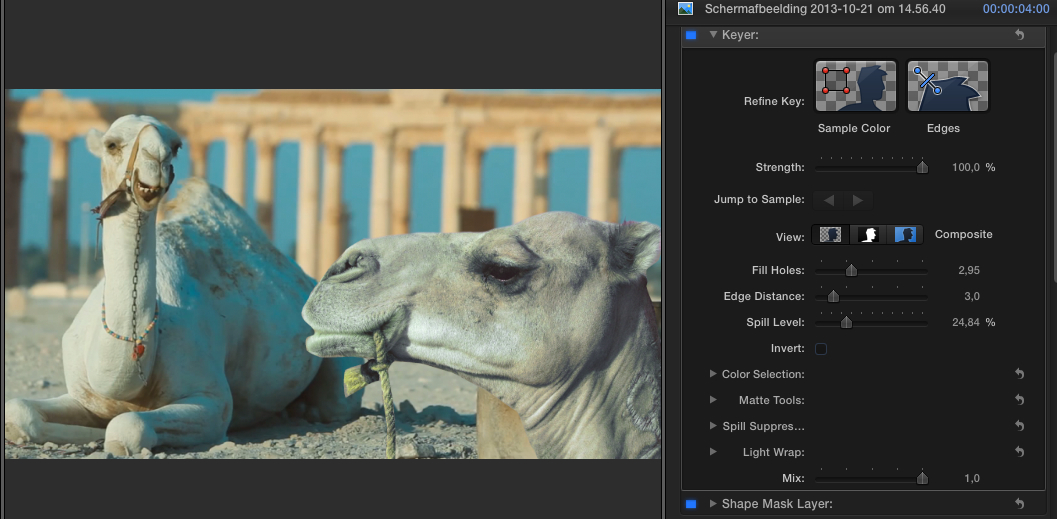
They look like two brothers (or sisters) having a conversation in the desert, don't they?
Done in less than 10 minutes, including the keying and masking, all in FCPX.
- Ronny
This cyan cast is not a CMYK color correction. If it were it would only affect the objects with a lot of cyan in any part of the video, and not the overall picture as it does here.
This can be done very easily in FCPX by slightly pushing the cyan for the Global parameter in the color board and then compensating for the greenish cast caused by the correction by only pushing the blue in the Highlights. I will demonstrate it with an example.
Here you have a screenshot from the camel scene in his video next to a low res still of a camel I have grabbed with Google. Look at how different they are:
Here I have made the corrections described above: push the global cyan and compensate with pushing the highlight blue:
The camels now look pretty similar, but of course the background and the sky in the two images are different. That's simply because they were shot differently. So to show you how well the color correction on my camel really matches with the corrected camel in the video I have used the FCPX keyer (the best keyer in the industry IMO) and a little bit of rough SliceX masking to cut out my camel and composite it over his scene. This is the result:
They look like two brothers (or sisters) having a conversation in the desert, don't they?
Done in less than 10 minutes, including the keying and masking, all in FCPX.
- Ronny
Last edit: 21 Oct 2013 13:57 by ronny courtens.
Please Log in to join the conversation.
21 Oct 2013 14:30 #32797
by Neguah
Replied by Neguah on topic Edit with CMYK profil?
You know, Ronny. It's not a problem being lost and hopeless. Because you serve the absolute best explanation there is. I love it!
You are so thorough so I'm sure I won't fuck up(sorry the language) when it's my turn.
Absolutely brilliant, Ronny! Thank you!
You are so thorough so I'm sure I won't fuck up(sorry the language) when it's my turn.
Absolutely brilliant, Ronny! Thank you!
Please Log in to join the conversation.
- Karsten Schlüter
-

- Offline
- Moderator
-
Less
More
- Posts: 3790
- Thank you received: 718
22 Oct 2013 07:03 #32839
by Karsten Schlüter
just to add:
FCPX' built-in 'Match Color' feature also does (sometimes…) marvel!
I'm using some very cheap cameras simultaneously = 5 different colors :woohoo:
I don't need broadcast quality, but the color-match button is in use here very frequently.
A little trick, I like to use:
The effect works very different, depending on what part of a clip is chosen… sometimes, just a few frames left/right gives VERY different results.
So, when I found a working 'template', I export a still and add it to my Event; I have a Smart Collection of my 'perfect colors match' ...
Replied by Karsten Schlüter on topic Edit with CMYK profil?
ronny courtens wrote: … I have used the FCPX keyer (the best keyer in the industry IMO) …
just to add:
FCPX' built-in 'Match Color' feature also does (sometimes…) marvel!
I'm using some very cheap cameras simultaneously = 5 different colors :woohoo:
I don't need broadcast quality, but the color-match button is in use here very frequently.
A little trick, I like to use:
The effect works very different, depending on what part of a clip is chosen… sometimes, just a few frames left/right gives VERY different results.
So, when I found a working 'template', I export a still and add it to my Event; I have a Smart Collection of my 'perfect colors match' ...
Please Log in to join the conversation.
- ronny courtens
-
- Offline
- Moderator
-
Less
More
- Posts: 4455
- Thank you received: 962
22 Oct 2013 07:38 #32840
by ronny courtens
Replied by ronny courtens on topic Edit with CMYK profil?
Hi Karsten,
Just to clarify: I did not use the keyer for any color correction. I just used it to composite my manually corrected image over the original to show how well it matched.
I agree the Match Color feature sometimes can give you a really good and instantaneous result. But just like any automatic filter it also often does not work as expected. The most important gripe I have with Match Color is that the changes it makes to your clip are not reflected in the Color Board. This means that if the matching is close but not entirely correct there is no way you can easily fine-tune it because you just don't see what changes it has made.
Just for fun I have gone back to this test project and used Match Color match the stills. Here's the result:
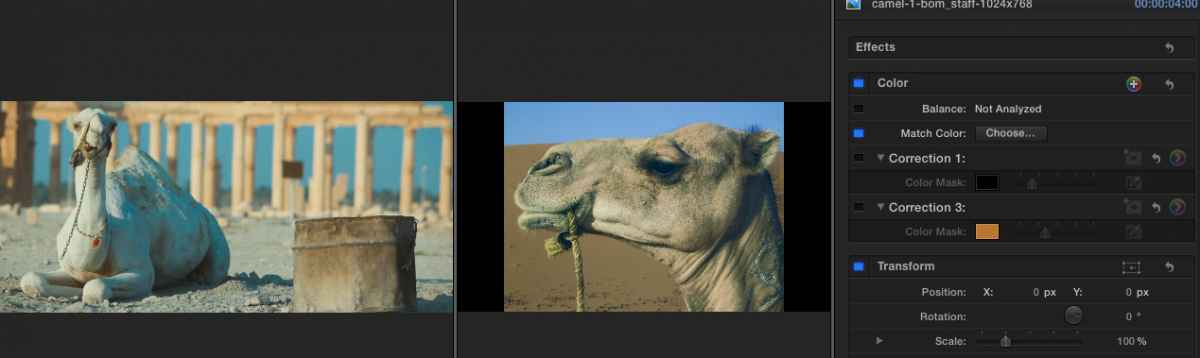
You see the automatically matched picture is "acceptable" but far from as good as the manual correction that only took 10 seconds to do. That's because Match Color only does global adjustments.
OTOH I have experienced that if both your original image and the image you want to match are of a very high quality (little compression and loads of pixels) the Match Color feature can do miracles. The more pixel information you have the better it will work.
- Ronny
Just to clarify: I did not use the keyer for any color correction. I just used it to composite my manually corrected image over the original to show how well it matched.
I agree the Match Color feature sometimes can give you a really good and instantaneous result. But just like any automatic filter it also often does not work as expected. The most important gripe I have with Match Color is that the changes it makes to your clip are not reflected in the Color Board. This means that if the matching is close but not entirely correct there is no way you can easily fine-tune it because you just don't see what changes it has made.
Just for fun I have gone back to this test project and used Match Color match the stills. Here's the result:
You see the automatically matched picture is "acceptable" but far from as good as the manual correction that only took 10 seconds to do. That's because Match Color only does global adjustments.
OTOH I have experienced that if both your original image and the image you want to match are of a very high quality (little compression and loads of pixels) the Match Color feature can do miracles. The more pixel information you have the better it will work.
- Ronny
Please Log in to join the conversation.
- Karsten Schlüter
-
- Offline
- Moderator
-
Less
More
- Posts: 3790
- Thank you received: 718
22 Oct 2013 10:45 #32852
by Karsten Schlüter
yepp, esp. for beginners like me, it would be (sometimes) very helpful to know which 'knobs&sliders' were turned for some result. Or, to adjust from that a little further....
… as the Keyer, it can do miracles ... sometimes not.
That's why I mentioned that ...
… and the 'trick' is, to find a 'good' color template.- Often I fail with that, results are sometimes a bit … erratic :lol:
THANKS Ronny for sharing your insights!
This is the most helpful board, I found in the last 10-15years ...
(aside The Mothership)
Replied by Karsten Schlüter on topic Edit with CMYK profil?
ronny courtens wrote: … The most important gripe I have with Match Color is that the changes it makes to your clip are not reflected in the Color Board.
yepp, esp. for beginners like me, it would be (sometimes) very helpful to know which 'knobs&sliders' were turned for some result. Or, to adjust from that a little further....
… as the Keyer, it can do miracles ... sometimes not.
That's why I mentioned that ...
… and the 'trick' is, to find a 'good' color template.- Often I fail with that, results are sometimes a bit … erratic :lol:
THANKS Ronny for sharing your insights!
This is the most helpful board, I found in the last 10-15years ...
(aside The Mothership)
Please Log in to join the conversation.
