


3 Post Moderation Rule for New Boarders (25 Jan 2021)
New boarders will have their posts moderated - Don't worry if you cannot see your post immediately.
Hellllppppp ... My Imac is running really slow !!!!
- pnlmckeown1973
-
 Topic Author
- Offline
- New Member
-

Less
More
15 Oct 2013 20:11 - 15 Oct 2013 20:12 #32530
by pnlmckeown1973
Hi there ...
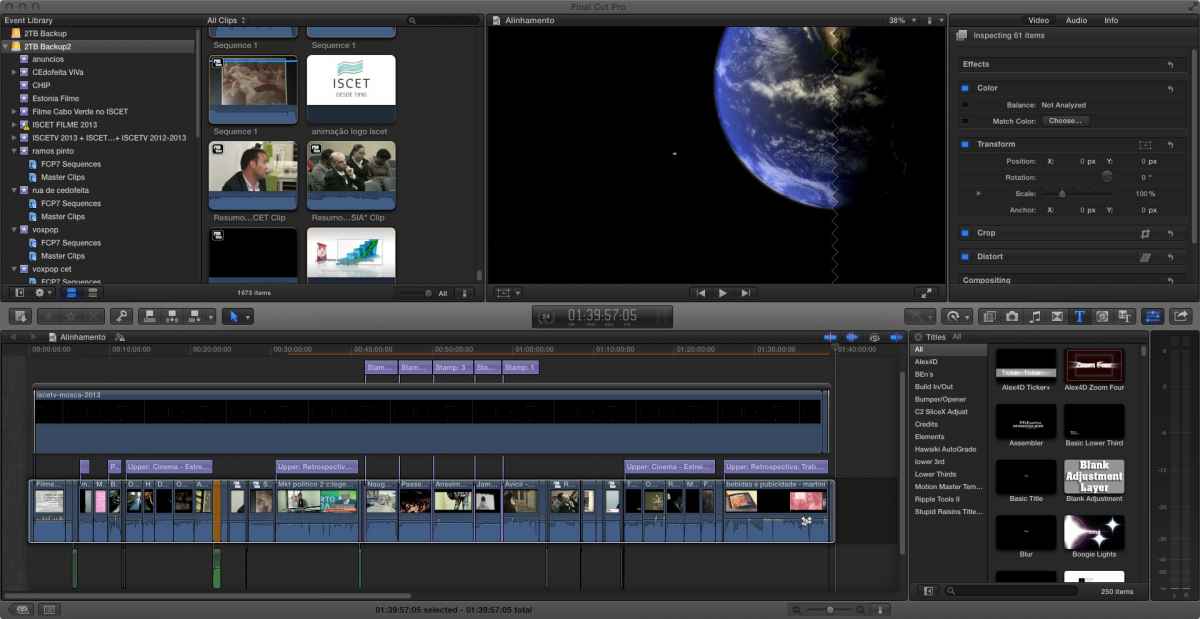
I am editing a playlist of over 2 hours in duration ... when i try to include a motion 5 template the system slows down to a crawl !!
Above shows the project
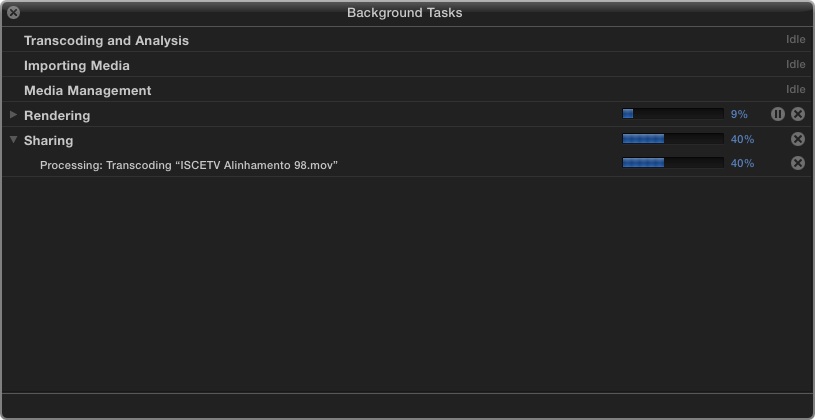
below shows the render state which has been this way for over a day !!!
any help would be grateful as i have to produce this type of project on a weekly basis .
the render in needed because otherwise the motion file won´t play without stuttering.
ok the stats
iMac 21.5" , mid 2010
Processor 3,06 GHz Intel Core i3
RAM 12 GB 1333 MHz DDR3
ATI Radeon HD 4670 256 MB
OS X 10.8.5
FINAL CUT PRO X 10.0.9
External drives are WD MyBOOK USB 3.0 using a Trust 10 USB HUb connected to the Imac
so what am i doing wrong ??
Mac
I am editing a playlist of over 2 hours in duration ... when i try to include a motion 5 template the system slows down to a crawl !!
Above shows the project
below shows the render state which has been this way for over a day !!!
any help would be grateful as i have to produce this type of project on a weekly basis .
the render in needed because otherwise the motion file won´t play without stuttering.
ok the stats
iMac 21.5" , mid 2010
Processor 3,06 GHz Intel Core i3
RAM 12 GB 1333 MHz DDR3
ATI Radeon HD 4670 256 MB
OS X 10.8.5
FINAL CUT PRO X 10.0.9
External drives are WD MyBOOK USB 3.0 using a Trust 10 USB HUb connected to the Imac
so what am i doing wrong ??
Mac
Last edit: 15 Oct 2013 20:12 by pnlmckeown1973.
Please Log in to join the conversation.
- pnlmckeown1973
-
Topic Author
- Offline
- New Member
-
15 Oct 2013 20:15 - 15 Oct 2013 20:20 #32531
by pnlmckeown1973
Replied by pnlmckeown1973 on topic Hellllppppp ... My Imac is running really slow !!!!
Last edit: 15 Oct 2013 20:20 by pnlmckeown1973. Reason: add image file
Please Log in to join the conversation.
- pnlmckeown1973
-
Topic Author
- Offline
- New Member
-
15 Oct 2013 20:16 #32532
by pnlmckeown1973
Replied by pnlmckeown1973 on topic Hellllppppp ... My Imac is running really slow !!!!
Please Log in to join the conversation.
- ronny courtens
-

- Offline
- Moderator
-

Less
More
- Posts: 4455
- Thank you received: 962
16 Oct 2013 07:29 #32560
by ronny courtens
Replied by ronny courtens on topic Hellllppppp ... My Imac is running really slow !!!!
Hi Paul,
1. Your USB3 drive is slowing everything down. As your computer does not have native USB3 ports you are in fact working with a USB2 connection, which is really slow. When rendering your timeline your computer must read the original media from your USB drive and simultaneously write the render files to it. That's way too much for a USB2.
2. But what surprises me most is that the screenshot of your Background tasks window shows that you are rendering and exporting at the same time. Your Render task shows 9% done and your Share task is at 40%. You should only render when you need to see something on your timeline in realtime or full quality, and export when your edit is completely finished. Don't do both at the same time, and certainly not with the drive you are using.
- Ronny
1. Your USB3 drive is slowing everything down. As your computer does not have native USB3 ports you are in fact working with a USB2 connection, which is really slow. When rendering your timeline your computer must read the original media from your USB drive and simultaneously write the render files to it. That's way too much for a USB2.
2. But what surprises me most is that the screenshot of your Background tasks window shows that you are rendering and exporting at the same time. Your Render task shows 9% done and your Share task is at 40%. You should only render when you need to see something on your timeline in realtime or full quality, and export when your edit is completely finished. Don't do both at the same time, and certainly not with the drive you are using.
- Ronny
Please Log in to join the conversation.
