


- Posts: 383
- Thank you received: 36
3 Post Moderation Rule for New Boarders (25 Jan 2021)
New boarders will have their posts moderated - Don't worry if you cannot see your post immediately.
Archiving Effects with Projects
09 Oct 2013 21:43 #32327
by Dave_EP
Archiving Effects with Projects was created by Dave_EP
We need to archive several events / projects in the coming week and I'm a little concerned about making sure we will have all the right custom created effects and transitions in place if we ever need to restore them.
It looks to me as if the effects / transitions simply live in the Movies folder (under the Motion folder) and these don't get backed up with projects. With this in mind, is there :
a) Anyway to get a list of all the effects used in a project (they are large projects with extensive customer effects) so we can find them / back them up
or
b) Automatically back them up with a project?
It looks to me as if the effects / transitions simply live in the Movies folder (under the Motion folder) and these don't get backed up with projects. With this in mind, is there :
a) Anyway to get a list of all the effects used in a project (they are large projects with extensive customer effects) so we can find them / back them up
or
b) Automatically back them up with a project?
Please Log in to join the conversation.
- ronny courtens
-

- Offline
- Moderator
-

Less
More
- Posts: 4455
- Thank you received: 962
09 Oct 2013 22:49 #32330
by ronny courtens
Replied by ronny courtens on topic Archiving Effects with Projects
Hi David,
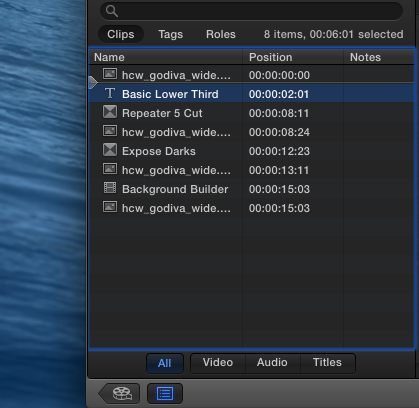
a. You can see any title, generator or transition you have used in a Project by opening the Timeline Index. All transitions, generators and titles are listed in there with their names, in the order in which they appear on your Timeline:
In the Inspector > Video tab you can see which filters you have used on a clip.
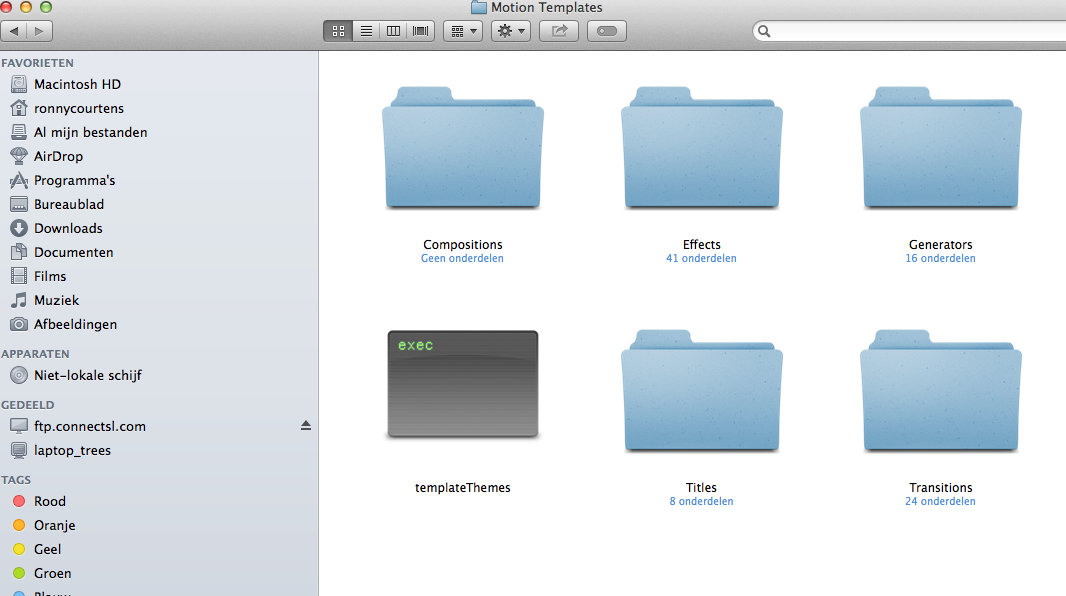
b. Not automatically, no. You will have to go into your Movies > Motion Templates folder and locate every effect you have used:
Then you can copy these effects, transitions, titles... into a new Motion Templates folder on the drive where you will be backing up your Event and your Projects.
Or you just can make a copy of your entire Motion Projects folder and put the copy on your backup drive. Motion Templates are relatively small files. When you need to restore a Project you drag the copied folder back onto your existing Movies > Motion Templates folder and any effects, titles etc... that are not in the existing Motion Templates folder will be added to it.
In short: no, it's not easy to include effects, transitions, etc... in your project backups. If this option still isn't there in the next update, fill in the feedback form.
- Ronny
a. You can see any title, generator or transition you have used in a Project by opening the Timeline Index. All transitions, generators and titles are listed in there with their names, in the order in which they appear on your Timeline:
In the Inspector > Video tab you can see which filters you have used on a clip.
b. Not automatically, no. You will have to go into your Movies > Motion Templates folder and locate every effect you have used:
Then you can copy these effects, transitions, titles... into a new Motion Templates folder on the drive where you will be backing up your Event and your Projects.
Or you just can make a copy of your entire Motion Projects folder and put the copy on your backup drive. Motion Templates are relatively small files. When you need to restore a Project you drag the copied folder back onto your existing Movies > Motion Templates folder and any effects, titles etc... that are not in the existing Motion Templates folder will be added to it.
In short: no, it's not easy to include effects, transitions, etc... in your project backups. If this option still isn't there in the next update, fill in the feedback form.
- Ronny
Please Log in to join the conversation.
