


3 Post Moderation Rule for New Boarders (25 Jan 2021)
New boarders will have their posts moderated - Don't worry if you cannot see your post immediately.
Relinking Transcoded Media


09 Oct 2013 13:57 #32291
by foxytom
Relinking Transcoded Media was created by foxytom
Hello All,
Had a disaster. Beach ball of death etc...
At one point I managed to access the event long enough to export an XML file.
I then re-imported this and relinked the media. I pointed it too the original media (as suggested by the relink event files dialogue) but the problem is that, despite being in the correct place, it does not see the transcoded (ProRes) media. It has also lost the analysis files (though I am less bothered by this).
As we are talking some 1.5TB you may understand that I am not massively keen on re-transcoding.
Does anyone have any pointers?
Had a disaster. Beach ball of death etc...
At one point I managed to access the event long enough to export an XML file.
I then re-imported this and relinked the media. I pointed it too the original media (as suggested by the relink event files dialogue) but the problem is that, despite being in the correct place, it does not see the transcoded (ProRes) media. It has also lost the analysis files (though I am less bothered by this).
As we are talking some 1.5TB you may understand that I am not massively keen on re-transcoding.
Does anyone have any pointers?
Please Log in to join the conversation.
- ronny courtens
-

- Offline
- Moderator
-

Less
More
- Posts: 4455
- Thank you received: 962
09 Oct 2013 15:12 - 09 Oct 2013 15:16 #32299
by ronny courtens
Replied by ronny courtens on topic Relinking Transcoded Media
Hi Tom,
You have been very wise to export an XML as soon as you could.
Are you sure FCPX does not see the optimized media?
Select a clip in the Event Browser and in the Inspector click the Info tab. Then click on the little gear icon at the bottom right of your Inspector window and select Show File Status:
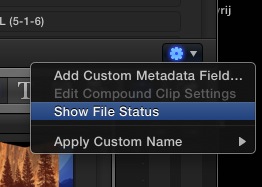
Now you will see the file status of the clip in the Info window. Look at Available Media Representations. Do you see Optimized with a green dot there? Can you post a screenshot go the Info window?
- Ronny
You have been very wise to export an XML as soon as you could.
Are you sure FCPX does not see the optimized media?
Select a clip in the Event Browser and in the Inspector click the Info tab. Then click on the little gear icon at the bottom right of your Inspector window and select Show File Status:
Now you will see the file status of the clip in the Info window. Look at Available Media Representations. Do you see Optimized with a green dot there? Can you post a screenshot go the Info window?
- Ronny
Last edit: 09 Oct 2013 15:16 by ronny courtens.
Please Log in to join the conversation.
- ronny courtens
-
- Offline
- Moderator
-
Less
More
- Posts: 4455
- Thank you received: 962
09 Oct 2013 15:16 #32302
by ronny courtens
Replied by ronny courtens on topic Relinking Transcoded Media
Error: click on the gear icon on the bottom RIGHT of the Inspector, not bottom left.
- Ronny
- Ronny
Please Log in to join the conversation.
09 Oct 2013 15:47 #32306
by foxytom
Replied by foxytom on topic Relinking Transcoded Media
Indeed, they are there. Thanks for that. I thought it was cutting nice an quickly for H264
Analysis is still gone anf the new project still takes ages to load, which, for a second, led me to believe that the Event was corrupted again.
Analysis is still gone anf the new project still takes ages to load, which, for a second, led me to believe that the Event was corrupted again.
Please Log in to join the conversation.
- ronny courtens
-
- Offline
- Moderator
-
Less
More
- Posts: 4455
- Thank you received: 962
09 Oct 2013 15:57 #32307
by ronny courtens
Replied by ronny courtens on topic Relinking Transcoded Media
Glad to hear the Optimized media are recognized after all.
Are you working from your internal system drive? If so you might consider moving the entire Event and Project to a decent (not USB2) external drive. This will run much faster. OTOH if your Project is nearly finished (and as you are working with a large Event) you might try to completely finish this as it is before you get into trouble again. Don't forget to make regular backups of both your Project and Event files.
As you have relinked to the original media (which is good) the analysis files may have lost their links to the clips on the Timeline. Please send feedback to Apple about this as it shows a weakness in FCPX relinking.
- Ronny
Are you working from your internal system drive? If so you might consider moving the entire Event and Project to a decent (not USB2) external drive. This will run much faster. OTOH if your Project is nearly finished (and as you are working with a large Event) you might try to completely finish this as it is before you get into trouble again. Don't forget to make regular backups of both your Project and Event files.
As you have relinked to the original media (which is good) the analysis files may have lost their links to the clips on the Timeline. Please send feedback to Apple about this as it shows a weakness in FCPX relinking.
- Ronny
Please Log in to join the conversation.
09 Oct 2013 16:10 #32309
by foxytom
Replied by foxytom on topic Relinking Transcoded Media
It is on an eSata Raid which interestingly is no faster than when it is on FireWire (800.) During the beachball, there is no activity on the raid. Indeed, when the Raid does wake up, it gives one a glimmer of hope.
This pm I purchased "Backups for Final Cut Pro" which merely archives the project / event file. Vital app.
I now realise that I copied the Media files but not the analysis files into the new event (rather than link to the content on the old event) so that pretty much answers that question. If I were to copy it over now (a new analysis folder has been created) I might solve more problems than I solve...
This pm I purchased "Backups for Final Cut Pro" which merely archives the project / event file. Vital app.
I now realise that I copied the Media files but not the analysis files into the new event (rather than link to the content on the old event) so that pretty much answers that question. If I were to copy it over now (a new analysis folder has been created) I might solve more problems than I solve...
Please Log in to join the conversation.
- ronny courtens
-
- Offline
- Moderator
-
Less
More
- Posts: 4455
- Thank you received: 962
09 Oct 2013 16:15 #32310
by ronny courtens
Replied by ronny courtens on topic Relinking Transcoded Media
Okay so the drive you are working from is not the issue. As you don't have the analysis files in the correct place it is very possible that FCPX starts re-analyzing your clips as soon as it opens the Project. This could explain the slowdown. You have two options:
1. Replace the contents of the Analysis folder with the "old" analysis files.
2. Just wait patiently until FCPX has created the new analysis files again. Do you see any activity in the Background Tasks window?
- Ronny
1. Replace the contents of the Analysis folder with the "old" analysis files.
2. Just wait patiently until FCPX has created the new analysis files again. Do you see any activity in the Background Tasks window?
- Ronny
Please Log in to join the conversation.
09 Oct 2013 16:21 #32311
by foxytom
Replied by foxytom on topic Relinking Transcoded Media
I'm going to do that as an overnighter methinks.
It does not seem to be analysing anything. The RAID, as previously mentioned, is dormant during the beachball.
I am suspecting a 3rd party, Motion based, plugin that I won't mention at this point out of fairness.
I am going to look at that too.
thanks Ronny
It does not seem to be analysing anything. The RAID, as previously mentioned, is dormant during the beachball.
I am suspecting a 3rd party, Motion based, plugin that I won't mention at this point out of fairness.
I am going to look at that too.
thanks Ronny
Please Log in to join the conversation.
- ronny courtens
-
- Offline
- Moderator
-
Less
More
- Posts: 4455
- Thank you received: 962
09 Oct 2013 16:28 #32313
by ronny courtens
Replied by ronny courtens on topic Relinking Transcoded Media
Yes some RAM-hungry plugins can slow down the opening of a Project and even crash it. It's very decent of you not to mention which one it is until you are entirely sure.
Good idea letting FCPX take the time do it's behind-the-scene organizing after such a heavy relink. Keep us posted on your progress.
- Ronny
Good idea letting FCPX take the time do it's behind-the-scene organizing after such a heavy relink. Keep us posted on your progress.
- Ronny
Please Log in to join the conversation.
09 Oct 2013 16:56 #32316
by foxytom
Replied by foxytom on topic Relinking Transcoded Media
Just as a heads up, I did just restart fcpx (after disabling said plugin in the timeline)
The same problem still occurs:
I laumch and the wait for 5 minutes of beachball. During this time:
1: Memory is not being excessively used (up to about 6 gigs)
2: The RAID is not being used at all
3: Actiivty monitor reports very moderate startup disk use (which could well not be FCPX)
4: CPU usage by FCPX is reported at being 100%, which on an Imac 2010 i7 is nothing to write home about.
5: After about 5 minutes the RAID (which has a nice nright light) flickers to life. It only after another munute or so that any thumbnails begin to appear.
6: This is a massive project. Am I mad to be using compound clips?
7: Make tea not love.
The same problem still occurs:
I laumch and the wait for 5 minutes of beachball. During this time:
1: Memory is not being excessively used (up to about 6 gigs)
2: The RAID is not being used at all
3: Actiivty monitor reports very moderate startup disk use (which could well not be FCPX)
4: CPU usage by FCPX is reported at being 100%, which on an Imac 2010 i7 is nothing to write home about.
5: After about 5 minutes the RAID (which has a nice nright light) flickers to life. It only after another munute or so that any thumbnails begin to appear.
6: This is a massive project. Am I mad to be using compound clips?
7: Make tea not love.
Please Log in to join the conversation.
- ronny courtens
-
- Offline
- Moderator
-
Less
More
- Posts: 4455
- Thank you received: 962
09 Oct 2013 17:14 #32317
by ronny courtens
Replied by ronny courtens on topic Relinking Transcoded Media
LOL!! Thanks for the video.
Yes Compound Clips can still be tricky. Especially if you have CCs within a CC, that's one thing you should avoid doing. If the project is so huge I would not really worry if it takes a minute or so to launch. But 5 minutes is really, really long. Next time you launch it check your Activity monitor > System Memory. If you see a lot of Page-ins, Page-outs and Used Swaps this means you are too low on RAM for the project you are loading (even if not all of your available RAM is actually being used when you load it) and the system is writing cache memory to your system drive, which makes the caching very slow.
- Ronny
Yes Compound Clips can still be tricky. Especially if you have CCs within a CC, that's one thing you should avoid doing. If the project is so huge I would not really worry if it takes a minute or so to launch. But 5 minutes is really, really long. Next time you launch it check your Activity monitor > System Memory. If you see a lot of Page-ins, Page-outs and Used Swaps this means you are too low on RAM for the project you are loading (even if not all of your available RAM is actually being used when you load it) and the system is writing cache memory to your system drive, which makes the caching very slow.
- Ronny
Please Log in to join the conversation.
- jjsanderson
-

- Offline
- Elite Member
-

10 Oct 2013 12:03 #32356
by jjsanderson
Replied by jjsanderson on topic Relinking Transcoded Media
A long shot: can you tell us more about the RAID? I had an eSATA RAID hanging off a cheap RocketRAID 2314 card that was woefully unreliable. Throwing a heavy load at it would cause the PCI card to stop responding, and eventually I tore the RAID apart and started again with the system reset to JBOD. It's still not brilliantly reliable once port multiplier enclosures are involved, but it can usually be coaxed into mounting the drives and talking to several of them at once.
When the system was playing up the RAID enclosure often showed no activity, but the problem wasn't with Final Cut as such, it was with the controller card dropping and reconnecting the RAID volume constantly.
If memory serves the system log in Console was spewing disconnect/reconnect messages even as the array itself sat idle. FCPX beachballed waiting for the drive to talk to it.
When the system was playing up the RAID enclosure often showed no activity, but the problem wasn't with Final Cut as such, it was with the controller card dropping and reconnecting the RAID volume constantly.
If memory serves the system log in Console was spewing disconnect/reconnect messages even as the array itself sat idle. FCPX beachballed waiting for the drive to talk to it.
Please Log in to join the conversation.
- ronny courtens
-
- Offline
- Moderator
-
Less
More
- Posts: 4455
- Thank you received: 962
10 Oct 2013 12:08 #32357
by ronny courtens
Replied by ronny courtens on topic Relinking Transcoded Media
Maybe a long shot, but great idea!
- Ronny
- Ronny
Please Log in to join the conversation.
11 Oct 2013 10:13 #32389
by foxytom
Replied by foxytom on topic Relinking Transcoded Media
That is an interesting point JJ
I have a hacked Imac 2010 with an eSata cable coming out of the memory bay. That does mean that the cable is coming straight off the logic board but it is also hacked.
I don't think that the eSata is the problem as, once loaded, the project/event are working fine (fingers crossed)
Interestingly, compressor is taking an age to kick in. This is the first time I have used compressor with fcpx.
I will try and reboot with the RAID (which I need to do as, with this hack, OS x thinks the drive is internal) as a FW800 and see what happens.
Cheers,
T
I have a hacked Imac 2010 with an eSata cable coming out of the memory bay. That does mean that the cable is coming straight off the logic board but it is also hacked.
I don't think that the eSata is the problem as, once loaded, the project/event are working fine (fingers crossed)
Interestingly, compressor is taking an age to kick in. This is the first time I have used compressor with fcpx.
I will try and reboot with the RAID (which I need to do as, with this hack, OS x thinks the drive is internal) as a FW800 and see what happens.
Cheers,
T
Please Log in to join the conversation.
