


3 Post Moderation Rule for New Boarders (25 Jan 2021)
New boarders will have their posts moderated - Don't worry if you cannot see your post immediately.
compound clip issues resolved


05 Oct 2013 14:46 #32090
by Gretta
compound clip issues resolved was created by Gretta
I posted a while ago that I could not delete some old, unused compound clips because they were "in use by a project or event". Many of my old CCs were trashed with no problem, so it was a real mystery. Whenever I had put a CC in a project, I always broke them apart and have re-edited and duplicated the projects many times (for versioning) since beginning work on this…(what do we call it now? 'Movie', I guess since Project now has a specific meaning.) Why was FCPX still seeing a connection?
Working thru' this (with Ben Balser), it became apparent that the CCs that were created before more recent updates (March, June) were the culprits. FCPX was holding on to old rules for CCs.
Some cannot be deleted at all, others can be trashed but result in missing media in ALL versions of project back to the first time I dropped the CC into it.
I've been taking the time to reconstruct these scenes to finally break the connection to outdated Compound Clips, and I wanted this info to be available to anyone who finds this issue in their workflow.
Onward Thru the Fog…
Gretta
Working thru' this (with Ben Balser), it became apparent that the CCs that were created before more recent updates (March, June) were the culprits. FCPX was holding on to old rules for CCs.
Some cannot be deleted at all, others can be trashed but result in missing media in ALL versions of project back to the first time I dropped the CC into it.
I've been taking the time to reconstruct these scenes to finally break the connection to outdated Compound Clips, and I wanted this info to be available to anyone who finds this issue in their workflow.
Onward Thru the Fog…
Gretta
Please Log in to join the conversation.
- ronny courtens
-

- Offline
- Moderator
-

Less
More
- Posts: 4455
- Thank you received: 962
06 Oct 2013 06:29 #32111
by ronny courtens
Replied by ronny courtens on topic compound clip issues resolved
Hi Gretta,
Glad you have sorted this out and thank you for posting your results. FCPX is growing fast and until it gets mature we are bound to see some growing pains like these.
- Ronny
Glad you have sorted this out and thank you for posting your results. FCPX is growing fast and until it gets mature we are bound to see some growing pains like these.
- Ronny
Please Log in to join the conversation.
- Karsten Schlüter
-

- Offline
- Moderator
-
Less
More
- Posts: 3790
- Thank you received: 718
06 Oct 2013 07:20 #32112
by Karsten Schlüter
… just my very personal view - but CCs are mentioned way to often as cause for 'issues'.
Funny enough: I almost work without any… But I know, CCs are 'abused' as replacement for goo' ol' tracks... :lol:
My preferred CC in use here is an Opening Sequence, … which varies slightly week-per-week.
In the beginning, I made the mistake, to modify the CC (double-click, edit, close) - which, indeed, changed EVERY Project, this CC was ever in use.
Finally found advice from our friends of rippletraining, Marc + Steve:
The whole 'trick' is:
'Clip/Reference to new Parent Clip'
When you plan to modify a CC in different Projects, use this command …
// meant as advice for beginners like me … //
Replied by Karsten Schlüter on topic compound clip issues resolved
Gretta wrote: … Some cannot be deleted at all, others can be trashed but result in missing media in ALL versions of project back to the first time I dropped the CC into it.…
… just my very personal view - but CCs are mentioned way to often as cause for 'issues'.
Funny enough: I almost work without any… But I know, CCs are 'abused' as replacement for goo' ol' tracks... :lol:
My preferred CC in use here is an Opening Sequence, … which varies slightly week-per-week.
In the beginning, I made the mistake, to modify the CC (double-click, edit, close) - which, indeed, changed EVERY Project, this CC was ever in use.
Finally found advice from our friends of rippletraining, Marc + Steve:
The whole 'trick' is:
'Clip/Reference to new Parent Clip'
When you plan to modify a CC in different Projects, use this command …
// meant as advice for beginners like me … //
Please Log in to join the conversation.
06 Oct 2013 15:34 - 06 Oct 2013 15:39 #32119
by Gretta
Replied by Gretta on topic compound clip issues resolved
Thanks, Karsten, but the problem I was experiencing had nothing to do with reusing TV bumpers or opens, it was that I could not delete unused CCs because they were still 'in use'. None of them had been 'in use' for months. The problem is that they were created 9 or 10 months ago in older versions of FCPX which had different rules for CCs.
I posted in case others had similar strange warning dialogs, as no one was able to figure out for me what was going on.
Created in 10.0.9, the CCs do indeed work exactly right: broken apart in a project, they don't reference the CC, and 'new parent' allows updating of stock opens (which I do need for one client) (PS: that MacBreak Studio clip was created in 2011: many versions ago. IMHO, tutorials that are out of date should be revised or deleted (much like old Compound clips!!
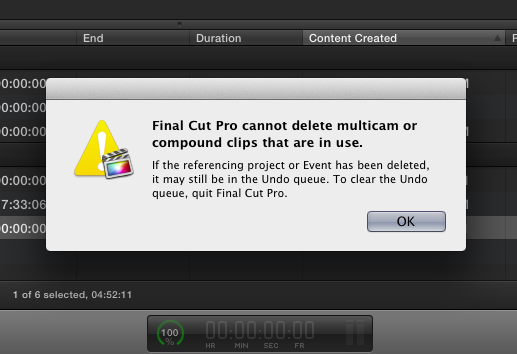
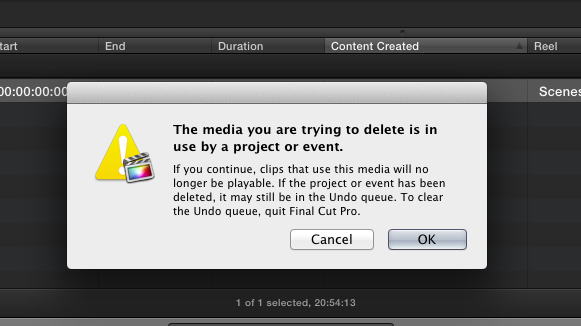
I posted in case others had similar strange warning dialogs, as no one was able to figure out for me what was going on.
Created in 10.0.9, the CCs do indeed work exactly right: broken apart in a project, they don't reference the CC, and 'new parent' allows updating of stock opens (which I do need for one client) (PS: that MacBreak Studio clip was created in 2011: many versions ago. IMHO, tutorials that are out of date should be revised or deleted (much like old Compound clips!!
Last edit: 06 Oct 2013 15:39 by Gretta.
Please Log in to join the conversation.


07 Oct 2013 11:45 #32152
by BenB
Replied by BenB on topic compound clip issues resolved
Those two specific warnings can be literal at time. I've actually found when getting these, to quit and restart FCPX and the CCs can then be moved to the trash easily. Not always, but often.
Please Log in to join the conversation.
