


- Posts: 32
- Thank you received: 1
3 Post Moderation Rule for New Boarders (25 Jan 2021)
New boarders will have their posts moderated - Don't worry if you cannot see your post immediately.
Green image on FCP X 10.0.9
05 Oct 2013 06:34 #32077
by namu5583
Green image on FCP X 10.0.9 was created by namu5583
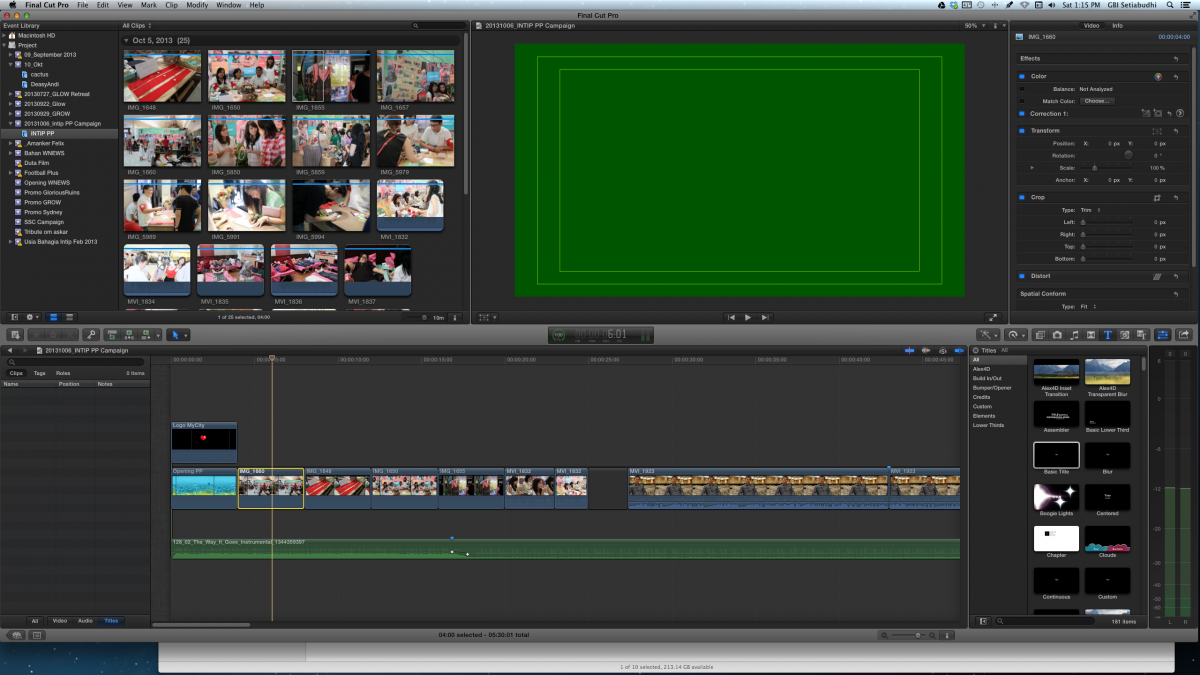
Guys, I'm using FCP X 10.0.9 and this never happens on older version of FCP X.
On random occasion, if I insert an image at the storyline or on top the storyline, the image became a solid green. I found that it can be cured when the image scale is changed.
Even on one occasion, the image never turns to green but when it rendered the image turn green.
If any of you can explain why this is happening or this is just another glitch on FCP X, maybe the people at Apple should know.
Thanks.
On random occasion, if I insert an image at the storyline or on top the storyline, the image became a solid green. I found that it can be cured when the image scale is changed.
Even on one occasion, the image never turns to green but when it rendered the image turn green.
If any of you can explain why this is happening or this is just another glitch on FCP X, maybe the people at Apple should know.
Thanks.
Please Log in to join the conversation.
- ronny courtens
-

- Offline
- Moderator
-

Less
More
- Posts: 4455
- Thank you received: 962
05 Oct 2013 09:51 #32081
by ronny courtens
Replied by ronny courtens on topic Green image on FCP X 10.0.9
Hi Alfred,
This issue has occurred in earlier versions as well. The green picture is indeed a render issue. That's why when you change something to the rendered clip (like resizing it) and then you re-render the clip the problem goes away.
In many cases this has happened when using two graphics cards on the same system, but it has happened on other occasions as well.
Mostly the problem is solved by deleting all your render files to get rid of any render file conflicts and then re-reder the timeline. If your video plays smoothly without rendering you don't need to re-render at all.
- Ronny
This issue has occurred in earlier versions as well. The green picture is indeed a render issue. That's why when you change something to the rendered clip (like resizing it) and then you re-render the clip the problem goes away.
In many cases this has happened when using two graphics cards on the same system, but it has happened on other occasions as well.
Mostly the problem is solved by deleting all your render files to get rid of any render file conflicts and then re-reder the timeline. If your video plays smoothly without rendering you don't need to re-render at all.
- Ronny
Please Log in to join the conversation.
- Tom Wolsky
-

- Offline
- Moderator
-
05 Oct 2013 10:09 #32082
by Tom Wolsky
Replied by Tom Wolsky on topic Green image on FCP X 10.0.9
You need to give the complete specifications of your media and your project properties.
Please Log in to join the conversation.
