


3 Post Moderation Rule for New Boarders (25 Jan 2021)
New boarders will have their posts moderated - Don't worry if you cannot see your post immediately.
Multicam - replacing an angle in the timeline


02 Oct 2013 10:56 - 02 Oct 2013 10:58 #31925
by foxytom
Multicam - replacing an angle in the timeline was created by foxytom
Hi there,
I recorded a multicam shoot, with two NEX-EA50's a goPro and Xoom h4. Set up the mutlticam and plopped in the timeline.
GoPro kept switching off and had to be restarted on several occasions and was therefore a bunch of separate clips.
It was not until I was fairly far in (sequence is 90 mins) that I realised that the GoPro was also out of sync (in my genius, which is not inconsiderable, I shot it at 48fps to the NEX's 50fps.)
So, I went back and transcoded the footage to 50fps in the hopes that I could pop it back in the timeline.
I have place the new recoded footage into a new angle and the timeline merely shows black (i have disabled, but not deleted the original goPro footage).
The new footage DOES show up in the angle editor but when I return to the main timeline there is nothing.
I tried moving the New footage into the angle of the Old footage but, again, nothing shows.
Any leads?
[EDIT first screen grab shows that one of the NEX's is black. The camera was not rolling at that particular moment]
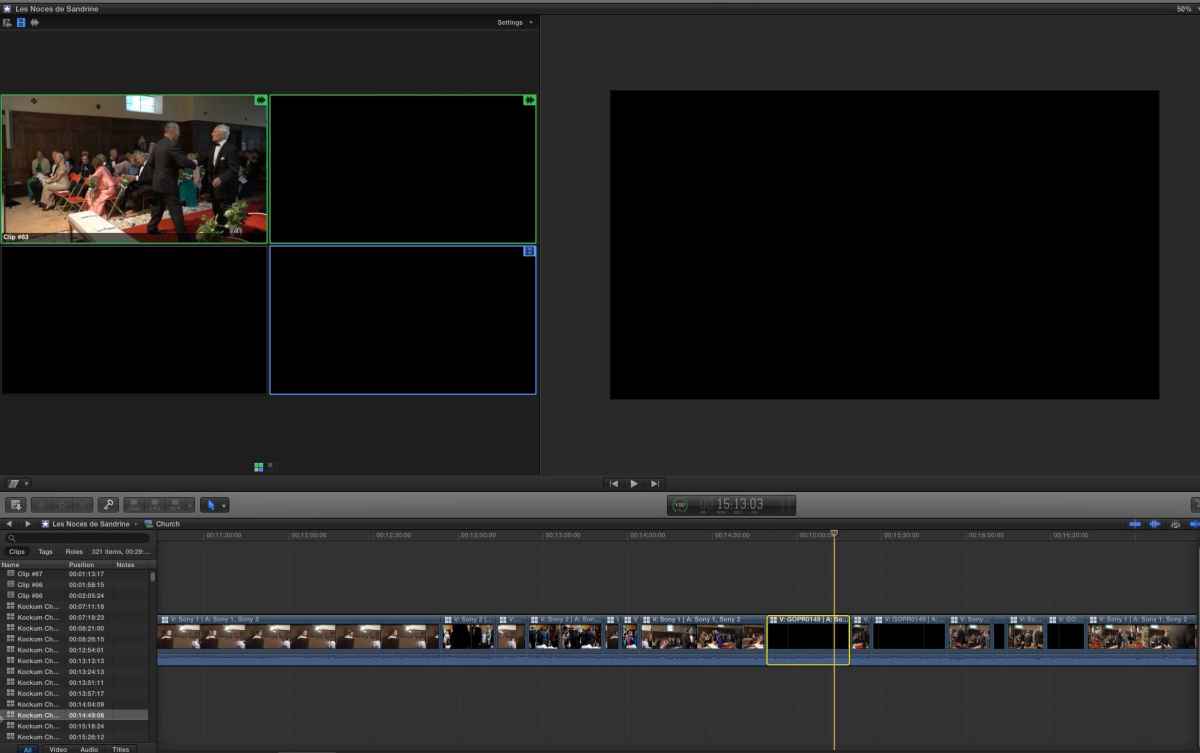
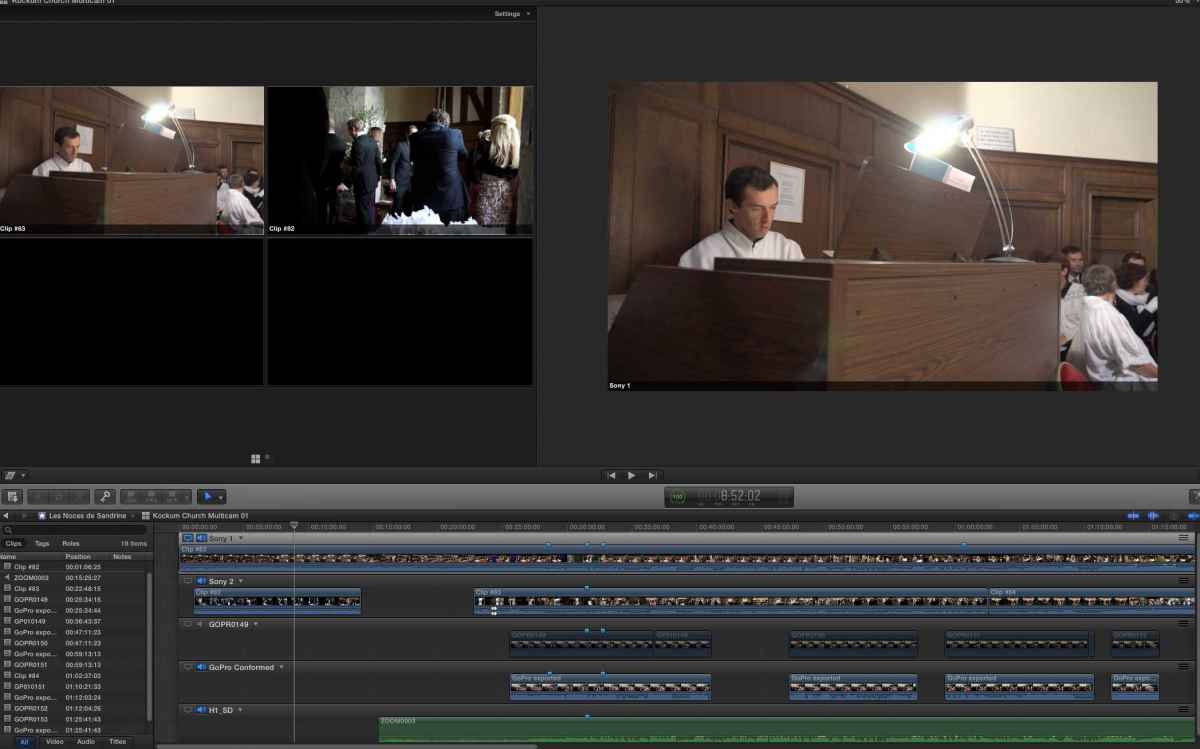
I recorded a multicam shoot, with two NEX-EA50's a goPro and Xoom h4. Set up the mutlticam and plopped in the timeline.
GoPro kept switching off and had to be restarted on several occasions and was therefore a bunch of separate clips.
It was not until I was fairly far in (sequence is 90 mins) that I realised that the GoPro was also out of sync (in my genius, which is not inconsiderable, I shot it at 48fps to the NEX's 50fps.)
So, I went back and transcoded the footage to 50fps in the hopes that I could pop it back in the timeline.
I have place the new recoded footage into a new angle and the timeline merely shows black (i have disabled, but not deleted the original goPro footage).
The new footage DOES show up in the angle editor but when I return to the main timeline there is nothing.
I tried moving the New footage into the angle of the Old footage but, again, nothing shows.
Any leads?
[EDIT first screen grab shows that one of the NEX's is black. The camera was not rolling at that particular moment]
Last edit: 02 Oct 2013 10:58 by foxytom. Reason: added info about angle viewer
Please Log in to join the conversation.
- ronny courtens
-

- Offline
- Moderator
-

Less
More
- Posts: 4455
- Thank you received: 962
02 Oct 2013 14:04 #31929
by ronny courtens
Replied by ronny courtens on topic Multicam - replacing an angle in the timeline
The screenshot you have posted only shows two active angles in the angle editor. Your playhead is parked at a spot where there is no video inside the "GoPro Conformed" angle. So it's very difficult to see what is exactly happening. Can you post a screenshot where your playhead is also over the first clip in the "GoPro Conformed" angle?
- Ronny
- Ronny
Please Log in to join the conversation.
02 Oct 2013 15:29 #31933
by foxytom
Replied by foxytom on topic Multicam - replacing an angle in the timeline
I thought that I had answered that question in my [Edit] tag, but it turns out I hadn't. When I went into the angle editor, I assumed that the playhead would be at the same point as in the "main" timeline. Why I thought it would be any different from a normal compound clip is a mystery. I find that "feature" very annoying.
So, as it turns out, the "goPro conformned" angle was working fine. I was just at the wrong point in the timeline. I told you that my "genius" was not inconsiderable
By asking that question, you provided that answer. Thank you Ronny
So, as it turns out, the "goPro conformned" angle was working fine. I was just at the wrong point in the timeline. I told you that my "genius" was not inconsiderable
By asking that question, you provided that answer. Thank you Ronny
Please Log in to join the conversation.
- ronny courtens
-
- Offline
- Moderator
-
Less
More
- Posts: 4455
- Thank you received: 962
02 Oct 2013 15:35 #31934
by ronny courtens
Replied by ronny courtens on topic Multicam - replacing an angle in the timeline
No problem, Tom. I am glad it works.
Yes it is indeed extremely annoying that when you open a multiclip from the Timeline in its Angle Editor, or a CC from the Timeline in its own timeline, the playhead does not stay at exactly the same spot in the clip where it was in the main Timeline. This absolutely needs to be addressed because it makes the whole "opening in timeline" feature quite useless.
- Ronny
Yes it is indeed extremely annoying that when you open a multiclip from the Timeline in its Angle Editor, or a CC from the Timeline in its own timeline, the playhead does not stay at exactly the same spot in the clip where it was in the main Timeline. This absolutely needs to be addressed because it makes the whole "opening in timeline" feature quite useless.
- Ronny
Please Log in to join the conversation.
