


- Posts: 20
- Thank you received: 0
3 Post Moderation Rule for New Boarders (25 Jan 2021)
New boarders will have their posts moderated - Don't worry if you cannot see your post immediately.
Why is my 960x720 (4:3) video showing with black letterbox bars at left & right???
02 Oct 2013 00:33 #31900
by mixedup
Why is my 960x720 (4:3) video showing with black letterbox bars at left & right??? was created by mixedup
I am trying to edit 960x720 (that has the 4:3 aspect ratio look) in FCPX but keep getting a 16:9 look as output when I "share" it. Can someone assist me in understanding where I am going wrong.
My steps:
[1] Recorded off iPad via Reflector => 960x720, AAC, H.264, HD(1-1-1) [no black edges]
[2] Import to FCP (transcoded) => 960x720, Apple ProRes 422, Lenear PCM, Timecode, HD (1-1-1) [no black edges]
[3] Create Project: 720p HD, 960x720, 30p (Apple ProRes 422)
[4] Put clip from [2] onto timeline ==> Get Black Edges (i.e. on left and right)
QUESTION 1 - Why is this if I set in [3] the video to 960x720, which matches that from [1] an d [2]?
[5] Share to Apple Devices 720p, with resolution 960x720 => has Black Edges
QUESTION 2 - Same as Q1 really
My steps:
[1] Recorded off iPad via Reflector => 960x720, AAC, H.264, HD(1-1-1) [no black edges]
[2] Import to FCP (transcoded) => 960x720, Apple ProRes 422, Lenear PCM, Timecode, HD (1-1-1) [no black edges]
[3] Create Project: 720p HD, 960x720, 30p (Apple ProRes 422)
[4] Put clip from [2] onto timeline ==> Get Black Edges (i.e. on left and right)
QUESTION 1 - Why is this if I set in [3] the video to 960x720, which matches that from [1] an d [2]?
[5] Share to Apple Devices 720p, with resolution 960x720 => has Black Edges
QUESTION 2 - Same as Q1 really
Please Log in to join the conversation.
- Tom Wolsky
-

- Offline
- Moderator
-

02 Oct 2013 01:31 #31904
by Tom Wolsky
Replied by Tom Wolsky on topic Why is my 960x720 (4:3) video showing with black letterbox bars at left & right???
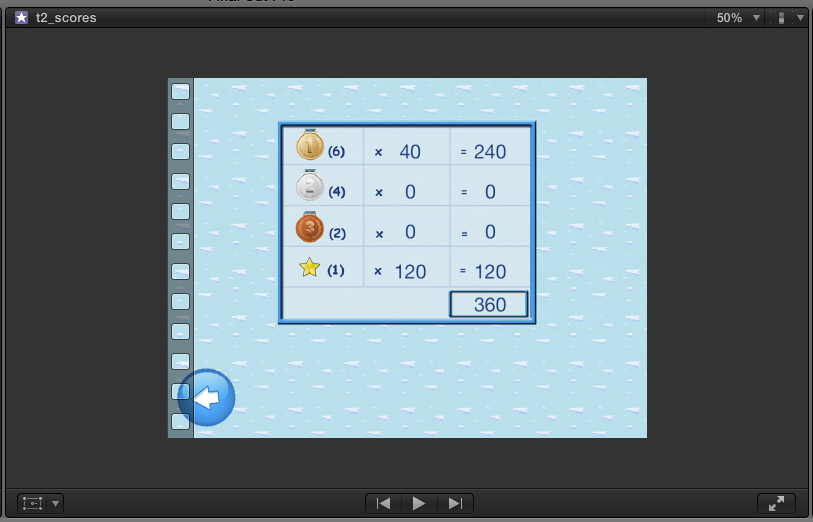
Post screen shot of this: Import to FCP (transcoded) => 960x720, Apple ProRes 422, Lenear PCM, Timecode, HD (1-1-1) [no black edges]
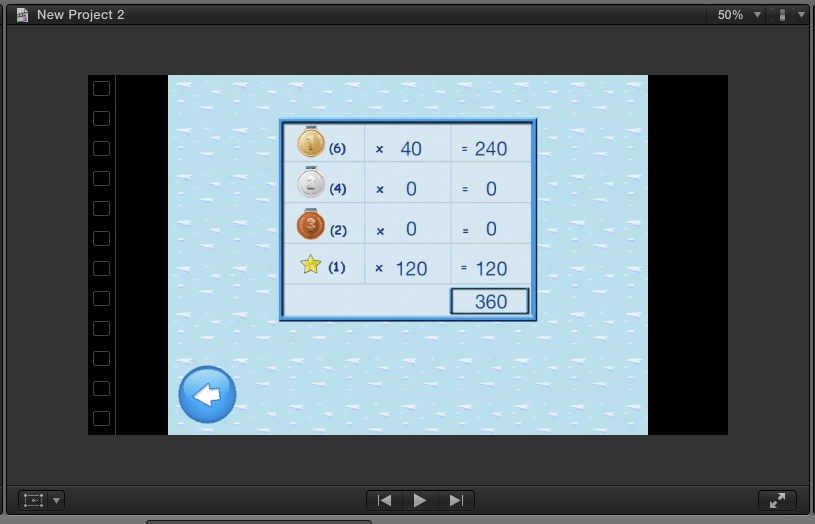
and post screen shot of this: Put clip from [2] onto timeline ==> Get Black Edges (i.e. on left and right)
and post screen shot of this: Put clip from [2] onto timeline ==> Get Black Edges (i.e. on left and right)
Please Log in to join the conversation.
02 Oct 2013 04:00 #31905
by mixedup
Replied by mixedup on topic Why is my 960x720 (4:3) video showing with black letterbox bars at left & right???
Hi Tom - here are the two snapshots (hopefully this was what you were after).
Please Log in to join the conversation.
- Tom Wolsky
-
- Offline
- Moderator
-
02 Oct 2013 04:29 #31907
by Tom Wolsky
Replied by Tom Wolsky on topic Why is my 960x720 (4:3) video showing with black letterbox bars at left & right???
The problem is 960x720 is an HD anamorphic format. Unfortunately what's been shot is not HD, not widescreen, but 4:3 square pixels. This would require a custom project size, or you could convert the media to standard definition using SD frame specs. FCP does not allow for custom project formats except using some workarounds.
Please Log in to join the conversation.
02 Oct 2013 04:35 #31908
by mixedup
Replied by mixedup on topic Why is my 960x720 (4:3) video showing with black letterbox bars at left & right???
Hi Tom,
So do you mean change the video to SD (PAL or NTSC) and try this? Would I lose some quality doing this? I should note final destination is uploading with as high as possible quality to youtube (not sure if this makes a difference to the answer)
I don't suppose there is a Mac app/tool that could easily "crop" off the edges? (just asking the dumb questions)
Else if the above is too difficult due to the nature of the formats, then reshooting the video using an iPhone 5 rather than an iPad may be required?
thanks
Greg
So do you mean change the video to SD (PAL or NTSC) and try this? Would I lose some quality doing this? I should note final destination is uploading with as high as possible quality to youtube (not sure if this makes a difference to the answer)
I don't suppose there is a Mac app/tool that could easily "crop" off the edges? (just asking the dumb questions)
Else if the above is too difficult due to the nature of the formats, then reshooting the video using an iPhone 5 rather than an iPad may be required?
thanks
Greg
Please Log in to join the conversation.
- Tom Wolsky
-
- Offline
- Moderator
-
02 Oct 2013 05:01 #31911
by Tom Wolsky
Replied by Tom Wolsky on topic Why is my 960x720 (4:3) video showing with black letterbox bars at left & right???
Going down to SD will reduce quality. Reshooting with a video camera would be best.
Please Log in to join the conversation.
02 Oct 2013 05:34 #31916
by mixedup
Replied by mixedup on topic Why is my 960x720 (4:3) video showing with black letterbox bars at left & right???
ok - thanks Tom
PS. As it is "videoing" a game being played on an IOS device I can't really video it as such (with using tilt and controls etc) hence the use of "Air Play" and "Reflector" to show a window on a Mac that can be recorded that emulates the device I'll try again with an iPhone 5 rather than iPad
PS. As it is "videoing" a game being played on an IOS device I can't really video it as such (with using tilt and controls etc) hence the use of "Air Play" and "Reflector" to show a window on a Mac that can be recorded that emulates the device
I'll try again with an iPhone 5 rather than iPad Please Log in to join the conversation.
