


- Posts: 192
- Thank you received: 23
3 Post Moderation Rule for New Boarders (25 Jan 2021)
New boarders will have their posts moderated - Don't worry if you cannot see your post immediately.
Bug in FCPX with dissapearing markers on the primary storyline
25 Sep 2013 18:36 #31555
by sidderke
So after loosing markers on my timeline for the second time, I finally know where the bug is, and I could reproduce it, and I also made a screen recording. I filled in feedback to Apple, but I also wanted to post it here, to make people aware of the issue and hopefully not experiencing the same.
If you ever had an edit session with a client where you depended on the information you put in your markers, it can cost you a lot of time, money and energy if you loose all your markers...
So!
The problem: Dissapearing Markers on the Primary Storyline
Details:
Although we like the benefits of the magnetic timeline, for certain complex edits we do, we have to do them as connected clips, to avoid magnetism. We have to work with layers anyhow, but in those edits we only leave gaps in the primary storyline for specific editing reasons.
Anyhow, we have a primary storyline full of gap clips (not one big long gap clip, but they are cut in multiple clips). We have connected clips on all of those.
We do put our markers with to do's etc on the primary storyline.
When you put a dissolve between 2 connected clips, it automatically becomes a connected storyline, you cannot change this.
But here comes the bug: if you select a clip in the connected storyline, and do the shortcut LIFT FROM STORYLINE, suddenly ALL your markers dissapear on the primary storyline, and it also made one big clip of all the different gap clips on the primary storyline (which explains the markers dissapearing as they were connected to those gap clips).
Pretty serious bug, and easily reproducable.
Here is a link to a screen recording showing the bug in action:
www.dropbox.com/s/6x5lswgt197bggt/BUG_MA...%20-%20Broadband.m4v
If you ever had an edit session with a client where you depended on the information you put in your markers, it can cost you a lot of time, money and energy if you loose all your markers...
So!
The problem: Dissapearing Markers on the Primary Storyline
Details:
Although we like the benefits of the magnetic timeline, for certain complex edits we do, we have to do them as connected clips, to avoid magnetism. We have to work with layers anyhow, but in those edits we only leave gaps in the primary storyline for specific editing reasons.
Anyhow, we have a primary storyline full of gap clips (not one big long gap clip, but they are cut in multiple clips). We have connected clips on all of those.
We do put our markers with to do's etc on the primary storyline.
When you put a dissolve between 2 connected clips, it automatically becomes a connected storyline, you cannot change this.
But here comes the bug: if you select a clip in the connected storyline, and do the shortcut LIFT FROM STORYLINE, suddenly ALL your markers dissapear on the primary storyline, and it also made one big clip of all the different gap clips on the primary storyline (which explains the markers dissapearing as they were connected to those gap clips).
Pretty serious bug, and easily reproducable.
Here is a link to a screen recording showing the bug in action:
www.dropbox.com/s/6x5lswgt197bggt/BUG_MA...%20-%20Broadband.m4v
Please Log in to join the conversation.

25 Sep 2013 19:57 #31559
by plysat
Can't sleep? Try this: fcpxpert.net ;-)
Replied by plysat on topic Bug in FCPX with dissapearing markers on the primary storyline
Well, since you posted it here as well, I'll reply here too. :lol:
Honestly, i don't think its a bug… it's a feature. For your workflow, yes, it's bad. For me, I'f I've lifted clips from a storyline, I want all the gap clips to reunite.
If I need fixed markers throughout a cut, since ya can't have markers in the timecode/navigation bar, my solution was to make a long, silent audio clip. Add it to the timeline first so it "sticks" to the primary, and make sure it begins, and is connected, to the first frame of your timeline. Give it a unique role, uncheck that role in the index to disable it, and also minimize it using the button in it's Role in the index. Put your "sequence markers" on this clip. Voila! Markers that don't move, unless you want them to.
If you think you may want to cut the marker clip to pull it up, say if you cut out a section but want your markers beyond the cut to stay in sync… create a secondary containing the marker clip and you chop it and pull it up with everything else, but the secondary will alway be connected to first frame so it won't move. The markers will reference timeline position unless you cut the marker clip within the secondary and move it manually.
It's actually way better than "sequence markers" from the old FCP, since they stayed put no matter where you moved the clips underneath them that the markers may have referred to.
Honestly, i don't think its a bug… it's a feature. For your workflow, yes, it's bad. For me, I'f I've lifted clips from a storyline, I want all the gap clips to reunite.
If I need fixed markers throughout a cut, since ya can't have markers in the timecode/navigation bar, my solution was to make a long, silent audio clip. Add it to the timeline first so it "sticks" to the primary, and make sure it begins, and is connected, to the first frame of your timeline. Give it a unique role, uncheck that role in the index to disable it, and also minimize it using the button in it's Role in the index. Put your "sequence markers" on this clip. Voila! Markers that don't move, unless you want them to.
If you think you may want to cut the marker clip to pull it up, say if you cut out a section but want your markers beyond the cut to stay in sync… create a secondary containing the marker clip and you chop it and pull it up with everything else, but the secondary will alway be connected to first frame so it won't move. The markers will reference timeline position unless you cut the marker clip within the secondary and move it manually.
It's actually way better than "sequence markers" from the old FCP, since they stayed put no matter where you moved the clips underneath them that the markers may have referred to.
Can't sleep? Try this: fcpxpert.net ;-)
Please Log in to join the conversation.
- ronny courtens
-

- Offline
- Moderator
-

Less
More
- Posts: 4455
- Thank you received: 962
25 Sep 2013 21:05 #31563
by ronny courtens
Replied by ronny courtens on topic Bug in FCPX with dissapearing markers on the primary storyline
You must understand that gaps are NOT clips and you should not work with gaps like you work with clips. Gaps are only useful when they are placed between clips. Sliced-up gaps (without any clips between them) don't have any use and they will always be joined by FCPX whenever it can. So you never should put markers on top of a sliced-up gap.
If you want to edit without using the Primary Storyline but you still want to put markers on it, just put a slug generator or an adjustment layer in the Primary. This will act as a regular clip to which your secondaries and CCs are attached and above which you can add markers.
Here you see a primary with sliced-up gaps and a secondary storyline:
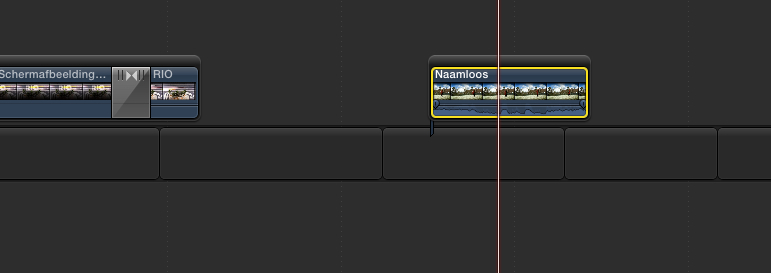
As soon as a new gap is created somewhere the sliced-up gaps are joined because they have no use in the primary. This is standard behavior:
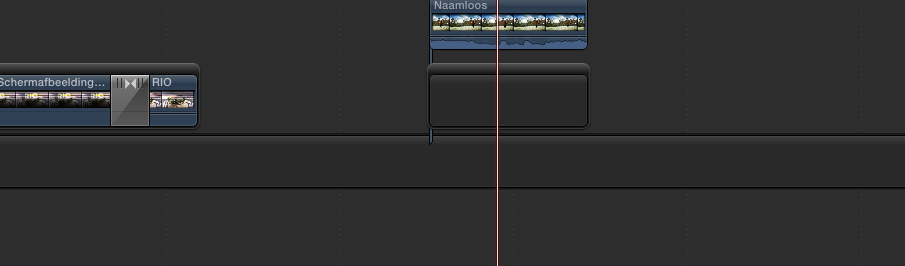
Here you see gaps between clips in the primary:
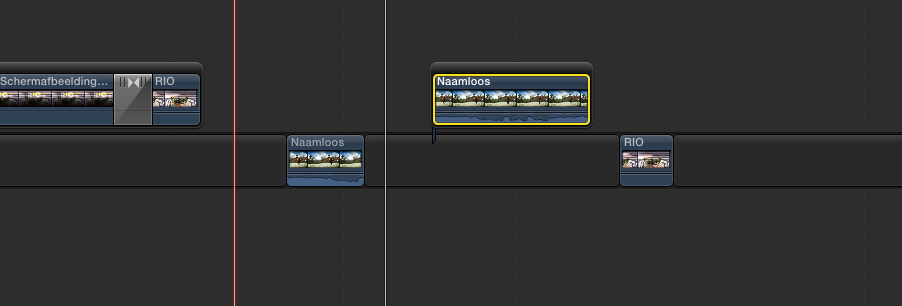
When a new gap is created the gaps in the primary do not change because they are needed between the clips:
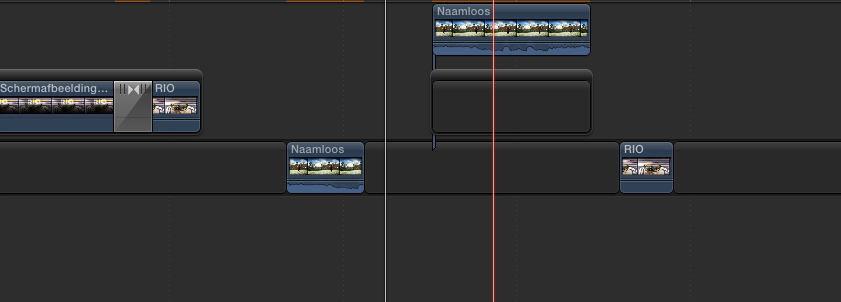
Here I have put an adjustment layer in the primary, I have sliced-up the layer and I have added markers to it:
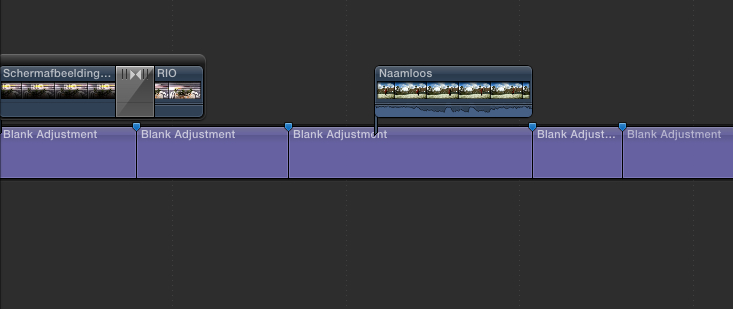
When I now create a gap in the secondary timeline everything stays in place in the primary and the markers are preserved:
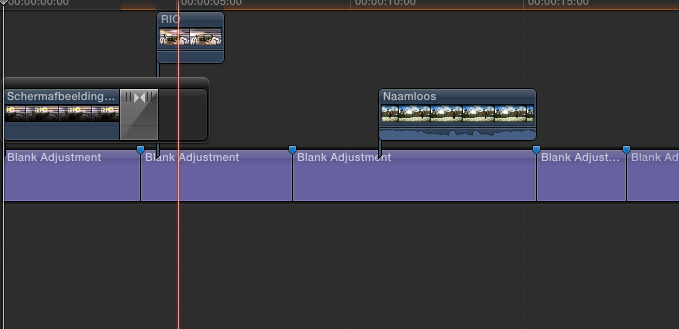
So if you want to preserve markers at specific points on a blank primary storyline just use a slug or an adjustment layer and don't use gaps.
- Ronny
If you want to edit without using the Primary Storyline but you still want to put markers on it, just put a slug generator or an adjustment layer in the Primary. This will act as a regular clip to which your secondaries and CCs are attached and above which you can add markers.
Here you see a primary with sliced-up gaps and a secondary storyline:
As soon as a new gap is created somewhere the sliced-up gaps are joined because they have no use in the primary. This is standard behavior:
Here you see gaps between clips in the primary:
When a new gap is created the gaps in the primary do not change because they are needed between the clips:
Here I have put an adjustment layer in the primary, I have sliced-up the layer and I have added markers to it:
When I now create a gap in the secondary timeline everything stays in place in the primary and the markers are preserved:
So if you want to preserve markers at specific points on a blank primary storyline just use a slug or an adjustment layer and don't use gaps.
- Ronny
Please Log in to join the conversation.
- Tom Wolsky
-

- Offline
- Moderator
-
25 Sep 2013 22:31 #31564
by Tom Wolsky
Replied by Tom Wolsky on topic Bug in FCPX with dissapearing markers on the primary storyline
I just can't repro it. There's something else going on.
www.fcpxbook.com/LiftFromSecondary.mov
www.fcpxbook.com/LiftOffGapClip.mov
www.fcpxbook.com/LiftFromSecondary.mov
www.fcpxbook.com/LiftOffGapClip.mov
Please Log in to join the conversation.
25 Sep 2013 22:41 - 25 Sep 2013 23:12 #31565
by plysat
Can't sleep? Try this: fcpxpert.net ;-)
Replied by plysat on topic Bug in FCPX with dissapearing markers on the primary storyline
"There's something else going on.'
Yes, there are no clips in the primary, just gap that he's cutting up into chucks and attaching connected clips to. So… lifting a clip will cause adjacent chunks of gap to join together into a *new* gap clip and lose all the markers on the previous little chunks.
EDIT: just saw Matthew's video… while it seems odd, that's normal behavior. As Ronny says, anytime new gap is created, X will "clean up" any empty story lines. Agin, because gap is considered nothing. Not media. Putting some sort of media in the primary… maybe even one clip, would prevent that from happening.
Yes, there are no clips in the primary, just gap that he's cutting up into chucks and attaching connected clips to. So… lifting a clip will cause adjacent chunks of gap to join together into a *new* gap clip and lose all the markers on the previous little chunks.
EDIT: just saw Matthew's video… while it seems odd, that's normal behavior. As Ronny says, anytime new gap is created, X will "clean up" any empty story lines. Agin, because gap is considered nothing. Not media. Putting some sort of media in the primary… maybe even one clip, would prevent that from happening.
Can't sleep? Try this: fcpxpert.net ;-)
Last edit: 25 Sep 2013 23:12 by plysat.
Please Log in to join the conversation.
- Tom Wolsky
-
- Offline
- Moderator
-
25 Sep 2013 22:50 #31566
by Tom Wolsky
Replied by Tom Wolsky on topic Bug in FCPX with dissapearing markers on the primary storyline
In the second video the secondary is connected to a gap. The secondary is only connected at one point so lifting from the secondary doesn't effect the gap markers. Not for me.
I can't see his video because Dropbox sux.
I can't see his video because Dropbox sux.
Please Log in to join the conversation.
25 Sep 2013 22:59 #31567
by plysat
Can't sleep? Try this: fcpxpert.net ;-)
Replied by plysat on topic Bug in FCPX with dissapearing markers on the primary storyline
"The secondary is only connected at one point so lifting from the secondary doesn't effect the gap markers. Not for me."
Cut up the gap in the empty primary and try again…
Cut up the gap in the empty primary and try again…
Can't sleep? Try this: fcpxpert.net ;-)
Please Log in to join the conversation.
- Tom Wolsky
-
- Offline
- Moderator
-
25 Sep 2013 23:13 #31568
by Tom Wolsky
Replied by Tom Wolsky on topic Bug in FCPX with dissapearing markers on the primary storyline
I see. What's the point of all these gap clip fragments in the primary? Why isn't anything actually edited on the primary. If there's actually edited material there this doesn't happen.
Please Log in to join the conversation.
25 Sep 2013 23:18 - 25 Sep 2013 23:21 #31569
by plysat
Can't sleep? Try this: fcpxpert.net ;-)
Replied by plysat on topic Bug in FCPX with dissapearing markers on the primary storyline
It seems like he's using the primary just as something to connect stacks of compound clips to, so they can be rearranged and moved around together. Which is fine, and wouldn't be a problem if there was some sort of media in the primary other than gap. you could chop it up, put markers on it, and move it around all you want. You could even rename each chunk of the slug in the primary to quickly jump to a section using the index if you wanted. But... gap isn't media so…
Can't sleep? Try this: fcpxpert.net ;-)
Last edit: 25 Sep 2013 23:21 by plysat.
Please Log in to join the conversation.
26 Sep 2013 08:57 #31577
by sidderke
Replied by sidderke on topic Bug in FCPX with dissapearing markers on the primary storyline
I very much think this is a bug: remember: I have 2 connected clips, which I just put a transition between. I have no choice but this to become a connected storyline (I get the 'logic' behind it, but I do wish Apple would make this optional). I select ONE clip in a CONNECTED Storyline, lift that clip from that same connected storyline, and suddenly FCPX decides to remove cuts in gap clips (and thus removing markers) in the primary storyline, which is a DIFFERENT storyline.
If it would have been a clip that I lifted from the primary storyline, I could see this logic happening (maybe not agreeing with it, but you could know something like this happen). This is just one shortcut, completely having an effect on a different storyline.
I don't think how anyone can not see this as a bug.
Ps, by just dragging the clip out of that secondary storyline, you do not get the bug.
That being said, I do appreciate the time, and efforts for everyone's reaction, and Ronny and Charlie, thank you for the alternative methods, I will make sure to check them out!
About our decision to leave the primary storyline out and just work with connected clips:
It's not aversion for the magnetism of the primary storyline. We like the advantages it gives, and we use it. But not when we do *these* edits. These are specific edits where we do things with a reason
So what are *these* edits?
We record medical procedures, sometimes up to 9 hours long (but ALWAYS continuous recordings of at least a couple of hours). We end up with about 6 Prores streams, timecode-locked. Not always do they all have sound. These often exist out of 2 camera-images, and the other 4 being medical monitors that are tapped. These can be pressures, an echo view of a heart, a fluroscopy, an any case: an image that is only logical for doctors, and not for editors. The only way we have to make sure that these images are in sync, is timecode, because we do not have a visual reference.
FCPX, as you know, does not have timecode overlays in the canvas or viewer, like FCP7 had.
If we put clips in the timeline in FCP7, and one would get out of sync, by accident, with the other streams, we would see it by the timecode overlays. Because we do not have a visual reference, we can NOT see on 6 hours of a black-and white medical image if something is a couple of seconds or minutes out of sync, but doctors can.
The way we work around this, is by making our source clips into compound clips with a timecode generator on them. We make sure the compound clips have the same timecode as the original. So then we have 6 big compound clips, each with a timecode generator on it. If we now drop them on the FCPX timeline, and we make them all small so we have one image with 6 picture-in-pictures, all of these images have a timecode generator so if something would get out of sync, we immediately see it just by the timecode in the frame.
We do not do multicam for these edits. It's not that the doctors want to see this OR that, they often want to see multiple images at the same time.
So we put this compound clips as connected clips on a sequence timeline, that again, has the same timecode as the originals. Why? What we do then is, we send the doctors a copy of this hour-long case (or they come and do it with us at the studio) so they see everything. They need to cut this hours-long video down to a 20 minute video to show on a congress. They need to see everything to make a selection of what is important.
So, they send us back often a timecode copy. It's a word-document that says:
10:45:98:10 - 10:45:98:10 I want to see Cam 1 and Echo (for example).
I will have a list that has hundreds of these selections. If I make sure that my timecode of my sequence matches up with those of my compound clips, and IF I only put them on the timeline as connected clips (so why do we have gaps? We just do Q, Q, Q to get them all above each other on the timeline), then we do not LOOSE the time relationship between the connected clips and the sequence timecode. Why is this important?
If I have to go trough hundred clips, I cannot skim always to the right frame and cut. It would take days to cut it. No, I look at the timecode in the document, type in the dashboard, and make the cuts. (pity we still cannot copy and paste timecode in the canvas or dashboard, but oh well…)
If I now blade all, I have this selection where a cut on 10:00:00:00 in the dashboard, I also makes a cut on 10:00:00:00 in the originals. I have to keep all the streams, because it happens often that we afterwards get the remark: oh in that selection I also want to see that. It doesn't take a lot of time to just leave an extra stream and put the visibility off, then to add it afterwards back in.
That's why we work with connected clips. We cannot loose the relationship with the source timecode. And because these are medical monitors, it is very dangerous to loose sync without visual reference because chances exist you won't notice. And then we work with connected clips in a way of being able to cut very fast trough time codes that we type in the dashboard.
We then do blade all, make the selection, and if it's a selection the doctor doesn't want to use, we put the visibility of all layers of (including the primary). Because I bladed all, including the primary, if I change the visibility on these 6 streams, it's only on the selection of for example 2 minutes I made, and not on the 5 hours of material after that selection.
I then also make a small marker on the primary storyline (gap) of that piece with markers. For instance, if I put 3 of the 6 layers visible, I have a marker saying: 'this one should be big, the other 2 should be small'.
Once you use the primary storyline with a video image you use to also cut, there is a lot of chance, because of the magnetism, that you loose the relationship between timecode of your source, and timecode of your sequence. And because in a way, you *only* have your sequence timecode in the dashboard of X it's pretty dangerous.
This method which included a couple of work-arounds in comparison with our workflow in FCP7, but it also included a couple of extra benefits. (we can drag a piece of primary storyline with gap to another place, and immediately have all those layers going with it, this is when we can use the magnetic timeline to our benefit.) We can also, if there is a patients name that needs to be covered from a medical monitor for privacy reasons, we adjust it in the compound clip, it ripples trough to our edit. Just before export, we just open the compound clips, put out the visibility of the timecode generators, it ripples trough to all our edits, and we can export. Do they need changes? We just put the visibility on again, and we can start editing again.
In FCP7, using only one timecode generator would have a lot of impact on performance and export times. In FCPX, we use 6 of them, unrendered, and play it all back at the same time. It's great.
Now it is easy to afterwards say: just use a title or something to put your markers on. It is a good idea, and I will do so in the future (thanks again). But we never had issues with this complete workflow or way of editing, on the contrary, it was the only way we could do this kind of edits in FCPX (and enjoy X's many other benefits) without getting into a mess or loosing too much time 6x 9 hours of material and making sure everything stays in sync. It works.
The only reason why would now change gaps to titles, or do them on a separate adjustment layer, is because X decides, if you lift a clip from a connected storyline, it immediately deletes cuts on the primary storyline, although I cannot fantom any reason to do so or any logic behind it. So yes, I still think this is a bug. And I am not a fan of connected story lines (they serve their purpose, but I'm just talking about - again - these specific edits) but there is no way to avoid them if you want to make a transition between 2 connected clips.
If it would have been a clip that I lifted from the primary storyline, I could see this logic happening (maybe not agreeing with it, but you could know something like this happen). This is just one shortcut, completely having an effect on a different storyline.
I don't think how anyone can not see this as a bug.
Ps, by just dragging the clip out of that secondary storyline, you do not get the bug.
That being said, I do appreciate the time, and efforts for everyone's reaction, and Ronny and Charlie, thank you for the alternative methods, I will make sure to check them out!
About our decision to leave the primary storyline out and just work with connected clips:
It's not aversion for the magnetism of the primary storyline. We like the advantages it gives, and we use it. But not when we do *these* edits. These are specific edits where we do things with a reason
So what are *these* edits?
We record medical procedures, sometimes up to 9 hours long (but ALWAYS continuous recordings of at least a couple of hours). We end up with about 6 Prores streams, timecode-locked. Not always do they all have sound. These often exist out of 2 camera-images, and the other 4 being medical monitors that are tapped. These can be pressures, an echo view of a heart, a fluroscopy, an any case: an image that is only logical for doctors, and not for editors. The only way we have to make sure that these images are in sync, is timecode, because we do not have a visual reference.
FCPX, as you know, does not have timecode overlays in the canvas or viewer, like FCP7 had.
If we put clips in the timeline in FCP7, and one would get out of sync, by accident, with the other streams, we would see it by the timecode overlays. Because we do not have a visual reference, we can NOT see on 6 hours of a black-and white medical image if something is a couple of seconds or minutes out of sync, but doctors can.
The way we work around this, is by making our source clips into compound clips with a timecode generator on them. We make sure the compound clips have the same timecode as the original. So then we have 6 big compound clips, each with a timecode generator on it. If we now drop them on the FCPX timeline, and we make them all small so we have one image with 6 picture-in-pictures, all of these images have a timecode generator so if something would get out of sync, we immediately see it just by the timecode in the frame.
We do not do multicam for these edits. It's not that the doctors want to see this OR that, they often want to see multiple images at the same time.
So we put this compound clips as connected clips on a sequence timeline, that again, has the same timecode as the originals. Why? What we do then is, we send the doctors a copy of this hour-long case (or they come and do it with us at the studio) so they see everything. They need to cut this hours-long video down to a 20 minute video to show on a congress. They need to see everything to make a selection of what is important.
So, they send us back often a timecode copy. It's a word-document that says:
10:45:98:10 - 10:45:98:10 I want to see Cam 1 and Echo (for example).
I will have a list that has hundreds of these selections. If I make sure that my timecode of my sequence matches up with those of my compound clips, and IF I only put them on the timeline as connected clips (so why do we have gaps? We just do Q, Q, Q to get them all above each other on the timeline), then we do not LOOSE the time relationship between the connected clips and the sequence timecode. Why is this important?
If I have to go trough hundred clips, I cannot skim always to the right frame and cut. It would take days to cut it. No, I look at the timecode in the document, type in the dashboard, and make the cuts. (pity we still cannot copy and paste timecode in the canvas or dashboard, but oh well…)
If I now blade all, I have this selection where a cut on 10:00:00:00 in the dashboard, I also makes a cut on 10:00:00:00 in the originals. I have to keep all the streams, because it happens often that we afterwards get the remark: oh in that selection I also want to see that. It doesn't take a lot of time to just leave an extra stream and put the visibility off, then to add it afterwards back in.
That's why we work with connected clips. We cannot loose the relationship with the source timecode. And because these are medical monitors, it is very dangerous to loose sync without visual reference because chances exist you won't notice. And then we work with connected clips in a way of being able to cut very fast trough time codes that we type in the dashboard.
We then do blade all, make the selection, and if it's a selection the doctor doesn't want to use, we put the visibility of all layers of (including the primary). Because I bladed all, including the primary, if I change the visibility on these 6 streams, it's only on the selection of for example 2 minutes I made, and not on the 5 hours of material after that selection.
I then also make a small marker on the primary storyline (gap) of that piece with markers. For instance, if I put 3 of the 6 layers visible, I have a marker saying: 'this one should be big, the other 2 should be small'.
Once you use the primary storyline with a video image you use to also cut, there is a lot of chance, because of the magnetism, that you loose the relationship between timecode of your source, and timecode of your sequence. And because in a way, you *only* have your sequence timecode in the dashboard of X it's pretty dangerous.
This method which included a couple of work-arounds in comparison with our workflow in FCP7, but it also included a couple of extra benefits. (we can drag a piece of primary storyline with gap to another place, and immediately have all those layers going with it, this is when we can use the magnetic timeline to our benefit.) We can also, if there is a patients name that needs to be covered from a medical monitor for privacy reasons, we adjust it in the compound clip, it ripples trough to our edit. Just before export, we just open the compound clips, put out the visibility of the timecode generators, it ripples trough to all our edits, and we can export. Do they need changes? We just put the visibility on again, and we can start editing again.
In FCP7, using only one timecode generator would have a lot of impact on performance and export times. In FCPX, we use 6 of them, unrendered, and play it all back at the same time. It's great.
Now it is easy to afterwards say: just use a title or something to put your markers on. It is a good idea, and I will do so in the future (thanks again). But we never had issues with this complete workflow or way of editing, on the contrary, it was the only way we could do this kind of edits in FCPX (and enjoy X's many other benefits) without getting into a mess or loosing too much time 6x 9 hours of material and making sure everything stays in sync. It works.
The only reason why would now change gaps to titles, or do them on a separate adjustment layer, is because X decides, if you lift a clip from a connected storyline, it immediately deletes cuts on the primary storyline, although I cannot fantom any reason to do so or any logic behind it. So yes, I still think this is a bug. And I am not a fan of connected story lines (they serve their purpose, but I'm just talking about - again - these specific edits) but there is no way to avoid them if you want to make a transition between 2 connected clips.
Please Log in to join the conversation.
- ronny courtens
-
- Offline
- Moderator
-
Less
More
- Posts: 4455
- Thank you received: 962
26 Sep 2013 09:34 #31578
by ronny courtens
Replied by ronny courtens on topic Bug in FCPX with dissapearing markers on the primary storyline
Thank you for clarifying your workflow. I understand the confusion and, quite honestly, if I ever had have to work this way I probably would have placed the markers on the sliced-up gaps myself only to find out that these gaps would close when lifting a clip from the secondary and making the markers vanish.
It all lies in the presumption that gaps are actual media, like the slugs in FCP were. But they are not, and this is the cause of this issue. I don't think this behavior would be very difficult for Apple to fix. If they can introduce a method for manually closing through-edits (which I expect they will as they already have done this with multicam clips) there would be no need anymore for automatically closing sliced-up gaps. Or they should at least make sure that actions performed on secondary storylines don't interfere with the Primary storyline, I entirely agree on this one.
So I'm going to post this interference between storylines as a bug report as well.
- Ronny
It all lies in the presumption that gaps are actual media, like the slugs in FCP were. But they are not, and this is the cause of this issue. I don't think this behavior would be very difficult for Apple to fix. If they can introduce a method for manually closing through-edits (which I expect they will as they already have done this with multicam clips) there would be no need anymore for automatically closing sliced-up gaps. Or they should at least make sure that actions performed on secondary storylines don't interfere with the Primary storyline, I entirely agree on this one.
So I'm going to post this interference between storylines as a bug report as well.
- Ronny
Please Log in to join the conversation.
- Tom Wolsky
-
- Offline
- Moderator
-
26 Sep 2013 10:37 #31584
by Tom Wolsky
Replied by Tom Wolsky on topic Bug in FCPX with dissapearing markers on the primary storyline
If you create one continuous gap clip that's the length of the project, the marker problem doesn't seem to happen. Only when the gaps are fragments in the primary.
I would think a multicam clip would have advantages for this. I'm not clear on your reluctance to do this especially as the angle viewer displays clip TC.
I would think a multicam clip would have advantages for this. I'm not clear on your reluctance to do this especially as the angle viewer displays clip TC.
Please Log in to join the conversation.
26 Sep 2013 10:48 #31585
by sidderke
Replied by sidderke on topic Bug in FCPX with dissapearing markers on the primary storyline
Hi Ronny, thanks. Anyhow, going forward we will use a custom generator or whatever on the timeline instead of a gap, which will remove our marker-problem.
Tom, when we first started to figure out how to do our edits in FCPX instead of 7, we tested Multicam-clips too. A Multicam-clip is a kind of Compound clip, so this does not really help us, it only makes it much more complex. Also we always need all layers to be visible at THE SAME time. The whole concept of multicam is that you SWITCH between angles. That's why we rather use compounds.
Tom, when we first started to figure out how to do our edits in FCPX instead of 7, we tested Multicam-clips too. A Multicam-clip is a kind of Compound clip, so this does not really help us, it only makes it much more complex. Also we always need all layers to be visible at THE SAME time. The whole concept of multicam is that you SWITCH between angles. That's why we rather use compounds.
Please Log in to join the conversation.
- Tom Wolsky
-
- Offline
- Moderator
-
26 Sep 2013 11:24 #31587
by Tom Wolsky
Replied by Tom Wolsky on topic Bug in FCPX with dissapearing markers on the primary storyline
All layers at the same time, or two or three layers at the same time? You could do the same with multiple copies of the multicam clip, switching off visibility, and putting up whatever angle you want on whatever layer. I see you have compounds inside your secondaries. Is that for syncing purposes?
Please Log in to join the conversation.
26 Sep 2013 12:00 - 26 Sep 2013 12:04 #31589
by sidderke
Replied by sidderke on topic Bug in FCPX with dissapearing markers on the primary storyline
Hi Tom,
I know I could make multiple copies of the multicam-clip, but at that point there is not much advantage to using a compound clip versus a multicam clip, even the opposite.
Otherwise we would have maybe compounds IN multicamclips on top of each other etc. (see my remarks below) ... and I want to keep it manageable, only working with compounds one or two levels deep.
So what happens is, we have 6 recorders running, Pix 240's or Pix 260's. They record for 6 hours, timecode sync. A Pix, in some modes, divides it's recording, splits their clips in chops of 30 or 60 minutes. So we make one compound timeline for every FEED (stream) of video that we have, put them all after each other, make sure that that timeline has the same starting timecode of the original first clip of that feed.
We then put a timecode generator on top of it, so we have the timecode always in the frame, big, so if it ever slips, we see it.
Now instead of all these clips, we have 6 big compound clips, that are our layers to work with.
We always see timecode big, and give every feed a name too, by giving it a label to the timecode generator in the compound clip. So one feed says CAM 1, CAM 2, so every time we communicate with the client about what they want, we are talking in the same terms.
This working with 6 big compounds was initially a necessity because X does not have a timecode overlay of it's source clips in the timeline and because it does not have a timecode READER effect, only a timecode generator that takes the timecode of the timeline in which it sits. That's why we use compounds. We noticed working with compounds has other advantages as well. General advantages: if there is a camera bit off, you can just in the compound do a color correction, it ripples trough. If there is a medical monitor where the name of the patient is on, we can just put a matte above that piece of the frame, it ripples trough to our edits. Very handy.
So for our master timeline in which we edit, we ONLY work with those compounds. Then, IF those layers that are on top of each other, in sync, if one of those get bumped a bit, for whatever reason, we immediately see it on the timecode generator
So yes, they are also in the secondary storyline. Reason being: sometimes we have a top layer that is a camera in picture-in-picture.
The whole edit cuts from for instance from a Fluroscopy view with a camera in picture-in-picture to for instance, an Echo view with a camera in -picture-in-picture, but an hour later. Then I want those picture-in-picture camera views to cross dissolve into each other, which is in this case visually nicer then a hard cut (remember, we are not cutting fiction or documentary).
So once I put a dissolve between those top layer clips, it automatically becomes a secondary timeline. I'm not a big fan of this behaviour, but I do understand the logic behind it.
In a stack of multicam clips choosing which stream goes to which layer, and being able to change that quickly would be good advantage of using those. But you have the disadvantage sometimes of visiblity. On your timeline you only see the multicam-clip, and if you afterwards have to put on every clip in your timeline effects (specific for that clip, not general effects that you want for the complete compound), it becomes a bit harder to track, visually, where is what.
I know I could make multiple copies of the multicam-clip, but at that point there is not much advantage to using a compound clip versus a multicam clip, even the opposite.
Otherwise we would have maybe compounds IN multicamclips on top of each other etc. (see my remarks below) ... and I want to keep it manageable, only working with compounds one or two levels deep.
So what happens is, we have 6 recorders running, Pix 240's or Pix 260's. They record for 6 hours, timecode sync. A Pix, in some modes, divides it's recording, splits their clips in chops of 30 or 60 minutes. So we make one compound timeline for every FEED (stream) of video that we have, put them all after each other, make sure that that timeline has the same starting timecode of the original first clip of that feed.
We then put a timecode generator on top of it, so we have the timecode always in the frame, big, so if it ever slips, we see it.
Now instead of all these clips, we have 6 big compound clips, that are our layers to work with.
We always see timecode big, and give every feed a name too, by giving it a label to the timecode generator in the compound clip. So one feed says CAM 1, CAM 2, so every time we communicate with the client about what they want, we are talking in the same terms.
This working with 6 big compounds was initially a necessity because X does not have a timecode overlay of it's source clips in the timeline and because it does not have a timecode READER effect, only a timecode generator that takes the timecode of the timeline in which it sits. That's why we use compounds. We noticed working with compounds has other advantages as well. General advantages: if there is a camera bit off, you can just in the compound do a color correction, it ripples trough. If there is a medical monitor where the name of the patient is on, we can just put a matte above that piece of the frame, it ripples trough to our edits. Very handy.
So for our master timeline in which we edit, we ONLY work with those compounds. Then, IF those layers that are on top of each other, in sync, if one of those get bumped a bit, for whatever reason, we immediately see it on the timecode generator
So yes, they are also in the secondary storyline. Reason being: sometimes we have a top layer that is a camera in picture-in-picture.
The whole edit cuts from for instance from a Fluroscopy view with a camera in picture-in-picture to for instance, an Echo view with a camera in -picture-in-picture, but an hour later. Then I want those picture-in-picture camera views to cross dissolve into each other, which is in this case visually nicer then a hard cut (remember, we are not cutting fiction or documentary).
So once I put a dissolve between those top layer clips, it automatically becomes a secondary timeline. I'm not a big fan of this behaviour, but I do understand the logic behind it.
In a stack of multicam clips choosing which stream goes to which layer, and being able to change that quickly would be good advantage of using those. But you have the disadvantage sometimes of visiblity. On your timeline you only see the multicam-clip, and if you afterwards have to put on every clip in your timeline effects (specific for that clip, not general effects that you want for the complete compound), it becomes a bit harder to track, visually, where is what.
Last edit: 26 Sep 2013 12:04 by sidderke.
Please Log in to join the conversation.
