


- Posts: 65
- Thank you received: 1
3 Post Moderation Rule for New Boarders (25 Jan 2021)
New boarders will have their posts moderated - Don't worry if you cannot see your post immediately.
FCPX XML to Logic Pro X problems
20 Sep 2013 21:34 #31384
by alven
FCPX XML to Logic Pro X problems was created by alven
Im trying to export an xml from fcpx to logic x so that i can export an omf file from there.
I have been editing multicam clips, with sound effects and music files also.
On the multicam clips, I am only using external mic but it's synced up with the clip.
When I open it in logic, only the music, and not the audio from the mic will appear.
So I'm thinking its something wrong with the way I am exporting it from FCP.
I have been trying to export audio only, but the other options haven't been working for me so far either.
Any suggestion on how to make this work?
I have been editing multicam clips, with sound effects and music files also.
On the multicam clips, I am only using external mic but it's synced up with the clip.
When I open it in logic, only the music, and not the audio from the mic will appear.
So I'm thinking its something wrong with the way I am exporting it from FCP.
I have been trying to export audio only, but the other options haven't been working for me so far either.
Any suggestion on how to make this work?
Please Log in to join the conversation.
21 Sep 2013 00:11 - 26 Oct 2013 00:23 #31386
by alven
Replied by alven on topic FCPX XML to Logic Pro X problems
I detached the audio, so now it just looks like an audio track in FCP, but it still doesn't show up in Logic. I can't understand why.
Last edit: 26 Oct 2013 00:23 by alven.
Please Log in to join the conversation.

22 Sep 2013 09:15 #31396
by benco
Replied by benco on topic FCPX XML to Logic Pro X problems
hi
From your post it's hard to understand, but I'll give it a try.
Do you export xml from fcpx or you share the project?
You have to export xml and not share if thats the case.
in fcpx go to File/Export XML --save the file anywhere you want.
in Logic X open new project then go
File/Import/Final Cut Pro XML
By the way, you mention you want to create OMF in Logic X.
You can't. Logic X doesn't support OMF. It support AAF which most of the programs can open.
From your post it's hard to understand, but I'll give it a try.
Do you export xml from fcpx or you share the project?
You have to export xml and not share if thats the case.
in fcpx go to File/Export XML --save the file anywhere you want.
in Logic X open new project then go
File/Import/Final Cut Pro XML
By the way, you mention you want to create OMF in Logic X.
You can't. Logic X doesn't support OMF. It support AAF which most of the programs can open.
Please Log in to join the conversation.
22 Sep 2013 09:27 #31398
by alven
Replied by alven on topic FCPX XML to Logic Pro X problems
Hi, Thanks for your reply.
Yes, I exported an xml like you said, and imported it in LPX like you said as well.
One of them ended up with more sound files, but they were not places where they should be when I imported it in LPX, they all started at the beginning of the timeline, which made it impossible for me.
But for the most part, every other time, I have only gotten the sound effects and music. I don't even think I did anything different, but I'm not 100% sure about that.
I was told it could export OMF, in that cause I guess I have been misinformed? well I am trying to get a hold of the sound guy so I can figure out if I can send an AAF, but in that case, I hopefully will figure this out!
I can't understand why, maybe it has something to do with the multi cam clips?
Yes, I exported an xml like you said, and imported it in LPX like you said as well.
One of them ended up with more sound files, but they were not places where they should be when I imported it in LPX, they all started at the beginning of the timeline, which made it impossible for me.
But for the most part, every other time, I have only gotten the sound effects and music. I don't even think I did anything different, but I'm not 100% sure about that.
I was told it could export OMF, in that cause I guess I have been misinformed? well I am trying to get a hold of the sound guy so I can figure out if I can send an AAF, but in that case, I hopefully will figure this out!
I can't understand why, maybe it has something to do with the multi cam clips?
Please Log in to join the conversation.
- ronny courtens
-

- Offline
- Moderator
-

Less
More
- Posts: 4455
- Thank you received: 962
22 Sep 2013 11:22 - 22 Sep 2013 11:25 #31400
by ronny courtens
Replied by ronny courtens on topic FCPX XML to Logic Pro X problems
It is correct that Logic Pro X cannot export OMF, I was mistaken about this. I thought LPX handled OMF, as Logic Pro 9 does handle OMF quite well. But for an unknown reason OMF has been dropped in Logic Pro X.
So to answer your questions:
1. Yes, as said before, ask your audio guy if you can send an AAF. Any serious DAW can import AAF, so I don't know why he would not be able to handle this.
2. Although FCPXML seems to work quite well for sending FCPX audio to LPX there definitely is a limitation when you work with multicam projects. It seems FCPXML does not translate any audio that is part of a multicam clip. As I have been testing FCPX to LPX workflows in the past few days I have found a workaround for this.
Here you see a small test project with a multicam clip (video clips edited over a music track), a regular video clip "Voice" of which I use the video as an insert over the multicam video and the audio as a voice track under the multicam music, and some random audio FX clips:
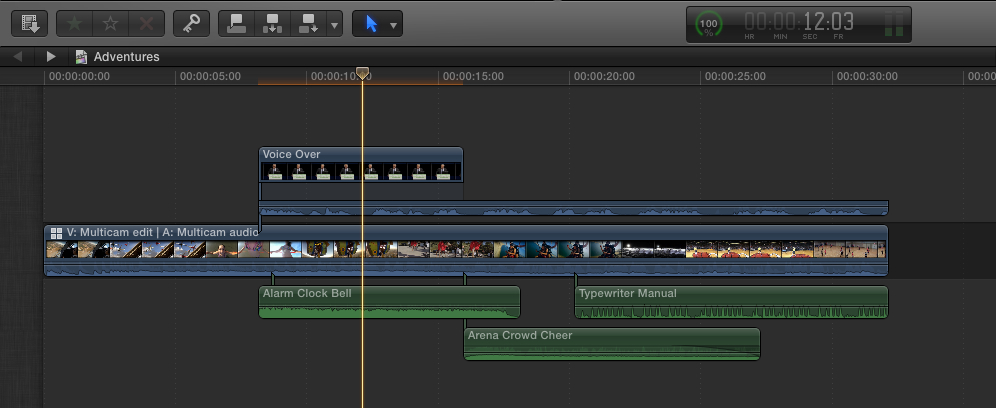
When I export an XML from FCPX and open the XML in LPX (R-click the XML and chose "Open with Logic") the Voice track transfers correctly, same as the audio FX clips. But none of the multicam music shows up in LPX:
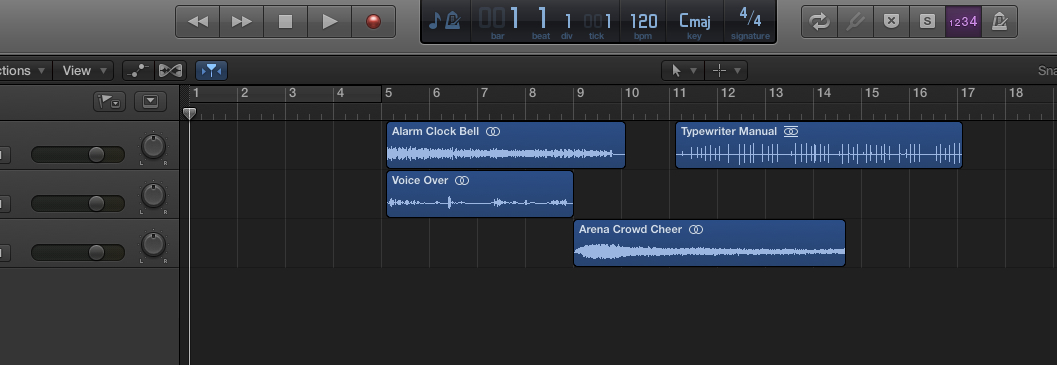
Detaching the audio from the multicam clip in FCPX would solve this problem, but that cannot be done. Neither can you "flatten" a multicam clip in FCPX like you can in FCP. You have to find another way of getting the audio out of the multiclip and onto the Timeline in FCPX so FCPXML can recognize it. Here's how:
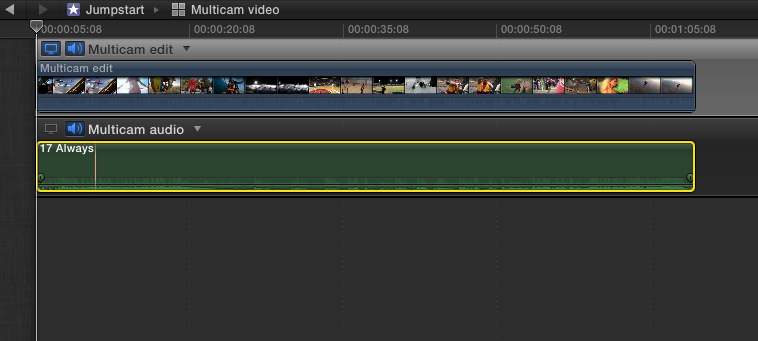
First open the multiclip in the Angle Editor and copy the audio angles inside the Angle Editor. In this case there is only one music track in the multiclip, called "Always":
Then back in the Project Timeline paste the copied multiclip audio under the multiclip.
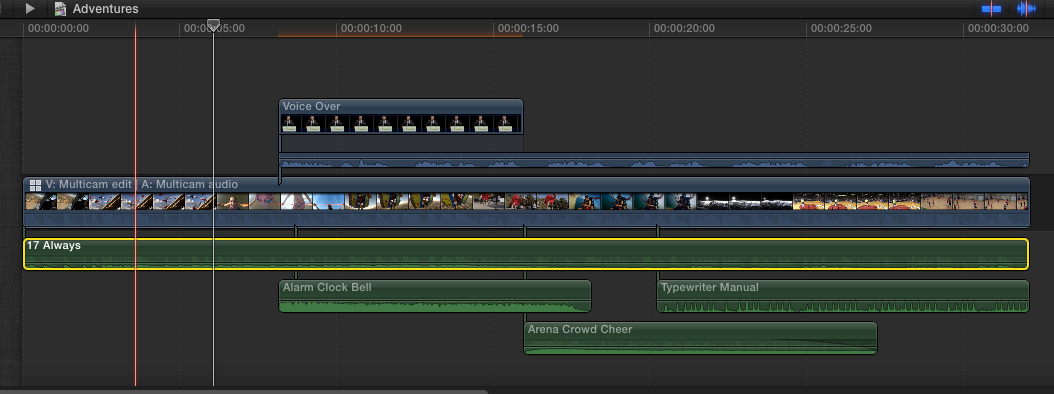
Now when you export an XML and you open it in LPX all the Project audio is correctly transferred and placed on the LPC timeline:
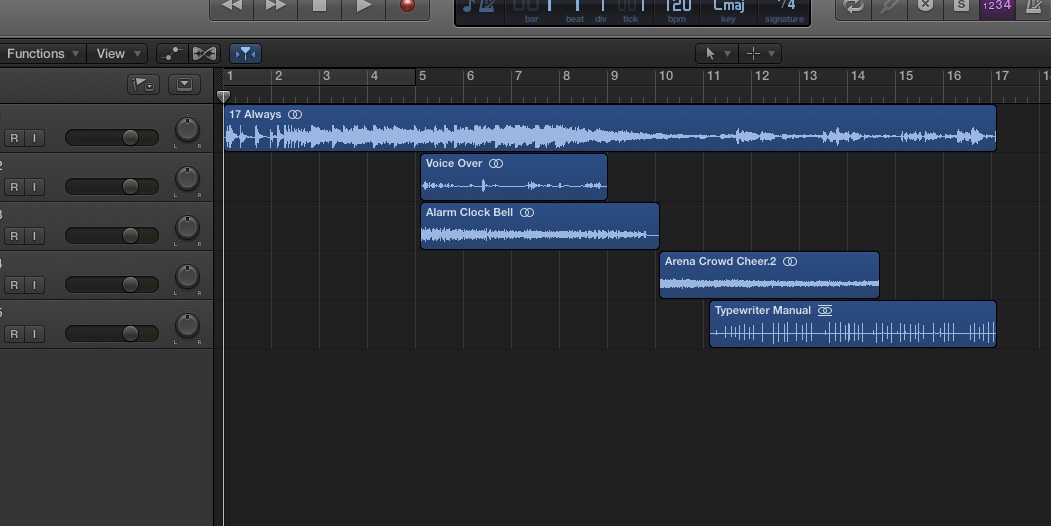
From here you can export an AAF for your sound guy.
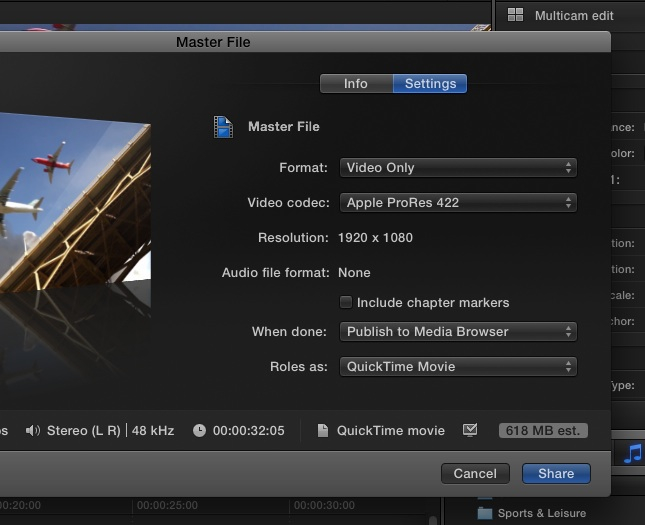
If you want to check if the audio tracks in LPX are in synch with the FCPX video, or if you want to add the video to the AAF for your audio guy, you can export a Master File (Video only or video with audio) from FCPX. For the easiest workflow select "Publish to Media Browser" in the Export window, so you will easily find the exported video in LPX:
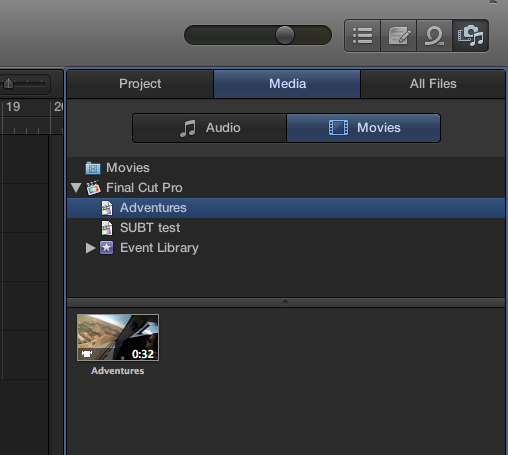
When the export is finished just launch LPX and go to the LPX Media Browser
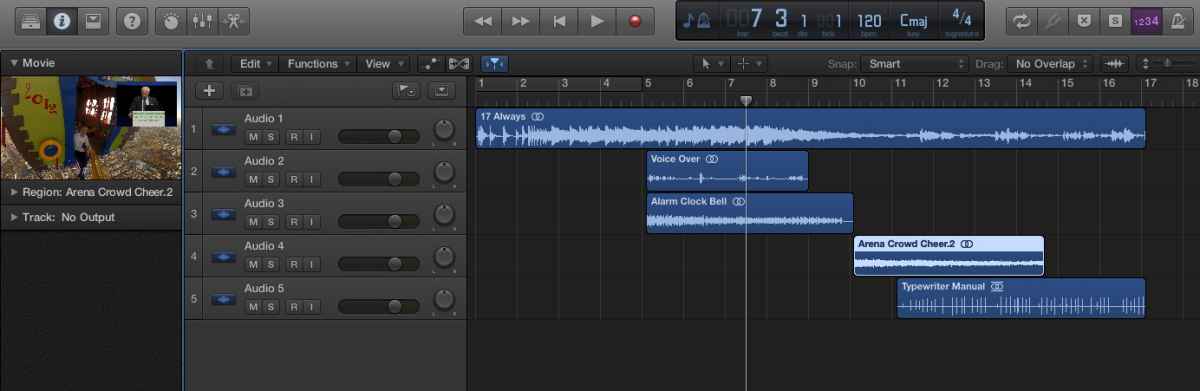
Drag the file anywhere onto the project and your video will be placed exactly at the start of your project timeline. Then you can play video and audio together
I am sorry I have misinformed you about OMF export in LPX, I'm just trying to get around this new app myself. To me not having OMF is not a big deal as we always use AAF for going to ProTools.
- Ronny
So to answer your questions:
1. Yes, as said before, ask your audio guy if you can send an AAF. Any serious DAW can import AAF, so I don't know why he would not be able to handle this.
2. Although FCPXML seems to work quite well for sending FCPX audio to LPX there definitely is a limitation when you work with multicam projects. It seems FCPXML does not translate any audio that is part of a multicam clip. As I have been testing FCPX to LPX workflows in the past few days I have found a workaround for this.
Here you see a small test project with a multicam clip (video clips edited over a music track), a regular video clip "Voice" of which I use the video as an insert over the multicam video and the audio as a voice track under the multicam music, and some random audio FX clips:
When I export an XML from FCPX and open the XML in LPX (R-click the XML and chose "Open with Logic") the Voice track transfers correctly, same as the audio FX clips. But none of the multicam music shows up in LPX:
Detaching the audio from the multicam clip in FCPX would solve this problem, but that cannot be done. Neither can you "flatten" a multicam clip in FCPX like you can in FCP. You have to find another way of getting the audio out of the multiclip and onto the Timeline in FCPX so FCPXML can recognize it. Here's how:
First open the multiclip in the Angle Editor and copy the audio angles inside the Angle Editor. In this case there is only one music track in the multiclip, called "Always":
Then back in the Project Timeline paste the copied multiclip audio under the multiclip.
Now when you export an XML and you open it in LPX all the Project audio is correctly transferred and placed on the LPC timeline:
From here you can export an AAF for your sound guy.
If you want to check if the audio tracks in LPX are in synch with the FCPX video, or if you want to add the video to the AAF for your audio guy, you can export a Master File (Video only or video with audio) from FCPX. For the easiest workflow select "Publish to Media Browser" in the Export window, so you will easily find the exported video in LPX:
When the export is finished just launch LPX and go to the LPX Media Browser
Drag the file anywhere onto the project and your video will be placed exactly at the start of your project timeline. Then you can play video and audio together
I am sorry I have misinformed you about OMF export in LPX, I'm just trying to get around this new app myself. To me not having OMF is not a big deal as we always use AAF for going to ProTools.
- Ronny
Last edit: 22 Sep 2013 11:25 by ronny courtens.
Please Log in to join the conversation.
22 Sep 2013 12:59 #31401
by alven
Replied by alven on topic FCPX XML to Logic Pro X problems
Thanks a lot for this Ronny. I will have a look into this, sounds like that would work though, so thanks for explaining it so well. 
I still havn't heard back from the sound guy, but it sounds like it's rather difficult to make an omf file from FCPX, so I hope it will be no big deal that it is an AAF file.
I still havn't heard back from the sound guy, but it sounds like it's rather difficult to make an omf file from FCPX, so I hope it will be no big deal that it is an AAF file.
Please Log in to join the conversation.
- ronny courtens
-
- Offline
- Moderator
-
Less
More
- Posts: 4455
- Thank you received: 962
22 Sep 2013 13:42 - 22 Sep 2013 14:01 #31402
by ronny courtens
Replied by ronny courtens on topic FCPX XML to Logic Pro X problems
It should not be a problem. OMF and AAF are basically the same, except AAF is newer and it retains more information such as volume automation and track names. Most applications for audio and video support AAF.
Oh yes, one more thing about the multicam XML issue:
Of course if your multicam has chopped up audio from different angles, copying the audio from the Angle Editor will be of little use unlesss your audio engineer wants to cut the whole multicam audio again. In this case you can flatten the multicam clip (i.e. export the multicam clip to a QT movie) from inside the FCPX Timeline and import it back. Then replace the original multicam clip with the flattened one before exporting the XML. This of course makes you lose any handles on the audio.
We can only hope that FCXML gets improved drastically as soon as possible.
- Ronny
Oh yes, one more thing about the multicam XML issue:
Of course if your multicam has chopped up audio from different angles, copying the audio from the Angle Editor will be of little use unlesss your audio engineer wants to cut the whole multicam audio again. In this case you can flatten the multicam clip (i.e. export the multicam clip to a QT movie) from inside the FCPX Timeline and import it back. Then replace the original multicam clip with the flattened one before exporting the XML. This of course makes you lose any handles on the audio.
We can only hope that FCXML gets improved drastically as soon as possible.
- Ronny
Last edit: 22 Sep 2013 14:01 by ronny courtens.
Please Log in to join the conversation.
22 Sep 2013 14:00 #31403
by alven
Replied by alven on topic FCPX XML to Logic Pro X problems
sound good and you tip did work very well. I notice that in LPX that the sound has no in and out fadings even though I made them in final cut, is this the same with the old omf file that you can export from final cut 7? I am just curious to know whether the file I send will be different from what he has gotten from the previous editor, I a not sure if I should do that in LPX before I send it off.
and you tip did work very well. I notice that in LPX that the sound has no in and out fadings even though I made them in final cut, is this the same with the old omf file that you can export from final cut 7? I am just curious to know whether the file I send will be different from what he has gotten from the previous editor, I a not sure if I should do that in LPX before I send it off. Please Log in to join the conversation.
- ronny courtens
-
- Offline
- Moderator
-
Less
More
- Posts: 4455
- Thank you received: 962
22 Sep 2013 14:28 - 22 Sep 2013 14:30 #31404
by ronny courtens
Replied by ronny courtens on topic FCPX XML to Logic Pro X problems
That's another limitation of the current FCPXML import feature in LPX. Although audio fades (as well as multicam audio) do get exported from FCPX via FCPXML, Logic pro X currently does not recognize these. So if you have made manual fades in FCPX you will either have to leave it to your audio guy to do them again in his DAW (audio people prefer doing or re-doing everything themselves anyway), or you can add the fades yourself in LPX and they will be included in the AAF.
To add manual fades in LPX just double-click any audio clip to open it in the track editor and use the fade tool (which is selected by default in the editor) to drag the fade handles at the start and end of your clip. Using the same tool you also can adjust the curves of your fades.

But as I said: audio engineers prefer receiving their audio untouched by "video people" and do all their audio magic themselves. So you might just send the AAF from LPX as it is and leave the rest to the engineer.
- Ronny
To add manual fades in LPX just double-click any audio clip to open it in the track editor and use the fade tool (which is selected by default in the editor) to drag the fade handles at the start and end of your clip. Using the same tool you also can adjust the curves of your fades.
But as I said: audio engineers prefer receiving their audio untouched by "video people" and do all their audio magic themselves. So you might just send the AAF from LPX as it is and leave the rest to the engineer.
- Ronny
Last edit: 22 Sep 2013 14:30 by ronny courtens.
Please Log in to join the conversation.

22 Sep 2013 17:54 #31408
by Wildgiles
Replied by Wildgiles on topic FCPX XML to Logic Pro X problems
From what I've heard xtopro audio convert works much better at converting audio from FCPX to Logic x than the FCPXML route. But... xtopro audio convert makes an AAF anyway... so why bother with logic x if your audio engineer is using pro tools.
Please Log in to join the conversation.
- ronny courtens
-
- Offline
- Moderator
-
Less
More
- Posts: 4455
- Thank you received: 962
22 Sep 2013 18:44 #31409
by ronny courtens
Replied by ronny courtens on topic FCPX XML to Logic Pro X problems
I have suggested X2pro in another thread:
www.fcp.co/forum/4-final-cut-pro-x-fcpx/...3-exporting-omf-file
But the OP prefers a solution that doesn't cost him extra money and he has Logic Pro X, that's why we are discussing this particular workflow now.
- Ronny
But the OP prefers a solution that doesn't cost him extra money and he has Logic Pro X, that's why we are discussing this particular workflow now.
- Ronny
Please Log in to join the conversation.
23 Sep 2013 03:36 - 23 Sep 2013 03:36 #31417
by Wildgiles
Replied by Wildgiles on topic FCPX XML to Logic Pro X problems
how strange, it sounds like alven was going to buy xtopro audio convert on that thread you mentioned.
Last edit: 23 Sep 2013 03:36 by Wildgiles.
Please Log in to join the conversation.
23 Sep 2013 06:14 #31420
by alven
Replied by alven on topic FCPX XML to Logic Pro X problems
Yes, I changed my mind because I thought an omf file would be the best thing, as I didn't hear from the sound guy. I did download x2pro now though and it works a lot better.
Please Log in to join the conversation.
24 Sep 2013 15:05 #31494
by alven
Replied by alven on topic FCPX XML to Logic Pro X problems
one more concern I have. When I open the AAF in Logic Pro X I have to locate where the files are saved. So I only send the AAF file to the sound guy, will he be able to open it at all without having all the media?
Please Log in to join the conversation.
- ronny courtens
-
- Offline
- Moderator
-
Less
More
- Posts: 4455
- Thank you received: 962
24 Sep 2013 21:26 #31506
by ronny courtens
Replied by ronny courtens on topic FCPX XML to Logic Pro X problems
If you have created the AAF with embedded (not referenced) media you won't have to send anything else, as long as his DAW can open AAF files with embedded audio.
- Ronny
- Ronny
Please Log in to join the conversation.
24 Sep 2013 23:57 #31508
by alven
Replied by alven on topic FCPX XML to Logic Pro X problems
Thanks. I had to import the file in Logic Pro X and then export an AAF from there in order to be able to open in up in LPX without linking it to the files. Maybe that's one of the disadvantages of having the LE version of x2pro
Please Log in to join the conversation.
20 Nov 2013 14:38 - 20 Nov 2013 15:12 #34425
by alven
Replied by alven on topic FCPX XML to Logic Pro X problems
It's so crazy.. I still have this problem, and I worked it out the first time, but now I have the problems of the sounds not being there (without linking them up) after I export the file.
And I keep getting an error message, that Logic Pro X shuts down unexpectedly when I try to import an X2ProLe AAF into Logic. I don't know why this is. Does anyone have any suggestions so I can successfully send an AAF file that is not broken?
And I keep getting an error message, that Logic Pro X shuts down unexpectedly when I try to import an X2ProLe AAF into Logic. I don't know why this is. Does anyone have any suggestions so I can successfully send an AAF file that is not broken?
Last edit: 20 Nov 2013 15:12 by alven.
Please Log in to join the conversation.
11 Feb 2014 03:49 #40923
by Jane
Replied by Jane on topic FCPX XML to Logic Pro X problems
If you want to create OMFs so you can go into Protools, the workaround that worked for me is:
Creating AAFs of each element of the sound track. To do this:
Duplicate your project (don't have to duplicate the events). Each duplicated project will represent one aspect of the sound. EG, music track 1; music track 2; fx track 1; dialogue track 1 etc etc.
Delete all but one element of the sound (eg delete all dialogue, fx etc, leave, say, the music track)
Create handles on each piece of sound (however long your mixer wants, usually 5 or 10 secs).
Once you've made the handles for one sound element, make sure they don't overlap with another sound element. If they do, you'll have to duplicate and make another project.
Then export as AAF and lable it.
Leave the image there - it will ensure your tracks start at 00.00.00
You'll need to do this with each element of sound.
Export as Audio Only and choose AAF.
It's a bugger but it works. Took me a couple of hours for a four minute video with complex sound.
Hope that helps all those burnt by FCPX as I was. Must move to Adobe Premier Pro.
Jane
Creating AAFs of each element of the sound track. To do this:
Duplicate your project (don't have to duplicate the events). Each duplicated project will represent one aspect of the sound. EG, music track 1; music track 2; fx track 1; dialogue track 1 etc etc.
Delete all but one element of the sound (eg delete all dialogue, fx etc, leave, say, the music track)
Create handles on each piece of sound (however long your mixer wants, usually 5 or 10 secs).
Once you've made the handles for one sound element, make sure they don't overlap with another sound element. If they do, you'll have to duplicate and make another project.
Then export as AAF and lable it.
Leave the image there - it will ensure your tracks start at 00.00.00
You'll need to do this with each element of sound.
Export as Audio Only and choose AAF.
It's a bugger but it works. Took me a couple of hours for a four minute video with complex sound.
Hope that helps all those burnt by FCPX as I was. Must move to Adobe Premier Pro.
Jane
Please Log in to join the conversation.

11 Feb 2014 04:13 #40924
by BenB
Replied by BenB on topic FCPX XML to Logic Pro X problems
Jane, simply use X2Pro.
Please Log in to join the conversation.
11 Feb 2014 05:01 #40927
by Jane
Replied by Jane on topic FCPX XML to Logic Pro X problems
Doesn't work according to those who've been using is - or at least really hit and miss. Not to mention the $$
Please Log in to join the conversation.
