


- Posts: 1080
- Thank you received: 106
3 Post Moderation Rule for New Boarders (25 Jan 2021)
New boarders will have their posts moderated - Don't worry if you cannot see your post immediately.
Reveal in Event Browser / Shift + F not working properly
17 Sep 2013 03:43 #31253
by Redifer
Reveal in Event Browser / Shift + F not working properly was created by Redifer
Is this a known bug? I tried to Shift+F a PNG file I have as a logo at the end of the timeline. It highlights a video clip in the event browser and it's definitely not the same thing. If I highlight a video clip and Shift+F it highlights the correct clip, but not the still image at the end. So I tried it on a different PNG file I have at the beginning of the video. Same thing. Takes me to a video clip. Yes, all of this is in the same event. Tried it on a JPEG image and Shift+F works properly. Is FCPX racist against PNGs or something? 10.0.9 (of course).
Please Log in to join the conversation.
- ronny courtens
-

- Offline
- Moderator
-

Less
More
- Posts: 4455
- Thank you received: 962
17 Sep 2013 09:46 #31263
by ronny courtens
Replied by ronny courtens on topic Reveal in Event Browser / Shift + F not working properly
Hi Joe,
Nope, I don't see this behavior. I have performed a SHIFT+F on a PNG on the timeline and it reveals the PNG in the Event.
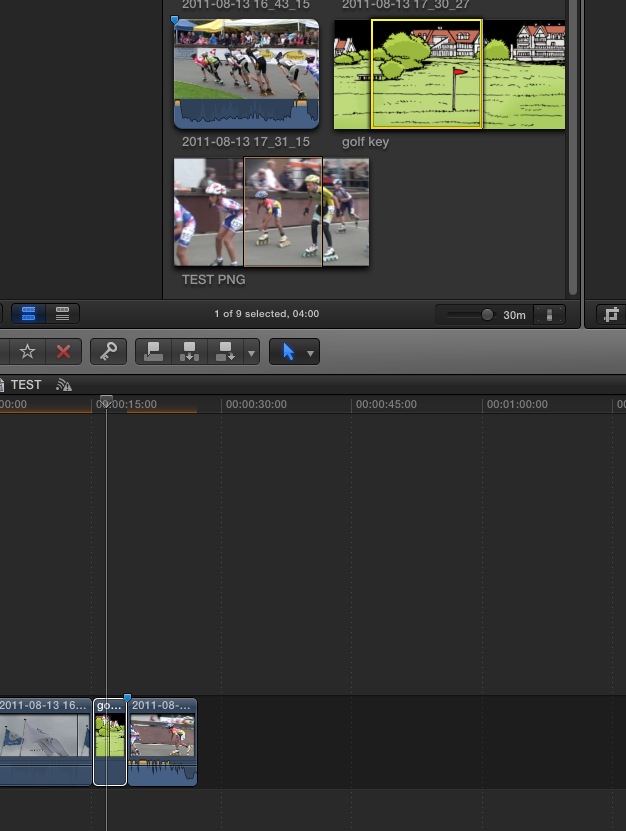
Then I thought: maybe this happens with PNG stills from a video clip on the timeline. So I made a PNG from a clip on the timeline, imported the PNG in the Event and dropped it onto the timeline as well. When I do a SHIFT+F on the PNG the PNG is revealed in the Event, not the clip.
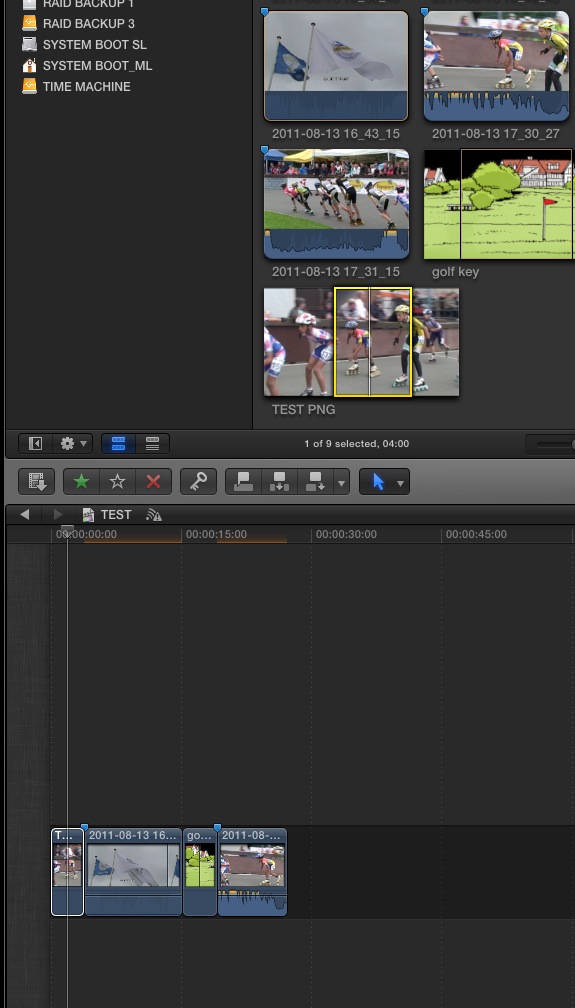
This seems to work correctly, so maybe you should have a look and see where your workflow differs from my test. Then perhaps we can see why this happens on your system.
- Ronny
Nope, I don't see this behavior. I have performed a SHIFT+F on a PNG on the timeline and it reveals the PNG in the Event.
Then I thought: maybe this happens with PNG stills from a video clip on the timeline. So I made a PNG from a clip on the timeline, imported the PNG in the Event and dropped it onto the timeline as well. When I do a SHIFT+F on the PNG the PNG is revealed in the Event, not the clip.
This seems to work correctly, so maybe you should have a look and see where your workflow differs from my test. Then perhaps we can see why this happens on your system.
- Ronny
Please Log in to join the conversation.
17 Sep 2013 20:13 - 17 Sep 2013 20:21 #31288
by Redifer
Replied by Redifer on topic Reveal in Event Browser / Shift + F not working properly
It doesn't differ. I am using 10.6.8 and maybe it's just ANOTHER case of Apple half-assing it in 10.6.8. Why even advertise that it's compatible with 10.6.8 if basic functions don't work right?
Last edit: 17 Sep 2013 20:21 by Redifer.
Please Log in to join the conversation.


17 Sep 2013 22:04 #31289
by Mattc
Replied by Mattc on topic Reveal in Event Browser / Shift + F not working properly
I think it works fine for me too, and on a machine running 10.6.8. Will try and check tomorrow when i'm at the machine.
Does it still do the same thing if you start a new project from scratch and add a png to the timeline?
Does it still do the same thing if you start a new project from scratch and add a png to the timeline?
Please Log in to join the conversation.
17 Sep 2013 22:25 - 17 Sep 2013 22:26 #31292
by Redifer
Replied by Redifer on topic Reveal in Event Browser / Shift + F not working properly
A fine question! You're on to something! It works fine in another event/project. Truly weird.
I don't have the external hard drive that the project referred to in the original post is on hooked up right now, but could having the event and project on the external drive have something to do with it?
I don't have the external hard drive that the project referred to in the original post is on hooked up right now, but could having the event and project on the external drive have something to do with it?
Last edit: 17 Sep 2013 22:26 by Redifer.
Please Log in to join the conversation.
17 Sep 2013 22:31 #31293
by Mattc
Replied by Mattc on topic Reveal in Event Browser / Shift + F not working properly
It sounds to me either something in the project is corrupt or an alias in finder has gone astray or can't find the original media.
If you haven't got the external drive hooked up then maybe it can't find the original file to match the frame too? That's just a guess though.
If you haven't got the external drive hooked up then maybe it can't find the original file to match the frame too? That's just a guess though.
Please Log in to join the conversation.
18 Sep 2013 01:57 #31299
by Redifer
Replied by Redifer on topic Reveal in Event Browser / Shift + F not working properly
Perhaps I should have worded that better. I have projects and events on one drive (the external) and other stuff on a different drive (internal). The problem seems to exist on the external drive events/projects, but I can't test other projects right now as I am simply too lazy to plug the external in and wait for it to power up. My laziness knows no bounds. 
Your comment of a corrupt alias got me thinking, but then again if that were the case I imagine the file would be missing on the timeline as well. It's in the event and hasn't been renamed. I'll have to try some experiments. I'll try a different project on that drive and see if it has the same issue next time I can muster up the extreme energy required to bend over a half-meter and plug the drive in.
Your comment of a corrupt alias got me thinking, but then again if that were the case I imagine the file would be missing on the timeline as well. It's in the event and hasn't been renamed. I'll have to try some experiments. I'll try a different project on that drive and see if it has the same issue next time I can muster up the extreme energy required to bend over a half-meter and plug the drive in.
Please Log in to join the conversation.
18 Sep 2013 06:00 #31306
by Redifer
Replied by Redifer on topic Reveal in Event Browser / Shift + F not working properly
UPDATE: Working on a brand new project tonight using an internal hard drive for the event and project. Running into the same problem again, but this time with a few JPEGs.
I think the bottom line is Apple doesn't fully bug test their apps in all OSes they claim it is compatible with.
I think the bottom line is Apple doesn't fully bug test their apps in all OSes they claim it is compatible with.
Please Log in to join the conversation.
