


3 Post Moderation Rule for New Boarders (25 Jan 2021)
New boarders will have their posts moderated - Don't worry if you cannot see your post immediately.
Stabilization option in Inspector gone
- gr8pics
-
 Topic Author
- Offline
- Senior Member
-

- www.christerdahl.com You gotta take the good with the bad, smile with the sad, love what you got and remember what you had. Learn to forgive, but never forget. Learn from your mistakes ...but never regret. People change, things go wrong. Just remember ..
Less
More
15 Sep 2013 17:14 #31212
by gr8pics
Stabilization option in Inspector gone was created by gr8pics
Im about to finalize a video with 39 clips, and what do deshake it, but the Stabilization option in Inspector is not there for many of the clips, why is it gone, and how do i smooth them out then?
Any backdoor to bring up that menu?
Any backdoor to bring up that menu?
Please Log in to join the conversation.
- Tom Wolsky
-

- Offline
- Moderator
-

15 Sep 2013 17:17 #31213
by Tom Wolsky
Replied by Tom Wolsky on topic Stabilization option in Inspector gone
Try opening the clip from the project into the timeline. See if you get it them.
Please Log in to join the conversation.
15 Sep 2013 17:28 #31214
by gr8pics
Replied by gr8pics on topic Stabilization option in Inspector gone
How do i do that?
When in project library, all clips appears as one long...
and i still wonder how i can insert a screen shot in these posts.
Add file -> insert -> submit
Isnt that correct?
When in project library, all clips appears as one long...
and i still wonder how i can insert a screen shot in these posts.
Add file -> insert -> submit
Isnt that correct?
Please Log in to join the conversation.
- Tom Wolsky
-
- Offline
- Moderator
-
15 Sep 2013 17:45 #31215
by Tom Wolsky
Replied by Tom Wolsky on topic Stabilization option in Inspector gone
Right click on the clip and select open in timeline.
Please Log in to join the conversation.
15 Sep 2013 17:53 #31216
by gr8pics
Replied by gr8pics on topic Stabilization option in Inspector gone
I dont have that option...
Are you sure you dont mean Event and not Project?
I found this on the apple forum, and it seems to work.
"I've had this problem too, and I'm not sure what the cause is, but the easiest way I've found to deal with it is to select the original clip in the event browser, drag it onto the troublesome clip in the timeline (so that you see the little green plus sign), and choose "Replace from start." That will at least leave all your markers, titles, etc. in place"
Are you sure you dont mean Event and not Project?
I found this on the apple forum, and it seems to work.
"I've had this problem too, and I'm not sure what the cause is, but the easiest way I've found to deal with it is to select the original clip in the event browser, drag it onto the troublesome clip in the timeline (so that you see the little green plus sign), and choose "Replace from start." That will at least leave all your markers, titles, etc. in place"
Please Log in to join the conversation.
- Tom Wolsky
-
- Offline
- Moderator
-
15 Sep 2013 18:06 #31217
by Tom Wolsky
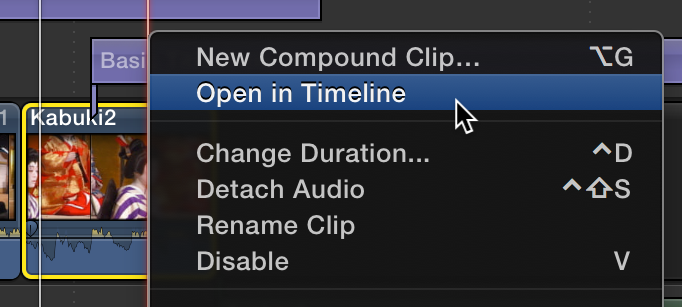
Replied by Tom Wolsky on topic Stabilization option in Inspector gone
Please Log in to join the conversation.

15 Sep 2013 18:19 #31218
by Julian
Replied by Julian on topic Stabilization option in Inspector gone
If it's a synchronized, compound, or multicam clip, you can't stabilize it, you have to right click or just double click on it to open it in its own timeline, then from there you can stabilize it in the inspector.
Please Log in to join the conversation.
- Don Rumsey
-
- Offline
- Elite Member
-

Less
More
- Posts: 220
- Thank you received: 17
16 Sep 2013 03:45 #31230
by Don Rumsey
Replied by Don Rumsey on topic Stabilization option in Inspector gone
What gr8pics wrote above is what I have always done to get the option back. I just did it yesterday as a a matter of fact. Also i find it irritating as well. Not sure what causes it though.
Please Log in to join the conversation.
