


- Posts: 60
- Thank you received: 0
3 Post Moderation Rule for New Boarders (25 Jan 2021)
New boarders will have their posts moderated - Don't worry if you cannot see your post immediately.
FCPX Black Box
11 Sep 2013 01:34 #31033
by AndyKamo
FCPX Black Box was created by AndyKamo
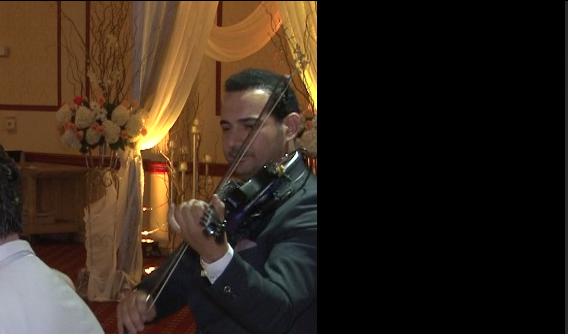
Hello, I recently came across a new problem with a project in FCPX, I get a black box on the right side of the screen sometimes. It does not show with Unrendered clips but when I render them the box appears, also when I export it shows. Sometimes the box disappears and reappears, I don't know what is causing this but I did solve some of the clips issues by deleting the effects that were on the clip but it still appears with some clips that have no effects or changes to the original clip. I left an example to show you what I'm talking about and what this box looks like
Please Log in to join the conversation.
11 Sep 2013 01:50 #31034
by AndyKamo
Replied by AndyKamo on topic FCPX Black Box
I forgot to mention that I'm working with a Multicam clip, one camera is fine but the other (main camera) has the black box on it, I tried moving the main camera clip in the multicam to the top thinking that would change something but nothing changed. Should I try Preference Manager?
Please Log in to join the conversation.
- Tom Wolsky
-

- Offline
- Moderator
-

11 Sep 2013 01:54 #31035
by Tom Wolsky
Replied by Tom Wolsky on topic FCPX Black Box
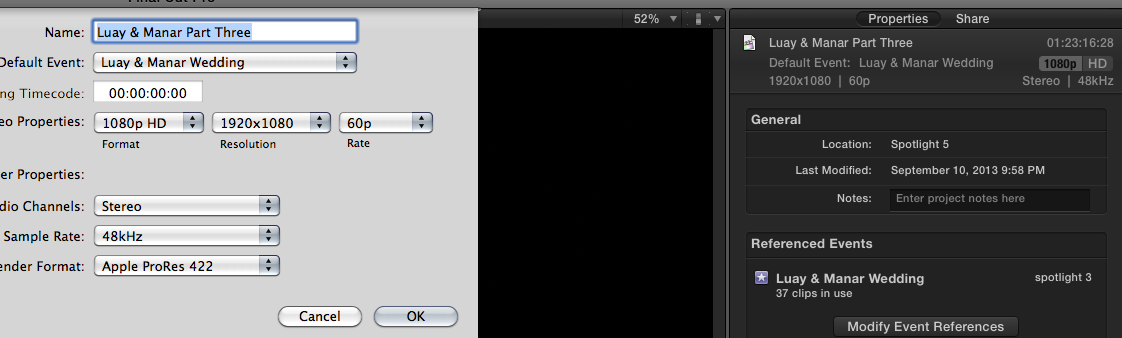
Give complete media specs for clips and project. Post screen shots.
Please Log in to join the conversation.
11 Sep 2013 01:56 #31036
by AndyKamo
Replied by AndyKamo on topic FCPX Black Box
Just tried Preference Manager, the box is still there  - Anyone know a fix to this problem?
- Anyone know a fix to this problem? Please Log in to join the conversation.
11 Sep 2013 02:01 #31037
by AndyKamo
Replied by AndyKamo on topic FCPX Black Box
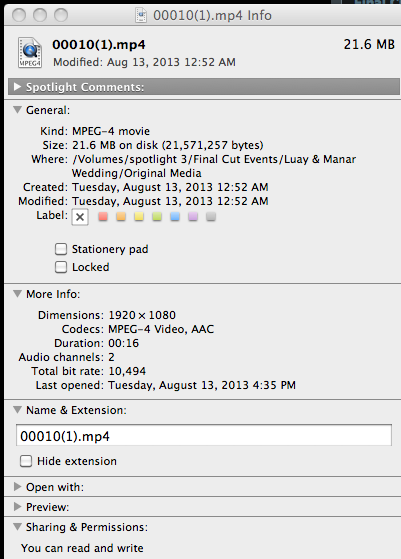
The original clips were .MTS files that were converted into .MP4 using a program called iSkySoft Video Converter
Please Log in to join the conversation.

- Tom Wolsky
-
- Offline
- Moderator
-
11 Sep 2013 02:23 #31040
by Tom Wolsky
Replied by Tom Wolsky on topic FCPX Black Box
.mts from where? Converting to MPEG-4 is crap. Sorry to be blunt, but the iSkySoft is useless for production as if MPEG-4. IF this is properly handled AVCHD in should be imported directly into FCP. If it's not been handled properly, metadata been deleted, then ClipWrap will rewrap to QuickTime.
You can use the Finder info for technical specs. You need a complete application or the QT player's movie inspector.
The project properties maybe OK, but there isn;'t enough info in the finder to tell.
You can use the Finder info for technical specs. You need a complete application or the QT player's movie inspector.
The project properties maybe OK, but there isn;'t enough info in the finder to tell.
Please Log in to join the conversation.
11 Sep 2013 02:23 #31041
by AndyKamo
Replied by AndyKamo on topic FCPX Black Box
Ok, so I tried checking the Multicam, changing the camera positions, it fixed nothing and then I checked the compound clip (I created compound clips of both cameras and placed those into a multicam clip) and it was the same thing, the compound clip also has the black box. Now, I checked the clips inside the compound clip and those are ok, no black box. Again, the black box only appears when the project is rendered or exported, it does not show when the clip is unrendered. One more thing is that I split the Multicam clip into two different projects, the first project has no black box when rendered or exported. The only problem is with the second project, it gets the black box
Please Log in to join the conversation.
11 Sep 2013 02:36 #31042
by AndyKamo
Replied by AndyKamo on topic FCPX Black Box
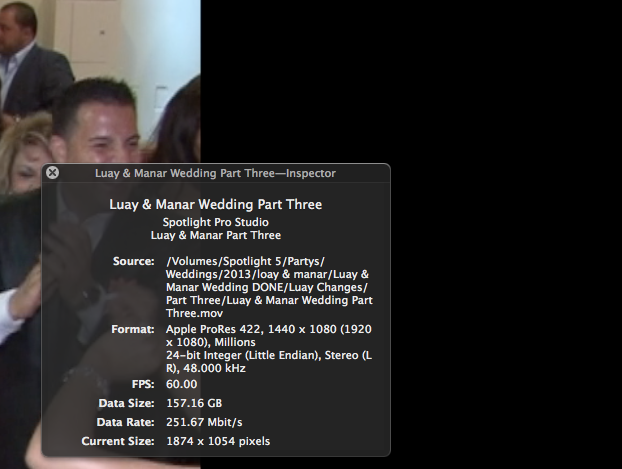
the .mts was obtained from a SD card, my boss copied those files and gave them to me instead of the SD Card itself, when I asked for the card itself he said the clips were already erased. Anyway, I provided an attachment for the exported QT file inspector
Please Log in to join the conversation.
- Tom Wolsky
-
- Offline
- Moderator
-
11 Sep 2013 02:36 #31043
by Tom Wolsky
Replied by Tom Wolsky on topic FCPX Black Box
How and where did you create the compound clip? was this ti sync audio? Which version of the software did you do this in?
I'm at a loss. This looks like a mess to start with. MPEG-4 in a compound clip is not a good start.
If you bladed the multicam clip in a project, nothing should change in the second half, but with this combination, there's no way to tell. If the first half is OK, I;d export that so you have that locked in. Let's see the second half. Let's see the screen shots. What are you seeing? What's this box looks like? What are the media specs?
I'm at a loss. This looks like a mess to start with. MPEG-4 in a compound clip is not a good start.
If you bladed the multicam clip in a project, nothing should change in the second half, but with this combination, there's no way to tell. If the first half is OK, I;d export that so you have that locked in. Let's see the second half. Let's see the screen shots. What are you seeing? What's this box looks like? What are the media specs?
Please Log in to join the conversation.
11 Sep 2013 02:52 #31044
by AndyKamo
Replied by AndyKamo on topic FCPX Black Box
FCPX was not working for me with its auto multicam sync using audio (Including metadata) so what I did was placed both cameras in the project in order and synced them using the audio waveforms, I then put both cameras into their own compound clip, after that I went into the event library and made a multicam clip with the two compounds and unchecking the audio sync option, I'm using FCPX 10.0.8. I put the multicam clip into the project and edited and toke half of it into a new project. Look at the attachments, they show the black box chopping off a good chunk of the viewer.
Please Log in to join the conversation.
- Tom Wolsky
-
- Offline
- Moderator
-
11 Sep 2013 02:59 #31045
by Tom Wolsky
Replied by Tom Wolsky on topic FCPX Black Box
I can't help you. I don't know how to undo this. It's gone wrong from the beginning.
Please Log in to join the conversation.
