


- Posts: 8
- Thank you received: 0
3 Post Moderation Rule for New Boarders (25 Jan 2021)
New boarders will have their posts moderated - Don't worry if you cannot see your post immediately.
How do I set the resolution to 960x720?
10 Sep 2013 18:03 #31018
by sb_stefan
How do I set the resolution to 960x720? was created by sb_stefan
I have a bunch of 8mm footage that is 960x720, but when I add the clips to the timeline, it's impossible to choose that format.
Any advice?
Any advice?
Please Log in to join the conversation.
- Tom Wolsky
-

- Offline
- Moderator
-

10 Sep 2013 18:17 #31019
by Tom Wolsky
Replied by Tom Wolsky on topic How do I set the resolution to 960x720?
What happens if you make a project at that size? The problem may be that 960x720 is an anamorphic format, not 4:3.
Please Log in to join the conversation.
10 Sep 2013 19:20 - 10 Sep 2013 19:22 #31020
by sb_stefan
Replied by sb_stefan on topic How do I set the resolution to 960x720?
I can't find that size in the drop down menu, and to me it seems there's no way to totally customise the resolution. Do I have to set the resolution when I start a project, or can I change it at the end right before exporting my finished video?

Last edit: 10 Sep 2013 19:22 by sb_stefan.
Please Log in to join the conversation.
- Tom Wolsky
-
- Offline
- Moderator
-
10 Sep 2013 19:38 #31021
by Tom Wolsky
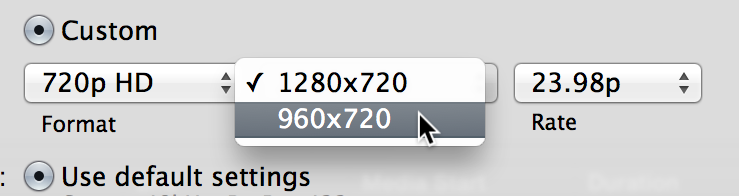
You need a complex workaround to create a custom size. Start here
www.fcpxbook.com/tips/customprojectsize.html
Replied by Tom Wolsky on topic How do I set the resolution to 960x720?
You need a complex workaround to create a custom size. Start here
www.fcpxbook.com/tips/customprojectsize.html
Please Log in to join the conversation.
10 Sep 2013 19:57 - 10 Sep 2013 19:58 #31023
by sb_stefan
Replied by sb_stefan on topic How do I set the resolution to 960x720?
Thanks for the tip! But one thing that I don't understand at all is this:
When I open my clip in Quicktime Player, it looks like this:

But when I then import the clips to FCP it looks like this even when I preview the clip, without even having added it to the timeline yet:

Does FCP resize my clip upon import, before even working with it at all? :dry:
When I open my clip in Quicktime Player, it looks like this:
But when I then import the clips to FCP it looks like this even when I preview the clip, without even having added it to the timeline yet:
Does FCP resize my clip upon import, before even working with it at all? :dry:
Last edit: 10 Sep 2013 19:58 by sb_stefan.
Please Log in to join the conversation.
- Tom Wolsky
-
- Offline
- Moderator
-
10 Sep 2013 20:07 #31024
by Tom Wolsky
Replied by Tom Wolsky on topic How do I set the resolution to 960x720?
Yes, because there is no video standard that is 960x720 that is not anamorphic HD. Anything that dimension is HD, and therefore must be widescreen. There is 4:3 HD, and 720 is always HD. At least those are the agreed video standards. This is a non-existent format at a non-=standard frame rate.
Please Log in to join the conversation.
- cinemaloha
-

- Offline
- Elite Member
-

Less
More
- Posts: 163
- Thank you received: 36
11 Sep 2013 20:11 - 11 Sep 2013 20:18 #31077
by cinemaloha
1. Go to Event Browser, select clip, press keyboard shortcut option+G to create a compound clip.
2. Go to the newly created compound clip, rename it to your project name, then right click on it and select 'Open in Timeline'.
New Compound Clip Settings:
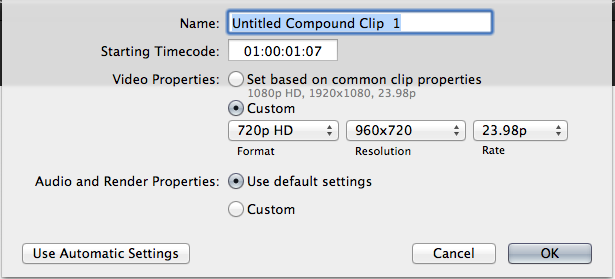
3. Use the compound clip timeline as your new project timeline to achieve the 960x720 resolution.
Export should have the same resolution.
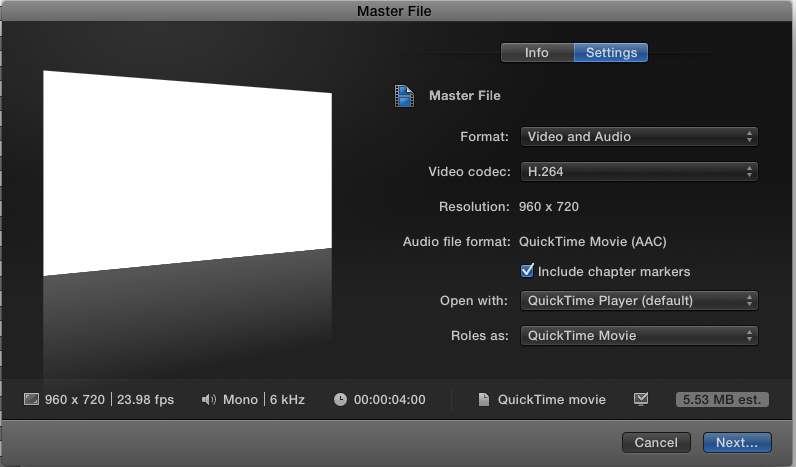
Replied by cinemaloha on topic How do I set the resolution to 960x720?
sb_stefan wrote: I have a bunch of 8mm footage that is 960x720, but when I add the clips to the timeline, it's impossible to choose that format.
Any advice?
1. Go to Event Browser, select clip, press keyboard shortcut option+G to create a compound clip.
2. Go to the newly created compound clip, rename it to your project name, then right click on it and select 'Open in Timeline'.
New Compound Clip Settings:
3. Use the compound clip timeline as your new project timeline to achieve the 960x720 resolution.
Export should have the same resolution.
Last edit: 11 Sep 2013 20:18 by cinemaloha. Reason: Added Compound Clip Settings Screenshot
Please Log in to join the conversation.
- Tom Wolsky
-
- Offline
- Moderator
-
11 Sep 2013 20:33 #31078
by Tom Wolsky
Replied by Tom Wolsky on topic How do I set the resolution to 960x720?
It won't work unfortunately, because as the OP noted FCP imports the video as anamorphic, so it's already stretched in the browser.
He might be able to edit in an anamorphic project and then distort it back in a 4:3 project.
He might be able to edit in an anamorphic project and then distort it back in a 4:3 project.
Please Log in to join the conversation.
- cinemaloha
-
- Offline
- Elite Member
-
Less
More
- Posts: 163
- Thank you received: 36
11 Sep 2013 20:47 #31080
by cinemaloha
Missed that part. Looking at the clip names in the Event Browser, sb_stefan may have imported the clips directly into FCPX. If he copies the files on to a new folder and then import that folder into FCPX, it might retain the 960x720 resolution and then proceed with the Compound Clip method. Hope it works out for you.
Replied by cinemaloha on topic How do I set the resolution to 960x720?
sb_stefan wrote: Thanks for the tip! But one thing that I don't understand at all is this:
When I open my clip in Quicktime Player, it looks like this:
But when I then import the clips to FCP it looks like this even when I preview the clip, without even having added it to the timeline yet:
Does FCP resize my clip upon import, before even working with it at all? :dry:
Tom Wolsky wrote: It won't work unfortunately, because as the OP noted FCP imports the video as anamorphic, so it's already stretched in the browser.
He might be able to edit in an anamorphic project and then distort it back in a 4:3 project.
Missed that part. Looking at the clip names in the Event Browser, sb_stefan may have imported the clips directly into FCPX. If he copies the files on to a new folder and then import that folder into FCPX, it might retain the 960x720 resolution and then proceed with the Compound Clip method. Hope it works out for you.
Please Log in to join the conversation.
- cinemaloha
-
- Offline
- Elite Member
-
Less
More
- Posts: 163
- Thank you received: 36
11 Sep 2013 20:55 #31081
by cinemaloha
Replied by cinemaloha on topic How do I set the resolution to 960x720?
sb_stefan,
Can you post a screenshot of your Info tab in the Inspector.
Like so...
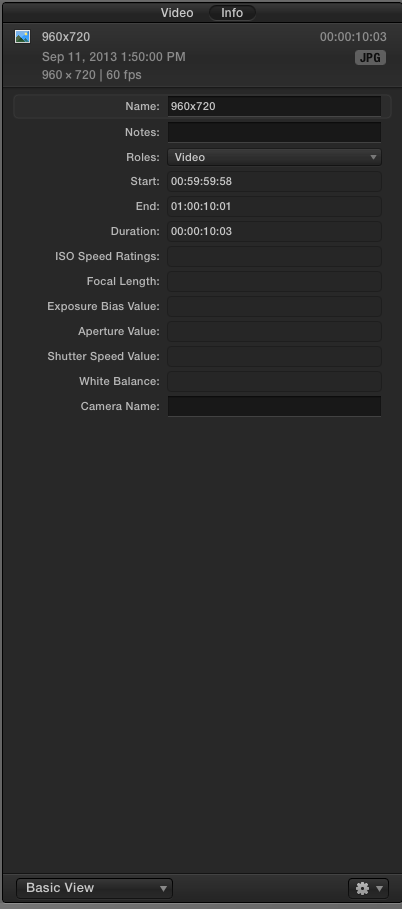
Can you post a screenshot of your Info tab in the Inspector.
Like so...
Please Log in to join the conversation.
12 Sep 2013 04:15 - 12 Sep 2013 04:16 #31092
by sb_stefan
Here it is:

Replied by sb_stefan on topic How do I set the resolution to 960x720?
cinemaloha wrote: sb_stefan,
Can you post a screenshot of your Info tab in the Inspector.
Here it is:
Last edit: 12 Sep 2013 04:16 by sb_stefan.
Please Log in to join the conversation.
- ronny courtens
-

- Offline
- Moderator
-
Less
More
- Posts: 4455
- Thank you received: 962
12 Sep 2013 09:01 #31099
by ronny courtens
Replied by ronny courtens on topic How do I set the resolution to 960x720?
The image in your FCPX viewer looks much more natural than what I see in your QT player, which looks squished. So I think this is indeed anamorphic video (1280x720 rectangular pixels) and FCPX displays it properly. QT player has a nasty habit of displaying anamorphic video in a 4:3 frame, i.e. with squished pixels.
To make sure just check some of your clips in the FCPX Browser. Do they look correct when you see them in the Viewer?
- Ronny
To make sure just check some of your clips in the FCPX Browser. Do they look correct when you see them in the Viewer?
- Ronny
Please Log in to join the conversation.
12 Sep 2013 10:57 - 12 Sep 2013 10:57 #31106
by sb_stefan
How do I do that?
I'm pretty new to FCP.
Replied by sb_stefan on topic How do I set the resolution to 960x720?
ronny courtens wrote: To make sure just check some of your clips in the FCPX Browser. Do they look correct when you see them in the Viewer?
How do I do that?
I'm pretty new to FCP.
Last edit: 12 Sep 2013 10:57 by sb_stefan.
Please Log in to join the conversation.
- ronny courtens
-
- Offline
- Moderator
-
Less
More
- Posts: 4455
- Thank you received: 962
12 Sep 2013 10:58 #31107
by ronny courtens
Replied by ronny courtens on topic How do I set the resolution to 960x720?
Just play the clips you have imported and watch the Viewer. Do the shots look correct or do they look abnormally stretched?
- Ronny
- Ronny
Please Log in to join the conversation.
12 Sep 2013 11:00 #31108
by donsmith
Replied by donsmith on topic How do I set the resolution to 960x720?
I always edit odd frame size videos in their own timeline. Right-click on the odd video and open in Timeline and the timeline will adopt the frame size. If you want to create an odd size timeline from scratch go to Motion and create a project of the odd size and then immediately export it. You'll get ten seconds of black at the odd frame size. Put that into your Event browser and open it on its own timeline and add your odd video and delete the black. Caution; never start the video with a still. It'll edit and play fine but won't export with the audio. I suspect that the still doesn't establish a frame rate and that's why the audio won't export. Now, if a client says they need a frame size the width of HD but three times the height of HD so that they can display three HD videos in a vertical column you'll know how to do it.
Please Log in to join the conversation.
- Tom Wolsky
-
- Offline
- Moderator
-
12 Sep 2013 11:06 #31109
by Tom Wolsky
Replied by Tom Wolsky on topic How do I set the resolution to 960x720?
The problem is that FCP is treating media in this frame resolution as anamorphic and stretching it to widescreen. That persists when you open the clip in the timeline. The material originated as 8mm film, so it's most likely 4:3.
Please Log in to join the conversation.
12 Sep 2013 14:24 - 12 Sep 2013 14:26 #31113
by sb_stefan
Replied by sb_stefan on topic How do I set the resolution to 960x720?
Actually, the footage was filmed with my iPhone using this app:
itunes.apple.com/app/8mm-vintage-camera/id406541444?mt=8
Perhaps I should have mentioned that right away, but I figured it would be the same as real 8 mm footage, since that's what it tries to imitate.
itunes.apple.com/app/8mm-vintage-camera/id406541444?mt=8
Perhaps I should have mentioned that right away, but I figured it would be the same as real 8 mm footage, since that's what it tries to imitate.
Last edit: 12 Sep 2013 14:26 by sb_stefan.
Please Log in to join the conversation.
- Tom Wolsky
-
- Offline
- Moderator
-
12 Sep 2013 15:02 - 12 Sep 2013 15:04 #31115
by Tom Wolsky
Replied by Tom Wolsky on topic How do I set the resolution to 960x720?
Don't know anything about the app. Is it supposed to be widescreen or 4:3? The image on the iTunes page makes it look as if it's supposed to be 4:3, which is the natural format of 8mm, though there does seem to be one 1920 setup as well.
Last edit: 12 Sep 2013 15:04 by Tom Wolsky.
Please Log in to join the conversation.
