


- Posts: 164
- Thank you received: 0
3 Post Moderation Rule for New Boarders (25 Jan 2021)
New boarders will have their posts moderated - Don't worry if you cannot see your post immediately.
Importing old project onto new Computer
10 Sep 2013 06:44 #30969
by Neil P
Importing old project onto new Computer was created by Neil P
Hi Team
I have a new mac, but a project that I need to finish is on my Drobo (was linked to my old mac), in Final Cut Events (does that sound right ?).
How do I import the project properly into FCPX on my new computer ?
Will this work if I import the folder using the import events folder ?
Thanks
Neil
I have a new mac, but a project that I need to finish is on my Drobo (was linked to my old mac), in Final Cut Events (does that sound right ?).
How do I import the project properly into FCPX on my new computer ?
Will this work if I import the folder using the import events folder ?
Thanks
Neil
Please Log in to join the conversation.
- Tom Wolsky
-

- Offline
- Moderator
-

10 Sep 2013 07:46 #30972
by Tom Wolsky
Replied by Tom Wolsky on topic Importing old project onto new Computer
You simply connect the drive and launch the application. If the files are in the right place FCP will recognize them and open them. You can't import them.
Please Log in to join the conversation.
10 Sep 2013 08:01 #30973
by Neil P
Replied by Neil P on topic Importing old project onto new Computer
ah, i can't find it in my project list under drobo - that is not good news.
The file that I am looking for is in the drobo in the Final cut events folder and the drobo is connected. I don't think I've moved anything ?
Neil
The file that I am looking for is in the drobo in the Final cut events folder and the drobo is connected. I don't think I've moved anything ?
Neil
Please Log in to join the conversation.
- Tom Wolsky
-
- Offline
- Moderator
-
10 Sep 2013 08:05 #30975
by Tom Wolsky
Replied by Tom Wolsky on topic Importing old project onto new Computer
Project files can't be in the events folder. There should be a separate folder called Final Cut Projects at the root level of the external drive.
Please Log in to join the conversation.
10 Sep 2013 08:16 #30977
by Neil P
Replied by Neil P on topic Importing old project onto new Computer
Yes, just found that, the film I require is not in there though 
Is this want I'm looking for (see screen grab). This folder is in my Final cut events within the external drive
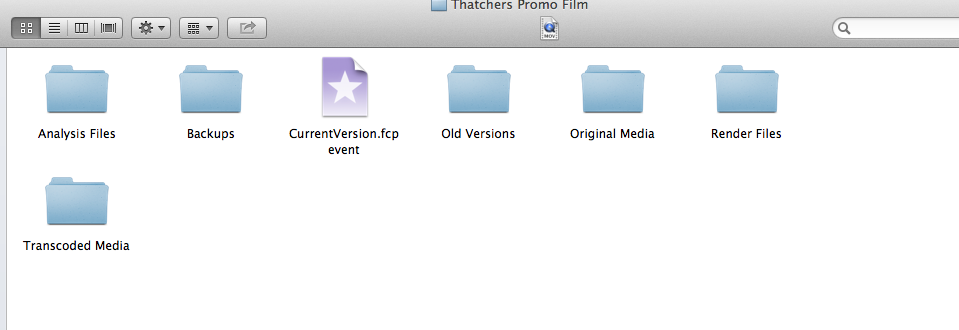
Is this want I'm looking for (see screen grab). This folder is in my Final cut events within the external drive
Please Log in to join the conversation.
10 Sep 2013 08:17 #30978
by Neil P
Replied by Neil P on topic Importing old project onto new Computer
can I drag that folder into the Projects folder to make i work ? (prob not)
Please Log in to join the conversation.
- Tom Wolsky
-
- Offline
- Moderator
-
10 Sep 2013 08:22 #30980
by Tom Wolsky
Replied by Tom Wolsky on topic Importing old project onto new Computer
No, that's the event folder, the container for the media. There should be another similar folder for the project, inside a folder called Final Cut Projects. Unless you have somehow edited inside an event, maybe inside a compound clip or another open clip, but normally there are separate project folders, completely independent of the events folders.
Please Log in to join the conversation.
10 Sep 2013 09:29 #30981
by Neil P
Replied by Neil P on topic Importing old project onto new Computer
err, I could be stuck then. I guess I'm going to have to connect back up to my old mac,
Neil
Neil
Please Log in to join the conversation.
- Andreas Kiel
-

- Offline
- Platinum Member
-

Less
More
- Posts: 1077
- Thank you received: 189
10 Sep 2013 09:29 #30982
by Andreas Kiel
Replied by Andreas Kiel on topic Importing old project onto new Computer
As Tom said there is the need to have everything in the structure FCPX needs.
Your screenshot says nothing about the file path and as mentioned it's a event,
I don't know anything about the setup of your new mac -- so everything is a kind of guess.
If you have only the internal disk and just use the Drobo to transport stuff, quit FCPX and move the event and project folder to "Users/yourname/Movies" into the events and projects folders. Disconnect the Drobo and launch FCPX (Source media must be available).
If you want the Drobo stay connected make sure the events and projects are on the root level of the Drobo means they are at "myDrobo/Final Cut Events/myEvent" and "myDrobo/Final Cut Projects/myProject".
Andreas
Your screenshot says nothing about the file path and as mentioned it's a event,
I don't know anything about the setup of your new mac -- so everything is a kind of guess.
If you have only the internal disk and just use the Drobo to transport stuff, quit FCPX and move the event and project folder to "Users/yourname/Movies" into the events and projects folders. Disconnect the Drobo and launch FCPX (Source media must be available).
If you want the Drobo stay connected make sure the events and projects are on the root level of the Drobo means they are at "myDrobo/Final Cut Events/myEvent" and "myDrobo/Final Cut Projects/myProject".
Andreas
Please Log in to join the conversation.
10 Sep 2013 09:36 #30983
by Neil P
Replied by Neil P on topic Importing old project onto new Computer
Thanks,
not sure I understand what you've just recomeneded but I'll give it a go.
thanks
Neil
not sure I understand what you've just recomeneded but I'll give it a go.
thanks
Neil
Please Log in to join the conversation.
- Andreas Kiel
-
- Offline
- Platinum Member
-
Less
More
- Posts: 1077
- Thank you received: 189
10 Sep 2013 11:16 #30986
by Andreas Kiel
Replied by Andreas Kiel on topic Importing old project onto new Computer
Neil,
Media/Project management with FCPX can be quite cumbersome especially if you want to "travel".
So what was your Drobo used for -- just for backup or a volume you used to work with for events and projects?
In first case your events and projects might stored in a folder which is both not visible for FCPX and maybe not understandable for you.
In the second case it should be visible for FCPX if both events, projects and media are on this Drobo.
If it's case one you can use the duplicate option for the project within FCPX to copy all the stuff needed to your Drobo. Keep in mind that it will create (depending on the options checked) a completely new relation and setup of event/project. Also don't forget to relink all files to update the databases.
Once done you can use your Drobo on the new machine -- either to work from it or copy the event/project structure to your new machine volumes or into your home directory. If you don't want the the Drobo as a "work volume" disconnect it after the files copied -- otherwise FCPX will give you an error message cause of duplicate events and projects.
Hope this helps.
-Andreas
Media/Project management with FCPX can be quite cumbersome especially if you want to "travel".
So what was your Drobo used for -- just for backup or a volume you used to work with for events and projects?
In first case your events and projects might stored in a folder which is both not visible for FCPX and maybe not understandable for you.
In the second case it should be visible for FCPX if both events, projects and media are on this Drobo.
If it's case one you can use the duplicate option for the project within FCPX to copy all the stuff needed to your Drobo. Keep in mind that it will create (depending on the options checked) a completely new relation and setup of event/project. Also don't forget to relink all files to update the databases.
Once done you can use your Drobo on the new machine -- either to work from it or copy the event/project structure to your new machine volumes or into your home directory. If you don't want the the Drobo as a "work volume" disconnect it after the files copied -- otherwise FCPX will give you an error message cause of duplicate events and projects.
Hope this helps.
-Andreas
Please Log in to join the conversation.
11 Sep 2013 10:33 #31057
by Neil P
Replied by Neil P on topic Importing old project onto new Computer
Hi
I've plugged the drobo back into my old mac and the footage now appears on the timeline etc so the info is on the Drobo somewhere, but not in Projects it seems.
I'll keep digging !
Neil
I've plugged the drobo back into my old mac and the footage now appears on the timeline etc so the info is on the Drobo somewhere, but not in Projects it seems.
I'll keep digging !
Neil
Please Log in to join the conversation.
11 Sep 2013 17:06 #31073
by Neil P
Replied by Neil P on topic Importing old project onto new Computer
Hi Guys
I've finally managed to copy the old project onto my new computer. I did this by duplicating the original project which I eventually found (it was in my hard drive on the old computer in final cut Projects) copying the project onto an external hard rive then copying it into the FCP project folder on my new hardrive.
Phew !!
Thanks for all your help on this one.
Neil
I've finally managed to copy the old project onto my new computer. I did this by duplicating the original project which I eventually found (it was in my hard drive on the old computer in final cut Projects) copying the project onto an external hard rive then copying it into the FCP project folder on my new hardrive.
Phew !!
Thanks for all your help on this one.
Neil
Please Log in to join the conversation.
