


3 Post Moderation Rule for New Boarders (25 Jan 2021)
New boarders will have their posts moderated - Don't worry if you cannot see your post immediately.
FCPX & Backup/RAID issues
- stkirkland
-
 Topic Author
- Offline
- Senior Member
-

- Haven't I already written something (LOTS) about myself on my "Info" page??
Less
More
09 Sep 2013 02:55 #30912
by stkirkland
FCPX & Backup/RAID issues was created by stkirkland
Hi:
I've been trying to beef up my system of backups for media in use with FCPX. I have Time Machine running, of course (except turning it off when editing.. and not using it to backup my other media drives, simply backing up my OS basically), and I have an 6TB OWC Mercury Elie-AL Pro I recently bought for a RAID1 setup. In addition, I have a 3TB OWC miniStack Classic that I'm setting up off-site for backups.
I have 2 internal drives: One for storage of raw media files and another for FCPX Events & Projects. I've got SuperDuper setup to backup both drives to the RAID volume.
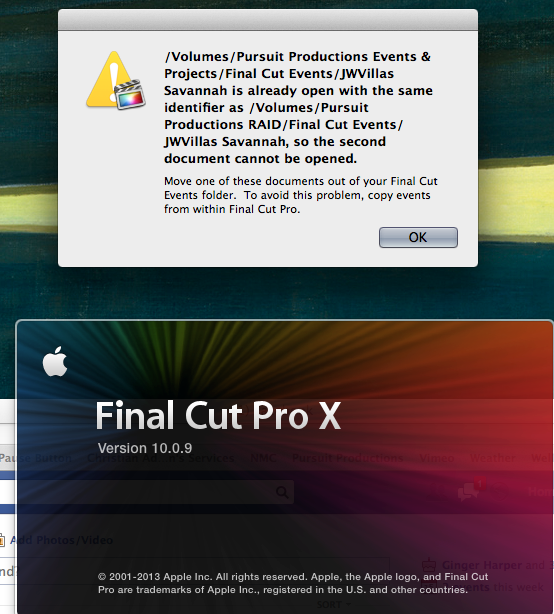
When I'm opening FCPX now, since I have the RAID setup, I am getting the message (not exact quote): "Another event with same name as 'Event X' is already open on {the RAID volume}. You will need to close one of the events in order to continue."
How do you keep a backup fairly regularly of your event/project files without getting this message? I have Event Manager X, but I'll still get this message even with other events/projects hidden. Would I simply need to eject the RAID volume while working, then mount it again after working, in order for SuperDuper to do it's regular backup?
:huh:
I've been trying to beef up my system of backups for media in use with FCPX. I have Time Machine running, of course (except turning it off when editing.. and not using it to backup my other media drives, simply backing up my OS basically), and I have an 6TB OWC Mercury Elie-AL Pro I recently bought for a RAID1 setup. In addition, I have a 3TB OWC miniStack Classic that I'm setting up off-site for backups.
I have 2 internal drives: One for storage of raw media files and another for FCPX Events & Projects. I've got SuperDuper setup to backup both drives to the RAID volume.
When I'm opening FCPX now, since I have the RAID setup, I am getting the message (not exact quote): "Another event with same name as 'Event X' is already open on {the RAID volume}. You will need to close one of the events in order to continue."
How do you keep a backup fairly regularly of your event/project files without getting this message? I have Event Manager X, but I'll still get this message even with other events/projects hidden. Would I simply need to eject the RAID volume while working, then mount it again after working, in order for SuperDuper to do it's regular backup?
:huh:
Please Log in to join the conversation.

09 Sep 2013 03:25 #30914
by EditGuru
Replied by EditGuru on topic FCPX & Backup/RAID issues
A simple fix would be to create a new folder on your back up drive with a name that FCPX won't recognise and therefor won't try & load at startup - ie 'FCPX Event Backups' & 'FCPX Project Backups'. Drag your events/projects into these until you need them. If you need to revert to the backup then drag them back out again to their original location where FCPX will see them and load.
Please Log in to join the conversation.

10 Sep 2013 14:24 #31005
by BenB
Replied by BenB on topic FCPX & Backup/RAID issues
I use Carbon Copy Cloner, as it can mount, backup, and unmount my backup drive so FCP never actually sees it, and it is an exact duplicate I can easily restore from. I wrote an article explaining this type of backup system. PM me for a link to it.
Please Log in to join the conversation.

12 Sep 2013 03:05 #31089
by dgwvideo
Creating history....one edit at a time !
Replied by dgwvideo on topic FCPX & Backup/RAID issues
Why not use Event Manager X application to deal with that?
Creating history....one edit at a time !
Please Log in to join the conversation.
- stkirkland
-
Topic Author
- Offline
- Senior Member
-
- Haven't I already written something (LOTS) about myself on my "Info" page??
12 Sep 2013 10:18 #31101
by stkirkland
Replied by stkirkland on topic FCPX & Backup/RAID issues
I do have Event Manager X, but even with this option, I still get the message. It must still see the duplicate files on the 2 drives when you open FCPX. I think my best option is to unmount the RAID until I back it up each time.
Please Log in to join the conversation.
- stkirkland
-
Topic Author
- Offline
- Senior Member
-
- Haven't I already written something (LOTS) about myself on my "Info" page??
12 Sep 2013 10:20 #31102
by stkirkland
Replied by stkirkland on topic FCPX & Backup/RAID issues
CCC sounds like it's got more options (hourly backups, unmounting of drives, etc) that make it a nice option, but I hate having to buy it (I think it used to be free??) after already buying SuperDuper. SD allows one backup scheduled per day and that might be sufficient in some cases. I'd like to see your article but I'll send another message on the PM for that.
Please Log in to join the conversation.
- Andreas Kiel
-
- Offline
- Platinum Member
-

Less
More
- Posts: 1077
- Thank you received: 189
12 Sep 2013 10:49 #31104
by Andreas Kiel
Replied by Andreas Kiel on topic FCPX & Backup/RAID issues
I also would recommend the folder handling.
If you only want to backup the "CurrentVersion" files in short intervals you can try my X-Files Pro, There is a 30 day demo. Read the help file before you start.
www.spherico.com/filmtools/X-Files/X_Files_Pro.dmg
-Andreas
If you only want to backup the "CurrentVersion" files in short intervals you can try my X-Files Pro, There is a 30 day demo. Read the help file before you start.
www.spherico.com/filmtools/X-Files/X_Files_Pro.dmg
-Andreas
Please Log in to join the conversation.
- stkirkland
-
Topic Author
- Offline
- Senior Member
-
- Haven't I already written something (LOTS) about myself on my "Info" page??
12 Sep 2013 14:43 #31114
by stkirkland
Replied by stkirkland on topic FCPX & Backup/RAID issues
Andreas, this looks like a great tool, in addition to Event Mgr X. Thanks for the link.
Please Log in to join the conversation.
- stkirkland
-
Topic Author
- Offline
- Senior Member
-
- Haven't I already written something (LOTS) about myself on my "Info" page??
16 Sep 2013 01:27 #31228
by stkirkland
Replied by stkirkland on topic FCPX & Backup/RAID issues
By the way, opened up the program tonight and here is a screenshot of the actual dialogue box:
Please Log in to join the conversation.

