


- Posts: 26
- Thank you received: 0
3 Post Moderation Rule for New Boarders (25 Jan 2021)
New boarders will have their posts moderated - Don't worry if you cannot see your post immediately.
USING BACKUP FOR FCPX AND EVENT MANAGER X
06 Sep 2013 00:46 #30816
by Aquaholic
USING BACKUP FOR FCPX AND EVENT MANAGER X was created by Aquaholic
Hello -
I’m trying to determine the best method of backing up using Backups for FCPX and Event Manager X when you’re using “Sets” in Event Manager. In other words, is Backups only backing up your current “Set” and would it be a better idea to check all events and projects in Event Manger before before moving / un-hiding before backing up using Backups.
Thanks,
Sean
I’m trying to determine the best method of backing up using Backups for FCPX and Event Manager X when you’re using “Sets” in Event Manager. In other words, is Backups only backing up your current “Set” and would it be a better idea to check all events and projects in Event Manger before before moving / un-hiding before backing up using Backups.
Thanks,
Sean
Please Log in to join the conversation.
- Andreas Kiel
-

- Offline
- Platinum Member
-

Less
More
- Posts: 1077
- Thank you received: 189
06 Sep 2013 09:19 #30822
by Andreas Kiel
Replied by Andreas Kiel on topic USING BACKUP FOR FCPX AND EVENT MANAGER X
What do mean with "backup" ?
Just a duplicate of your CurrenVersion.fcp...? Or do mean the whole stuff?
-Andreas
Just a duplicate of your CurrenVersion.fcp...? Or do mean the whole stuff?
-Andreas
Please Log in to join the conversation.
- cinemaloha
-
- Offline
- Elite Member
-

Less
More
- Posts: 163
- Thank you received: 36
06 Sep 2013 09:40 - 06 Sep 2013 09:42 #30824
by cinemaloha
Replied by cinemaloha on topic USING BACKUP FOR FCPX AND EVENT MANAGER X
I currently use 'Backups for FCPX' with Event Manager X (EMX). I load ONE project at a time by "hiding" unused projects with EMX & then create a new backup in 'Backups for FCPX' for each project. This workflow helps me isolate each project to its own 'Backups' file. I've restored a few projects successfully when FCPX's undo function "grays out' because of software bugs. Hope this helps.
Backups is an excellent app but I wish it was more intuitive and just sits at the menu bar like other menu tab apps in the App Store.
* A tip for Backups is when you're working intensely on long project, change the backup intervals to 2 minutes because there are times when the Undo bug occur. When finished go to the 'snapshots' in Backups to delete old snapshots to reclaim storage space. There are times when my snapshots get over 20 GB.
Backups is an excellent app but I wish it was more intuitive and just sits at the menu bar like other menu tab apps in the App Store.
* A tip for Backups is when you're working intensely on long project, change the backup intervals to 2 minutes because there are times when the Undo bug occur. When finished go to the 'snapshots' in Backups to delete old snapshots to reclaim storage space. There are times when my snapshots get over 20 GB.
Last edit: 06 Sep 2013 09:42 by cinemaloha.
Please Log in to join the conversation.
- Andreas Kiel
-
- Offline
- Platinum Member
-
Less
More
- Posts: 1077
- Thank you received: 189
06 Sep 2013 10:12 #30828
by Andreas Kiel
Replied by Andreas Kiel on topic USING BACKUP FOR FCPX AND EVENT MANAGER X
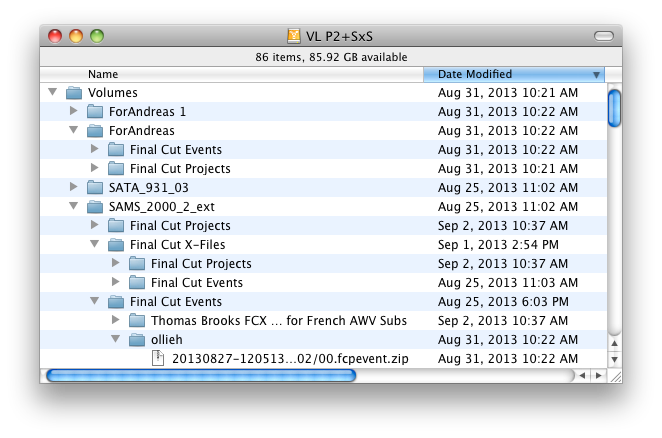
So it seems you only back up the CurrenVersion.fcp... stuff. It's more a kind of versioning.
I don't know 'Backups for FCPX' but why do you need 'Event Manager X' with it?
From my point of view (and with my own app) all 'CurrenVersion.fcp...' stuff should scanned every x minutes (set by the user) regardless where they reside.
If there is a change they will be saved - if there is no change nothing happens.
Doing a 'real back up' includes all files needed. Ben Balser made a nice tutorial about that using CCC.
But this should be done during the night time.
Andreas
I don't know 'Backups for FCPX' but why do you need 'Event Manager X' with it?
From my point of view (and with my own app) all 'CurrenVersion.fcp...' stuff should scanned every x minutes (set by the user) regardless where they reside.
If there is a change they will be saved - if there is no change nothing happens.
Doing a 'real back up' includes all files needed. Ben Balser made a nice tutorial about that using CCC.
But this should be done during the night time.
Andreas
Please Log in to join the conversation.
- Carsten Orlt
-

- Offline
- Platinum Member
-
Less
More
- Posts: 422
- Thank you received: 82
06 Sep 2013 10:21 #30831
by Carsten Orlt
Replied by Carsten Orlt on topic USING BACKUP FOR FCPX AND EVENT MANAGER X
I'm using Backups for FCPx and I just have it setup to backup each media drive. I create one backup set per drive. This way it doesn't matter where the event/project is as it also recognises them in the hidden folder created by Event Manager.
I limit the snapshots to 10 in the preferences so Backups puts old ones in the trash. I still manually have to delete the trash, but hey always areas for improvements
Interval is set to 1 hour which effectively makes it the same as time machine. There is a risk of 59 to 1 min of loosing stuff if hell breaks loose but so has living)
I limit the snapshots to 10 in the preferences so Backups puts old ones in the trash. I still manually have to delete the trash, but hey always areas for improvements
Interval is set to 1 hour which effectively makes it the same as time machine. There is a risk of 59 to 1 min of loosing stuff if hell breaks loose but so has living
) Please Log in to join the conversation.
- cinemaloha
-
- Offline
- Elite Member
-
Less
More
- Posts: 163
- Thank you received: 36
06 Sep 2013 12:31 - 06 Sep 2013 12:39 #30843
by cinemaloha
Andreas,
Yes you are correct, it is a form of "versioning". The app is like an autosave function and it's just a cheaper version of Digital Rebellion's Pro Versioner.
Again, you are correct, a "real back up" is backing up everything (in triplicate and an offsite backup in case the building burns down).
However, the original question is about the app 'Backups for Final Cut Pro' and how it interacts with Event Manager X (read more about 'Backups' here: www.fcp.co/final-cut-pro/news/1041-backi...tically-with-backups ).
Each editor have their own workflow and my "versioning" workflow is with these two apps that have saved many hours of paid work.
Replied by cinemaloha on topic USING BACKUP FOR FCPX AND EVENT MANAGER X
Andreas Kiel wrote: So it seems you only back up the CurrenVersion.fcp... stuff. It's more a kind of versioning.
I don't know 'Backups for FCPX' but why do you need 'Event Manager X' with it?
From my point of view (and with my own app) all 'CurrenVersion.fcp...' stuff should scanned every x minutes (set by the user) regardless where they reside.
If there is a change they will be saved - if there is no change nothing happens.
Doing a 'real back up' includes all files needed. Ben Balser made a nice tutorial about that using CCC.
But this should be done during the night time.
Andreas
Andreas,
Yes you are correct, it is a form of "versioning". The app is like an autosave function and it's just a cheaper version of Digital Rebellion's Pro Versioner.
Again, you are correct, a "real back up" is backing up everything (in triplicate and an offsite backup in case the building burns down).
However, the original question is about the app 'Backups for Final Cut Pro' and how it interacts with Event Manager X (read more about 'Backups' here: www.fcp.co/final-cut-pro/news/1041-backi...tically-with-backups ).
Each editor have their own workflow and my "versioning" workflow is with these two apps that have saved many hours of paid work.
Last edit: 06 Sep 2013 12:39 by cinemaloha.
Please Log in to join the conversation.
07 Sep 2013 08:57 #30869
by NocoDave
I don't know about "Backup for FCPX" as I don't use it. But I have a system I use with "Time Machine" that you might be able to work with it.
Before, when moving stuff between the Event/Projects, Hidden/In Use folders "Time Machine" backed up both, so gradually as they get moved about I have backups of both versions at different stages on the same drive, obviously a waist of space.
What I do now is have a separate folder titled "Rushes" at the root of my Raid (could be anywhere). All footage goes straight from the camera into here before bing imported in to FCPX. I also have an "Automator - Folder Action" set up to copy all files in here to a backup disk.
I set "Time Machine" to ignore this folder, this way "Time Machine" can backup both the Event/Projects, Hidden/In Use folders twice without worry of the amount of space it is taking up, everything is relatively small without the rushes. Especially as using "Motion Templates" rules out the need for exporting graphics to be imported back in to FCPX.
Replied by NocoDave on topic USING BACKUP FOR FCPX AND EVENT MANAGER X
In other words, is Backups only backing up your current “Set” and would it be a better idea to check all events and projects in Event Manger before before moving / un-hiding before backing up using Backups.
I don't know about "Backup for FCPX" as I don't use it. But I have a system I use with "Time Machine" that you might be able to work with it.
Before, when moving stuff between the Event/Projects, Hidden/In Use folders "Time Machine" backed up both, so gradually as they get moved about I have backups of both versions at different stages on the same drive, obviously a waist of space.
What I do now is have a separate folder titled "Rushes" at the root of my Raid (could be anywhere). All footage goes straight from the camera into here before bing imported in to FCPX. I also have an "Automator - Folder Action" set up to copy all files in here to a backup disk.
I set "Time Machine" to ignore this folder, this way "Time Machine" can backup both the Event/Projects, Hidden/In Use folders twice without worry of the amount of space it is taking up, everything is relatively small without the rushes. Especially as using "Motion Templates" rules out the need for exporting graphics to be imported back in to FCPX.
Please Log in to join the conversation.
