


- Posts: 222
- Thank you received: 3
3 Post Moderation Rule for New Boarders (25 Jan 2021)
New boarders will have their posts moderated - Don't worry if you cannot see your post immediately.
Strange Import error
27 Aug 2013 02:54 #30449
by Rbelfi
Strange Import error was created by Rbelfi
12 clips out of about 500 I imported won't import correctly. They show up as MPEG-4's even though they are the same format as the rest (AVCHD). They can be seen when the card is imported, but won't stay visible. Also, If I manually drag over a converted quicktime from other user who had it, it constantly "goes missing". When selecting the clip to re-link, Final Cut doesn't populate anything in the re-link window even though the clip is selected. I brought the version from the 2nd user and converted to pro res using compressor and that seemed to do the trick. It's an annoying work around though, any thoughts on what may be causing this error?
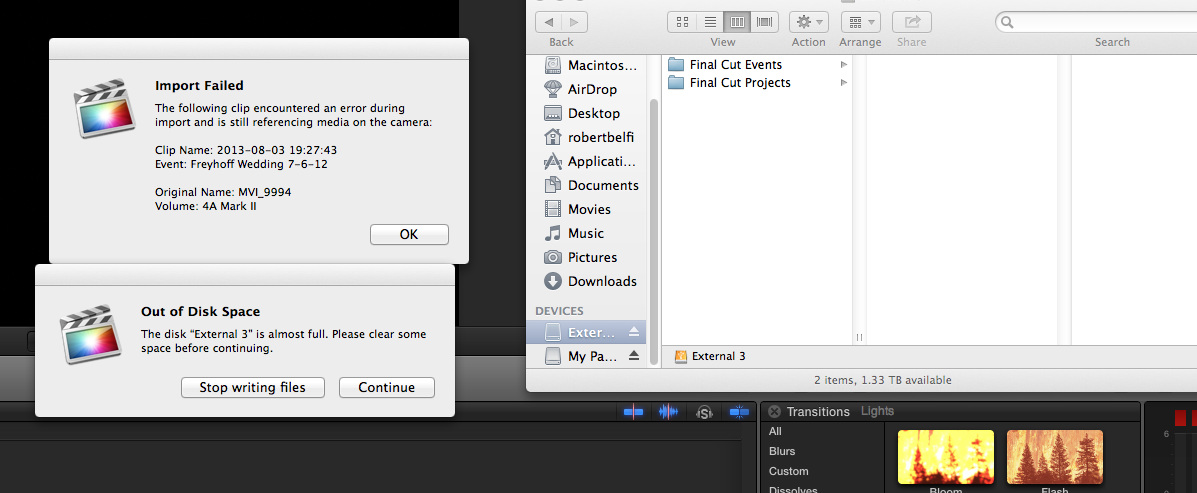
I've taken a screen grab of the import error I've been getting.
I've taken a screen grab of the import error I've been getting.
Please Log in to join the conversation.
- Tom Wolsky
-

- Offline
- Moderator
-

27 Aug 2013 03:49 #30453
by Tom Wolsky
Replied by Tom Wolsky on topic Strange Import error
That doesn't look like and AVCHD original name. What's the camera exactly?
It looks like the drive is too full.
It looks like the drive is too full.
Please Log in to join the conversation.

27 Aug 2013 06:32 #30459
by Overturf
Replied by Overturf on topic Strange Import error
Hm. On the one hand it says that drive 3 is too full, on the other hand the finder window says that drive 3 has 1.3TB of free space. How does that go together, Tom?
Please Log in to join the conversation.
- ronny courtens
-

- Offline
- Moderator
-
Less
More
- Posts: 4455
- Thank you received: 962
27 Aug 2013 08:08 - 27 Aug 2013 08:11 #30461
by ronny courtens
Replied by ronny courtens on topic Strange Import error
Looks like you are importing 5D files. MVI is a common file name for video files shot with some Canon gear such as the Powershot or the 5D.
The "Out Of Disk Space" message has a bad habit of popping up for other reasons than your drive being full, one of the most common reasons being a problem with importing files (as we have here).
There are still known issues with importing Canon 5D video. Much less than before, but Canon's import plugin for FCPX seems to remain deficient. Many people have been getting the "Import failed etc..." warning when importing from Canon card files. Strangely enough most of the times this only occurs with some of the importing files and not all of them. It seems the only reliable workaround to date is to open the card folder structure in Finder and drag the problematic video files out of the card structure straight onto the Event, bypassing the FCPX Import window. Canon really should get off their lazy asses and finally provide a more reliable import plugin for FCPX such as the one they made for FCP7.
- Ronny
The "Out Of Disk Space" message has a bad habit of popping up for other reasons than your drive being full, one of the most common reasons being a problem with importing files (as we have here).
There are still known issues with importing Canon 5D video. Much less than before, but Canon's import plugin for FCPX seems to remain deficient. Many people have been getting the "Import failed etc..." warning when importing from Canon card files. Strangely enough most of the times this only occurs with some of the importing files and not all of them. It seems the only reliable workaround to date is to open the card folder structure in Finder and drag the problematic video files out of the card structure straight onto the Event, bypassing the FCPX Import window. Canon really should get off their lazy asses and finally provide a more reliable import plugin for FCPX such as the one they made for FCP7.
- Ronny
Last edit: 27 Aug 2013 08:11 by ronny courtens.
Please Log in to join the conversation.
27 Aug 2013 09:55 #30465
by Rbelfi
Replied by Rbelfi on topic Strange Import error
Ronny, that would explain it. The files are from a Mark III so what you explained would make sense for my issue. I guess I'll just have to write down the file name each time I get the error and manually bring them in. Thanks.
Please Log in to join the conversation.
