


3 Post Moderation Rule for New Boarders (25 Jan 2021)
New boarders will have their posts moderated - Don't worry if you cannot see your post immediately.
How do I move two objects closer to each other?
- GottaRUN
-
 Topic Author
- Offline
- New Member
-

- All about Will:http://www.youtube.com/watch?v=7dq3DFpZceAhttp://GottaRunWithWill.blip.tvhttp://www.youtube.com/watch?v=GwFB_3RL3Hci'm a planking member of Coast Guard Flotilla 5-11 community board 8m member. founding member of ESNA-CERT and curr
Less
More
26 Aug 2013 04:33 - 26 Aug 2013 13:05 #30394
by GottaRUN
How do I move two objects closer to each other? was created by GottaRUN
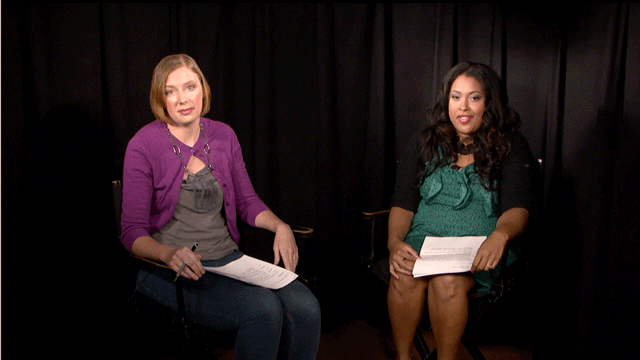
I have two guests sitting talking to each other.. They are too far apart. How can I move them closer? Background is a black screen. Some time ago I saw a plugin that eliminate in-between space. Maybe that plugin would help. Thanks for any assist.
Last edit: 26 Aug 2013 13:05 by GottaRUN.
Please Log in to join the conversation.
- ronny courtens
-

- Offline
- Moderator
-

Less
More
- Posts: 4455
- Thank you received: 962
26 Aug 2013 10:16 #30404
by ronny courtens
Replied by ronny courtens on topic How do I move two objects closer to each other?
There are different ways you can do this. Much depends on what exactly you see in the picture between the two guests. Can you post a screenshot from the scene?
- Ronny
- Ronny
Please Log in to join the conversation.
26 Aug 2013 13:07 - 26 Aug 2013 13:10 #30406
by GottaRUN
Replied by GottaRUN on topic How do I move two objects closer to each other?
how big a png file can I attach?
hopefully it's attached.
thanks for looking!
hopefully it's attached.
thanks for looking!
Last edit: 26 Aug 2013 13:10 by GottaRUN. Reason: add file
Please Log in to join the conversation.
- ronny courtens
-
- Offline
- Moderator
-
Less
More
- Posts: 4455
- Thank you received: 962
26 Aug 2013 13:11 - 26 Aug 2013 13:11 #30407
by ronny courtens
Replied by ronny courtens on topic How do I move two objects closer to each other?
Okay, I see it now. Will have a look at it.
- Ronny
- Ronny
Last edit: 26 Aug 2013 13:11 by ronny courtens.
Please Log in to join the conversation.
- ronny courtens
-
- Offline
- Moderator
-
Less
More
- Posts: 4455
- Thank you received: 962
26 Aug 2013 13:49 #30408
by ronny courtens
Replied by ronny courtens on topic How do I move two objects closer to each other?
Will,
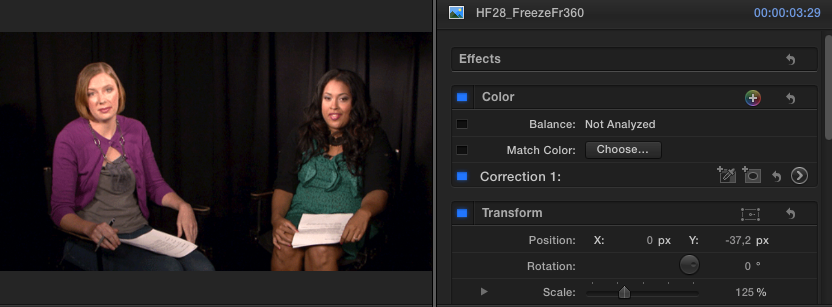
There's not much you can do because they sit back and their chairs are already close to each other.
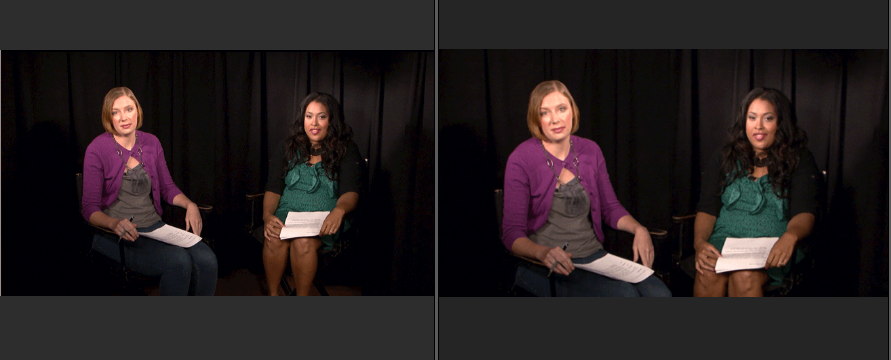
If you don't mind scaling up the footage you will show less background which would make them appear sitting closer, like this:
In this case you also can cut out some of the space in the middle and move both persons closer, which would give this result, compared with your original picture:
If this is what you want post back and I will post a little video showing how to do this.
- Ronny
There's not much you can do because they sit back and their chairs are already close to each other.
If you don't mind scaling up the footage you will show less background which would make them appear sitting closer, like this:
In this case you also can cut out some of the space in the middle and move both persons closer, which would give this result, compared with your original picture:
If this is what you want post back and I will post a little video showing how to do this.
- Ronny
Please Log in to join the conversation.
26 Aug 2013 18:15 #30425
by GottaRUN
Replied by GottaRUN on topic How do I move two objects closer to each other?
Yes, this is good! My producer would love it if we could move in closer as well, so that we would not see legs nor the papers. It was shot 1080 so it's acceptable to the producer to lose some clarity. It would be web-shown at 720p. Many thanks for the video offer!
Please Log in to join the conversation.
- ronny courtens
-
- Offline
- Moderator
-
Less
More
- Posts: 4455
- Thank you received: 962
26 Aug 2013 19:22 #30427
by ronny courtens
Replied by ronny courtens on topic How do I move two objects closer to each other?
I am making the vid. Will be back soon.
- Ronny
- Ronny
Please Log in to join the conversation.
- ronny courtens
-
- Offline
- Moderator
-
Less
More
- Posts: 4455
- Thank you received: 962
26 Aug 2013 21:03 #30430
by ronny courtens
Replied by ronny courtens on topic How do I move two objects closer to each other?
Hi Will,
I have made a little video, you can download it here: we.tl/CHYBbtar1Y
If you want to get rid of the legs and the papers you will need to scale up the clip quite a bit. But as you have shot in 1080 and will be delivering in 720 this probably will pass without too much quality loss. As long as we can keep the producer happy
In the video I have used simple cropping to bring the two ladies closer to each other. As they are in front of a dark background this should work with a little correction you will see at the end to match the cropped backgrounds.
You could do this even better in Motion using a feathered mask or in FCPX with a soft Garbage Matte. Should you have any problems with the method I describe in the vid, post back and I will give you some other options.
- Ronny
I have made a little video, you can download it here: we.tl/CHYBbtar1Y
If you want to get rid of the legs and the papers you will need to scale up the clip quite a bit. But as you have shot in 1080 and will be delivering in 720 this probably will pass without too much quality loss. As long as we can keep the producer happy
In the video I have used simple cropping to bring the two ladies closer to each other. As they are in front of a dark background this should work with a little correction you will see at the end to match the cropped backgrounds.
You could do this even better in Motion using a feathered mask or in FCPX with a soft Garbage Matte. Should you have any problems with the method I describe in the vid, post back and I will give you some other options.
- Ronny
Please Log in to join the conversation.
27 Aug 2013 02:00 #30447
by GottaRUN
Replied by GottaRUN on topic How do I move two objects closer to each other?
this is fab! I'm learning loads and its loads of fun.
thanks a bunch.
thanks a bunch.
Please Log in to join the conversation.
12 Sep 2013 04:14 #31091
by GottaRUN
Replied by GottaRUN on topic How do I move two objects closer to each other?
<= the program with Ronny's tip applied .. many thanks again.
The producer was thrilled that she didn't have to reshoot the two-shots.
How did you create the training vid?
The producer was thrilled that she didn't have to reshoot the two-shots.
How did you create the training vid?
Please Log in to join the conversation.
- ronny courtens
-
- Offline
- Moderator
-
Less
More
- Posts: 4455
- Thank you received: 962
12 Sep 2013 04:18 #31093
by ronny courtens
Replied by ronny courtens on topic How do I move two objects closer to each other?
Hi Will,
Looks great, well done!
I use SnapzPro or Screenflow (depending on the circumstances) for recording tutorials and demos. The one I sent you was done with SnapzPro.
- Ronny
Looks great, well done!
I use SnapzPro or Screenflow (depending on the circumstances) for recording tutorials and demos. The one I sent you was done with SnapzPro.
- Ronny
Please Log in to join the conversation.


12 Sep 2013 04:36 #31094
by Redifer
Replied by Redifer on topic How do I move two objects closer to each other?
Now I'm curious as to what tasks are better for SnapZpro and what's better for Screenflow.
Please Log in to join the conversation.
- ronny courtens
-
- Offline
- Moderator
-
Less
More
- Posts: 4455
- Thank you received: 962
12 Sep 2013 05:03 #31095
by ronny courtens
Replied by ronny courtens on topic How do I move two objects closer to each other?
Hi Joe,
It merely depends on what computer I'm on at the moment I want to record something. At home I have Snapz installed, in my office I have Screenflow. I don't have any particular preference for one or the other.
- Ronny
It merely depends on what computer I'm on at the moment I want to record something. At home I have Snapz installed, in my office I have Screenflow. I don't have any particular preference for one or the other.
- Ronny
Please Log in to join the conversation.

12 Sep 2013 13:27 #31110
by BenB
Replied by BenB on topic How do I move two objects closer to each other?
ScreenFlow for serious work, it is more feature rich and independent. Has great editing abilities for doing "how to" videos. Most professional trainers use it for capturing screen movies AND editing them.
Snapz Pro is more of a utility, lacks the production features of ScreenFlow, but has some screen snapshot options (I've never used).
Snapz Pro is more of a utility, lacks the production features of ScreenFlow, but has some screen snapshot options (I've never used).
Please Log in to join the conversation.
