


- Posts: 5
- Thank you received: 0
3 Post Moderation Rule for New Boarders (25 Jan 2021)
New boarders will have their posts moderated - Don't worry if you cannot see your post immediately.
Multiple Versions of Projects?
26 Aug 2013 01:26 #30390
by implicted
Multiple Versions of Projects? was created by implicted
I'm wondering if you have any insight on saving versions of project/events.
I do a lot of client work and typically there are a few revisions and i'd like to be able to reference the previous versions.
the problem i'm running into with the current workflow of "duplicate project" is that if i make a change to something like a compound clip for the next version, it effects all instances of the project. in other NLEs, i'm used to just duplicating the file name or 'save as' with a different R# on it, but I have yet to figure the same solution for FCPx. the only other way i can think is duplicate project and all media, but that doubles the used space for no reason.
Hopefully you can shine some light on my situation.
I do a lot of client work and typically there are a few revisions and i'd like to be able to reference the previous versions.
the problem i'm running into with the current workflow of "duplicate project" is that if i make a change to something like a compound clip for the next version, it effects all instances of the project. in other NLEs, i'm used to just duplicating the file name or 'save as' with a different R# on it, but I have yet to figure the same solution for FCPx. the only other way i can think is duplicate project and all media, but that doubles the used space for no reason.
Hopefully you can shine some light on my situation.
Please Log in to join the conversation.

26 Aug 2013 02:46 #30392
by canelson
--
Matias Canelson
www.canelson.us
Replied by canelson on topic Multiple Versions of Projects?
Edit inside a project instead of a compound clip. Then you just duplicate the project (the first option from the window) and that´s it. This won´t duplicate media, just the project timeline.
--
Matias Canelson
www.canelson.us
Please Log in to join the conversation.
26 Aug 2013 02:55 #30393
by canelson
--
Matias Canelson
www.canelson.us
Replied by canelson on topic Multiple Versions of Projects?
BTW, if you want to keep on working with compound clips as projects. Just duplicate and start editing on the NEW copy. The old copy will remain unaltered.
--
Matias Canelson
www.canelson.us
Please Log in to join the conversation.
26 Aug 2013 05:16 #30396
by implicted
Replied by implicted on topic Multiple Versions of Projects?
In my project, i have multiple compound clips within it. When i start editing on the new 'version' of the project. Some compound clips need to be altered. I'm pretty sure those adjustments happen across all projects... How does that get avoided?
Please Log in to join the conversation.

26 Aug 2013 07:01 #30397
by plysat
Either break apart the compound clip to edit or, perhaps better for you, select the CC you wish to edit, and choose "Reference New Parent Clip" from the "Clip" menu. That'll make a new CC in the event...
Can't sleep? Try this: fcpxpert.net ;-)
Replied by plysat on topic Multiple Versions of Projects?
implicted wrote: In my project, i have multiple compound clips within it. When i start editing on the new 'version' of the project. Some compound clips need to be altered. I'm pretty sure those adjustments happen across all projects... How does that get avoided?
Either break apart the compound clip to edit or, perhaps better for you, select the CC you wish to edit, and choose "Reference New Parent Clip" from the "Clip" menu. That'll make a new CC in the event...
Can't sleep? Try this: fcpxpert.net ;-)
Please Log in to join the conversation.
- ronny courtens
-

- Offline
- Moderator
-

Less
More
- Posts: 4455
- Thank you received: 962
26 Aug 2013 07:08 #30398
by ronny courtens
Replied by ronny courtens on topic Multiple Versions of Projects?
Hi Brandon,
In your new Project version select the Compound Clip in the Timeline and choose Clip > Reference New Parent Clip. This will created a new instance of the CC in the Event Browser. Now any changes you make to the CC in the new Project will not be reflected in any previous Projects.
- Ronny
In your new Project version select the Compound Clip in the Timeline and choose Clip > Reference New Parent Clip. This will created a new instance of the CC in the Event Browser. Now any changes you make to the CC in the new Project will not be reflected in any previous Projects.
- Ronny
Please Log in to join the conversation.
26 Aug 2013 08:26 #30400
by implicted
Replied by implicted on topic Multiple Versions of Projects?
Thanks. Unfortunately these are workarounds not built into the program. especially with a program that has infinite undo and no 'save as'. it'd be nice if when you 'duplicated' a project, it would make all changes completely independent, including ones to all connected clips and other media.
... Hopefully something implemented in the October version.
... Hopefully something implemented in the October version.
Please Log in to join the conversation.
- ronny courtens
-
- Offline
- Moderator
-
Less
More
- Posts: 4455
- Thank you received: 962
26 Aug 2013 09:17 #30402
by ronny courtens
Replied by ronny courtens on topic Multiple Versions of Projects?
Clip > Reference New Parent Clip is in the FCPX menu, which means it is built into the program and it's not a workaround. This will not change in a next version of the program. It gives us the option to decide for ourselves wether we want changes we make to a CC also reflect in other Project versions or not. And having options is always a good thing.
- Ronny
- Ronny
Please Log in to join the conversation.
26 Aug 2013 22:46 #30441
by Seanus
Sean Lander - Editing since 1982 - AVID 1991 - FCP 1999 - FCPX 2011
Replied by Seanus on topic Multiple Versions of Projects?
This is how you actually do it.
Select Duplicate Project. Now Select "Duplicate Project + Used Clips" below select "Multicam and Compound Clips only".
This will automatically create new parents for the compound clips.
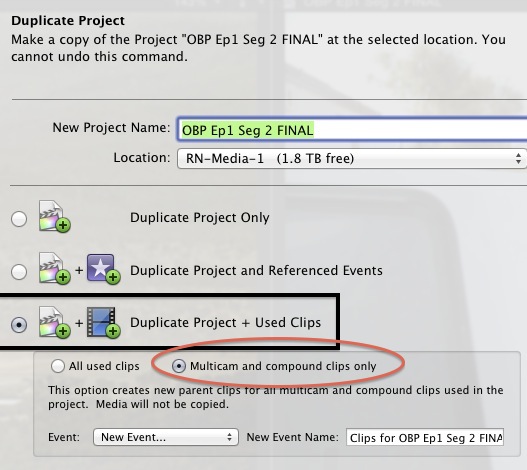
Select Duplicate Project. Now Select "Duplicate Project + Used Clips" below select "Multicam and Compound Clips only".
This will automatically create new parents for the compound clips.
Sean Lander - Editing since 1982 - AVID 1991 - FCP 1999 - FCPX 2011
Please Log in to join the conversation.
- ronny courtens
-
- Offline
- Moderator
-
Less
More
- Posts: 4455
- Thank you received: 962
26 Aug 2013 23:29 #30444
by ronny courtens
Replied by ronny courtens on topic Multiple Versions of Projects?
Good call Seanus.
But I prefer not having all my CCs automatically being duplicated as new parent clips. Many of our CTV clients want multiple distribution formats for their ads, sometimes up to 20 versions. They all have the same titles and pack shots but most versions have different images or even different music for different distribution channels.
These ads have to be adapted on a regular basis, mostly just changing the titles such as a new date, a new action a.s.o. So we make CCs from these titles in the original edit and then we duplicate the original project to create the different versions. As the duplicated CCs are parent clips for every version all we have to do when a title has to change is to change it in the title CC and the change is instantly reflected in all the versions. This saves a lot of time.
- Ronny
But I prefer not having all my CCs automatically being duplicated as new parent clips. Many of our CTV clients want multiple distribution formats for their ads, sometimes up to 20 versions. They all have the same titles and pack shots but most versions have different images or even different music for different distribution channels.
These ads have to be adapted on a regular basis, mostly just changing the titles such as a new date, a new action a.s.o. So we make CCs from these titles in the original edit and then we duplicate the original project to create the different versions. As the duplicated CCs are parent clips for every version all we have to do when a title has to change is to change it in the title CC and the change is instantly reflected in all the versions. This saves a lot of time.
- Ronny
Please Log in to join the conversation.
27 Aug 2013 08:33 #30462
by Seanus
Sean Lander - Editing since 1982 - AVID 1991 - FCP 1999 - FCPX 2011
Replied by Seanus on topic Multiple Versions of Projects?
Good point. I guess it's horses for courses isn't it? I rarely need my comps to link, as I use them very little and my projects are always unique.
Sean Lander - Editing since 1982 - AVID 1991 - FCP 1999 - FCPX 2011
Please Log in to join the conversation.
- ronny courtens
-
- Offline
- Moderator
-
Less
More
- Posts: 4455
- Thank you received: 962
27 Aug 2013 08:45 #30463
by ronny courtens
Replied by ronny courtens on topic Multiple Versions of Projects?
For other work I don't need my comps to link either, but for these cases having CCs carry over different Projects is a godsend. Just happy we at least have a choice 
- Ronny
- Ronny
Please Log in to join the conversation.
