


3 Post Moderation Rule for New Boarders (25 Jan 2021)
New boarders will have their posts moderated - Don't worry if you cannot see your post immediately.
Request: Niggas In Paris "Mirror Effect" and "Crowd In Text"
- Infamouz One
-
 Topic Author
- Offline
- New Member
-

- The Common "Bad Habit" is much like a Comfortable Bed... Easy To Get Into, Difficult to get out of. Checkout November's Very Own official blog site for all the latest news and updates from Hip-Hop to Hollywood! www.nvomg.blogspot.com nVo iz where da st
Times: 0:08 (crowd inside of text), 0:25 (Split View/Mirror) and throughout the entire video...
Please Log in to join the conversation.
- cinemaloha
-
- Offline
- Elite Member
-

- Posts: 163
- Thank you received: 36
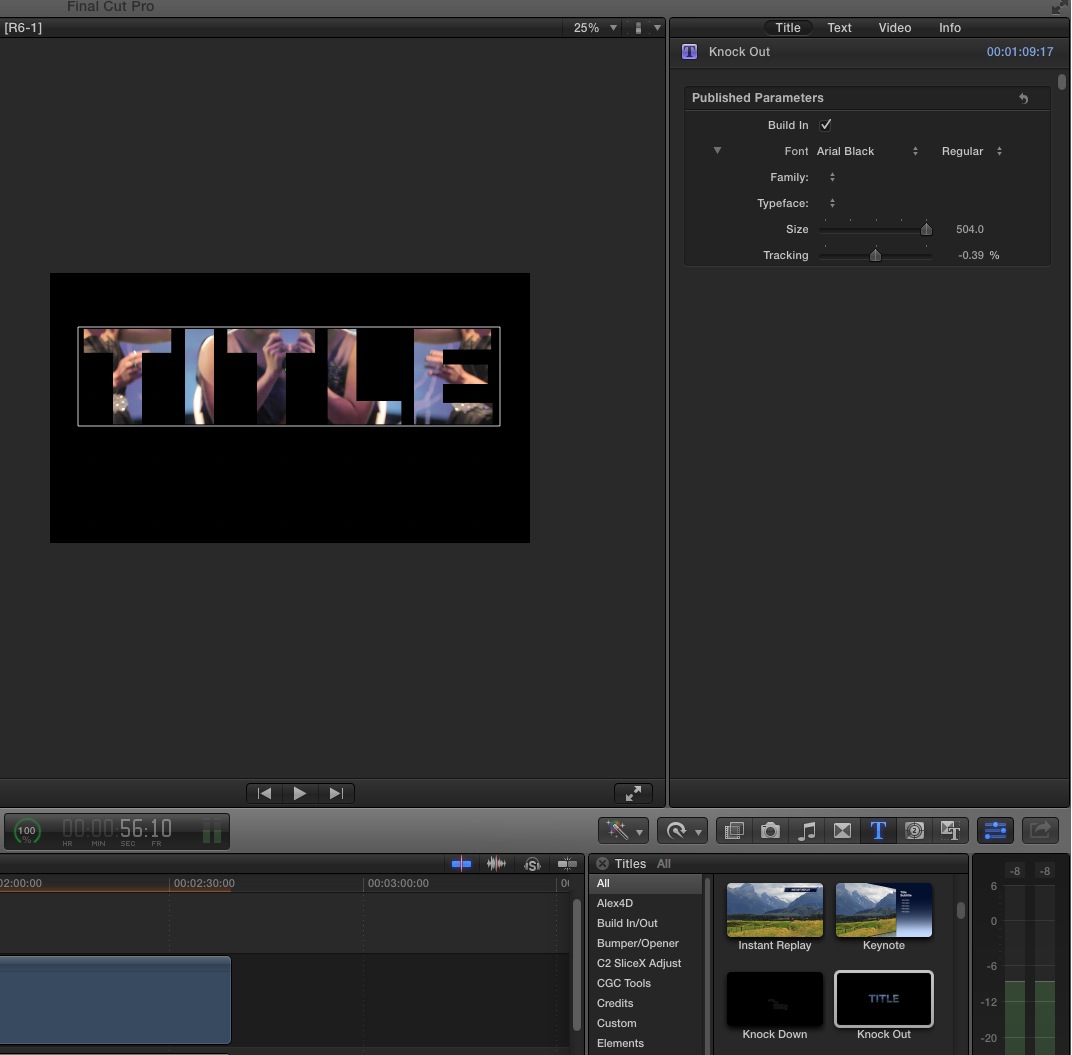
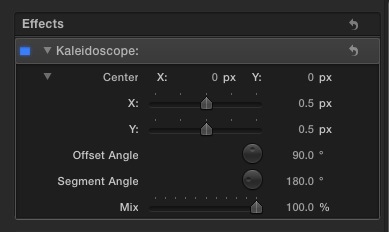
Filter is Kaleidoscope. Offset Angle at 90 degrees and Segment Angle 180 degrees and then Press Shift+T to go to 'Transform' and then flip the image (take the bottom "anchor" and then drag it to the top).
Please Log in to join the conversation.

www.fcp.co/forum/text-titles/16937-video-inside-text
Please Log in to join the conversation.
- Infamouz One
-
Topic Author
- Offline
- New Member
-
- The Common "Bad Habit" is much like a Comfortable Bed... Easy To Get Into, Difficult to get out of. Checkout November's Very Own official blog site for all the latest news and updates from Hip-Hop to Hollywood! www.nvomg.blogspot.com nVo iz where da st
cinemaloha wrote: Title is Knock Out
Filter is Kaleidoscope. Offset Angle at 90 degrees and Segment Angle 180 degrees and then Press Shift+T to go to 'Transform' and then flip the image (take the bottom "anchor" and then drag it to the top).
Wow. You, my friend, are amazing. I'm gonna save those screens in case I ever forget. Thanks a MILLION.
Please Log in to join the conversation.

Please Log in to join the conversation.
- cinemaloha
-
- Offline
- Elite Member
-
- Posts: 163
- Thank you received: 36
expander wrote: Hello guys, any of you know how to fade out the Knock Out Title? I just cant figure it out. Hope you can give me a hand with this
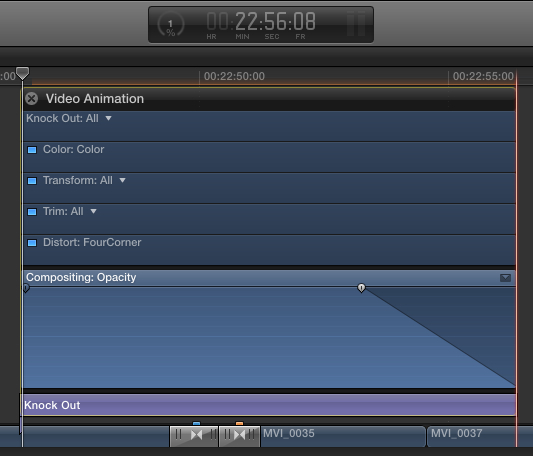
1. Select the title in the timeline.
2. Press keyboard shortcut cntl+v to show video animations.
3. Expand the 'Compositing: Opacity' by clicking the little upside down triangle in the upper right hand corner.
4. Place cursor over fade out handle point at the right side (on the line) and drag to the left to create a fade out.
It should look like this:
Please Log in to join the conversation.
- cinemaloha
-
- Offline
- Elite Member
-
- Posts: 163
- Thank you received: 36
expander wrote: Hello guys, any of you know how to fade out the Knock Out Title? I just cant figure it out. Hope you can give me a hand with this
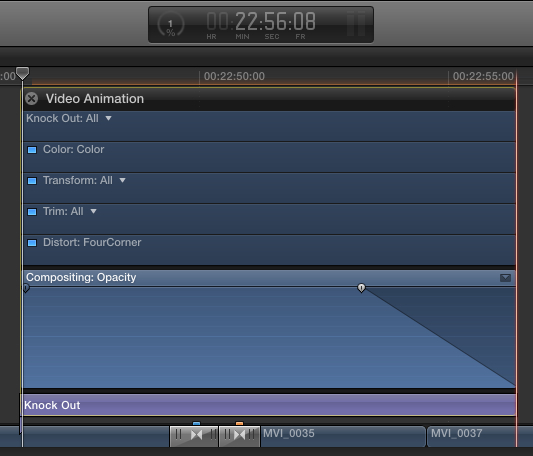
1. Select the title in the timeline.
2. Press keyboard shortcut cntl+v to show video animations.
3. Expand the 'Compositing: Opacity' by clicking the little upside down triangle in the upper right hand corner.
4. Place cursor over fade out handle point at the right side (on the line) and drag to the left to create a fade out.
It should look like this:
Please Log in to join the conversation.

Please Log in to join the conversation.
- cinemaloha
-
- Offline
- Elite Member
-
- Posts: 163
- Thank you received: 36
Please Log in to join the conversation.
