


- Posts: 379
- Thank you received: 6
3 Post Moderation Rule for New Boarders (25 Jan 2021)
New boarders will have their posts moderated - Don't worry if you cannot see your post immediately.
clip fades & dissolves
- Marc Lucas
-
 Topic Author
- Offline
- Platinum Member
-

Less
More
19 Aug 2013 22:40 #30124
by Marc Lucas
clip fades & dissolves was created by Marc Lucas
This has bugged me for a while but always worked around it but would really like an explanation. If you have a clip stacked on top of another the first one with a fade in. After that fades in you then have another clip with a fade, say fade from colour of any other, why does the first clip then get affected by the fade and fade out then back in again. I have tried different layer ordering but really don't know who to remedy this. It might be simple but I've always worked around it. Is there a workaround for this?
The file below has a title that fades in then underneath the other layer fades in.
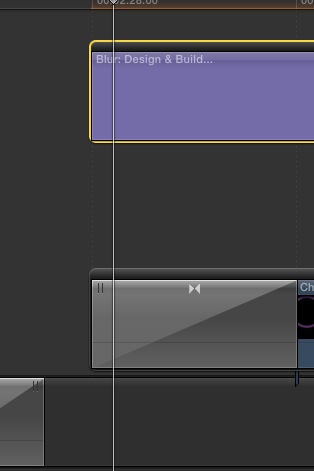
The file below has a title that fades in then underneath the other layer fades in.
Please Log in to join the conversation.
- Tom Wolsky
-

- Offline
- Moderator
-

20 Aug 2013 00:33 #30128
by Tom Wolsky
Replied by Tom Wolsky on topic clip fades & dissolves
It depends completely on the effect. Fade to color effects everything because it's a solid color.
Please Log in to join the conversation.
- Marc Lucas
-
Topic Author
- Offline
- Platinum Member
-
Less
More
- Posts: 379
- Thank you received: 6
20 Aug 2013 00:42 #30129
by Marc Lucas
Replied by Marc Lucas on topic clip fades & dissolves
but why other layer even though they are above or below a layer. I could kind of understand if the effect was on a top layer and affects all the layers below but even if the title in this case is above a layer with a fade to colour. It really doesn't make sense.
Please Log in to join the conversation.
- Tom Wolsky
-
- Offline
- Moderator
-
20 Aug 2013 00:50 - 20 Aug 2013 00:50 #30130
by Tom Wolsky
Replied by Tom Wolsky on topic clip fades & dissolves
It depends on the transition. Many are based on used the entire frame content, so that means the layers underneath as well. There is no one answer for every single effect. They are all different, unique effects, all built using the Motion tools, all built differently and behave differently. Fade to color effects everything because it's adding a color element to the transition that effects the entire screen. Not really sure why you would use fade to color with a title.
Last edit: 20 Aug 2013 00:50 by Tom Wolsky.
Please Log in to join the conversation.
- Marc Lucas
-
Topic Author
- Offline
- Platinum Member
-
Less
More
- Posts: 379
- Thank you received: 6
20 Aug 2013 00:54 #30131
by Marc Lucas
Replied by Marc Lucas on topic clip fades & dissolves
I haven't used fade to colour with the title., The title blurred on the layer underneath fades up from black because at the end of the project it fades to black. I then bring a title on and a couple of logos
Please Log in to join the conversation.
- Tom Wolsky
-
- Offline
- Moderator
-
20 Aug 2013 01:01 #30132
by Tom Wolsky
Replied by Tom Wolsky on topic clip fades & dissolves
I tried fade to color on the video clip and the blur title on top just as you show. It's behaving exactly as I would expect. What's not working for you?
Please Log in to join the conversation.
