


- Posts: 18
- Thank you received: 0
3 Post Moderation Rule for New Boarders (25 Jan 2021)
New boarders will have their posts moderated - Don't worry if you cannot see your post immediately.
Renaming favorite selection once name has been deleted
- chrisgilesphoto
-
 Topic Author
- Offline
- New Member
-

Less
More
19 Aug 2013 18:43 #30115
by chrisgilesphoto
I've searched for this answer but can't find it anywhere.
I have a multicam interview and I have made a series of "favorite" selections. Once I have made my selections, I change from filmstrip view to column view so I can rename the selections.
In order to rename the selection, I double click the word favorite and it becomes editable. If I hit delete when the text box is highlighted the present text, favorite, is deleted. If I accidentally hit enter again without typing in any characters, the selection is renamed with nothing.
Here's the issue. As far as I can tell, there is no way for click on the name field and edit it. In other words, I cant open up the name box if there are no characters, thus the selection can't be renamed and is left blank.
How can I access this name field and rename it?
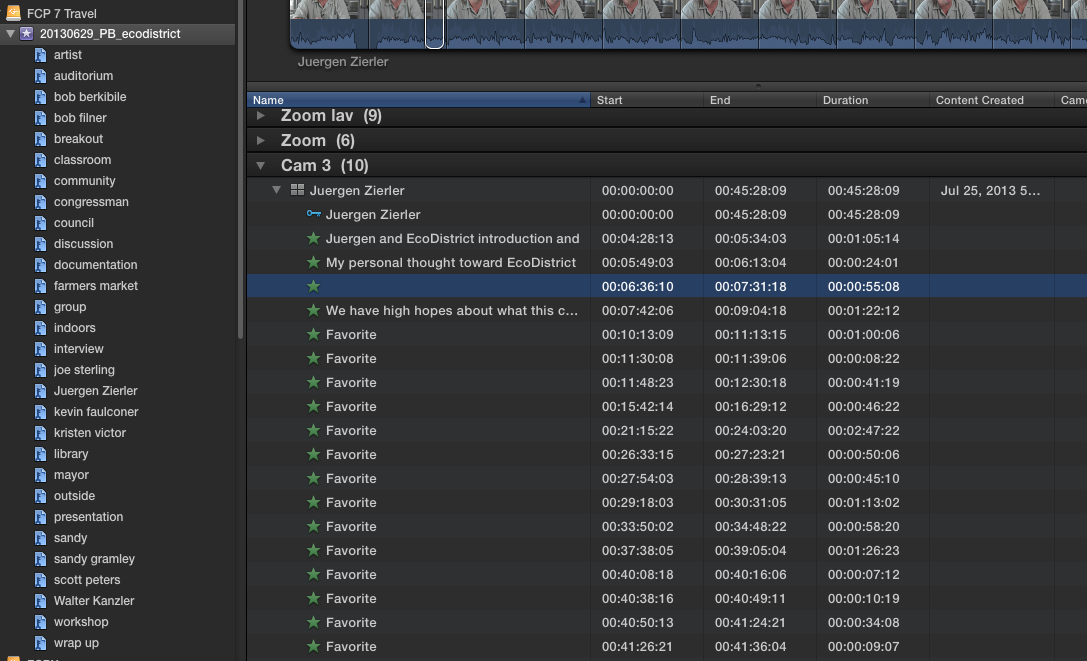
I've attached a screen grab for reference. Note the third favorite selection is blank. That is what is what I can't access. Thanks in advance for any insight
I have a multicam interview and I have made a series of "favorite" selections. Once I have made my selections, I change from filmstrip view to column view so I can rename the selections.
In order to rename the selection, I double click the word favorite and it becomes editable. If I hit delete when the text box is highlighted the present text, favorite, is deleted. If I accidentally hit enter again without typing in any characters, the selection is renamed with nothing.
Here's the issue. As far as I can tell, there is no way for click on the name field and edit it. In other words, I cant open up the name box if there are no characters, thus the selection can't be renamed and is left blank.
How can I access this name field and rename it?
I've attached a screen grab for reference. Note the third favorite selection is blank. That is what is what I can't access. Thanks in advance for any insight
Please Log in to join the conversation.
- Tom Wolsky
-

- Offline
- Moderator
-

19 Aug 2013 18:56 #30116
by Tom Wolsky
Replied by Tom Wolsky on topic Renaming favorite selection once name has been deleted
Select the favorite press Enter.
Don't use the delete key. When you select the favorite and press enter, the name is selected, you simply have to type in the new name.
(Clicking in the empty name box works for me as well.)
Don't use the delete key. When you select the favorite and press enter, the name is selected, you simply have to type in the new name.
(Clicking in the empty name box works for me as well.)
Please Log in to join the conversation.
- chrisgilesphoto
-
Topic Author
- Offline
- New Member
-
Less
More
- Posts: 18
- Thank you received: 0
19 Aug 2013 19:01 #30117
by chrisgilesphoto
Replied by chrisgilesphoto on topic Renaming favorite selection once name has been deleted
Thank you. I swear I tried that with no results but obviously it works. I kinda feel like an ass. Moving on now.
Please Log in to join the conversation.
