


- Posts: 4
- Thank you received: 0
3 Post Moderation Rule for New Boarders (25 Jan 2021)
New boarders will have their posts moderated - Don't worry if you cannot see your post immediately.
create optimised media - transcoding on import
16 Aug 2013 17:21 - 16 Aug 2013 17:30 #30015
by jimmy66
create optimised media - transcoding on import was created by jimmy66
Hello I am importing about 110 files and have ticked the 'Create optimised media' option because I want all the files to be transcoded into 'pro res 422' for editing.
Its 20% done and its taken most of the day which is fine.
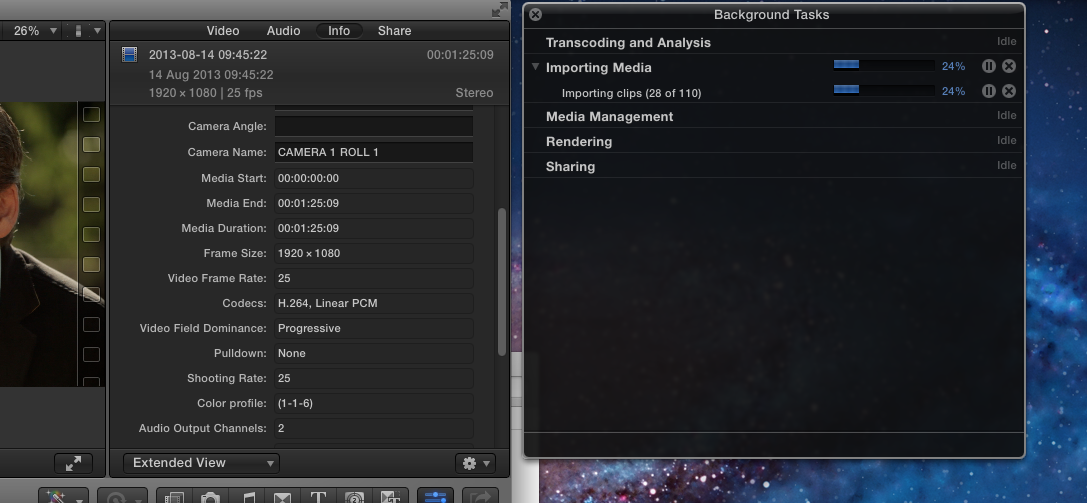
The thing Im worried about is when I browse the clips in the info window in the 'Codecs' field it still says the original codec from the source which is either h264 from camera 1 or PAL from camera 2.
(see screen shot)
Why doesn't it say prores 422?
I want to know whats happening, it must be transcoding because its taking so long?
So will it change to press 422 when the jobs are finished ?
I hope to find out before the jobs are finished before I waste more days waiting and hoping I'm going the right way about it. Maybe it should be done in good old MPEG stream clip instead like i used to before final cut pro X?
Its 20% done and its taken most of the day which is fine.
The thing Im worried about is when I browse the clips in the info window in the 'Codecs' field it still says the original codec from the source which is either h264 from camera 1 or PAL from camera 2.
(see screen shot)
Why doesn't it say prores 422?
I want to know whats happening, it must be transcoding because its taking so long?
So will it change to press 422 when the jobs are finished ?
I hope to find out before the jobs are finished before I waste more days waiting and hoping I'm going the right way about it. Maybe it should be done in good old MPEG stream clip instead like i used to before final cut pro X?
Last edit: 16 Aug 2013 17:30 by jimmy66.
Please Log in to join the conversation.
- ronny courtens
-

- Offline
- Moderator
-

Less
More
- Posts: 4455
- Thank you received: 962
16 Aug 2013 17:42 - 16 Aug 2013 17:45 #30017
by ronny courtens
Replied by ronny courtens on topic create optimised media - transcoding on import
You don't have to worry. In fact the codec shown in the Info tab is the codec of the original files you have imported. While optimizing new ProRes versions of these files will be created inside the Optimized Media folder. However, the info tab will keep displaying the format of the original files, not of the optimized files. The optimized files are always ProRes anyway, so there is not much advantage in showing this in the Info tab.
It does seem to me that it's taking a very long time to import and optimize your 110 files. But I see your original media is H.264, so this could be the reason. Could you provide some extra information?
- What kind of Mac are you working on and how much RAM do you have?
- Are you importing directly from a camera via USB or from a card folder on your hard drive?
- Is your FCPX Event located on an external drive or on your system drive?
- How much free space do you have left on your system drive?
It does seem to me that it's taking a very long time to import and optimize your 110 files. But I see your original media is H.264, so this could be the reason. Could you provide some extra information?
- What kind of Mac are you working on and how much RAM do you have?
- Are you importing directly from a camera via USB or from a card folder on your hard drive?
- Is your FCPX Event located on an external drive or on your system drive?
- How much free space do you have left on your system drive?
Last edit: 16 Aug 2013 17:45 by ronny courtens.
Please Log in to join the conversation.
16 Aug 2013 18:09 #30018
by jimmy66
Replied by jimmy66 on topic create optimised media - transcoding on import
Thanks so much for the reply it means a lot to me.I haven't used fcpX before and its a little daunting.
So when I drag clips onto the timeline they will be in pro res 422 even though the clip info only shows original format? Or do I need to reimport from the Optimized Media Folder ? Its a little bit confusing at the moment.
About the reason it is taking so long...
my Mac a is an iMac
Processor 2.7 GHz Intel Core i5
Memory 4 GB 1333 MHz DDR3
There is about 500gb storage space left on start up disc which
is a lot although it does seem to be disappearing fast
Im importing from a USB3/USB2 hardrive, and I have just realised my mac only supports usb2 which could be a reason for the delay.
I wonder if it is worth aborting the operation and redoing the import with firewire ?
I am also getting a lot of failed imports with the following type of message:
FAILED IMPORT
The following clip encountered an error during import and is still referencing media on the camera:
Clip Name: 2013-08-14 14:25:48
Event: New Event 16-08-2013
Original Name: MVI_0924
Volume: CAMERA 1 ROLL 2
So when I drag clips onto the timeline they will be in pro res 422 even though the clip info only shows original format? Or do I need to reimport from the Optimized Media Folder ? Its a little bit confusing at the moment.
About the reason it is taking so long...
my Mac a is an iMac
Processor 2.7 GHz Intel Core i5
Memory 4 GB 1333 MHz DDR3
There is about 500gb storage space left on start up disc which
is a lot although it does seem to be disappearing fast
Im importing from a USB3/USB2 hardrive, and I have just realised my mac only supports usb2 which could be a reason for the delay.
I wonder if it is worth aborting the operation and redoing the import with firewire ?
I am also getting a lot of failed imports with the following type of message:
FAILED IMPORT
The following clip encountered an error during import and is still referencing media on the camera:
Clip Name: 2013-08-14 14:25:48
Event: New Event 16-08-2013
Original Name: MVI_0924
Volume: CAMERA 1 ROLL 2
Please Log in to join the conversation.
- ronny courtens
-
- Offline
- Moderator
-
Less
More
- Posts: 4455
- Thank you received: 962
16 Aug 2013 18:43 - 16 Aug 2013 18:52 #30021
by ronny courtens
Replied by ronny courtens on topic create optimised media - transcoding on import
Okay, good to ask questions as soon as you see problems. Hate to say this but if this is possible for you I would stop the importing straight away and start all over again.
Your iMac is a bit on the weak side for FCPX, especially your RAM is low. But it is doable. Your most important issues however are:
1. You have your FCPX Event on your system drive.
This is NOT good. This definitely slows down your system, even more when you are importing and optimizing at the same time. Your system drive has to continuously jump from one process to the other: handle your OS, import your files, create temp files for your ProRes conversion, FCPX database management, etc, etc...
If this is possible for you you should create your Event on a decent external FireWire drive (NO USB!) and re-import your footage to that Event. That would already make a huge difference.
2. You are importing from a USB drive.
If you can import your media via Firewire this is much better.
If you have only one external FireWire drive use this drive to put your Event on and import the footage onto that Event. If your camera card is already on that same drive you can either keep it there and import from the card on the same drive, or copy the camera card over to your iMac and import form there.
With your system I would advise to first do the importing and see if everything imports well, then optimize the imported clips from within the Event Browser. This way you will avoid overloading your system with too many tasks at the same time.
So my advice is:
Delete your Event from your system drive, create a new Event on an external FireWire drive (make sure there is plenty of space on that drive) then import your footage into that Event. Do NOT check the "Optimize while importing" checkbox. You will optimize later, after having imported your clips.
Oh yes, and one more thing: while you are importing your footage leave FCPX alone. Don't start clicking anywhere, just let it import the video and when that's done you can check your clips and go to the next step.
Start with this and post back if you have any further questions.
- Ronny
Your iMac is a bit on the weak side for FCPX, especially your RAM is low. But it is doable. Your most important issues however are:
1. You have your FCPX Event on your system drive.
This is NOT good. This definitely slows down your system, even more when you are importing and optimizing at the same time. Your system drive has to continuously jump from one process to the other: handle your OS, import your files, create temp files for your ProRes conversion, FCPX database management, etc, etc...
If this is possible for you you should create your Event on a decent external FireWire drive (NO USB!) and re-import your footage to that Event. That would already make a huge difference.
2. You are importing from a USB drive.
If you can import your media via Firewire this is much better.
If you have only one external FireWire drive use this drive to put your Event on and import the footage onto that Event. If your camera card is already on that same drive you can either keep it there and import from the card on the same drive, or copy the camera card over to your iMac and import form there.
With your system I would advise to first do the importing and see if everything imports well, then optimize the imported clips from within the Event Browser. This way you will avoid overloading your system with too many tasks at the same time.
So my advice is:
Delete your Event from your system drive, create a new Event on an external FireWire drive (make sure there is plenty of space on that drive) then import your footage into that Event. Do NOT check the "Optimize while importing" checkbox. You will optimize later, after having imported your clips.
Oh yes, and one more thing: while you are importing your footage leave FCPX alone. Don't start clicking anywhere, just let it import the video and when that's done you can check your clips and go to the next step.
Start with this and post back if you have any further questions.
- Ronny
Last edit: 16 Aug 2013 18:52 by ronny courtens.
Please Log in to join the conversation.
16 Aug 2013 19:27 #30022
by jimmy66
Replied by jimmy66 on topic create optimised media - transcoding on import
Thanks again for this.
I've abounded ship for now.
My firewire drive was ordered yesterday so it should arrive soon.
I also ordered another 8gb of ram so that should arrive early next week.
Will start again when I have better equipment
Jimmy
I've abounded ship for now.
My firewire drive was ordered yesterday so it should arrive soon.
I also ordered another 8gb of ram so that should arrive early next week.
Will start again when I have better equipment
Jimmy
Please Log in to join the conversation.
- ronny courtens
-
- Offline
- Moderator
-
Less
More
- Posts: 4455
- Thank you received: 962
16 Aug 2013 19:34 #30024
by ronny courtens
Replied by ronny courtens on topic create optimised media - transcoding on import
Jimmy,
Good you have ordered an external FireWire drive as well as extra RAM. Both will make working with FCPX much easier. Post back if you have any further questions.
- Ronny
Good you have ordered an external FireWire drive as well as extra RAM. Both will make working with FCPX much easier. Post back if you have any further questions.
- Ronny
Please Log in to join the conversation.

18 Aug 2013 16:07 #30087
by BenB
What camera are you using? I know the Canon 7D is notorious for this. My 7D comes up with this message all the time. I created a Droplet in Compressor to create ProRes 422 versions from my 7D before importing.
Replied by BenB on topic create optimised media - transcoding on import
jimmy66 wrote: FAILED IMPORT
The following clip encountered an error during import and is still referencing media on the camera:
Clip Name: 2013-08-14 14:25:48
Event: New Event 16-08-2013
Original Name: MVI_0924
Volume: CAMERA 1 ROLL 2
What camera are you using? I know the Canon 7D is notorious for this. My 7D comes up with this message all the time. I created a Droplet in Compressor to create ProRes 422 versions from my 7D before importing.
Please Log in to join the conversation.
20 Aug 2013 18:50 #30161
by jimmy66
Replied by jimmy66 on topic create optimised media - transcoding on import
I was using a cannon 5d and cannon 660
Not sure which was giving the errors though
Not sure which was giving the errors though
Please Log in to join the conversation.
20 Aug 2013 19:37 #30166
by carambo
Can someone confirm this point ? If the importation is done with the optimise option activated, any edit will be made using the Prores files, not the original (h264 for instance) ? This is automatic as long we don't change the prefs ?
Replied by carambo on topic create optimised media - transcoding on import
jimmy66 wrote: So when I drag clips onto the timeline they will be in pro res 422 even though the clip info only shows original format?
Can someone confirm this point ? If the importation is done with the optimise option activated, any edit will be made using the Prores files, not the original (h264 for instance) ? This is automatic as long we don't change the prefs ?
Please Log in to join the conversation.
- ronny courtens
-
- Offline
- Moderator
-
Less
More
- Posts: 4455
- Thank you received: 962
20 Aug 2013 20:26 #30168
by ronny courtens
Replied by ronny courtens on topic create optimised media - transcoding on import
If the importation is done with the optimise option activated, any edit will be made using the Prores files, not the original (h264 for instance) ?
This is correct. If you have optimized your files while importing them, or by transcoding them to optimized media from within the Event Browser, you will always work with the ProRes versions on the Timeline. Never with the original media.
This is automatic, although with every importing action you will get an import window where you can change this if you wish.
- Ronny
This is correct. If you have optimized your files while importing them, or by transcoding them to optimized media from within the Event Browser, you will always work with the ProRes versions on the Timeline. Never with the original media.
This is automatic, although with every importing action you will get an import window where you can change this if you wish.
- Ronny
Please Log in to join the conversation.
