


- Posts: 13
- Thank you received: 0
3 Post Moderation Rule for New Boarders (25 Jan 2021)
New boarders will have their posts moderated - Don't worry if you cannot see your post immediately.
Need help with Title ASAP!!
- nomijoestar
-
 Topic Author
- Offline
- New Member
-

- http://ask.fm/NomanDurrani
Less
More
15 Aug 2013 07:41 #29951
by nomijoestar
Need help with Title ASAP!! was created by nomijoestar
Guys I'm using the Line Reveal and I want to change the text that goes on top to a different color from the one at the bottom and the line?? Can anybody tell me on this?? ASAP!
Please Log in to join the conversation.
- ronny courtens
-

- Offline
- Moderator
-

Less
More
- Posts: 4455
- Thank you received: 962
15 Aug 2013 08:36 #29953
by ronny courtens
Replied by ronny courtens on topic Need help with Title ASAP!!
Click the top text in your Viewer to select it. A little white rectangle will show it is selected. Then in the Inspector > Text tab change its color.
Please Log in to join the conversation.
- nomijoestar
-
Topic Author
- Offline
- New Member
-
- http://ask.fm/NomanDurrani
Less
More
- Posts: 13
- Thank you received: 0
15 Aug 2013 08:38 #29954
by nomijoestar
Replied by nomijoestar on topic Need help with Title ASAP!!
I know I tried that.. showed color change in the inspector, but didn't actually change it in the video.. I applied a shape mask and changed the colors a bit.. not very clean at all
Please Log in to join the conversation.
- ronny courtens
-
- Offline
- Moderator
-
Less
More
- Posts: 4455
- Thank you received: 962
15 Aug 2013 08:42 - 15 Aug 2013 09:09 #29955
by ronny courtens
Replied by ronny courtens on topic Need help with Title ASAP!!
No need for any shape mask. This always works.
Before you change the color you have to make sure the text is highlighted in the Text tab: drag with your mouse over the text in the Text tab to highlight it, the highlight will be blue.
Then apply the color change. The color change will be applied in the Viewer.
Before you change the color you have to make sure the text is highlighted in the Text tab: drag with your mouse over the text in the Text tab to highlight it, the highlight will be blue.
Then apply the color change. The color change will be applied in the Viewer.
Last edit: 15 Aug 2013 09:09 by ronny courtens.
Please Log in to join the conversation.

15 Aug 2013 13:19 #29969
by NocoDave
Replied by NocoDave on topic Need help with Title ASAP!!
I just taken a look at this title in Motion, it works different. The idea is that the 2 titles are supposed to be merging from the line in the middle so the colours have been linked (sort of) to deliberately stop you from doing different colours.
I made a few tiny changes to it, this version will allow you to do what you want.
I made a few tiny changes to it, this version will allow you to do what you want.
Please Log in to join the conversation.
- ronny courtens
-
- Offline
- Moderator
-
Less
More
- Posts: 4455
- Thank you received: 962
15 Aug 2013 21:06 - 15 Aug 2013 21:09 #29983
by ronny courtens
Replied by ronny courtens on topic Need help with Title ASAP!!
Hi David,
This morning I was able to change the color of one line using the existing Line Reveal template, as you see here:
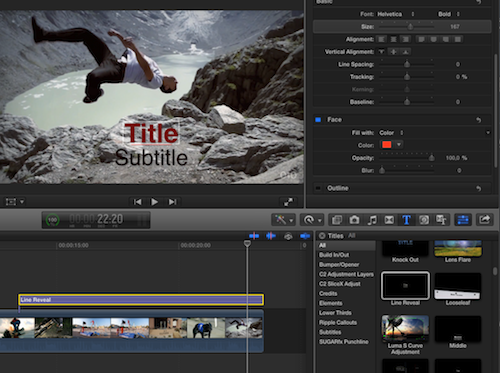
BUT you are correct. I only pulled back the luminance for the test, making the title black. When you select a different color though, it does not work with this title. So thank you for the modified template.
This morning I was able to change the color of one line using the existing Line Reveal template, as you see here:
BUT you are correct. I only pulled back the luminance for the test, making the title black. When you select a different color though, it does not work with this title. So thank you for the modified template.
Last edit: 15 Aug 2013 21:09 by ronny courtens.
Please Log in to join the conversation.
15 Aug 2013 21:16 #29984
by NocoDave
Replied by NocoDave on topic Need help with Title ASAP!!
So it does Ronny, this is a weird one. I found the method used, that causes the strange behaviour, to be unusual and I couldn't think why who ever made it done it that way.
I have a wee gut feeling. Maybe the title was made at a time in pre-release FCPX development when there might have been issues with publishing related to the link behaviour. or maybe issues in the updating to Motion 5 with the link behaviour.
If any other reason for it being set up that way comes to mind I'll post back for sure.
I have a wee gut feeling. Maybe the title was made at a time in pre-release FCPX development when there might have been issues with publishing related to the link behaviour. or maybe issues in the updating to Motion 5 with the link behaviour.
If any other reason for it being set up that way comes to mind I'll post back for sure.
Please Log in to join the conversation.
- ronny courtens
-
- Offline
- Moderator
-
Less
More
- Posts: 4455
- Thank you received: 962
15 Aug 2013 23:00 #29987
by ronny courtens
Replied by ronny courtens on topic Need help with Title ASAP!!
I think you may be right David. This particular issue intrigues me as well. Do post back if you come up with more findings.
Please Log in to join the conversation.
