


- Posts: 383
- Thank you received: 36
3 Post Moderation Rule for New Boarders (25 Jan 2021)
New boarders will have their posts moderated - Don't worry if you cannot see your post immediately.
Audio Limiter
14 Aug 2013 08:22 #29874
by Dave_EP
Audio Limiter was created by Dave_EP
I'm struggling a little with the various options for audio limiting.
In Premiere Pro I can use the Dynamics filter (on any channel AND the master channel!) and tell it to soft clip with a limit of (say) -12db. Works great. If you have some spikes it clamps them nicely.
I'm having trouble doing the same thing in FCPX. No matter what filter I choose I can get the average to clamp to -12db but the spikes seem to make it through.
While I know I could manually go and fix those spikes, sometimes the client is in a bigger hurry and time doesn't allow.
So, what filter / settings do you recommend for clamping audio to a given limit (e.g. -6db, -12db etc) ? I really like the soft clipping in Premiere Pro but can't seem to emulate it in FCPX.
In Premiere Pro I can use the Dynamics filter (on any channel AND the master channel!) and tell it to soft clip with a limit of (say) -12db. Works great. If you have some spikes it clamps them nicely.
I'm having trouble doing the same thing in FCPX. No matter what filter I choose I can get the average to clamp to -12db but the spikes seem to make it through.
While I know I could manually go and fix those spikes, sometimes the client is in a bigger hurry and time doesn't allow.
So, what filter / settings do you recommend for clamping audio to a given limit (e.g. -6db, -12db etc) ? I really like the soft clipping in Premiere Pro but can't seem to emulate it in FCPX.
Please Log in to join the conversation.

14 Aug 2013 13:18 #29897
by BenB
Replied by BenB on topic Audio Limiter
It is called the "Limiter" audio filter. Simple set the threshold.
Please Log in to join the conversation.
14 Aug 2013 13:20 #29899
by Dave_EP
That was the "first" one I tried !
Maybe I'm doing it wrong
Replied by Dave_EP on topic Audio Limiter
BenB wrote: It is called the "Limiter" audio filter. Simple set the threshold.
That was the "first" one I tried !
Maybe I'm doing it wrong
Please Log in to join the conversation.
14 Aug 2013 13:29 #29902
by BenB
Replied by BenB on topic Audio Limiter
Do not use the Final Cut version, use the Logic version, more control.
You may want to turn off Soft Knee, and adjust the Output Level.
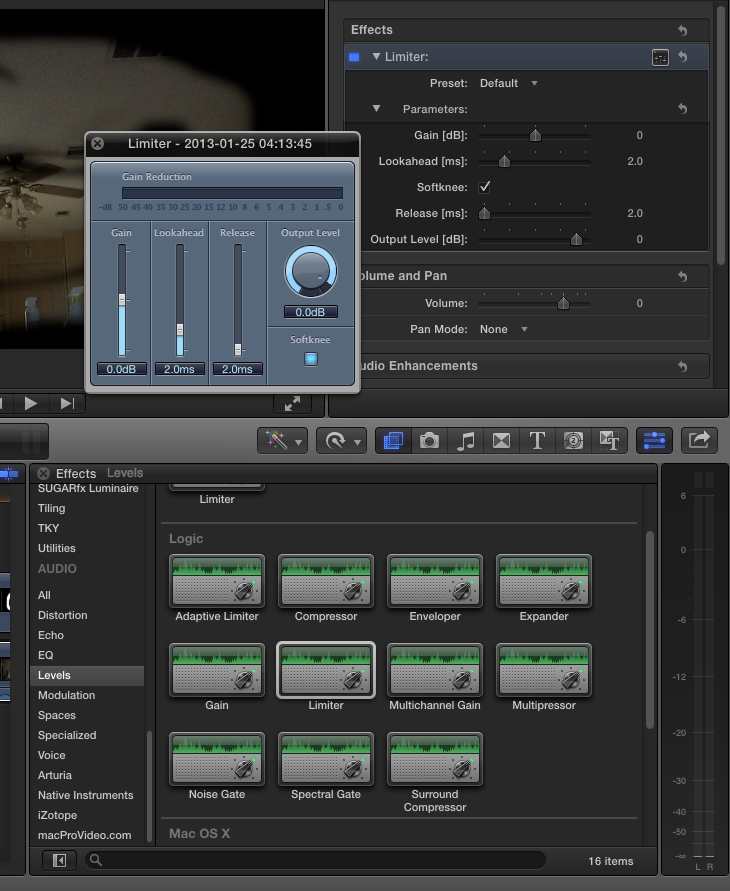
You may want to turn off Soft Knee, and adjust the Output Level.
Please Log in to join the conversation.
- Disproportionate Pictures
-

- Offline
- Platinum Member
-

Less
More
- Posts: 1433
- Thank you received: 64
15 Aug 2013 02:04 #29933
by Disproportionate Pictures
Replied by Disproportionate Pictures on topic Audio Limiter
Make sure the audio tracks in your clips are mono and single channel in the inspector. If they're stereo or dual mono, the tracks will be additive and the peak will go beyond what you set in the Limiter.
Personally, I use the Logic Compressor for this. I do my dialogue boosting (vs in the audio enhancements tab) and there's an option for a limiter as well.
Personally, I use the Logic Compressor for this. I do my dialogue boosting (vs in the audio enhancements tab) and there's an option for a limiter as well.
Please Log in to join the conversation.
