


3 Post Moderation Rule for New Boarders (25 Jan 2021)
New boarders will have their posts moderated - Don't worry if you cannot see your post immediately.
how to fade in luma effect

13 Aug 2013 20:28 - 14 Aug 2013 02:13 #29849
by Gretta
how to fade in luma effect was created by Gretta
clip on top of video is a black on white image (.png) with composite mode set to 'Stencil Luma'.
this looks just the way I want it to, and I have animated it so it moves diagonally as the guy is speaking.
But I can't for the life of me figure out how to have this upper image fade in/out.
Perhaps there is a better way to accomplish this effect?
TIA,
gretta
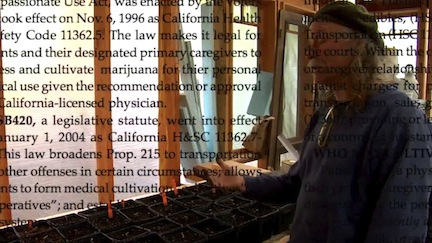
this looks just the way I want it to, and I have animated it so it moves diagonally as the guy is speaking.
But I can't for the life of me figure out how to have this upper image fade in/out.
Perhaps there is a better way to accomplish this effect?
TIA,
gretta
Last edit: 14 Aug 2013 02:13 by Gretta.
Please Log in to join the conversation.
- Andreas Kiel
-

- Offline
- Platinum Member
-

Less
More
- Posts: 1077
- Thank you received: 189
14 Aug 2013 13:11 #29895
by Andreas Kiel
Replied by Andreas Kiel on topic how to fade in luma effect
We had another thread about this.
Comp modes and transitions/transparency seem to work not reliable.
Take your PNG, open in PS or similar, copy the PNG foreground to the alpha channel, invert, and make the foreground black. Save with alpha. Import into FCPX and it will work.
-Andreas
Comp modes and transitions/transparency seem to work not reliable.
Take your PNG, open in PS or similar, copy the PNG foreground to the alpha channel, invert, and make the foreground black. Save with alpha. Import into FCPX and it will work.
-Andreas
Please Log in to join the conversation.
15 Aug 2013 07:11 #29950
by NocoDave
Replied by NocoDave on topic how to fade in luma effect
You could use this, it will work.
www.fcp.co/forum/utility/17263-luma-mask#27800
Connect a colour generator above the clip and apply the "Luma Mask" effect to that. You'll need to export your animated PNG as a video file, bring that back into an event and apply it to the drop zone.
Then just add a "Cross Dissolve" transition to the generator and your set.
www.fcp.co/forum/utility/17263-luma-mask#27800
Connect a colour generator above the clip and apply the "Luma Mask" effect to that. You'll need to export your animated PNG as a video file, bring that back into an event and apply it to the drop zone.
Then just add a "Cross Dissolve" transition to the generator and your set.
Please Log in to join the conversation.
- ronny courtens
-

- Offline
- Moderator
-

Less
More
- Posts: 4455
- Thank you received: 962
15 Aug 2013 10:28 - 15 Aug 2013 11:44 #29957
by ronny courtens
Replied by ronny courtens on topic how to fade in luma effect
I have found an easier workaround for this, I have put it in a little video. You can watch it here:
vimeo.com/72405366
Or download it from here:
we.tl/vOrHUCyxIg
In short:
1. Blade the underlying clip at the end of the PNG, and where you want the PNG to start dissolving out.
2. Copy the bladed section and paste it on top of the PNG.
3. Add a Dissolve to the start of the pasted section.
It's still a workaround, but it does the trick in less than 10 seconds.
- Ronny
vimeo.com/72405366
Or download it from here:
we.tl/vOrHUCyxIg
In short:
1. Blade the underlying clip at the end of the PNG, and where you want the PNG to start dissolving out.
2. Copy the bladed section and paste it on top of the PNG.
3. Add a Dissolve to the start of the pasted section.
It's still a workaround, but it does the trick in less than 10 seconds.
- Ronny
Last edit: 15 Aug 2013 11:44 by ronny courtens.
Please Log in to join the conversation.
- Andreas Kiel
-
- Offline
- Platinum Member
-
Less
More
- Posts: 1077
- Thank you received: 189
15 Aug 2013 15:31 #29973
by Andreas Kiel
Replied by Andreas Kiel on topic how to fade in luma effect
Ronny,
very good workaround.
But to me it looks a little bit like introducing tracks into a trackless app
Here an example of that what I suggested before (you have to reconnect and replace media)
dl.dropboxusercontent.com/u/63959366/example.zip
-Andreas
very good workaround.
But to me it looks a little bit like introducing tracks into a trackless app
Here an example of that what I suggested before (you have to reconnect and replace media)
dl.dropboxusercontent.com/u/63959366/example.zip
-Andreas
Please Log in to join the conversation.
- ronny courtens
-
- Offline
- Moderator
-
Less
More
- Posts: 4455
- Thank you received: 962
15 Aug 2013 20:36 #29980
by ronny courtens
Replied by ronny courtens on topic how to fade in luma effect
Andreas,
I have tried your suggestion and it works well. There are many ways to skin a cat
But still these are workarounds. I have sent feedback to Apple about this issue.
- Ronny
I have tried your suggestion and it works well. There are many ways to skin a cat
But still these are workarounds. I have sent feedback to Apple about this issue.
- Ronny
Please Log in to join the conversation.
- Andreas Kiel
-
- Offline
- Platinum Member
-
Less
More
- Posts: 1077
- Thank you received: 189
15 Aug 2013 21:50 #29986
by Andreas Kiel
Replied by Andreas Kiel on topic how to fade in luma effect
Ronny,
It's good to send issues like that to Apple. With this thing I know several people who sent feedback to Apple.
Let's hope they listen to us.
-Andreas
It's good to send issues like that to Apple. With this thing I know several people who sent feedback to Apple.
Let's hope they listen to us.
-Andreas
Please Log in to join the conversation.
