


- Posts: 5
- Thank you received: 0
3 Post Moderation Rule for New Boarders (25 Jan 2021)
New boarders will have their posts moderated - Don't worry if you cannot see your post immediately.
Sharing to Youtube from FCPx
12 Aug 2013 19:02 #29790
by torres
Sharing to Youtube from FCPx was created by torres
Greetings to all. I'm new here!
I have edited about 15 -20 videos using FCPx Up until now I was able to share them to youtube without any trouble. The last two videos though, I have received a "invalid file format" error message.
The video has finally uploaded after the third try.
I have no idea what changed or how I can fix this. Any ideas or help will be appreciated.
I have edited about 15 -20 videos using FCPx Up until now I was able to share them to youtube without any trouble. The last two videos though, I have received a "invalid file format" error message.
The video has finally uploaded after the third try.
I have no idea what changed or how I can fix this. Any ideas or help will be appreciated.
Please Log in to join the conversation.
- Snapdragon
-

- Offline
- Senior Member
-

Less
More
- Posts: 63
- Thank you received: 1
13 Aug 2013 12:33 #29812
by Snapdragon
Replied by Snapdragon on topic Sharing to Youtube from FCPx
i would try deleting the project's render files incase that is throwing the export.
Please Log in to join the conversation.
13 Aug 2013 16:19 #29818
by Makki
Replied by Makki on topic Sharing to Youtube from FCPx
Use compressor, share master file and let Compressor encode, then upload the output file. I never fails
Please Log in to join the conversation.
13 Aug 2013 19:37 #29843
by torres
Replied by torres on topic Sharing to Youtube from FCPx
Thank you Makki,
Could you outline the steps to use use compressor?
1. I upload the video to iphoto
2. I open it in FCP or in compressor?
3 ....
(love your avatar... your cat?)
Could you outline the steps to use use compressor?
1. I upload the video to iphoto
2. I open it in FCP or in compressor?
3 ....
(love your avatar... your cat?)
Please Log in to join the conversation.
- DmitriZigany
-
- Offline
- Platinum Member
-

Less
More
- Posts: 730
- Thank you received: 26
13 Aug 2013 19:53 #29846
by DmitriZigany
Replied by DmitriZigany on topic Sharing to Youtube from FCPx
There used to be a problem with files uploaded from FCPX to YouTube where audio was out of sync. I'm not seeing this anymore though. But if I export a Master File from FCPX and upload it to YouTube I still get a warning with a link to a page where they explain some way to re-save them in Quicktime. YouTube should get their act together regarding this, it works perfectly with Vimeo...
That said, I haven't noticed any sync issues for the last year and I think it has only failed to upload directly once for me...
I cannot be bothered ruining the beautiful workflow of FCPX by sending files to Compressor, which is a very user unfriendly application, I think.
That said, I haven't noticed any sync issues for the last year and I think it has only failed to upload directly once for me...
I cannot be bothered ruining the beautiful workflow of FCPX by sending files to Compressor, which is a very user unfriendly application, I think.
Please Log in to join the conversation.

14 Aug 2013 00:28 #29864
by BenB
Replied by BenB on topic Sharing to Youtube from FCPx
Export a "Master File".
In the Setting section, set "When Done" to "Compressor", and it will change to "Open with: Compressor".
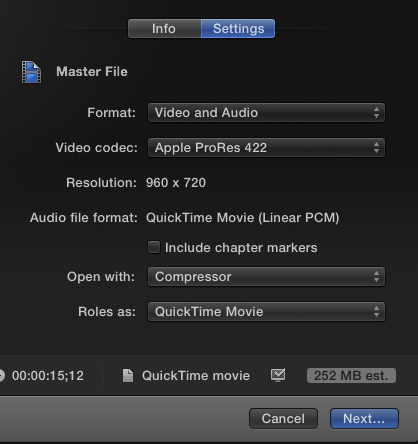
In the Setting section, set "When Done" to "Compressor", and it will change to "Open with: Compressor".
Please Log in to join the conversation.

14 Aug 2013 07:04 #29872
by airmax32
Replied by airmax32 on topic Sharing to Youtube from FCPx
Just a footnote to this if youtube says the video is shaky don't select that option where youtube would fix the shakiness.
Please Log in to join the conversation.
14 Aug 2013 10:32 - 14 Aug 2013 10:34 #29889
by Makki
Replied by Makki on topic Sharing to Youtube from FCPx
Hi Torres
You use Share Master file- Open Compressor - choose Youtube preset to encode - Drag the master file to the encode pane- click submit, this can take some time to finish - then you upload the output file to Youtube - via the the uploader or Safari.
Yes this is my dear friend Moses
You use Share Master file- Open Compressor - choose Youtube preset to encode - Drag the master file to the encode pane- click submit, this can take some time to finish - then you upload the output file to Youtube - via the the uploader or Safari.
Yes this is my dear friend Moses
Last edit: 14 Aug 2013 10:34 by Makki.
Please Log in to join the conversation.
