


- Posts: 6
- Thank you received: 0
3 Post Moderation Rule for New Boarders (25 Jan 2021)
New boarders will have their posts moderated - Don't worry if you cannot see your post immediately.
Obtaining an OMF file from a Red 4K Project
07 Aug 2013 15:11 #29568
by zeehaen
Obtaining an OMF file from a Red 4K Project was created by zeehaen
Hi there,
Apologies in advance if there are multiple discussions about this, but I couldn't find anything after a quick search on here. I'm quickly approaching a major issue with my first FCPX project, and would hugely appreciate your comments on what pathways you suggest I attempt.
Firstly, a little back story... I got quite excited about Premiere's ability to handle 4k footage natively, however ran into multiple problems (basically immediately after installing the correct plugins). I'm still a daily FCP7 user, and was keen to try out FCPX solely because of its ability to ingest native filetypes, including 4k Red and Alexa footage. I am tired of the run-around headaches that offline edits often present.
Anyway... I'm cutting a pilot shot on Red at 4k, and my FCPX project is hosting almost 1Tb of footage. I have completed the edit and now need to export an OMF to give to the sound designer.
Now the problem: I can't export OMF files in FCPX... :side:
Every forum I've checked out suggests software that has ceased compatibility with FCPX several updates ago. I'm running the trial version of FCPX 10.0.8.
What would be the most effective method of extracting an OMF file? Is there some sort of app or workflow that will allow me to do this that is dependable?
The pilot is a comedy and there are many audio cuts between the banter - so I'm looking for the most sync-effective, not cost-effective solution. At a run time of 22 minutes, it's not a timely solution for me to have to go into ProTools myself and tweak the audio handles...
Thanks in advance everyone! And please be kind, it's my first post
Apologies in advance if there are multiple discussions about this, but I couldn't find anything after a quick search on here. I'm quickly approaching a major issue with my first FCPX project, and would hugely appreciate your comments on what pathways you suggest I attempt.
Firstly, a little back story... I got quite excited about Premiere's ability to handle 4k footage natively, however ran into multiple problems (basically immediately after installing the correct plugins). I'm still a daily FCP7 user, and was keen to try out FCPX solely because of its ability to ingest native filetypes, including 4k Red and Alexa footage. I am tired of the run-around headaches that offline edits often present.
Anyway... I'm cutting a pilot shot on Red at 4k, and my FCPX project is hosting almost 1Tb of footage. I have completed the edit and now need to export an OMF to give to the sound designer.
Now the problem: I can't export OMF files in FCPX... :side:
Every forum I've checked out suggests software that has ceased compatibility with FCPX several updates ago. I'm running the trial version of FCPX 10.0.8.
What would be the most effective method of extracting an OMF file? Is there some sort of app or workflow that will allow me to do this that is dependable?
The pilot is a comedy and there are many audio cuts between the banter - so I'm looking for the most sync-effective, not cost-effective solution. At a run time of 22 minutes, it's not a timely solution for me to have to go into ProTools myself and tweak the audio handles...
Thanks in advance everyone! And please be kind, it's my first post
Please Log in to join the conversation.

07 Aug 2013 15:20 - 07 Aug 2013 15:25 #29569
by Dawar
Replied by Dawar on topic Obtaining an OMF file from a Red 4K Project
Hi,
X2Pro Audio Convert is the way to go.
It translates FCPX XML into AAF file, which you can open in ProTools and Nuendo (and I think Pyramix and Logic Pro X).
It supports native R3D files.
Be sure to assign roles to your audio channels, as X2Pro converts these roles into tracks for Protools.
X2Pro Audio Convert is the way to go.
It translates FCPX XML into AAF file, which you can open in ProTools and Nuendo (and I think Pyramix and Logic Pro X).
It supports native R3D files.
Be sure to assign roles to your audio channels, as X2Pro converts these roles into tracks for Protools.
Last edit: 07 Aug 2013 15:25 by Dawar.
Please Log in to join the conversation.

07 Aug 2013 15:31 #29570
by BenB
Replied by BenB on topic Obtaining an OMF file from a Red 4K Project
And if you considered Logic Pro X, it reads FCPXML natively. But yes, X2pro. Logic won't read X2Pro AAF files.
Please Log in to join the conversation.
07 Aug 2013 15:43 #29572
by zeehaen
Replied by zeehaen on topic Obtaining an OMF file from a Red 4K Project
Thanks so much guys, has anyone tried this program first hand? I'm curious to see if its worth purchasing the Pro version if the LE version will accomplish everything that I need for this project.
It's also difficult to gauge how valid this purchase will be with a new version of FCPX on the horizon... Any thoughts?
It's also difficult to gauge how valid this purchase will be with a new version of FCPX on the horizon... Any thoughts?
Please Log in to join the conversation.
07 Aug 2013 15:53 #29575
by BenB
Replied by BenB on topic Obtaining an OMF file from a Red 4K Project
I highly doubt you'll see AAF export like this in any version of FCPX any time soon. I don't know for a fact, but I doubt a developer would invest this much into a function Apple had plans for. My best guess is that FCPX will support round trips to Logic Pro X easier and easier, and that's it.
As for how this app works, well, do you have any alternatives? I'd jump on their forums and see what folks are saying, what issues they're having, what solutions they're finding.
As for which version to get, check their FAQ page, there are a couple of things about the differences between the two versions there.
But if anyone in this forum uses X2Pro, it would be interesting to hear their experiences.
As for how this app works, well, do you have any alternatives? I'd jump on their forums and see what folks are saying, what issues they're having, what solutions they're finding.
As for which version to get, check their FAQ page, there are a couple of things about the differences between the two versions there.
But if anyone in this forum uses X2Pro, it would be interesting to hear their experiences.
Please Log in to join the conversation.
07 Aug 2013 16:24 #29581
by Wildgiles
Replied by Wildgiles on topic Obtaining an OMF file from a Red 4K Project
Until recently XtoPro Audio Convert didn't deal with RED audio very well. Just last month a new update fixed this. XtoPro Audio convert works very well with protools.
You've kinda stuck yourself with purchasing FCP X if you need to edit after a month of a free trial. Who knows if the next big update will be a paid update or not.
Good luck.
You've kinda stuck yourself with purchasing FCP X if you need to edit after a month of a free trial. Who knows if the next big update will be a paid update or not.
Good luck.
Please Log in to join the conversation.

07 Aug 2013 17:26 #29582
by Seanus
Sean Lander - Editing since 1982 - AVID 1991 - FCP 1999 - FCPX 2011
Replied by Seanus on topic Obtaining an OMF file from a Red 4K Project
This subject got me thinking. As its only $50 more is Logic Pro X now the best option for creating an OMF for ProTools?
Or is it still really buggy with FCP X XML?
I ask because I'm nearing the point where I'll need to export my 50 minute documentary to ProTools soon.
Or is it still really buggy with FCP X XML?
I ask because I'm nearing the point where I'll need to export my 50 minute documentary to ProTools soon.
Sean Lander - Editing since 1982 - AVID 1991 - FCP 1999 - FCPX 2011
Please Log in to join the conversation.
07 Aug 2013 18:15 #29585
by Dawar
Replied by Dawar on topic Obtaining an OMF file from a Red 4K Project
I've used X2Pro for several feature length documentaries and it worked very well, in Protools and Nuendo.
If you've carefully assigned roles to your audio (in Event on ingest, or in timeline after edit), AAF from X2Pro will open in ProTools as a session with tracks named upon your roles names.
It's far better than OMF export from FCP7.
You can embed or reference your media, consolidate (trim) media choosing handle length, choose roles you want to be included in AAF, BWF metadata are preserved...
The FAQ page for differences between Pro and LE.
@Seanus: For now, FCPX-LPX round-tripping seems pretty buggy , but it sure will become better...
@BenB : apparently LPX can read X2Pro AAF, including roles and volumes keyframes :
twitter.com/Alex4D/statuses/358166790985093120
If you've carefully assigned roles to your audio (in Event on ingest, or in timeline after edit), AAF from X2Pro will open in ProTools as a session with tracks named upon your roles names.
It's far better than OMF export from FCP7.
You can embed or reference your media, consolidate (trim) media choosing handle length, choose roles you want to be included in AAF, BWF metadata are preserved...
The FAQ page for differences between Pro and LE.
@Seanus: For now, FCPX-LPX round-tripping seems pretty buggy , but it sure will become better...
@BenB : apparently LPX can read X2Pro AAF, including roles and volumes keyframes :
twitter.com/Alex4D/statuses/358166790985093120
Please Log in to join the conversation.
11 Aug 2013 09:07 #29705
by zeehaen
Replied by zeehaen on topic Obtaining an OMF file from a Red 4K Project
So after a long discussion with my sound designer, we learnt that Final Cut Pro XML can be read in Logic Pro X. However, this function doesn't work with Logic Pro 9, which is the program version he is running. :side:
I downloaded X27, hoping that I'd simply be able to create a FCP7 file and export an OMF that way. However once I open the app and select my FCPXML, it then goes on to tell me that I have "272 Compound Clips in this Project". I click "Okay" and then it asks me to open another file... I select the same file, and it just loops the "272 Compound Clips in this Project" window again... :silly:
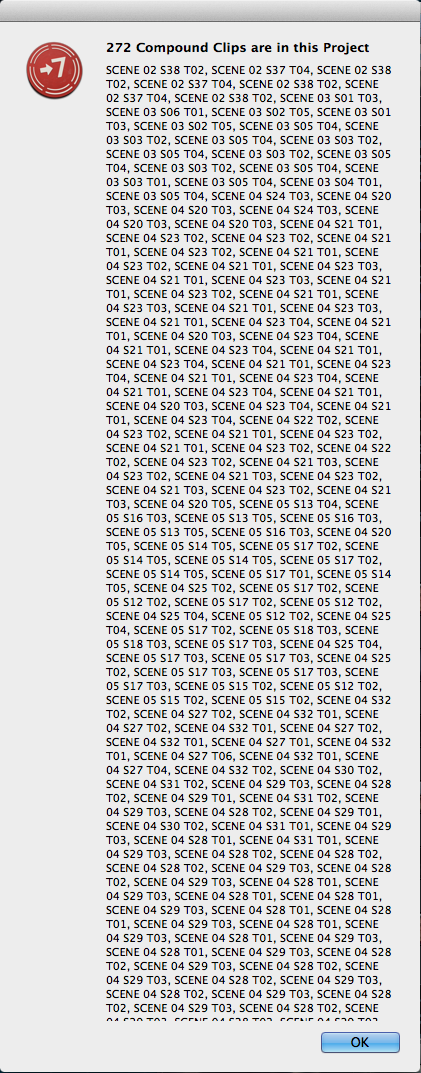
I'm a little stuck here... Does anyone have any experience with this? Being new to FCPX, I'm guessing that I have a terribly unorganised project which is the main source of my troubles here.
The reason why we didn't go with X2Pro is that AAF files aren't flexible enough for this project. It would be too difficult to mix a comedic piece with quick, overlaying dialogue from multiple takes (and need to be individually cleaned up) with an AAF file.
I downloaded X27, hoping that I'd simply be able to create a FCP7 file and export an OMF that way. However once I open the app and select my FCPXML, it then goes on to tell me that I have "272 Compound Clips in this Project". I click "Okay" and then it asks me to open another file... I select the same file, and it just loops the "272 Compound Clips in this Project" window again... :silly:
I'm a little stuck here... Does anyone have any experience with this? Being new to FCPX, I'm guessing that I have a terribly unorganised project which is the main source of my troubles here.
The reason why we didn't go with X2Pro is that AAF files aren't flexible enough for this project. It would be too difficult to mix a comedic piece with quick, overlaying dialogue from multiple takes (and need to be individually cleaned up) with an AAF file.
Please Log in to join the conversation.
11 Aug 2013 13:51 - 11 Aug 2013 15:50 #29714
by Dawar
When you export the AAF file with X2Pro, you get separate tracks in ProTools, individual clips with handle length...
Anyway, I don't think Logic Pro 9 can open AAF files.
About your problem with Xto7, you can read in the help documentation that compound clips don't get translated.
Good luck
Replied by Dawar on topic Obtaining an OMF file from a Red 4K Project
Are you sure you're talking about AAF and not AIFF ? AAF is more like OMF.zeehaen wrote: The reason why we didn't go with X2Pro is that AAF files aren't flexible enough for this project. It would be too difficult to mix a comedic piece with quick, overlaying dialogue from multiple takes (and need to be individually cleaned up) with an AAF file.
When you export the AAF file with X2Pro, you get separate tracks in ProTools, individual clips with handle length...
Anyway, I don't think Logic Pro 9 can open AAF files.
About your problem with Xto7, you can read in the help documentation that compound clips don't get translated.
Compound Clips need to be broken apart into their original items. The easiest way to locate
your Compound Clips is using the Timeline Index. Select multiple Compound Clips and
choose Clip > Break Apart Clip Items before exporting the project XML from Final Cut Pro X.
Good luck
Last edit: 11 Aug 2013 15:50 by Dawar.
Please Log in to join the conversation.
11 Aug 2013 16:01 #29721
by zeehaen
Yeah I was getting confused with the AAF/AIFF names - too many late nights are taking their toll! I'm turning into an insomniac. :dry:
Thanks so much for pointing out the compound clips error with Xto7, it seems that I had so many of them in my initial attempt that it was cutting off part of the window's message which suggested I break them apart in FCPX.
Replied by zeehaen on topic Obtaining an OMF file from a Red 4K Project
Dawar wrote:
Are you sure you're talking about AAF and not AIFF ? AAF is more like OMF.zeehaen wrote: The reason why we didn't go with X2Pro is that AAF files aren't flexible enough for this project. It would be too difficult to mix a comedic piece with quick, overlaying dialogue from multiple takes (and need to be individually cleaned up) with an AAF file.
When you export the AAF file with X2Pro, you get separate tracks in ProTools, individual clips with handle length...
Anyway, I don't think Logic Pro 9 can open AAF files.
About your problem with Xto7, you can read in the help documentation that compound clips don't get translated.Compound Clips need to be broken apart into their original items. The easiest way to locate
your Compound Clips is using the Timeline Index. Select multiple Compound Clips and
choose Clip > Break Apart Clip Items before exporting the project XML from Final Cut Pro X.
Good luck
Yeah I was getting confused with the AAF/AIFF names - too many late nights are taking their toll! I'm turning into an insomniac. :dry:
Thanks so much for pointing out the compound clips error with Xto7, it seems that I had so many of them in my initial attempt that it was cutting off part of the window's message which suggested I break them apart in FCPX.
Please Log in to join the conversation.
11 Aug 2013 23:00 - 11 Aug 2013 23:00 #29749
by BenB
Replied by BenB on topic Obtaining an OMF file from a Red 4K Project
Logic 9 and before could always open and export AFF files. Just FYI. X2Pro makes AAFs Logic can't read.
Last edit: 11 Aug 2013 23:00 by BenB.
Please Log in to join the conversation.
12 Aug 2013 17:07 #29786
by Dawar
Replied by Dawar on topic Obtaining an OMF file from a Red 4K Project
You're right, I should have said : "I don't think Logic Pro 9 can open AAF files from X2Pro".
Logic Pro X can.
Logic Pro X can.
Please Log in to join the conversation.
13 Aug 2013 17:51 #29827
by BenB
Replied by BenB on topic Obtaining an OMF file from a Red 4K Project
You've actually opened AAF's from X2Pro in LPX? Really? If so, that's awesome! But then, what do you need X2Pro for then? HHmmm...
Please Log in to join the conversation.
13 Aug 2013 22:14 #29859
by Dawar
Replied by Dawar on topic Obtaining an OMF file from a Red 4K Project
No, I don't own LPX, I've just read several users reports (see twitter link in my post above).
Not sure I understand the second question, neither the Hmmm, honestly.
Not sure I understand the second question, neither the Hmmm, honestly.
Please Log in to join the conversation.
14 Aug 2013 00:07 #29862
by BenB
Replied by BenB on topic Obtaining an OMF file from a Red 4K Project
Well, if you have LPX, it reads FCPXML, so what would you use X2Pro for?
Please Log in to join the conversation.

14 Aug 2013 07:14 #29873
by Soundwise
Replied by Soundwise on topic Obtaining an OMF file from a Red 4K Project
Ben, I guess what Dawar ment was that LPX reads AAF from X2Pro better than a FCPXML since with AAF import (from X2Pro) the Roles (as track names) and clip volume keyframes carry thru fine, which isn't the case with FCPXML import (yet).
Please Log in to join the conversation.
14 Aug 2013 13:19 #29898
by BenB
Replied by BenB on topic Obtaining an OMF file from a Red 4K Project
Well, yeah, there's that. Interesting.
Please Log in to join the conversation.
14 Aug 2013 15:56 - 14 Aug 2013 15:57 #29914
by plysat
As it stands now, Logic X's ability to open fcpxml files is um... a work in progress, and that's being charitable. It opens them, but what you end up with is a huge, disorganized mess. Especially if you have multichannel source files, as it brings all channels in regardless of their enabled/disabled status.
X2Pro is the way to go hands down. And to the OP, get the Pro version, as the LE version does not trim the clips. If you've used 1 second of a 2 hour clip, the entire 2 hour clip gets copied to the AAF. Not ideal for transferring out of house. The Pro version gives you more control over Roles, as well as a couple other additional features.
If you assign your Roles/Subroles well, the sequences that X2Pro creates are beautifully split out when opened in PT, Logic X, etc.... Your sound guy will love you!
Can't sleep? Try this: fcpxpert.net ;-)
Replied by plysat on topic Obtaining an OMF file from a Red 4K Project
BenB wrote: Well, if you have LPX, it reads FCPXML, so what would you use X2Pro for?
As it stands now, Logic X's ability to open fcpxml files is um... a work in progress, and that's being charitable.
It opens them, but what you end up with is a huge, disorganized mess. Especially if you have multichannel source files, as it brings all channels in regardless of their enabled/disabled status.X2Pro is the way to go hands down. And to the OP, get the Pro version, as the LE version does not trim the clips. If you've used 1 second of a 2 hour clip, the entire 2 hour clip gets copied to the AAF. Not ideal for transferring out of house. The Pro version gives you more control over Roles, as well as a couple other additional features.
If you assign your Roles/Subroles well, the sequences that X2Pro creates are beautifully split out when opened in PT, Logic X, etc.... Your sound guy will love you!
Can't sleep? Try this: fcpxpert.net ;-)
Last edit: 14 Aug 2013 15:57 by plysat.
Please Log in to join the conversation.
14 Aug 2013 17:23 #29920
by Dawar
Thanks to Soundwise and Plysat, I apparently failed to explain it myself, I guess my english isn't as good as I wish !
@plysat : I totally agree with you about the sound guys loving you
I just hope we'll soon have the ability to batch assign roles to component channels from the event, in the inspector. I've sent a feedback about this.
For now, it's one clip at a time, or from the project for "batch roling", but then it doesn't affect Event clips.
To the OP, it seems he achieved to export the OMF file from FCP7 with Xto7, after having broken apart compound clips in FCPX.
Replied by Dawar on topic Obtaining an OMF file from a Red 4K Project
Dawar wrote: @BenB : apparently LPX can read X2Pro AAF, including roles and volumes keyframes : twitter.com/Alex4D/statuses/358166790985093120
Thanks to Soundwise and Plysat, I apparently failed to explain it myself, I guess my english isn't as good as I wish !
@plysat : I totally agree with you about the sound guys loving you
I just hope we'll soon have the ability to batch assign roles to component channels from the event, in the inspector. I've sent a feedback about this.
For now, it's one clip at a time, or from the project for "batch roling", but then it doesn't affect Event clips.
To the OP, it seems he achieved to export the OMF file from FCP7 with Xto7, after having broken apart compound clips in FCPX.
Please Log in to join the conversation.
