


- Posts: 13
- Thank you received: 0
3 Post Moderation Rule for New Boarders (25 Jan 2021)
New boarders will have their posts moderated - Don't worry if you cannot see your post immediately.
Adding glow to image in FCP/Motion?
- nomijoestar
-
 Topic Author
- Offline
- New Member
-

- http://ask.fm/NomanDurrani
Less
More
24 Jul 2013 20:04 #29044
by nomijoestar

I have the background image separate, and I have 2 logos(with transparent backgrounds) separate. I need to add the glow to the 2 logos like shown in the image ^. If anybody knows how I can do it, because I can't find it on google or anywhere.
Thanks
Adding glow to image in FCP/Motion? was created by nomijoestar
I have the background image separate, and I have 2 logos(with transparent backgrounds) separate. I need to add the glow to the 2 logos like shown in the image ^. If anybody knows how I can do it, because I can't find it on google or anywhere.
Thanks
Please Log in to join the conversation.
- Simon Ubsdell
-
- Offline
- Platinum Member
-

Less
More
- Posts: 350
- Thank you received: 337
24 Jul 2013 20:28 - 24 Jul 2013 20:31 #29045
by Simon Ubsdell
Replied by Simon Ubsdell on topic Adding glow to image in FCP/Motion?
Why not just use the great new Drop Shadow effect in FCP X?
Set the shadow color to be whatever you want for the glow (rather than the default of black) and then move it so it sits right behind your image rather than offset (go for an X position of zero and a Y position of -.5). Add enough blur so it looks nice and soft.
You should get a great result this way - and very fast!
Set the shadow color to be whatever you want for the glow (rather than the default of black) and then move it so it sits right behind your image rather than offset (go for an X position of zero and a Y position of -.5). Add enough blur so it looks nice and soft.
You should get a great result this way - and very fast!
Last edit: 24 Jul 2013 20:31 by Simon Ubsdell.
Please Log in to join the conversation.

25 Jul 2013 02:01 #29051
by BenB
Replied by BenB on topic Adding glow to image in FCP/Motion?
Both CoreMelt and CHV have nice glow filters.
Please Log in to join the conversation.
- Simon Ubsdell
-
- Offline
- Platinum Member
-
Less
More
- Posts: 350
- Thank you received: 337
25 Jul 2013 07:56 - 25 Jul 2013 08:08 #29064
by Simon Ubsdell
Replied by Simon Ubsdell on topic Adding glow to image in FCP/Motion?
Yes, those filters are a good recommendation, but I do think what we are seeing in the image above is a simple soft drop shadow effect.
However if anyone is interested in trying out my method here's an example taking it to the next level that really does create a glow.

This consists of an image with alpha channel to which I have applied a coloured FCP X drop shadow centered on the image as described above. I then copied it twice to layer it up in itself. For the two upper layers I set the Blend Mode to Add (or you could also try Linear Dodge for an even stronger effect) and for the top one I added a Gaussian Blur to increase the glow factor even more.
You could do this with just the first two layers but adding the third really helps to turn up the heat on the glow effect.
Honestly, it really does work - you're simply recreating some of the processes used in a third party glow filter anyway.
Here's a very similar technique used to create a dramatic glow around a dark logo:
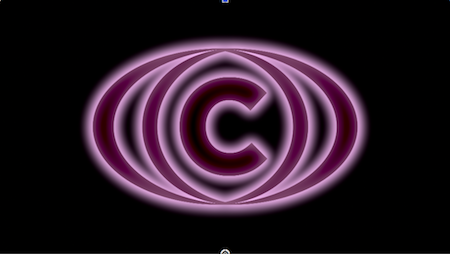
If you start experimenting you can roll your own effects incredibly easily without ever leaving FCP X. The speed and power of FCP X means that it can make a really great compositor for things like this as you can stack up many layers and get realtime feedback very freely.
However if anyone is interested in trying out my method here's an example taking it to the next level that really does create a glow.
This consists of an image with alpha channel to which I have applied a coloured FCP X drop shadow centered on the image as described above. I then copied it twice to layer it up in itself. For the two upper layers I set the Blend Mode to Add (or you could also try Linear Dodge for an even stronger effect) and for the top one I added a Gaussian Blur to increase the glow factor even more.
You could do this with just the first two layers but adding the third really helps to turn up the heat on the glow effect.
Honestly, it really does work - you're simply recreating some of the processes used in a third party glow filter anyway.
Here's a very similar technique used to create a dramatic glow around a dark logo:
If you start experimenting you can roll your own effects incredibly easily without ever leaving FCP X. The speed and power of FCP X means that it can make a really great compositor for things like this as you can stack up many layers and get realtime feedback very freely.
Last edit: 25 Jul 2013 08:08 by Simon Ubsdell.
Please Log in to join the conversation.
