


3 Post Moderation Rule for New Boarders (25 Jan 2021)
New boarders will have their posts moderated - Don't worry if you cannot see your post immediately.
A little tip for Split Edits


24 Jul 2013 02:36 - 24 Jul 2013 02:39 #29006
by Seanus
Sean Lander - Editing since 1982 - AVID 1991 - FCP 1999 - FCPX 2011
A little tip for Split Edits was created by Seanus
If you have a clip sitting on top another clip (connected clip) but you'd like to drag it into the primary story line but not disrupt the audio of the clip you will be covering. Select the position tool, and turn on "Expand Audio/Video clips -> For All, then drag the clip down into the primary storyline.
You will notice that only the video of the primary storyline is replaced while the audio simply moves out of the way. Creating a "Split Edit or an L Cut".
This also works when dragging in clips from the browser using the position tool.
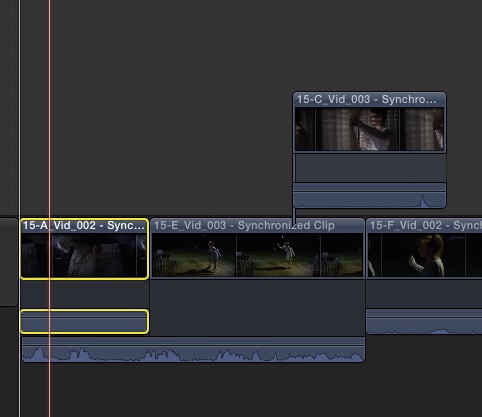
You will notice that only the video of the primary storyline is replaced while the audio simply moves out of the way. Creating a "Split Edit or an L Cut".
This also works when dragging in clips from the browser using the position tool.
Sean Lander - Editing since 1982 - AVID 1991 - FCP 1999 - FCPX 2011
Last edit: 24 Jul 2013 02:39 by Seanus.
Please Log in to join the conversation.
24 Jul 2013 12:27 #29020
by Overturf
Replied by Overturf on topic A little tip for Split Edits
I do this differently. Just select the connected clip and hit ALT-CMD-DOWNARROW and the connected clip will slide down into the primary storyline while preserving the former clip's audio. I use it all the time!
Please Log in to join the conversation.
