


- Posts: 17
- Thank you received: 0
3 Post Moderation Rule for New Boarders (25 Jan 2021)
New boarders will have their posts moderated - Don't worry if you cannot see your post immediately.
Upgrading to 10.0.8
22 Jul 2013 01:43 #28896
by Liz
Upgrading to 10.0.8 was created by Liz
Hi, since I have no option to do a full cross dissolve (my handles are ALWAYS long enuff so never get offered an option to do a full cross dissolve) I thought I'd upgrade to 10.0.8 and I was wondering if this version has a FULL cross dissolve option??
Also, if I do upgrade to 10.0.8, how do I back up my current version, 10.0.7?
Lastly, is the upgrade free?
Cheers!
Also, if I do upgrade to 10.0.8, how do I back up my current version, 10.0.7?
Lastly, is the upgrade free?
Cheers!
Please Log in to join the conversation.

22 Jul 2013 11:25 #28910
by BenB
Replied by BenB on topic Upgrading to 10.0.8
What do you mean by a full cross dissolve? Every version does cross dissolves just fine. Can you be more specific?
Here's the info on backing up before upgrading (something I've never done) that you're looking for.
support.apple.com/kb/ht5550
Here's the info on backing up before upgrading (something I've never done) that you're looking for.
support.apple.com/kb/ht5550
Please Log in to join the conversation.
23 Jul 2013 02:47 #28938
by Liz
Replied by Liz on topic Upgrading to 10.0.8
Thanks for the info to upgrade. Will check that out.
By full cross dissolve I mean overlapping two separate clips for the entire duration of each clip. I have no option to do this. It will only overlap the end of one clip and the beginning of the next.
Another forum said that an option will pop up and say that I don't have enough handles and do I want a a full cross dissolve? - but I always have enough handles and don't get offered that option. I've already chatted to someone on this forum about this. No one can help me so that's why I though I'd upgrade to 10.08.
Hope that makes sense?
By full cross dissolve I mean overlapping two separate clips for the entire duration of each clip. I have no option to do this. It will only overlap the end of one clip and the beginning of the next.
Another forum said that an option will pop up and say that I don't have enough handles and do I want a a full cross dissolve? - but I always have enough handles and don't get offered that option. I've already chatted to someone on this forum about this. No one can help me so that's why I though I'd upgrade to 10.08.
Hope that makes sense?
Please Log in to join the conversation.
23 Jul 2013 07:52 #28947
by BenB
Replied by BenB on topic Upgrading to 10.0.8
So you want to cross dissolve from the first frame of both clips through it's last frame? That is a very odd thing to do. You mean like a 20 second cross dissolve?
The warning you refer to is not to do a "full cross dissolve" as I think you're looking for, but only if there are no handles to do one at all.
And I am taking a wild guess as to what you're trying to do, as it is not really clear.
If that is the case, put the second clip in the Primary Storyline, the second clip as a connected clip to it, and either keyframe the Opacity of the top clip from zero to 100.
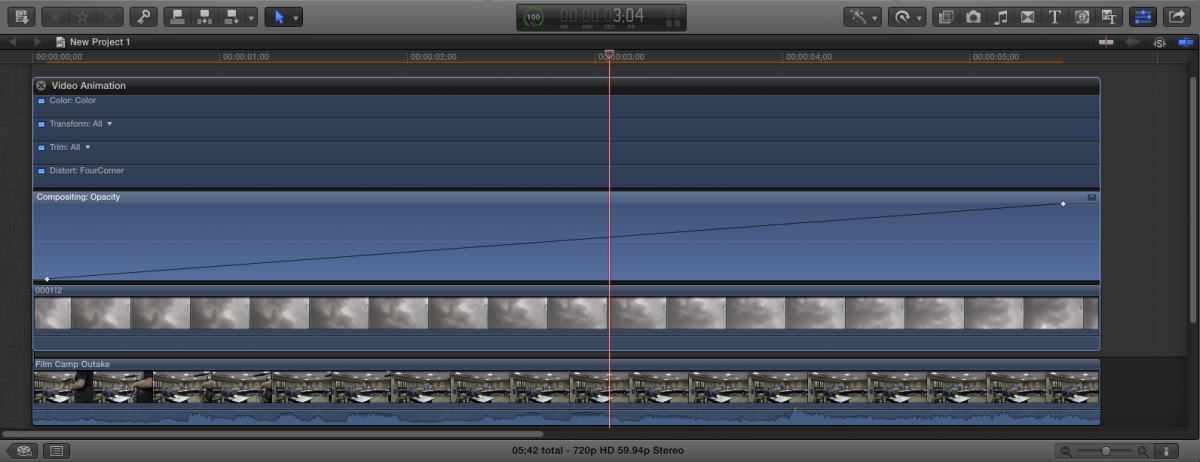
Or apply a cross dissolve to the start of the second clip, and drag it's right edge out over the whole clip.
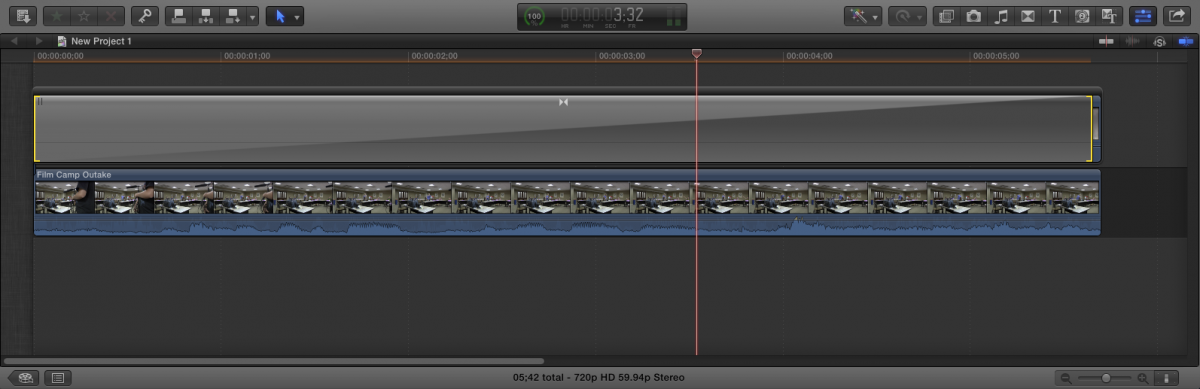
The warning you refer to is not to do a "full cross dissolve" as I think you're looking for, but only if there are no handles to do one at all.
And I am taking a wild guess as to what you're trying to do, as it is not really clear.
If that is the case, put the second clip in the Primary Storyline, the second clip as a connected clip to it, and either keyframe the Opacity of the top clip from zero to 100.
Or apply a cross dissolve to the start of the second clip, and drag it's right edge out over the whole clip.
Please Log in to join the conversation.
24 Jul 2013 00:50 #29001
by Liz
Replied by Liz on topic Upgrading to 10.0.8
Yes to your first question. It's not that odd a thing to do really. I want to have a photo of a painting then cross dissolve this with footage of people to give a ghostly affect, ie, a painting of a tall ship overlapped with characters from that era doing stuff. It's a school film based on the history of travel to Australia in the 1700's.
You understood me perfectly, thanks! The second option you put actually works and I'm thrilled. I don't understand what 'keyframe the Opacity of the top clip from 0 to 100' means though?? How do you do actually do that?
Also, how do you copy the storyline and paste it like you have done?
Cheers.
You understood me perfectly, thanks! The second option you put actually works and I'm thrilled. I don't understand what 'keyframe the Opacity of the top clip from 0 to 100' means though?? How do you do actually do that?
Also, how do you copy the storyline and paste it like you have done?
Cheers.
Please Log in to join the conversation.
24 Jul 2013 04:12 #29008
by BenB
Replied by BenB on topic Upgrading to 10.0.8
What you're talking about is a compositing effect, not a transition.
Stack one clip on top of the other, keyframe the opacity.
Maybe play around with Blend Modes of the top cilp, also.
No, you're not doing a "transition" at all, but a special effects composite.
Stack one clip on top of the other, keyframe the opacity.
Maybe play around with Blend Modes of the top cilp, also.
No, you're not doing a "transition" at all, but a special effects composite.
Please Log in to join the conversation.
24 Jul 2013 09:43 #29011
by Liz
Replied by Liz on topic Upgrading to 10.0.8
Ok, it's an effects composition. I can live with that. I worked out how to keyframe the opacity. Thanks.
Would you know how I might paste photos into the timeline so that they appear in 16:9 format? Is that possible because at the moment, the photo clips are narrower than the footage clips when I playback.
Would you know how I might paste photos into the timeline so that they appear in 16:9 format? Is that possible because at the moment, the photo clips are narrower than the footage clips when I playback.
Please Log in to join the conversation.

24 Jul 2013 10:02 #29013
by Julian
Replied by Julian on topic Upgrading to 10.0.8
Superimpose would be the technical term since there is no fading in and out like in a cross dissolve.
Please Log in to join the conversation.
24 Jul 2013 10:27 #29014
by Liz
Replied by Liz on topic Upgrading to 10.0.8
Ah yes, superimpose.
Please Log in to join the conversation.
24 Jul 2013 11:09 #29015
by Seanus
Sean Lander - Editing since 1982 - AVID 1991 - FCP 1999 - FCPX 2011
Replied by Seanus on topic Upgrading to 10.0.8
Use the transform tool to enlarge the photos to fill the frame.
And it would probably be a good idea to read the manual.
And it would probably be a good idea to read the manual.
Sean Lander - Editing since 1982 - AVID 1991 - FCP 1999 - FCPX 2011
Please Log in to join the conversation.
24 Jul 2013 12:01 #29019
by Liz
Replied by Liz on topic Upgrading to 10.0.8
Thanks, Seanus. The photo does enlarge but it also zooms in so I loose the edges. I thought there'd be a way to stretch it without losing any of the original photo?
And I don't need to read the manual when you helpful guys have read it for me.
But in all seriousness, I do refer to the manual and find it hard to understand at times. I mean if it was that clear, we wouldn't need a forum would we.
And I don't need to read the manual when you helpful guys have read it for me.
But in all seriousness, I do refer to the manual and find it hard to understand at times. I mean if it was that clear, we wouldn't need a forum would we.
Please Log in to join the conversation.

24 Jul 2013 14:05 #29030
by ddixon
Replied by ddixon on topic Upgrading to 10.0.8
I don't exactly understand which way you're trying to stretch, but would this free plugin help?
andymees.wordpress.com/elastic-aspect/
andymees.wordpress.com/elastic-aspect/
Please Log in to join the conversation.
25 Jul 2013 08:22 #29065
by Julian
Replied by Julian on topic Upgrading to 10.0.8
If you have an iPad, I'd suggest getting the Graphically Enhanced Manuals by Edgar Rothermich. I just read through the "how it works" version and it helped clear up a lot of things. Totally worth the $9.
Please Log in to join the conversation.
